

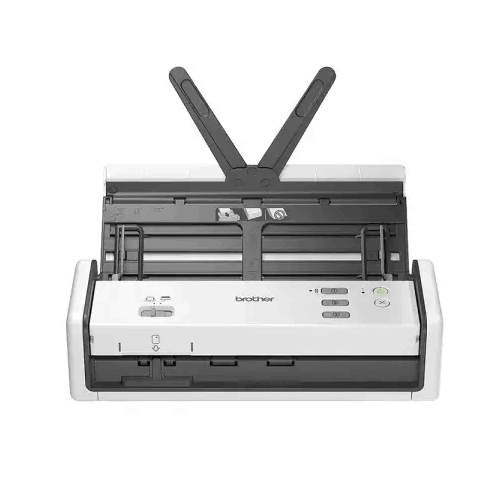
Brother ADS-1300 Portable Document Scanner
Regular Price:৳0.00Availability: SKU: 7.29.75.9221
Quick Overview
-
Support
Saturday – Thursday: 09 AM - 06 PM. -
Payment
Cash on Delivery | Card | Online Payment -
Shipping Cost
Inside Dhaka 100tk | Outside Dhaka 150tk -
Warranty Policy
Read More
Description
Brother ADS-1300 Portable Document Scanner Price in Bangladesh
That’s where the Brother ADS‑1300 Portable Document Scanner makes a lot of practical sense. It’s designed to deliver the advantages of an ADF document scanner—speed, consistency, and repeatable batch scanning—in a portable form that can sit on a desk, travel with a team, or be deployed as a shared scanning tool in a small office.
For Bangladesh buyers, the appeal is straightforward: you want scanning that is fast enough for daily work, simple enough for any staff member to use, and flexible enough to fit modern desk setups that increasingly rely on USB‑C laptops. The ADS‑1300 positions itself as a compact, productive scanner for exactly that.
A productivity-focused portable scanner—why it matters in Bangladesh
Portability in Bangladesh isn’t only about carrying a device in a bag. It’s also about fitting into tight spaces. Many offices—especially SMEs—don’t have a dedicated “scanner desk.” Equipment shares space with laptops, files, printers, and paperwork. A portable scanner helps by reducing the footprint while still supporting batch scanning through an ADF.
In practical office terms, a portable ADF scanner like the ADS‑1300 is often used for:
- Scanning invoices, bills, and supplier papers before filing
- Converting signed documents into digital records quickly
- Digitizing client paperwork at the front desk
- Scanning travel and logistics documents on the move
- Building searchable archives later (OCR workflow depends on software, not confirmed here)
When the scanner is easy to place and easy to connect, scanning becomes a routine task instead of a bottleneck.
30 PPM scanning speed: fast enough to keep work moving
The provided specification lists Scanning Speed: 30 PPM. That’s a meaningful speed level for a portable scanner, especially in Bangladesh office workflows where scanning is frequent but not always industrial-scale.
What 30 pages per minute means in everyday use:
- You can scan a 10–20 page document set quickly, without a long wait
- Staff are more likely to scan immediately instead of postponing the task
- Digitization projects (like converting old files) become more achievable in small batches each day
Speed becomes even more valuable when you’re scanning throughout the day—small stacks repeatedly—rather than doing one huge scanning project once a month.
Because duplex capability wasn’t explicitly confirmed in the specifications you provided, this page does not claim duplex scanning. If you confirm duplex (yes/no), the listing can be updated accurately.
20-sheet ADF: right-sized for portable batch scanning
The ADS‑1300 includes an ADF capacity of 20 sheets. In Bangladesh, that fits a lot of daily tasks:
- A full set of onboarding papers
- A batch of invoices or delivery notes
- Contract pages and supporting documents
- Office forms and approvals
A 20-sheet ADF strikes a practical balance for portability: large enough to reduce constant feeding, but compact enough to keep the scanner small and easy to deploy.
For best results in real environments, users typically:
- Remove staples and clips
- Align and “fan” the stack to reduce misfeeds
- Keep very thin receipts in smaller batches (common best practice)
Up to 600 × 600 dpi: clear document capture for archiving
Resolution is listed as up to 600 × 600 dpi. For most Bangladesh office document tasks, 200–300 dpi is commonly used to balance clarity and file size. But having up to 600 dpi is useful when scanning:
- Small text on forms
- Faint printing on older documents
- Stamps, seals, and signatures that need clarity
- Documents you may need to reprint later
Higher resolution also supports better OCR accuracy in general, though OCR depends on software workflow (not confirmed in the specs you provided).
USB‑C connectivity (USB 3.2) + USB 2.0: designed for modern desks
One of the best practical advantages of the ADS‑1300 as specified is connectivity:
- USB Type‑C 3.2
- USB 2.0
In Bangladesh, more professionals now use USB‑C laptops, including modern ultrabooks used in corporate offices and by freelancers. USB‑C makes setup cleaner and more convenient. USB 3.2 also supports fast data transfer, which helps scanning feel responsive—especially when scanning higher-resolution pages or long multi-page files.
USB 2.0 compatibility is also useful for flexibility, particularly in offices where older desktops still exist.
Optional accessories: output tray and AC power adapter
The provided information lists optional accessories:
- Output Tray: OT‑1001C (optional)
- Interface: USB Type‑C AC Power Adapter: PA‑AD‑004 (optional)
This suggests you can tailor the setup based on how you use the scanner:
- If you want a neater “paper out” workflow on a desk, the output tray can help.
- If your usage scenario benefits from an AC power adapter (for example, a fixed scanning station or less dependence on laptop power), the optional adapter provides that flexibility.
Because these are optional, it’s helpful for buyers in Bangladesh to confirm whether they need them at purchase time—especially in shared office setups.
Memory: 128 GB (as provided)
Your specification list includes Memory: 128 GB. Portable scanners and their memory specs can sometimes refer to internal storage or buffering depending on the product design. Since you provided it as a confirmed spec, it is included here as stated. If you want to clarify whether this is internal storage, user-accessible storage, or processing memory, you can share that detail and the listing can be refined.
Where the Brother ADS‑1300 fits best in Bangladesh
The ADS‑1300 is a practical match for environments where you need a reliable scanner but don’t want a large, fixed device:
- SME offices in Dhaka and Chattogram that scan invoices, forms, and approvals daily
- Accounts departments that digitize documents before filing and need consistent PDF organization
- HR teams that collect onboarding paperwork and want quick digital backups
- Sales and service teams scanning signed paperwork on-site
- Field operations where documents must be captured and sent quickly
- Shared desks / limited space offices where a compact scanner is easier to keep accessible
Bangladesh workflow examples (realistic, practical)
Example 1: Accounts scanning routine
An accounts officer in Dhaka collects invoices and delivery notes throughout the day. With a 20-sheet ADF, they can scan a batch at a time, store digital copies in supplier folders, and reduce paper pile-up.
Example 2: HR onboarding
HR receives forms, NID copies, and signed agreements. Scanning the entire set immediately creates a digital employee file for internal access and reduces the risk of losing papers.
Example 3: Branch-to-head-office document flow
A branch in another city can scan key paperwork and send it to head office quickly. Even without network scanning features, a portable USB scanner connected to a laptop makes the workflow fast and consistent.
Example 4: Client-side signing
A sales team closes a deal and collects signed documents. A portable scanner helps capture clean copies on the same day, improving speed of processing.
Practical care tips (general, accuracy-safe)
Portable ADF scanners perform best when treated like daily tools:
- Keep the scanner in a dust-managed environment; dust can affect feed consistency.
- Avoid scanning stapled pages.
- Use the output tray (if chosen) to prevent paper from falling and mixing out of order.
- Maintain consistent scan settings within the team (resolution, color/black & white) to keep file sizes predictable.
- When scanning official documents, verify each batch before sending or archiving.
Why a portable scanner can be a smarter first scanner
Many Bangladesh SMEs delay buying a scanner because they don’t want another big device taking up space. A portable scanner changes the equation. It’s easier to place, easier to share, and often gets used more because it’s accessible. The result is better record keeping and faster workflows with less resistance from staff.
The Brother ADS‑1300 Portable Document Scanner is, therefore, best seen as an everyday productivity tool: fast enough (30 PPM), batch-friendly (20-sheet ADF), clear enough (up to 600 × 600 dpi), and modern enough (USB‑C 3.2) for today’s Bangladesh office setups.
✅ Key Features
- Portable Document Scanner Design: Fits small desks and mobile work styles for Bangladesh offices and field teams.
- Scanning Speed up to 30 PPM: Helps finish batches quickly so scanning doesn’t disrupt daily work.
- 20-Sheet ADF Capacity: Supports convenient batch scanning for invoices, forms, and multi-page documents.
- Up to 600 × 600 dpi Resolution: Captures clear text and fine details for better archiving and readability.
- USB Type‑C 3.2 Connectivity: Works smoothly with modern USB‑C laptops and improves transfer responsiveness.
- USB 2.0 Support: Adds compatibility for older PCs and flexible office deployment.
- Optional Output Tray (OT‑1001C): Helps keep scanned pages organized at the output end (optional accessory).
- Optional USB‑C AC Power Adapter (PA‑AD‑004): Provides an alternative power option for fixed scanning stations (optional accessory).
- Memory 128 GB (as provided): Supports the device’s scanning and processing requirements as specified.
- Built for Everyday Office Workflows: Ideal for repetitive scanning tasks in accounts, HR, and administration.
✅ Usage / Applications
- Invoice and accounts document scanning for filing, audits, and digital backups.
- HR onboarding document capture for employee records and compliance storage.
- Small office digitization where space is limited but scanning is frequent.
- Branch office paperwork sharing by scanning and sending documents to head office.
- Client document scanning after signing agreements or delivery confirmations.
- Education admin paperwork for admissions files and office records.
- Travel and logistics paperwork scanning for quick reporting and record submission.
- Personal document management for certificates, bills, and important records.
✅ Benefits of This Product?
- Saves desk space while still enabling batch scanning with an ADF.
- Speeds up paperwork handling with 30 PPM scanning for everyday workloads.
- Reduces manual effort by scanning stacks instead of single pages on a flatbed.
- Improves record security by creating digital copies quickly after documents are received.
- Supports modern laptop workflows through USB‑C 3.2 connectivity.
- Works in flexible deployment styles—fixed desk, shared station, or portable use.
- Creates cleaner document archives with consistent resolution and predictable scan quality.
- Allows workflow customization through optional output tray and power adapter accessories.
✅ Ideal For
The Brother ADS‑1300 Portable Document Scanner is ideal for Bangladesh professionals and teams who need fast document digitization but don’t want a bulky scanner occupying a permanent spot. It fits small offices in Dhaka and Chattogram that scan invoices, forms, and approvals every day, as well as HR departments that want to digitize onboarding paperwork immediately to reduce loss risk. It’s also well suited for field-oriented teams—sales, service, and branch staff—who collect signed documents and need to send clean copies quickly. Because it uses USB Type‑C 3.2 and supports USB 2.0, it adapts well to modern USB‑C laptops and older desktops, making it practical for mixed IT environments common in Bangladesh. If you want a scanner that’s easy to place, easy to share, and fast enough to keep scanning from becoming a bottleneck, the ADS‑1300 is a strong match.
✅ Why Choose the Brother ADS-1300 Portable Document Scanner?
Choosing a document scanner in Bangladesh often comes down to one question: will it actually get used every day? Many scanners look great in specs but fail in reality because they’re inconvenient—too big, too complex, or stuck in a room people don’t visit often. The ADS‑1300 is compelling because it’s designed to be accessible: compact, portable, and simple to connect via USB‑C.
From a workflow perspective, it covers the essentials that matter most for everyday office scanning. A 20-sheet ADF supports batch scanning for invoices, HR papers, and multi-page document sets. A 30 PPM speed rating means those batches finish quickly, reducing the “I’ll scan later” delay that creates paper clutter. And with up to 600 × 600 dpi resolution, it delivers the clarity needed for readable archives and official documentation.
It also supports practical flexibility through optional accessories like an output tray and AC power adapter. That means you can run it as a purely portable scanner or build it into a small fixed scanning station based on how your office operates. For SMEs and teams that want an efficient scanner without the space and complexity of a full-size production unit, the ADS‑1300 is a well-balanced choice.
✅ Why Buy This Product from BME?
When you purchase a portable document scanner for business use in Bangladesh, you’re not only buying hardware—you’re building a workflow. Business Machine & Equipment (BME) can help you purchase the Brother ADS‑1300 with practical guidance so your scanner fits your real daily needs: invoice scanning, HR paperwork, branch file capture, or front-desk documentation.
BME can support procurement-friendly buying for organizations, including quotation and documentation suitable for accounts. If you want to build a complete scanning station, BME can also help you plan around optional items (like the OT‑1001C output tray and PA‑AD‑004 AC power adapter) so you only add what your workflow truly needs.
Most importantly, BME can help you avoid common mismatches—such as buying a portable scanner for a workload that requires a larger ADF capacity, or choosing the wrong connection approach for your office PCs. Share your typical document types and daily volume, and BME can guide you toward a setup that makes scanning faster and simpler from day one.
✅ Buying Guide
- Step 1: Estimate your daily page volume: If you scan small-to-medium batches throughout the day, a portable 20-sheet ADF scanner is usually ideal.
- Step 2: Confirm your speed needs: For fast daily workflow, higher ppm matters; 30 PPM is a strong baseline for small office productivity.
- Step 3: Decide portability vs fixed station: If you want a desk-based station, consider whether you need the optional output tray and AC adapter.
- Step 4: Check your computer ports: If your team uses USB‑C laptops, prioritize USB‑C connectivity. Keep USB 2.0 compatibility in mind for older PCs.
- Step 5: Choose scanning resolution wisely: Use 300 dpi for most documents to keep file sizes manageable; use higher resolution when details matter.
- Step 6: Plan file organization: Decide how you will store files—by supplier, by employee, by project, by date—to keep archives useful.
- Step 7: Standardize scan profiles: Set consistent settings (color/black & white, DPI, file format) so multiple staff can scan uniformly.
- Step 8: Prepare paper properly: Remove staples, align stacks, and avoid overloading the ADF to reduce misfeeds.
- Step 9: Avoid common mistakes: Don’t overscan at high DPI for routine paperwork (files become too large), and don’t skip verification for critical documents.
- Step 10: Consider warranty and support: For business use, confirm warranty terms and after-sales process at purchase time.
✅ Customers Ask About / Frequently Asked Questions
-
Q: What is the scanning speed of the Brother ADS‑1300?
A: The provided specification lists 30 PPM scanning speed. -
Q: How many pages can I load in the ADF?
A: The ADF capacity is specified as 20 sheets. -
Q: What is the maximum scanning resolution?
A: It supports scanning resolution up to 600 × 600 dpi. -
Q: Does it connect via USB‑C?
A: Yes. Connectivity includes USB Type‑C 3.2, and it also supports USB 2.0. -
Q: Is an output tray included?
A: An output tray OT‑1001C is listed as optional, meaning it may be purchased separately. -
Q: Does it support an AC power adapter?
A: A USB Type‑C AC Power Adapter (PA‑AD‑004) is listed as optional. -
Q: Is it suitable for scanning invoices and office paperwork in Bangladesh?
A: Yes. With 30 PPM speed and a 20-sheet ADF, it’s well suited for routine invoice and document scanning. -
Q: Can I use it with older computers?
A: Yes. USB 2.0 support provides compatibility for older PCs (port availability on the PC is still required). -
Q: Is duplex scanning supported?
A: Duplex capability was not confirmed in the specifications you provided, so it is not stated here. If you confirm duplex support, the listing can be updated. -
Q: What warranty is included in Bangladesh?
A: You provided 1-year brand warranty, which applies as per the seller’s warranty process in Bangladesh.
✅ Why Buy This Product
If you want to digitize documents quickly without dedicating a large space to a scanner, the Brother ADS‑1300 Portable Document Scanner is a practical solution for Bangladesh homes and offices. It brings real productivity features—30 PPM speed, a 20-sheet ADF, and clear scanning up to 600 × 600 dpi—in a compact format that suits modern desk setups. With USB Type‑C 3.2 connectivity, it pairs well with newer laptops, while USB 2.0 support keeps it flexible for older PCs. Optional accessories like an output tray and AC adapter let you shape it into either a portable scanner or a small fixed station, depending on your workflow.
Order the Brother ADS‑1300 from BME to build a faster, cleaner document routine—scan, file, and move forward with less paper clutter and better record control.
What is the price of Brother ADS-1300 Portable Document Scanner in Bangladesh?
Write a review
Question Answer
Have question about this product? Get specific details about this product from expert.

Brother ADS-1200 Desktop Document Scanner

Avision AD130 Flatbed Color Document Scanner


Brother ADS- 3600W Desktop Document Scanner
Brother ADS- 3600W Desktop Document Scanner


Brother ADS-4900W Desktop Document Scanner

Brother ADS-4700W Desktop Document Scanner

Brother ADS-3100 Sheet-Fed Document Scanner

