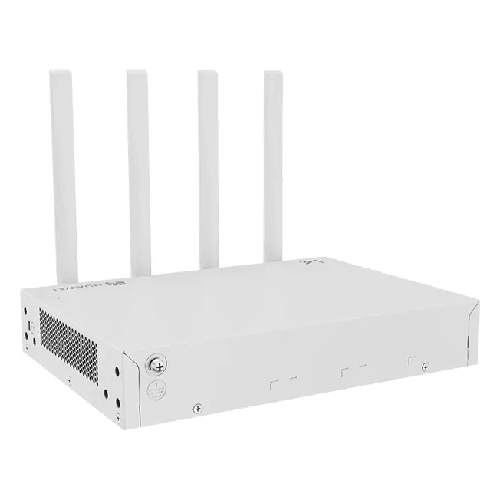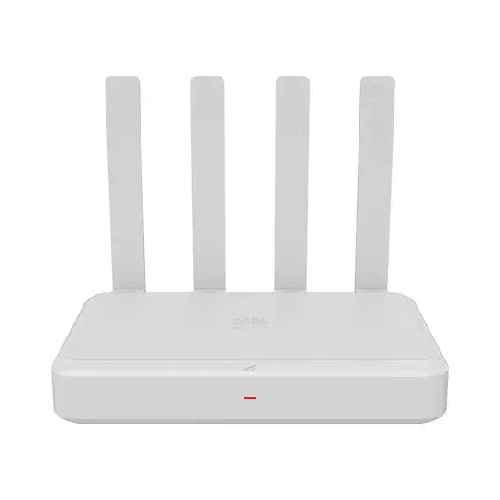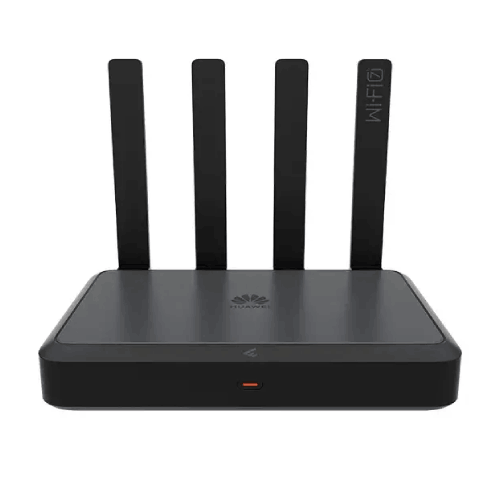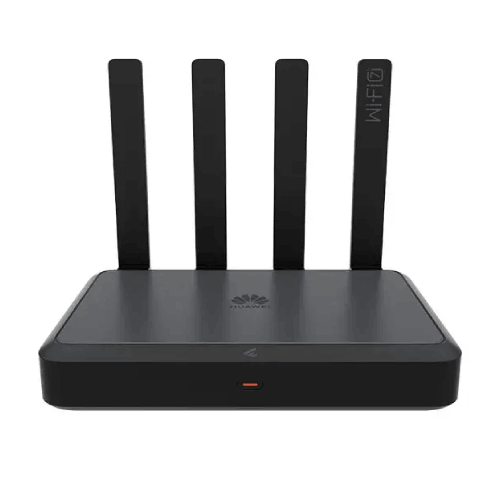
Huawei eKitEngine AR180Pro 4-port GE Electrical Ports + 1-port 2.5GE Electrical Port, Wi-Fi 7 Router
Regular Price:৳0.00Availability: SKU: 6.52.130.9190
Quick Overview
-
Support
Saturday – Thursday: 09 AM - 06 PM. -
Payment
Cash on Delivery | Card | Online Payment -
Shipping Cost
Inside Dhaka 100tk | Outside Dhaka 150tk -
Warranty Policy
Read More
Description
Huawei eKitEngine AR180Pro 4-port GE Electrical Ports + 1-port 2.5GE Electrical Port, Wi-Fi 7 Router in Bangladesh
The Huawei eKitEngine AR180Pro 4-Port GE Electrical + 2-Port 2.5GE Wi-Fi 7 Router is an enterprise-grade wireless networking solution designed for small and micro businesses, offices, retail spaces, and professional work environments. Combining Wi-Fi 7 wireless technology with multiple Gigabit Ethernet interfaces and two higher-speed 2.5GE ports, the AR180Pro provides a flexible foundation for modern business connectivity.
As part of Huawei's eKitEngine AR180 Series, the AR180Pro is designed to support business networks that require wired connections, wireless access, and practical network-management capabilities in a single device. Its dual-band Wi-Fi 7 design supports operation across the 2.4 GHz and 5 GHz frequency bands. Huawei specifies a combined wireless rate of up to 3,600 Mbps for the AR180 Series. Actual performance depends on client-device capabilities, signal conditions, interference, network configuration, and the internet service.
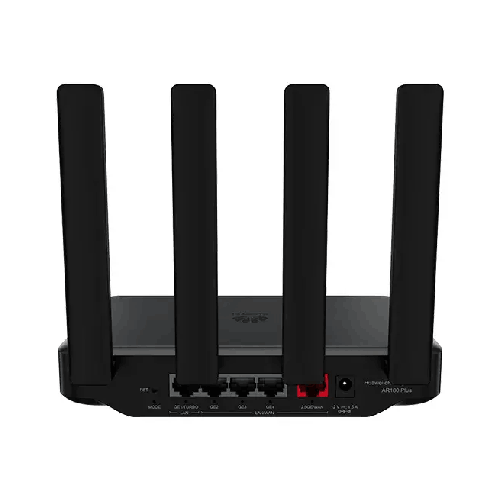
The AR180Pro offers four Gigabit Ethernet LAN ports, one 2.5GE WAN port, and one 2.5GE LAN port. This is an important distinction from the standard AR180 model, which has a different port configuration. The additional 2.5GE interface on the AR180Pro provides greater flexibility for connecting compatible high-speed network equipment. The 2.5GE LAN interface can also be switched to WAN operation, while the 2.5GE WAN interface can be switched to LAN operation, subject to the supported configuration.
The router includes business-oriented capabilities such as IPSec VPN, application control, Smart Mesh networking, and a dedicated Turbo acceleration port. These features can support a range of network requirements, including branch connectivity, application access management, and traffic prioritisation. Their actual use depends on the network design, supported software functions, and configuration.
Designed with natural heat dissipation and a fanless construction, the Huawei eKitEngine AR180Pro can be deployed in suitable office and commercial environments where quiet operation is desirable. Its workbench installation design allows it to fit into compact network setups without requiring a large rack-based installation.
For businesses in Bangladesh, the Huawei eKitEngine AR180Pro can serve as a central networking device for wired computers, printers, compatible switches, and wireless client devices. It is worth considering for small offices, shops, showrooms, consultation rooms, and professional workspaces that need a modern wireless standard alongside flexible Ethernet connectivity.
Before choosing the AR180Pro, businesses should consider the number of connected devices, required internet bandwidth, wireless coverage, security policies, and whether additional switches or mesh devices will be needed. Matching the router to the actual network requirements helps create a more practical and maintainable installation.
✅ Key Features of Huawei eKitEngine AR180Pro
- Wi-Fi 7 Technology: Supports next-generation wireless networking across the 2.4 GHz and 5 GHz bands.
- Dual-Band Wireless Connectivity: Provides simultaneous operation across two wireless frequency bands.
- Up to 3,600 Mbps Combined Wireless Rate: Huawei specifies an aggregate dual-band rate of up to 3,600 Mbps for the AR180 Series.
- Four Gigabit Ethernet LAN Ports: Supports wired connections for computers, printers, and compatible network equipment.
- One 2.5GE WAN Port: Provides a high-speed Ethernet interface for the WAN connection.
- One 2.5GE LAN Port: Offers an additional high-speed interface for compatible LAN equipment.
- Flexible 2.5GE Interfaces: The 2.5GE interfaces can be reassigned between WAN and LAN roles according to supported configuration.
- IPSec VPN Support: Supports VPN connectivity for compatible business network deployments.
- Application Control: Provides application access-control capabilities.
- Smart Mesh Networking: Supports mesh networking within the Huawei AR180 Series ecosystem.
- Dedicated Turbo Acceleration Port: Supports traffic prioritisation for compatible use cases.
- Fanless Construction: Uses natural heat dissipation for quiet operation.
- Compact Workbench Design: Suitable for desktop or workbench installation.
- Business Networking Focus: Designed for small and micro enterprise network environments.
- AC Adapter Power Supply: Uses an external AC power adapter.
✅ Detailed Features of Huawei eKitEngine AR180Pro
✅ Wi-Fi 7 for Modern Business Connectivity
The Huawei eKitEngine AR180Pro supports Wi-Fi 7, a newer generation of wireless networking technology designed to improve wireless capacity and efficiency when used with compatible devices. It provides a modern wireless platform for businesses upgrading their networking infrastructure or introducing newer laptops, smartphones, tablets, and other wireless equipment.
The benefits of Wi-Fi 7 depend on the capabilities of the connected client devices. Older devices can still connect according to their supported wireless standards, but they will not necessarily use all the capabilities of Wi-Fi 7. A business should therefore consider both its existing equipment and its expected device upgrades when selecting a wireless router.
Wi-Fi performance is also affected by physical obstacles, interference from neighbouring networks, distance, and the number of active clients. The AR180Pro's wireless standard is one part of the overall network design rather than a guarantee of a particular internet speed in every location.
✅ Dual-Band Wireless Operation
The AR180Pro supports wireless operation on the 2.4 GHz and 5 GHz frequency bands. Each band has different characteristics, which can help accommodate a variety of client devices and usage scenarios.
The 2.4 GHz band is widely supported by wireless equipment and may be useful for devices that require broad compatibility. The 5 GHz band can provide additional wireless capacity for compatible devices, depending on the environment and the channel conditions.
Dual-band operation gives administrators flexibility when managing wireless connectivity. Device placement, signal strength, interference, and application requirements should be considered when determining how the wireless network will be used.
✅ Combined Wireless Rate of up to 3,600 Mbps
Huawei's AR180 Series datasheet specifies combined dual-band wireless rates of up to 3,600 Mbps. This is an aggregate wireless rate for the series, not a guaranteed throughput figure for a single device or an internet connection.
The speed experienced by a client depends on its wireless capabilities, the selected band, signal quality, interference, and the router's operating conditions. Internet performance is also limited by the broadband service and the performance of other network components.
For business buyers, the published wireless rate provides an indication of the product's wireless capacity class. It should be assessed alongside the expected number of simultaneous users, the types of applications being used, and the physical layout of the premises.
✅ Four Gigabit Ethernet LAN Ports
The Huawei eKitEngine AR180Pro includes four GE electrical LAN ports. These ports support Ethernet connections at 10 Mbps, 100 Mbps, and 1,000 Mbps, depending on the connected equipment and negotiated link speed.
Gigabit Ethernet is useful for fixed devices that benefit from a wired connection. Examples include desktop computers, network printers, point-of-sale terminals, and compatible network equipment. Wired connections can reduce reliance on wireless airtime and provide a convenient option for devices that remain in one place.
Four LAN ports can accommodate several wired devices in a compact office network. If more wired connections are required, a compatible Ethernet switch can expand the number of available ports, subject to the requirements of the network design.
✅ Dedicated 2.5GE WAN Port
The AR180Pro has one 2.5GE electrical WAN port. This interface supports Ethernet link speeds of up to 2.5 Gbps when connected to compatible equipment and configured appropriately.
A 2.5GE WAN interface can be useful when the upstream network equipment or internet service supports a link speed above 1 Gbps. To use the higher link rate, the connected device and Ethernet cabling must also support 2.5GE operation.
The port's maximum link speed does not guarantee that the internet connection itself will deliver 2.5 Gbps. Actual throughput depends on the subscribed service, upstream equipment, network configuration, and other performance factors.
✅ Dedicated 2.5GE LAN Port
In addition to its 2.5GE WAN port, the AR180Pro includes a second 2.5GE electrical interface that operates as a LAN port by default. This provides a higher-speed wired connection for compatible equipment on the local network.
The additional 2.5GE interface is one of the key distinctions between the AR180Pro and the standard AR180. It can be useful when a business has compatible equipment that benefits from a link faster than conventional Gigabit Ethernet.
Huawei's documentation indicates that the 2.5GE LAN interface can be switched to WAN operation. The other 2.5GE interface, which operates as WAN by default, can be switched to LAN operation. The final port roles depend on the supported configuration.
✅ Flexible WAN and LAN Port Configuration
The AR180Pro's Ethernet arrangement supports flexible network design. Its two 2.5GE interfaces have default WAN and LAN roles, while the GE interfaces also have specified default roles and supported configuration options.
This flexibility can help administrators adapt the router to different network layouts. For example, the business may need to connect to an upstream device through a high-speed interface while retaining a high-speed local connection for compatible equipment.
Port reassignment should be performed according to Huawei's configuration guidance. Before deployment, verify the intended WAN and LAN roles and ensure that the selected arrangement meets the requirements of the internet connection and local network.
✅ IPSec VPN for Business Connectivity
IPSec VPN support is a business-oriented feature of the Huawei eKitEngine AR180 Series. A properly configured VPN can establish protected communication between compatible network endpoints.
This capability can be relevant to organisations that connect branch locations, remote networks, or other supported systems. VPN operation requires suitable endpoint compatibility, configuration, and security settings.
The presence of IPSec VPN support does not mean that every VPN service or topology will work automatically. Businesses should verify the supported configuration and interoperability requirements before relying on the feature for a particular deployment.
✅ Application Control
Application control provides a way to manage application access according to supported network policies. This can help administrators align network usage with business requirements.
Depending on the available configuration options, an organisation may apply access rules based on supported criteria such as time or IP address. The exact controls should be verified against the relevant software version and documentation.
Application control is most effective when used as part of a broader network-management approach. Administrators should establish clear policies and ensure that configuration changes do not interrupt essential business applications.
✅ Smart Mesh Networking
The Huawei eKitEngine AR180 Series supports Smart Mesh networking. Mesh networking allows compatible devices to work together to extend wireless coverage beyond the area served effectively by a single router.
This can be useful in offices with multiple rooms, partitions, or locations where a single wireless device does not provide the required signal quality. Huawei's series datasheet describes support for up to eight devices and a 20-metre auto-discovery range under the specified conditions.
Actual coverage depends on building materials, device placement, interference, and the layout of the premises. Before expanding a network, confirm the compatibility of the additional devices and follow the manufacturer's deployment recommendations.
✅ Dedicated Turbo Acceleration Port
Huawei's AR180 Series documentation describes a dedicated Turbo acceleration port intended to prioritise traffic from connected devices. Traffic prioritisation can help support applications that are sensitive to congestion or require more consistent network responsiveness.
The actual benefit depends on the type of traffic, network conditions, configuration, and the equipment connected to the designated port. It should not be treated as a guarantee of lower latency for every application.
For businesses using video communication, interactive applications, or other time-sensitive services, traffic prioritisation can form part of a wider network-management strategy.
✅ Fanless Design and Natural Heat Dissipation
The Huawei eKitEngine AR180Pro uses natural heat dissipation and a fanless design. This avoids the operating noise associated with a cooling fan and can make the router suitable for quiet office environments.
Fanless construction does not eliminate the need for proper ventilation. The router should be placed in a suitable location where heat can dissipate and where the device remains within the manufacturer's operating conditions.
Avoid enclosing the router in a space that restricts airflow or placing it near sources of excessive heat. Appropriate installation helps maintain a suitable operating environment.
✅ Compact Workbench Installation
The AR180Pro is designed for workbench installation. Its basic dimensions are 43.6 × 250 × 180 mm, while the maximum dimensions are 192 × 250 × 210 mm.
The device can be positioned on a suitable desk, shelf, or network work surface. Its placement should allow convenient access to power and Ethernet connections while leaving enough space for natural heat dissipation.
The compact installation format is useful for businesses that do not require a large rack-mounted router. For installations involving multiple switches, patch panels, or other equipment, the complete layout should be planned before installation.
✅ Power Consumption and AC Adapter
Huawei specifies typical power consumption of 7.5 W and maximum power consumption of 13.5 W for the AR180Pro. The router uses an AC power adapter, with a maximum adapter output power of 24 W.
The product's rated input is 110–220 V AC at 50/60 Hz, with a specified input range of 90–264 V AC. The supplied compatible adapter should be used in accordance with the manufacturer's instructions.
Typical and maximum power figures describe different operating conditions. They should not be interpreted as the same measurement. A suitable power arrangement can help support reliable operation in an office or commercial network.
✅ Why Choose Huawei eKitEngine AR180Pro?
✅ More Flexible Ethernet Connectivity
The AR180Pro combines four Gigabit Ethernet LAN ports with two 2.5GE interfaces. This provides a mixture of conventional wired connectivity and higher-speed Ethernet options.
The additional 2.5GE LAN interface distinguishes the AR180Pro from the standard AR180 configuration. It can be useful for businesses that need a faster local connection while retaining a dedicated high-speed WAN interface.
✅ Modern Wireless Networking
Wi-Fi 7 support gives the router a modern wireless foundation for compatible devices. Dual-band operation allows the network to support clients using the 2.4 GHz and 5 GHz bands.
The value of this capability depends on the connected devices and the wireless environment. Businesses should assess the router in relation to their actual coverage, capacity, and performance requirements.
✅ Business-Oriented Features
IPSec VPN, application control, Smart Mesh, and Turbo acceleration provide capabilities relevant to small-business networking. These features can support protected connectivity, network access management, coverage expansion, and traffic prioritisation.
Their availability does not remove the need for proper configuration. Businesses should confirm the required functions and ensure that the router fits the intended network design.
✅ Quiet Operation
The fanless construction and natural heat dissipation make the AR180Pro suitable for environments where equipment noise is undesirable. This can be relevant to offices, consultation rooms, and customer-facing spaces.
The router still requires appropriate ventilation and installation conditions. Its location should be selected with heat dissipation, cabling, and access in mind.
✅ Suitable for Compact Business Networks
The AR180Pro is designed for small and micro enterprise networks. It combines routing, wireless connectivity, and wired interfaces in one device, reducing the need to deploy separate equipment for every basic networking function.
Larger networks may require additional switches, access points, or other infrastructure. The number of users, traffic patterns, and coverage requirements should guide the final design.
✅ Applications in Bangladesh
✅ Small and Medium-Sized Offices
The AR180Pro can be considered for offices that need Wi-Fi connectivity for laptops and mobile devices alongside wired connections for computers, printers, and other Ethernet equipment.
Its suitability depends on the number of users, the required coverage, and the applications being used. Larger offices may need additional compatible access points or mesh devices.
✅ Retail Shops and Showrooms
Retail environments often combine computers, point-of-sale equipment, printers, and wireless devices. The AR180Pro can provide a central network connection for compatible equipment in a suitable installation.
Businesses should separately verify the connectivity and security requirements of payment systems and other critical services.
✅ Clinics and Professional Consultation Rooms
Small clinics and professional offices may require connectivity for administrative computers, printers, and wireless devices. The AR180Pro can serve as part of the network, provided that its capacity and coverage meet the site's requirements.
Where sensitive information is handled, network security, access control, and appropriate configuration are important parts of the deployment.
✅ Training Centres and Small Educational Facilities
Training rooms and small educational centres may use wireless laptops, tablets, and wired administrative equipment. The AR180Pro can provide connectivity for compatible devices within a suitably sized network.
For multiple classrooms or larger premises, assess wireless coverage and concurrent usage before deciding whether additional network equipment is required.
✅ Home Offices and Professional Workspaces
The AR180Pro can also be used in a professional home-office environment where users need wired and wireless connectivity. Wi-Fi 7 support may be useful for compatible devices, while Ethernet ports can serve fixed equipment.
Its VPN and application-control capabilities may be relevant to particular work requirements. The appropriate configuration depends on the user's systems, security policies, and internet service.
What is the price of Huawei eKitEngine AR180Pro 4-port GE Electrical Ports + 1-port 2.5GE Electrical Port, Wi-Fi 7 Router in Bangladesh?
Write a review
Question Answer
Have question about this product? Get specific details about this product from expert.