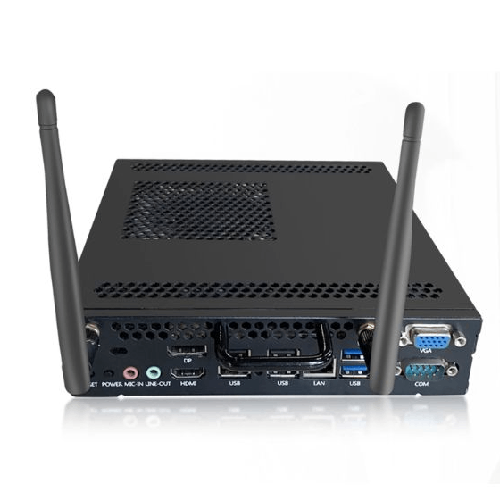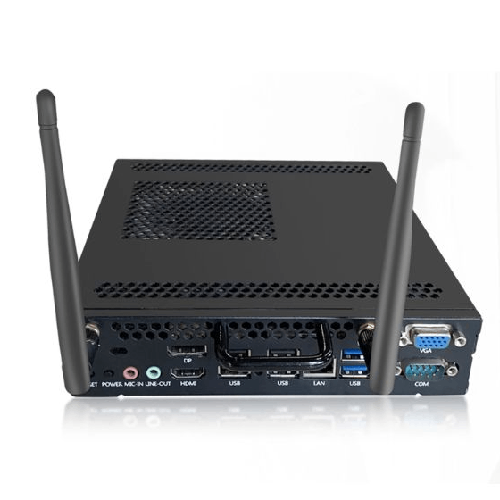
Riotouch OPS-I7 13650HX (13th Gen) Pluggable OPS PC Module
Regular Price:৳0.00Availability: SKU: 2.74.74.9589
Quick Overview
-
Support
Saturday – Thursday: 09 AM - 06 PM. -
Payment
Cash on Delivery | Card | Online Payment -
Shipping Cost
Inside Dhaka 100tk | Outside Dhaka 150tk -
Warranty Policy
Read More
Description
Riotouch OPS-I7 13650HX (13th Gen) Pluggable OPS PC Module in Bangladesh
The Riotouch OPS-I7 13650HX (13th Gen) Pluggable OPS PC Module is a high-performance, compact computer designed to slot directly into compatible interactive displays and smart boards—especially large-format solutions like the Riotouch LTS series—turning them into complete Windows-based systems without external desktop towers or messy cabling.
Powered by an Intel Core i7-13650HX 13th Gen processor, running at 2.4GHz base clock and up to 4.9GHz boost, with 14 cores and 20 threads, this OPS PC module delivers serious computing power in a sleek, pluggable form. For schools, universities, training centres, corporate offices and boardrooms in Bangladesh, it’s the perfect brain for interactive teaching, presentations, video conferencing, and content-rich collaboration.
Instead of connecting a separate desktop PC or laptop to each interactive board, you can simply slot this OPS module into the OPS slot at the side or rear of the display. Your smart board instantly becomes an all-in-one PC + display solution, with Windows and applications running right on-board. Inputs, cabling and power become cleaner and easier to manage—especially important in classrooms and meeting rooms used by many different people.
What is an OPS PC Module and Why It Matters
OPS stands for Open Pluggable Specification, a standard created to simplify how PCs connect to large displays and digital signage. The Riotouch OPS-I7 13650HX follows this standard: it’s like a full PC packed into a slender module that slides into a compatible OPS slot.
Benefits of this design in Bangladesh environments:
- Clean installation: No external PC on the table, no extra HDMI and power cables running everywhere.
- Integrated control: The interactive display and PC function as a unified device.
- Easier maintenance and upgrades: If you need to upgrade or service the PC, you can slide out the OPS module rather than disassemble an entire setup.
For a school with multiple smart boards or a corporate office with many meeting rooms, using OPS PCs brings standardisation and neatness. Each board gets its own built-in PC, powered by the same interface and specs, making training and support simpler.
13th Gen Intel Core i7-13650HX: High-End Performance
At the heart of this module is the Intel Core i7-13650HX, a 13th Generation high-performance laptop/desktop-class hybrid processor, with:
- 14 cores
- 20 threads
- Base frequency 2.4GHz, boosting up to 4.9GHz
This means the processor mixes Performance cores and Efficient cores (P-cores and E-cores) to handle both heavy, foreground applications and background tasks smoothly. In real-world Bangladeshi usage, that translates into:
- Faster app launches and responsiveness when opening office documents, presentations and browsers.
- Smoother multitasking when multiple applications are open—such as PowerPoint, PDF viewers, browsers, conferencing tools and annotation software.
- Enough headroom to handle 4K content, multimedia lessons, large slide decks, complex Excel sheets and light creative workloads.
For education, the OPS-I7 13650HX can power interactive lessons using rich educational software, video content, simulation tools, and web resources without stuttering. For corporate users, it can run presentations, Teams/Zoom/Meet video calls, browser-based SaaS dashboards, and collaboration apps with confidence.
In training centres and universities that use heavy content (high-resolution videos, multiple browser tabs, LMS platforms and perhaps some specialised software), the 14-core/20-thread CPU offers enough processing muscle to maintain a responsive experience even under higher workloads.
Ideal Companion for Riotouch LTS Smart Boards and Large Displays
The Riotouch OPS-I7 13650HX is particularly well-suited as a plug-in PC for Riotouch LTS interactive smart boards (65/75/86/98/100/105/110-inch etc., where compatible) and other OPS-ready large screens. By installing this module, your board becomes:
- A full Windows-based PC directly integrated into the display.
- Ready for Office apps, browsers, education tools, video conferencing clients, and more.
- Easy to use for teachers and corporate staff (just power on the display and switch to the OPS source).
In a Bangladeshi classroom, a teacher can walk up to the smart board, switch to the OPS input, and instantly access the Windows desktop. From there they can open slides, PDFs, videos, whiteboard software or their LMS without needing to connect and disconnect personal laptops.
In corporate meeting rooms, the OPS module allows permanent installation of corporate-approved apps and settings. Meetings don’t have to become a “who has the HDMI cable” struggle. The in-built OPS PC can handle the core workload, and guests can still connect laptops via wireless casting or HDMI if needed.
Cleaner, Safer and More Professional Installations
Without an OPS module, many organisations in Bangladesh run a separate small PC or laptop for each board, leading to:
- Visible cables (HDMI, power, USB) hanging around the screen.
- PC boxes placed precariously on stands or brackets.
- Risk of accidental disconnection or damage when students or staff bump into cables.
Using the Riotouch OPS-I7 13650HX:
- The PC is hidden inside the display, with video, audio and control delivered through the OPS interface.
- Only mains power and possibly a network cable are visibly connected to the display.
- The front of the class or meeting room looks tidier and more professional—important for image-conscious schools, universities and corporates in Dhaka, Chattogram, Sylhet, Khulna and beyond.
For large deployments, this tidiness translates into easier facility management and less downtime from cable-related issues.
Powerful Enough for Modern Collaboration and Video Conferencing
Today, classrooms and meeting rooms regularly use video conferencing platforms for hybrid teaching and remote collaboration:
- Zoom, Google Meet, Microsoft Teams, Webex, and similar tools.
The i7-13650HX CPU with 14 cores and 20 threads is more than capable of handling:
- High-resolution video calls.
- Screen sharing and remote control sessions.
- Simultaneous app usage during calls (PowerPoint, PDF, browsers, annotation tools).
In a Bangladeshi boardroom, you could:
- Use the Riotouch LTS board + OPS-I7 to host a Teams call with foreign collaborators.
- Display a slide deck, keep a browser open on dashboards, and annotate over content, all with the remote participants visible in a tile.
In universities and training centres, remote guest lectures or hybrid classes become more practical and stable when running on a robust OPS PC rather than an underpowered device.
Great for Content-Rich Teaching and Training
The modern classroom in Bangladesh is shifting towards interactive, content-rich learning:
- HD video lessons.
- Interactive simulations and animations.
- LMS portals and online quizzes.
- Multi-document workflows (notes, presentations, browser tabs).
The Riotouch OPS-I7 13650HX enables smart boards and displays to handle these workloads without slowdowns. Teachers can:
- Quickly switch between video, slides, and interactive whiteboard tools.
- Load online exams or tests, run them, and show results during class.
- Use multiple browser tabs and content sources at once.
Training centres conducting coding, IT, business or design courses can use the OPS PC module to run demonstration software right on the big board, making it easier for students to follow.
Compact Yet Upgradable Form Factor (Depending on Configuration)
OPS modules are typically designed for easy removal and replacement:
- Upgrading from an older OPS PC to this 13th Gen i7 module is straightforward.
- Servicing can be done by sliding out the unit without dismantling the whole board.
Depending on configuration (RAM and SSD options, not specified here), institutions can order OPS modules that meet their performance and storage needs, and scale as requirements increase.
This is particularly valuable for Bangladeshi organisations planning multi-year usage. You can keep the display installed for a long time, while updating the PC module when software demands grow.
Benefits in Bangladesh Conditions
Bangladesh has specific operational realities:
- Voltage fluctuation and load-shedding.
- Heavy usage of classrooms and meeting rooms (multiple sessions back-to-back).
- Shared usage across many users (teachers, trainers, staff).
While the OPS module itself uses the display’s power and environment, designing your installation well ensures:
- Better power conditioning when the display (with OPS) is connected via a quality stabiliser/UPS.
- Fewer external devices to protect (since the PC is inside the display).
- Centralised upgrade paths when IT teams decide to improve performance down the line.
For example, a school that upgrades from an older i5 OPS to Riotouch OPS-I7 13650HX may gain smoother performance across all interactive board tasks, without replacing the displays themselves.
✅ Key Features
- 13th Gen Intel Core i7-13650HX Processor: High-performance CPU with 14 cores and 20 threads, clocked from 2.4GHz up to 4.9GHz turbo for demanding applications.
- Pluggable OPS PC Form Factor: Slides directly into compatible OPS slots on smart boards and large displays, eliminating external PC clutter.
- Clean, Integrated Installation: Reduces external HDMI, power and USB cabling, resulting in a neater, more professional classroom or meeting room.
- Strong Multitasking Capability: Handles office apps, browsers, LMS portals, video streaming and conferencing tools simultaneously with responsive performance.
- Ideal for Large Interactive Displays: Perfect companion for Riotouch LTS and other OPS-ready interactive boards and smart TVs in schools and offices.
- Easier Maintenance & Upgrades: OPS design allows quick removal and replacement of the module without dismantling the display installation.
- Optimised for Education & Corporate Use: Provides enough power for content-rich lessons, remote collaboration and training sessions in Bangladesh conditions.
- Space-Saving Design: Consolidates PC performance into the display itself, freeing up desks and lecterns from bulky hardware.
✅ Usage / Applications
- Smart classrooms in schools, colleges and universities to power interactive lessons directly on Riotouch or similar boards.
- Corporate meeting rooms and boardrooms for running Windows-based conferencing, presentations and collaboration on large displays.
- Training centres and coaching institutes for delivering content-rich courses on big interactive screens.
- University lecture halls and seminar rooms where OPS-ready displays are used for both teaching and conferencing.
- Digital signage and command centres where integrated OPS PCs drive dashboards and live updating data on big screens.
- Hybrid learning environments where the same interactive display is used for both in-person teaching and remote sessions.
- IT labs and innovation spaces where a single OPS PC powers a large collaboration display for group work.
✅ Benefits of This Product?
- High performance in a compact module: Delivers desktop-class processing in a small OPS form factor.
- Cleaner, safer front-of-room setups: Fewer external devices and cables mean tidier, more robust installations.
- Simplified user experience: Teachers and presenters can just select the OPS input and work from a familiar Windows environment.
- Future-ready processing power: 13th Gen i7 cores help handle evolving software demands without lag.
- Reduced IT complexity: Standardised OPS modules across many displays make support and upgrades more manageable.
- Flexible use across spaces: The same OPS concept works in classrooms, boardrooms, training centres and signage environments.
- Better utilisation of large displays: Unlocks the full “PC inside the board” capability of OPS-compatible screens, maximising ROI.
✅ Ideal For
The Riotouch OPS-I7 13650HX (13th Gen) Pluggable OPS PC Module is ideal for institutions and businesses in Bangladesh that already invest in large interactive displays and want powerful, integrated computing without external PCs.
It suits:
- Schools, colleges and universities deploying multiple Riotouch or other OPS-ready smart boards and needing a strong, standardised PC in each.
- Corporate offices, banks, telcos and software companies where meeting rooms and boardrooms rely on big screens for daily collaboration and remote meetings.
- Training centres and coaching institutes that run heavy multimedia and web-based content on large boards, wanting smoother performance and simpler setups.
- Government and NGO training facilities using interactive boards for capacity building, requiring reliable and powerful PC modules.
- Any organisation upgrading from older OPS/i5 systems to a modern 13th Gen i7 platform for better responsiveness and long-term value.
If you want each interactive display to function as a complete, high-performing Windows system without external clutter, this OPS module is a strong fit.
✅ Why Choose the Riotouch OPS-I7 13650HX (13th Gen) Pluggable OPS PC Module i7-13650HX 2.4GHz-4.9GHz, 14 Cores 20 Threads?
Choosing the Riotouch OPS-I7 13650HX means selecting a high-end OPS PC platform that matches the capabilities of modern large-format interactive displays. Many institutions and businesses invest in high-quality smart boards but then bottleneck them with weak, old or messy PC setups. This 13th Gen i7 module fixes that mismatch.
The 14-core, 20-thread architecture provides enough power to comfortably run teaching software, browser-based apps, Office tools, 4K content and video conferencing simultaneously. The 2.4GHz–4.9GHz clock range ensures responsiveness even when tasks become heavy.
Because it is an OPS pluggable module, the solution remains elegant and serviceable: no extra desktop tower under the lectern, no dangling HDMI cables to trip over, and no cluttered teacher desk. The board becomes a true all-in-one machine, with the OPS PC delivering the compute power from within.
Long-term, your organisation benefits from:
- Easier management of a uniform hardware standard (the same OPS PC spec in all rooms).
- Simpler upgrades (swap modules instead of wholesale reinstallation).
- Better reliability and user satisfaction in everyday operation.
If you’re serious about using interactive boards and large displays at full potential—in classrooms, lecture halls, boardrooms or training spaces—the Riotouch OPS-I7 13650HX is a robust, future-ready choice.
✅ Why Buy This Product from BME?
Purchasing the Riotouch OPS-I7 13650HX (13th Gen) Pluggable OPS PC Module from Business Machine & Equipment (BME) connects you with a specialist supplier deeply familiar with interactive displays, OPS PCs and education/corporate AV solutions in Bangladesh.
BME can help you:
- Match the OPS-I7 with your existing or planned Riotouch LTS and other OPS-ready displays.
- Plan configurations (per-room deployment, counts, potential future expansion).
- Understand basic integration aspects such as networking, power protection and room usage patterns.
For schools, universities, large corporates and government bodies, BME can support B2B quotations, procurement documentation and project rollouts, making it easier to standardise OPS PCs across many rooms or branches. Their focus on genuine sourcing reduces risk related to incompatible or sub-standard modules.
BME’s experience in education and corporate environments in Bangladesh also means they understand practical points like:
- The need for stable performance across back-to-back classes or meetings.
- The importance of clean installation and minimal downtime.
- The value of having similar interfaces and performance across all rooms for training and support.
By choosing BME as your supplier, you’re not just buying an OPS module—you’re working with a local partner who can help you design and grow a more coherent, high-performing display and PC ecosystem over time.
✅ Buying Guide
Before ordering the Riotouch OPS-I7 13650HX (13th Gen) Pluggable OPS PC Module, consider these points:
-
Check Display Compatibility
- Confirm that your interactive displays or smart boards have an OPS slot compatible with standard OPS PC modules.
- Verify with your display’s model documentation or consult BME.
-
Define Performance Needs
- List what you’ll be doing: presentations, HD/4K video, web apps, LMS, coding demos, conferencing, etc.
- The i7-13650HX is powerful; if you know you have heavier workloads (multi-app usage, many browser tabs), this model is appropriate.
-
Plan Room Coverage
- Decide how many rooms and boards should receive OPS modules.
- Standardise if possible (same module everywhere) to simplify IT support.
-
Consider Power and Network
- Ensure each display location has stable power and, ideally, wired network if required.
- Use quality voltage protection (stabiliser/UPS) shared between the display and OPS module.
-
Think about Software Image and Management
- Plan a standard Windows image/software loadout for all OPS PCs (Office, security tools, conferencing apps, etc.).
- Decide who manages OS updates and app installations.
-
Upgrade Path
- If you have older OPS PCs, plan when and how you’ll phase them out in favour of this 13th Gen i7 module.
- Consider redeploying older units to less-demanding rooms if necessary.
-
Avoid Common Mistakes
- Don’t buy powerful displays but under-spec PCs; match the OPS power to your usage.
- Don’t treat OPS as an afterthought; plan it as part of the core solution.
- Don’t ignore cooling/ventilation around displays; ensure OPS units can dissipate heat properly.
With a proper plan, installing the Riotouch OPS-I7 across your displays can dramatically improve day-to-day performance and user satisfaction.
✅ Customers Ask About / Frequently Asked Questions
Q1: Is the Riotouch OPS-I7 13650HX compatible with all interactive displays?
It is designed for displays that support the OPS (Open Pluggable Specification) slot. Check your display model or consult BME to confirm compatibility.
Q2: What is the advantage of an OPS PC compared to an external PC?
An OPS PC slots inside the display, reducing visible cables, simplifying installation and making the display plus PC act like one integrated device. It also makes maintenance and upgrades easier.
Q3: Is the i7-13650HX powerful enough for video conferencing and teaching?
Yes. With 14 cores and 20 threads, and boost up to 4.9GHz, it is well-suited for video conferencing, multitasking with apps, and content-rich teaching/training.
Q4: Can this OPS module be upgraded later?
You can typically replace the OPS module itself with a newer one in the future. Internal upgradeability (RAM/SSD) depends on the specific configuration; ask BME about available options.
Q5: Does it support 4K content playback?
The 13th Gen i7 platform is generally capable of smooth 4K video playback when properly configured, making it suitable for high-resolution displays and media.
Q6: Is this module suitable for classrooms that run all day?
Yes, it is built for professional environments. With proper ventilation and power protection, it is suitable for back-to-back class or meeting schedules.
Q7: Do I still need a separate PC in the room if I use this OPS module?
In most cases, no. The OPS module acts as the primary PC. However, users can still connect laptops when needed for specific content.
Q8: How is the OPS module powered?
It is powered via the OPS slot in the display, so no separate external power brick is usually necessary—reducing cabling.
Q9: Is special installation required?
Installation is mostly inserting the module into the OPS slot and securing it. For large deployments, you may prefer professional assistance to ensure consistency and configuration.
Q10: What operating system does it run?
OPS modules are typically used with Windows (e.g., Windows 10/11). Confirm OS licensing and version with BME when ordering.
✅ Why Buy This Product
The Riotouch OPS-I7 13650HX (13th Gen) Pluggable OPS PC Module brings together serious computing power and elegant integration for your interactive displays and smart boards. Instead of relying on ad-hoc external PCs and messy cabling, you can embed a high-performance 13th Gen i7 system directly inside each OPS-ready display, turning it into a complete, robust Windows workstation.
For schools, universities, training centres and corporate offices in Bangladesh, this means smoother classes, sharper presentations, more reliable video conferencing and easier IT management. The 14 cores and 20 threads of the i7-13650HX ensure that heavy multitasking and rich content are handled with ease, keeping users focused on teaching and collaboration—rather than waiting on slow hardware.
If you’re upgrading or planning a serious interactive display deployment, order the Riotouch OPS-I7 13650HX OPS PC Module today from BME and unlock the full potential of your smart boards with a powerful, integrated, future-ready PC engine.
What is the price of Riotouch OPS-I7 13650HX (13th Gen) Pluggable OPS PC Module in Bangladesh?
Write a review
Question Answer
Have question about this product? Get specific details about this product from expert.