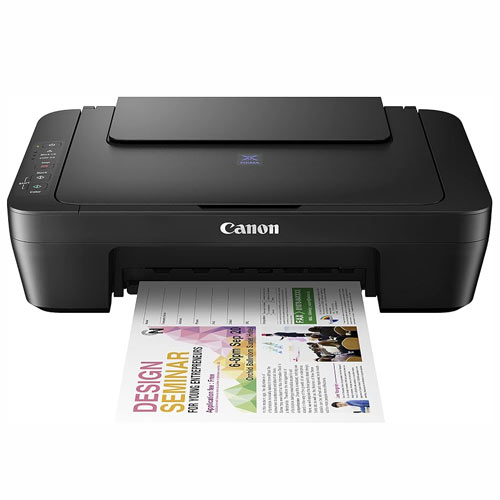
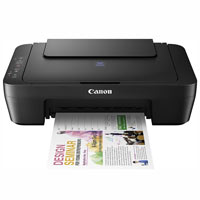
Canon PIXMA E410 Multifunction Inkjet Printer
Cash Price: ৳9,150.00 Regular Price:৳10,350.00Availability: In Stock SKU: 1.3.7.6257
Quick Overview
-
Support
Saturday – Thursday: 09 AM - 06 PM. -
Payment
Cash on Delivery | Card | Online Payment -
Shipping Cost
Inside Dhaka 250tk | Outside Dhaka 350tk -
Warranty Policy
Read More
Description
Canon PIXMA E410 Multifunction Inkjet Printer Price in Bangladesh
The Canon PIXMA E410 Multifunction Inkjet Printer is a compact printing solution designed for home users, students, freelancers and small offices that need essential document-handling functions in one device. Combining printing, scanning and copying, it helps users manage everyday paperwork without purchasing separate machines for each task.
With a maximum stated print resolution of 4800 × 600 dpi, the Canon PIXMA E410 is suitable for producing everyday documents, colourful graphics, school assignments, letters and selected photo prints. Its approximate print speeds are 8.0 images per minute (ipm) for black-and-white documents and 4.0 ipm for colour documents.
The integrated flatbed scanner offers an optical resolution of 600 × 1200 dpi, making it convenient to digitise documents, application forms, letters and other paper-based materials. Its copying function provides additional flexibility for routine document reproduction.
Featuring Hi-Speed USB connectivity, a compact black design and a weight of approximately 3.4 kg, the Canon PIXMA E410 fits comfortably into many home workstations and small office environments.
For customers in Bangladesh looking for an entry-level multifunction printer for everyday printing, scanning and copying, the Canon PIXMA E410 offers a straightforward solution. Before purchasing, users should consider cartridge costs, expected print volume and the requirement for a wired USB connection.
Technical Description
1. Three Essential Functions in One Device
The Canon PIXMA E410 combines printing, scanning and copying in a single multifunction inkjet printer. This integrated design is useful for households, students and small businesses that regularly handle documents.
Users can print digital files from a connected computer, scan paper documents for digital storage, and make copies of suitable originals without needing separate basic office machines.
2. High-Resolution Inkjet Printing
The printer supports a stated maximum print resolution of 4800 × 600 dpi. This resolution is suitable for detailed text, coloured graphics, charts, school projects and everyday business documents when appropriate paper and print settings are used.
Its inkjet printing technology also supports selected photo paper formats, making it useful for occasional personal photo printing. Actual image quality depends on the source file, paper type, ink condition and selected settings.
3. Practical Black and Colour Print Speeds
The Canon PIXMA E410 offers approximate document print speeds of:
-
Black-and-white: 8.0 ipm
-
Colour: 4.0 ipm
These figures provide a useful reference for routine personal and light office printing. Actual print times vary according to document complexity, computer performance, paper selection and printer settings.
4. Flatbed Scanning for Document Digitisation
The integrated flatbed scanner uses Contact Image Sensor (CIS) technology and offers an optical scanning resolution of 600 × 1200 dpi.
With a maximum document size of A4 or Letter (216 × 297 mm), it can handle common paper documents, forms, letters and printed materials. The scanner supports selectable resolutions from 25 to 19200 dpi, although higher selectable settings may involve software interpolation rather than equivalent optical detail.
The stated A4 colour scanning time is approximately 19 seconds at 300 dpi. Actual scanning performance may vary with document content, computer configuration and software settings.
5. Convenient USB Connectivity
The printer features a Hi-Speed USB interface for connecting to a compatible computer. This wired connection provides a simple setup for users who prefer direct computer-to-printer operation.
The supplied specifications do not list built-in Wi-Fi, Bluetooth or Ethernet. Customers who require wireless printing from smartphones, tablets or multiple computers should verify their connectivity requirements before purchase.
6. Flexible Paper Handling
The Canon PIXMA E410 supports a broad selection of standard paper formats, including A4, A5, B5, Letter and Legal, as well as 4 × 6-inch and 5 × 7-inch photo media and DL and COM10 envelopes.
It also supports custom paper dimensions within the following stated ranges:
-
Width: 101.6–215.9 mm
-
Length: 152.4–676 mm
This flexibility supports everyday documents, selected photo prints, envelopes and compatible custom-sized print jobs.
7. Paper Input Capacity for Everyday Tasks
The printer has one paper tray, with listed input capacities depending on the media type.
| Paper Type | Stated Input Capacity |
|---|---|
| A4, A5, B5 and Letter plain paper | Up to 60 sheets |
| Legal plain paper | Up to 10 sheets |
| Photo Paper Plus Glossy II, 4 × 6 inches | Up to 20 sheets |
| Photo Paper Plus Glossy II, 5 × 7 inches | Up to 10 sheets |
| Glossy Photo Paper Everyday Use, 4 × 6 inches | Up to 20 sheets |
| Glossy Photo Paper GP-508, 4 × 6 inches | Up to 20 sheets |
| DL and COM10 envelopes | Up to 5 envelopes |
| Canon Oce Red Label Paper, A4 | Up to 60 sheets |
| Canon Oce Office Colour Paper, A4 | Up to 50 sheets |
Paper capacity can vary with the specified media and loading conditions. Follow the manufacturer's guidance when loading different paper types.
8. Everyday Copying Capability
The Canon PIXMA E410 provides a convenient copying function for routine paperwork. The supplied specifications list a colour first-copy-out time of approximately 30 seconds and a colour copying speed of approximately 1.8 images per minute under the stated test conditions.
It supports between 1 and 21 copies per job. This is useful for reproducing letters, forms and other documents without first creating a digital file, although actual copy performance depends on the source document and selected settings.
9. Compact Design for Small Workspaces
Measuring approximately 426 × 306 × 145 mm and weighing around 3.4 kg, the Canon PIXMA E410 is easy to accommodate on many desks and home office workstations.
Its black finish gives it a simple, understated appearance suitable for study rooms, personal workspaces and small business counters.
10. Cartridge-Based Printing System
The listed compatible cartridge models are PG-47 pigment black and CL-57 or CL-57S colour cartridges.
The supplied yield figures are approximately 400 pages for PG-47, 300 pages for CL-57 and 180 pages for CL-57S. These are indicative figures and actual cartridge yield may vary considerably depending on coverage, printing frequency, settings and maintenance.
Before buying, check the availability and current price of compatible original cartridges in Bangladesh. Cartridge cost and yield are important factors when estimating the total cost of ownership.
Key Features of Canon PIXMA E410
-
Three-in-One Multifunction Design: Print, scan and copy documents with one device, helping simplify everyday paperwork at home or in a small office.
-
4800 × 600 dpi Maximum Print Resolution: Produce detailed text, graphics and colour documents when using suitable media and print settings.
-
Black Document Printing at Approximately 8.0 ipm: Handle routine monochrome printing tasks such as assignments, letters, forms and office documents.
-
Colour Document Printing at Approximately 4.0 ipm: Print colour documents, charts and educational materials at a stated speed suited to everyday personal use.
-
Flatbed CIS Scanner: Digitise paper documents with a stated optical resolution of 600 × 1200 dpi for everyday archiving and document sharing.
-
Selectable Scanning Resolution: Choose from supported scan-resolution settings ranging from 25 to 19200 dpi, with the understanding that settings above the optical resolution may use interpolation.
-
Flexible Paper Size Support: Print on A4, A5, B5, Letter, Legal, selected photo paper sizes, envelopes and compatible custom formats.
-
Multiple Media Input Capacities: Accommodate different paper quantities depending on the media, with listed capacities of up to 60 sheets for common plain paper sizes.
-
Hi-Speed USB Connectivity: Connect to a compatible computer through a direct wired interface for straightforward printing and scanning workflows.
-
Compact and Lightweight Construction: Fit the approximately 3.4 kg printer into a home study area, small office or personal workstation.
-
Dedicated Black and Colour Cartridges: Use the listed PG-47 black and CL-57-series colour cartridges, subject to confirmed model compatibility and local availability.
-
One-Year Stated Warranty: Benefit from the supplied one-year warranty terms, with the adapter excluded and the required packaging and accessories retained for claims.
Technical Specifications
| Specification | Details |
|---|---|
| Brand | Canon |
| Model | PIXMA E410 |
| Product Type | Multifunction Inkjet Printer |
| Functions | Print, Scan, Copy |
| Colour | Black |
| Print Technology | Inkjet |
| Black Print Speed | Approx. 8.0 ipm |
| Colour Print Speed | Approx. 4.0 ipm |
| Maximum Print Resolution | 4800 × 600 dpi |
| Interface | Hi-Speed USB |
| Scanner Type | Flatbed |
| Scanning Technology | CIS (Contact Image Sensor) |
| Optical Scan Resolution | 600 × 1200 dpi |
| Selectable Scan Resolution | 25–19200 dpi |
| Maximum Scan Size | A4 / Letter (216 × 297 mm) |
| Colour Scan Speed | Approx. 19 seconds for A4 at 300 dpi |
| Copy Speed, Colour | Approx. 1.8 ipm |
| Colour First Copy Out | Approx. 30 seconds |
| Maximum Copies per Job | 21 |
| Paper Tray | 1 |
| Supported Paper Sizes | A4, A5, B5, Letter, Legal, 4 × 6 in, 5 × 7 in, DL and COM10 envelopes |
| Custom Paper Width | 101.6–215.9 mm |
| Custom Paper Length | 152.4–676 mm |
| Black Cartridge | PG-47 pigment black |
| Black Cartridge Yield | Approx. 400 pages |
| Colour Cartridge | CL-57 |
| CL-57 Colour Cartridge Yield | Approx. 300 pages |
| Alternative Listed Colour Cartridge | CL-57S |
| CL-57S Colour Cartridge Yield | Approx. 180 pages |
| Dimensions (W × D × H) | Approx. 426 × 306 × 145 mm |
| Weight | Approx. 3.4 kg |
| Power Supply | AC 100–240 V, 50/60 Hz |
| Warranty | 1 year; adapter excluded |
Specifications and cartridge yields are based on the supplied product information. Confirm regional model compatibility, software support, included accessories and warranty terms before purchase.
Usage and Applications
Home Printing
Print household documents, online forms, personal letters, travel paperwork and everyday records.
Student Assignments
Prepare school projects, homework, worksheets, study notes and educational materials.
Small Office Documentation
Print quotations, invoices, business letters, application forms and internal office documents.
Document Scanning
Digitise paper records, letters, certificates and other suitable documents for electronic storage or sharing.
Copying Paper Documents
Create copies of suitable originals for routine personal, educational and administrative tasks.
Personal Photo Printing
Print selected photo-size media for personal projects, subject to compatible paper, suitable ink and appropriate print settings.
Freelancers and Home-Based Businesses
Manage occasional document printing and scanning from a single workstation without needing separate entry-level devices.
Benefits of the Canon PIXMA E410
One device for three tasks: Print, scan and copy documents using an integrated multifunction solution.
Useful print detail: The stated maximum resolution of 4800 × 600 dpi supports detailed everyday text and graphics.
Straightforward computer connection: USB connectivity provides a direct wired workflow for compatible computers.
Flexible media support: Handle common office paper sizes, envelopes and selected photo media.
Document digitisation: Convert physical documents into digital files with the integrated flatbed scanner.
Compact workstation footprint: The printer's dimensions make it suitable for many desks and smaller work areas.
Choice of listed cartridges: The PG-47, CL-57 and CL-57S cartridge options allow users to review the applicable cartridge configuration and yield before purchasing replacements.
Suitable for occasional printing: It can meet the needs of households and students who do not require a high-volume office printing system.
Copying without a separate copier: Reproduce suitable paper documents directly through the multifunction device.
Flexible everyday applications: Support home administration, schoolwork, personal projects and routine small-office paperwork.
Why Choose the Canon PIXMA E410?
The Canon PIXMA E410 is worth considering if you need a basic multifunction printer for everyday printing, scanning and copying. Its compact design, flatbed scanner, colour printing capability and broad paper-size support make it a practical option for personal and light-duty use.
Consider this model if you:
-
Need print, scan and copy functions in one device.
-
Primarily print schoolwork, household paperwork or occasional office documents.
-
Want colour printing for charts, graphics and selected photo media.
-
Prefer a direct USB connection to a computer.
-
Have limited desk space.
-
Want to compare cartridge-based printing costs before investing in a printer.
If you print hundreds or thousands of pages regularly, compare the running costs with a suitable ink-tank printer or a higher-volume business model. If wireless printing is essential, select a model with confirmed Wi-Fi support.
Why Buy the Canon PIXMA E410 from BME?
BME, operated by BME Solutions (BD) Limited, has served the Bangladeshi ICT and office equipment market since 2003. BME supplies technology products and office equipment to individual customers, businesses and institutional buyers.
When considering the Canon PIXMA E410 from BME, customers can contact the sales team to confirm the current selling price, stock status, package contents and applicable warranty conditions.
Reasons to Consider BME
-
Industry Experience: BME has experience in Bangladesh's ICT and office equipment market.
-
Product Information: Get assistance reviewing printer specifications and evaluating whether the model suits your workload.
-
Warranty Clarification: Confirm the warranty period, exclusions, claim process and required accessories before purchase.
-
Purchase Assistance: Ask about current pricing, availability and ordering arrangements.
-
Business Purchasing: Discuss requirements for individual use, small offices or business orders.
Check current stock, pricing, delivery options and warranty coverage with BME before ordering. Warranty support and service commitments should be confirmed at the time of purchase.
Buying Guide: How to Choose the Right Printer
1. Evaluate Your Monthly Print Volume
Estimate how many pages you print each month. The PIXMA E410 is suited to everyday personal and light-duty requirements; frequent high-volume printing may justify a different printer category.
2. Compare Cartridge Costs
Check the current local price and availability of the listed PG-47, CL-57 and CL-57S cartridges. Consider both cartridge yield and the type of content you usually print.
3. Confirm Your Connectivity Requirements
The supplied specifications list Hi-Speed USB connectivity. If you need wireless printing from phones, tablets or multiple computers, consider a printer with confirmed Wi-Fi support.
4. Check Paper and Media Compatibility
Make sure the printer supports your usual document sizes and paper types. The E410 lists support for common office paper, envelopes, selected photo sizes and custom media within specified dimensions.
5. Assess Your Scanning Needs
The flatbed scanner supports documents up to A4 or Letter size. If you regularly scan large batches of multi-page documents, a model with an automatic document feeder may be more convenient.
6. Consider Photo Printing Requirements
The printer supports selected photo paper formats, but the results depend on media compatibility, ink condition and print settings. For frequent professional photo printing, compare dedicated photo printers.
7. Confirm the Warranty
The supplied information states a one-year warranty, excluding the adapter. Check the warranty provider, coverage conditions and required packaging and accessories.
8. Calculate Total Ownership Cost
Compare the purchase price, cartridge expenditure, paper costs and expected maintenance. A printer with a lower initial price is not always the least expensive option over time.
Frequently Asked Questions (FAQ)
1. What is the Canon PIXMA E410 printer price in Bangladesh?
The price may vary with stock availability and retailer offers. Contact BME Bangladesh or visit its website for the current selling price.
2. Is the Canon PIXMA E410 a multifunction printer?
Yes. It combines printing, scanning and copying in one device.
3. Does the Canon PIXMA E410 support colour printing?
Yes. It supports both black-and-white and colour document printing.
4. What is the maximum print resolution?
The supplied specifications list a maximum print resolution of 4800 × 600 dpi.
5. What is the print speed of the Canon PIXMA E410?
The stated approximate document speeds are 8.0 ipm for black-and-white printing and 4.0 ipm for colour printing. Actual speeds depend on the document and selected settings.
6. Does the Canon PIXMA E410 have Wi-Fi?
Wi-Fi is not listed in the supplied specifications. The listed interface is Hi-Speed USB. Verify the exact regional model if wireless connectivity is required.
7. Which cartridges does the Canon PIXMA E410 use?
The supplied information lists the PG-47 pigment black cartridge and the CL-57 or CL-57S colour cartridges. Confirm compatibility with the exact printer version before purchasing replacements.
8. What is the page yield of its cartridges?
The supplied approximate yields are 400 pages for PG-47, 300 pages for CL-57 and 180 pages for CL-57S. Actual yields vary with print coverage, settings, usage and maintenance.
9. Can the Canon PIXMA E410 scan documents?
Yes. It has a flatbed CIS scanner with a stated optical resolution of 600 × 1200 dpi and a maximum document size of A4 or Letter.
10. Can I print photos with this printer?
It supports selected photo paper sizes, including 4 × 6-inch and 5 × 7-inch media. Results depend on paper, ink, source-image quality and print settings.
11. Is the Canon PIXMA E410 suitable for students?
It can suit students who need to print assignments, study materials and forms, as well as scan or copy everyday documents.
12. Is this printer suitable for heavy office printing?
It is better considered for personal and light-duty printing unless the expected workload has been assessed against the manufacturer's operating guidance. For high-volume work, compare higher-capacity alternatives.
13. What is the warranty period?
The supplied warranty information states one year, with the adapter excluded. Confirm the warranty provider and terms before purchasing.
14. What should I retain for a warranty claim?
The supplied terms require the product box, original cartridge or ink and other supplied accessories, as applicable. Keep these items and follow the seller's claim procedure.
15. Where can I buy the Canon PIXMA E410 in Bangladesh?
Contact BME through https://www.bme.com.bd or email info@bmebd.com to ask about current price, availability and purchasing options.
The Canon PIXMA E410 Multifunction Inkjet Printer is a practical option for users who want printing, scanning and copying in one compact device. With a stated maximum print resolution of 4800 × 600 dpi, USB connectivity, flexible paper-size support and a flatbed scanner, it can serve the everyday needs of households, students and small workspaces.
Before purchasing, check cartridge prices and availability, confirm that USB connectivity meets your requirements, and verify the applicable warranty terms.
For the current Canon PIXMA E410 printer price in Bangladesh, contact BME Bangladesh for availability and purchasing information.
What is the price of Canon PIXMA E410 Multifunction Inkjet Printer in Bangladesh?
Write a review
Question Answer
Have question about this product? Get specific details about this product from expert.



Canon imageCLASS LBP647CDW Laser Printer



Canon Pixma G1810 Ink Efficient Printer
Canon imageCLASS LBP171DN Mono Laser Printer