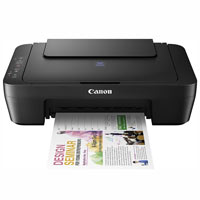
Canon PIXMA MG2570S Inkjet Multifunction Printer
Cash Price: ৳5,950.00 Regular Price:৳6,350.00Availability: In Stock SKU: 1.3.7.3606
Quick Overview
-
Support
Saturday – Thursday: 09 AM - 06 PM. -
Payment
Cash on Delivery | Card | Online Payment -
Shipping Cost
Inside Dhaka 150tk | Outside Dhaka 250tk -
Warranty Policy
Read More
Description
Canon PIXMA MG2570S Inkjet Multifunction Printer Price in Bangladesh
The Canon PIXMA MG2570S Inkjet Multifunction Printer is a practical printing solution for home users, students, small offices, and personal workspaces that need essential document handling in one compact device. Combining printing, scanning, and copying, this multifunction inkjet printer helps users manage everyday paperwork without requiring separate machines for each task.
Designed for routine document printing, the Canon PIXMA MG2570S supports black-and-white and colour printing with a maximum stated print resolution of 4800 × 600 dpi. Its flatbed scanner offers an optical resolution of 600 × 1200 dpi, making it suitable for digitising documents, forms, and other paper-based materials.
The printer connects to a computer through a Hi-Speed USB 2.0 interface. Its support for commonly used paper sizes, including A4, A5, B5, Letter, Legal, photo paper sizes, and envelopes, makes it versatile for everyday personal and professional requirements.
For customers in Bangladesh looking for a straightforward Canon printer for occasional printing, school assignments, office documents, scanning, and photocopy-style copying, the Canon PIXMA MG2570S offers three essential functions in one device.
Technical Description
1. Multifunction Printing, Scanning and Copying
The Canon PIXMA MG2570S integrates three core functions into one printer: print, scan, and copy. This combination is useful for students preparing assignments, households printing forms, and small businesses managing routine paperwork.
Instead of purchasing separate devices, users can print digital documents, scan physical papers to a computer, and make copies of documents using the printer's built-in functions.
2. High-Resolution Inkjet Printing
With a stated maximum print resolution of 4800 × 600 dpi for both black and colour output, the MG2570S is designed to produce detailed everyday documents, graphics, and colour content on supported media.
Its inkjet printing technology is suitable for letters, schoolwork, reports, charts, forms, and other general-purpose printing requirements. Actual output quality depends on the source document, selected print settings, paper type, and ink condition.
3. Stated Print Speed
The supplied specifications list approximate print speeds of 8.0 images per minute (ipm) for colour and 4.0 ipm for black printing.
These figures provide a useful reference when evaluating the printer for personal or light-duty use. Actual printing time may vary according to the document, computer settings, connection, media, and print mode.
4. Flatbed Scanning Capability
The integrated flatbed scanner supports an optical scanning resolution of 600 × 1200 dpi and a maximum scan area of 216 × 297 mm.
This allows users to digitise standard-sized documents, letters, forms, and selected printed materials for electronic storage, sharing, and recordkeeping. The flatbed design is particularly convenient for individual sheets and documents that need careful positioning.
5. Convenient USB 2.0 Connectivity
The printer features a Hi-Speed USB 2.0 interface for connecting to a compatible computer. This wired connection provides a straightforward setup for users who prefer a direct computer-to-printer connection.
Important: The supplied specifications list USB connectivity only. Wi-Fi, Bluetooth, Ethernet, and direct mobile printing should not be assumed to be available on this model.
6. Flexible Paper Size Support
The Canon PIXMA MG2570S supports a range of common paper formats, including A4, A5, B5, Letter, Legal, 4 × 6-inch and 5 × 7-inch media, and DL and COM10 envelopes.
Custom paper sizes are also listed within the following dimensions:
-
Width: 101.6 mm to 215.9 mm
-
Length: 152.4 mm to 676 mm
This flexibility makes the printer useful for standard documents, selected photo prints, envelopes, and compatible custom-format printing jobs.
7. Suitable for Everyday Home and Office Tasks
The combination of printing, scanning, and copying makes this model a useful choice for households, students, freelancers, and small offices with moderate document-handling requirements.
It can help users manage assignments, personal records, business letters, invoices, application forms, and other routine paperwork from a single workstation.
8. Operating Environment
The stated operating temperature range is 5°C to 35°C, while the supported operating humidity range is 10% to 90% relative humidity.
For reliable operation, install the printer in a clean, dry, well-ventilated location and follow Canon's handling, installation, and maintenance recommendations.
Key Features of Canon PIXMA MG2570S
-
Three-in-One Multifunction Design: Print, scan, and copy documents using one convenient device, reducing the need for separate machines.
-
Inkjet Printing Technology: Produce everyday black-and-white and colour documents for home, educational, and light office use.
-
Up to 4800 × 600 dpi Print Resolution: Create detailed text, graphics, and colour output when using suitable paper and print settings.
-
Approximate Colour Print Speed of 8.0 ipm: Handle routine colour printing tasks at a stated speed suitable for personal document requirements.
-
Approximate Black Print Speed of 4.0 ipm: Print ordinary monochrome documents for assignments, forms, letters, and basic business paperwork.
-
Integrated Flatbed Scanner: Digitise physical documents with a scanning area of up to 216 × 297 mm.
-
600 × 1200 dpi Optical Scan Resolution: Capture document details for electronic archiving and everyday document sharing.
-
Hi-Speed USB 2.0 Interface: Connect directly to a compatible computer using a wired USB connection.
-
Multiple Paper Size Support: Work with A4, A5, B5, Letter, Legal, selected photo paper sizes, envelopes, and supported custom formats.
-
Compact Multifunction Solution: Combine three essential document-handling functions in a single device for a home or small workspace.
-
Flexible Document Applications: Support school assignments, personal paperwork, office forms, invoices, and other routine printing tasks.
-
One-Year Warranty: Receive the stated one-year product warranty, subject to the seller's terms; the adapter is excluded from warranty coverage.
Technical Specifications
| Specification | Details |
|---|---|
| Brand | Canon |
| Product Model | PIXMA MG2570S |
| Printer Type | Inkjet Multifunction Printer |
| Functions | Print, Scan, Copy |
| Printing Technology | Inkjet |
| Black Print Speed | Approx. 4.0 ipm |
| Colour Print Speed | Approx. 8.0 ipm |
| Black Print Resolution | Up to 4800 × 600 dpi |
| Colour Print Resolution | Up to 4800 × 600 dpi |
| Scanner Type | Flatbed |
| Optical Scan Resolution | 600 × 1200 dpi |
| Maximum Scan Area | 216 × 297 mm |
| Connectivity | Hi-Speed USB 2.0 |
| Supported Paper Sizes | A4, A5, B5, Letter, Legal, 4 × 6 in, 5 × 7 in, DL and COM10 envelopes |
| Custom Paper Width | 101.6–215.9 mm |
| Custom Paper Length | 152.4–676 mm |
| Operating Temperature | 5°C–35°C |
| Operating Humidity | 10%–90% RH |
| Warranty | 1 year; adapter excluded |
| Warranty Claim Requirement | Product box, original cartridge/ink and other supplied accessories must be retained, as applicable |
Specifications are based on the supplied product information. Confirm the exact package contents, compatible ink cartridge numbers, supported operating systems, and warranty terms before purchase.
Usage and Applications
Home Printing
Print personal documents, online forms, letters, household records, and other everyday materials.
Student Assignments
Prepare school projects, homework, study notes, worksheets, and educational documents.
Small Office Documentation
Print routine business correspondence, invoices, quotations, application forms, and internal paperwork.
Document Scanning
Digitise paper documents for electronic storage, email attachments, and digital recordkeeping.
Copying Documents
Make copies of suitable paper documents without needing a separate photocopier.
Personal Projects
Print selected graphics, charts, and compatible photo-size media for non-commercial personal use.
Benefits of the Canon PIXMA MG2570S
Three functions in one device: Printing, scanning, and copying are available from a single machine.
Practical for everyday use: It supports routine document requirements in homes, study areas, and small offices.
Detailed print output: Its stated maximum resolution of 4800 × 600 dpi supports clear text and detailed graphics when the correct settings and media are used.
Convenient document digitisation: The flatbed scanner helps convert physical papers into digital files.
Direct computer connectivity: USB 2.0 provides a simple wired connection to a compatible computer.
Flexible media compatibility: Multiple standard and selected custom paper sizes support a range of document formats.
Space-conscious setup: One multifunction printer can take the place of separate basic printing, scanning, and copying equipment.
Straightforward functionality: Its core feature set suits users who need essential document-handling functions rather than advanced office networking features.
Why Choose the Canon PIXMA MG2570S?
Choose the Canon PIXMA MG2570S if you need an entry-level multifunction inkjet printer for regular personal or light-duty printing. Its main appeal is the combination of colour printing, scanning, and copying with direct USB connectivity.
It is particularly worth considering if you:
-
Need a printer for schoolwork or household paperwork.
-
Want a scanner and copier in the same device.
-
Prefer a wired USB connection to a computer.
-
Print occasionally or in moderate quantities.
-
Do not require built-in Wi-Fi or advanced business printing features.
Before buying, compare the price and availability of compatible ink cartridges, your expected monthly print volume, and the cost per page. These factors can matter more than the initial printer price over the product's lifetime.
Why Buy the Canon PIXMA MG2570S from BME?
BME, operated by BME Solutions (BD) Limited, provides ICT products and office equipment to individual customers, businesses, and institutional buyers in Bangladesh.
When purchasing the Canon PIXMA MG2570S from BME, customers can contact the sales team to confirm current pricing, product availability, package contents, and warranty conditions before ordering.
Reasons to consider BME include:
-
ICT and Office Equipment Experience: BME has been serving Bangladesh's ICT and office equipment market since 2003.
-
Product Information: Get assistance reviewing the printer's functions, specifications, and suitability for your intended use.
-
Warranty Clarification: Confirm the applicable warranty period, exclusions, and required documents or accessories for a claim.
-
Purchase Assistance: Contact the sales team for current pricing, availability, and ordering information.
-
Business and Individual Sales: Ask about purchasing options for personal use, office requirements, and business orders.
Please confirm stock availability, current selling price, delivery arrangements, and the warranty provider with BME before placing an order. Do not assume a specific service commitment or manufacturer-authorised status unless it has been confirmed.
Buying Guide: Is the Canon PIXMA MG2570S Right for You?
1. Identify Your Printing Requirements
Consider whether you mainly print school assignments, personal paperwork, office forms, colour graphics, or occasional photo-size images.
2. Estimate Your Monthly Print Volume
For occasional or moderate everyday use, this model may be suitable. If you print large volumes every day, compare it with a higher-volume printer or an ink-tank model.
3. Check the Ink Cartridge Cost
Review the price and availability of compatible original cartridges before purchasing. Ink costs and cartridge yield will influence your long-term printing expenses.
4. Confirm Your Connectivity Needs
The supplied specifications identify USB 2.0 connectivity. If you need wireless printing from phones, tablets, or multiple computers, consider a model with confirmed Wi-Fi support.
5. Review Scanning Requirements
The flatbed scanner supports documents up to 216 × 297 mm. If you regularly scan multi-page documents or need automatic document feeding, consider a scanner or multifunction printer with an automatic document feeder.
6. Check Warranty and Package Contents
Confirm the included accessories, cartridge configuration, warranty provider, and claim conditions. Keep the product box and supplied accessories as required by the warranty terms.
7. Compare Total Ownership Cost
Evaluate the purchase price together with ink expenditure, paper costs, expected maintenance, and your typical monthly workload.
Frequently Asked Questions (FAQ):
1. What is the price of the Canon PIXMA MG2570S in Bangladesh?
The selling price may change depending on stock, supply, and retailer offers. Contact BME Bangladesh or visit BME's website for the current price.
2. Is the Canon PIXMA MG2570S a multifunction printer?
Yes. It combines three functions: printing, scanning, and copying.
3. Does the Canon PIXMA MG2570S print in colour?
Yes. It supports colour printing as well as black printing.
4. What is the maximum print resolution?
The supplied specifications state a maximum black and colour print resolution of 4800 × 600 dpi.
5. What is its printing speed?
The supplied figures list approximate speeds of 4.0 images per minute for black printing and 8.0 images per minute for colour printing. Actual results vary by document and settings.
6. Does the Canon PIXMA MG2570S support Wi-Fi?
The supplied specifications list Hi-Speed USB 2.0 connectivity only. Built-in Wi-Fi is not specified, so confirm the official model configuration if wireless printing is essential.
7. Can I scan documents using this printer?
Yes. It features a flatbed scanner with a stated optical resolution of 600 × 1200 dpi and a scan area of 216 × 297 mm.
8. Which paper sizes does the printer support?
Listed sizes include A4, A5, B5, Letter, Legal, 4 × 6-inch, 5 × 7-inch, and DL and COM10 envelopes. Supported custom dimensions are also specified.
9. Is this printer suitable for students?
It can be a practical choice for students who need to print assignments, worksheets, notes, and application forms, as well as scan or copy documents.
10. Is it suitable for heavy office printing?
It is better considered for personal or light-duty printing unless your workload has been assessed against its actual operating requirements. For high-volume use, compare models designed for heavier workloads.
11. What warranty comes with the Canon PIXMA MG2570S?
The supplied information states a one-year warranty, excluding the adapter. Confirm the warranty provider and applicable terms at the time of purchase.
12. What should I keep for a warranty claim?
According to the supplied terms, the product box, original cartridge or ink, and other supplied accessories must be retained as applicable. Follow the seller's specific claim instructions.
13. Can I use this printer for photo printing?
It supports selected photo paper sizes, including 4 × 6 inches and 5 × 7 inches. Results depend on paper quality, ink condition, source image, and print settings.
14. Where can I buy the Canon PIXMA MG2570S in Bangladesh?
You can contact BME Bangladesh through https://www.bme.com.bd to ask about current price, stock availability, and ordering options.
The Canon PIXMA MG2570S Inkjet Multifunction Printer is worth considering for users who want essential colour printing, document scanning, and copying in one device. Its USB connection and support for commonly used paper formats make it a practical option for home users, students, and small workspaces.
Before purchasing, compare cartridge costs and confirm that the printer's wired connectivity meets your needs. For customers in Bangladesh, BME can provide further information about current availability, pricing, and warranty conditions. Buy with confidence by checking the specifications and total running cost first.
What is the price of Canon PIXMA MG2570S Inkjet Multifunction Printer in Bangladesh?
Write a review
Question Answer
Have question about this product? Get specific details about this product from expert.



Canon imageCLASS LBP647CDW Laser Printer



Canon Pixma G1810 Ink Efficient Printer
Canon imageCLASS LBP171DN Mono Laser Printer