

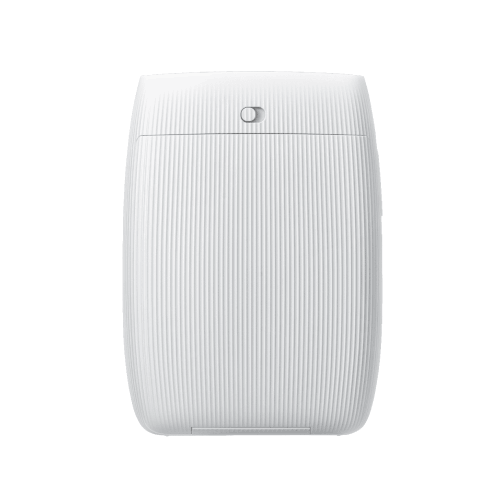
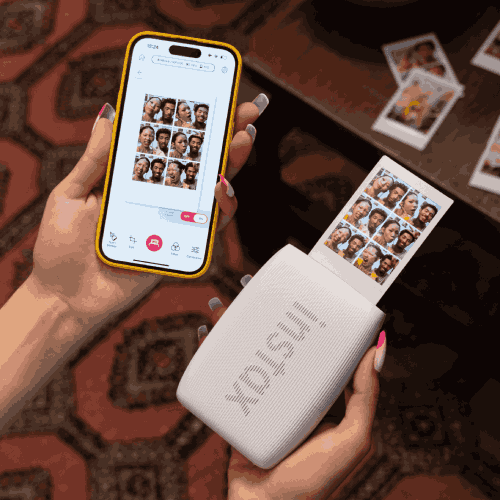
Fujifilm instax mini Link 3 Smartphone Printer
Regular Price:৳0.00Availability: SKU: 1.4.112.9358
Quick Overview
-
Support
Saturday – Thursday: 09 AM - 06 PM. -
Payment
Cash on Delivery | Card | Online Payment -
Shipping Cost
Inside Dhaka 100tk | Outside Dhaka 150tk -
Warranty Policy
Read More
Description
Fujifilm instax mini Link 3 Smartphone Printer in Bangladesh
The Fujifilm instax mini Link 3 Smartphone Printer brings a new level of creativity and fun to photo printing in Bangladesh. Instead of letting your best shots get lost in your phone’s gallery or social media timelines, this compact instant printer turns them into real instax mini instant photos—colourful, credit-card-sized prints that you can hold, share, and keep for years.
All you need is your smartphone, a pack of instax mini film, and the free instax mini Link app. From there, your everyday life—hangouts in Dhanmondi, coffee dates in Banani, campus life at DU, NSU or BRAC, family gatherings in Chattogram—suddenly becomes a series of physical memories instead of just scrolling content.
Fujifilm has designed the instax mini Link 3 around one simple idea: Bring fun to life™. That means fast printing, playful app features, AR effects, and intuitive controls that make the printer feel less like a piece of equipment and more like a social accessory. Whether you’re at a birthday party, a wedding holud, a corporate event, or just chilling with friends in a hostel room, the Link 3 quickly becomes the centre of attention.
Simple Print – Relive the Moment Instantly
With the Simple Print mode, the Fujifilm instax mini Link 3 makes it incredibly easy to turn any photo on your smartphone into a physical print.
Open the instax mini Link app, pick a picture from your camera roll, edit if you want, and tap print. That’s it. The printer receives the image over Bluetooth and starts printing a instax mini instant photo. Within seconds the photo emerges, and in about 90 seconds it fully develops into a sharp, colourful print.
This is perfect for:
- A quick group selfie after iftar with friends.
- A cute couple photo during a weekend outing.
- A special moment with your parents or grandparents who appreciate printed photos more than digital albums.
Instead of promising to “send the picture later,” you can hand them a physical photo on the spot. That simple act feels surprisingly meaningful in an age of screenshots and disappearing stories.
Video Print – Freeze the Best Second
Some of the most fun moments exist as videos, not photos—friends laughing, kids running, fireworks, a cricket celebration. With Video Print, the instax mini Link 3 lets you slow life down and freeze the perfect frame.
Inside the app, you choose a video stored on your smartphone. Scroll through the timeline frame by frame, select the moment you love the most, and tap print. The printer outputs that single frame as an instax mini instant photo.
This is ideal for:
- Capturing the exact millisecond your friend blows out birthday candles.
- Freezing a mid-air jump at Cox’s Bazar beach.
- Saving the cutest expression of your baby from a video clip.
The combination of video memories and instant film gives you a unique way to preserve motion as a single iconic still.
Click to Collage – Your Pocket Photo Booth
The Click to Collage feature turns your smartphone and instax mini Link 3 into a mini photo booth—perfect for parties, dorm rooms, and gatherings.
Here’s how it works:
- Open Click to Collage in the app.
- The app captures six images automatically, at three-second intervals.
- From those six, you select two, four, or six shots to build a collage.
- The chosen shots get printed together on one instax mini photo.
- The app can also turn all six shots into an animation for you to share digitally.
This feature is a hit in social situations. You and your friends can goof around, pose differently for each shot, and then decide which ones make the final collage. It feels like having a Japanese-style photo booth (purikura) in your pocket, without leaving your living room or café table.
instax AiR Studio – Add AR Magic to Your Prints
With instax AiR Studio (an in-app feature), the instax mini Link 3 goes beyond normal filters and frames. It lets you add 3D AR effects in real-time before taking a picture with your smartphone.
You can:
- Draw “in the air” with your phone and see trails of sparkles, hearts, or doodles appear around your subject.
- Add floating objects like balloons, leaves, or confetti to the scene.
- Experiment with different backgrounds and decor to fully set your stage.
You can save up to 20 of these AR-enhanced images in the app to print later or record a video of the AR performance to share online. It’s like having a small AR studio tucked inside your phone, with the Link 3 as your instant output device.
For content creators, influencers, and anyone who loves playful edits, this opens a new creative playground. You’re not just printing; you’re designing unique photo-art that blends digital effects with analogue-style prints.
Create Your Stage & Remote Live View – Collaborative Fun
Using the instax AiR Studio features, you can even scan the floor with your smartphone to set up a virtual stage. Pick a background, choose decor elements (balloons, garlands, hearts, confetti, spotlights), and see your entire “set” come alive on screen.
Then, with Remote Live View, another smartphone can scan a QR code and join the same scene. Both of you can see how the shot will look before capturing it. This is incredibly fun for:
- Long-distance couples or friends collaborating on photos.
- Group shots where you want everyone perfectly arranged.
- Creative sessions where one person directs while another poses.
These features turn a simple print session into an interactive experience, especially in group gatherings or creative workshops in Bangladesh.
Motion Control – Print Again with a Gesture
The instax mini Link 3 introduces a clever and surprisingly satisfying feature: Motion Control reprint.
If you just printed a photo you love and want another copy, don’t open the app again. Instead:
- Hold the Link 3 printer.
- Turn it upside down.
- Press and hold the power button for about one second.
The printer recognises this motion and prints another copy of the last photo automatically. One for you, one for your friend. It’s fast, intuitive, and feels like a little bit of magic every time.
Frame Print & Collage Print – Tell More Stories per Photo
With Frame Print, you can decorate your photos with:
- Themed frames (cute, romantic, seasonal, etc.)
- Stickers and emojis
- Custom text or captions
This is particularly useful for:
- Adding dates and locations to travel photos.
- Writing small inside jokes on friends’ prints.
- Creating mini “polaroid cards” for gifts or room décor.
Then there’s Collage Print—another way to tell multiple stories in a single print. Instead of just one large photo, you can combine several small images into one instax mini frame. It’s great for:
- Summarising an entire day trip or event.
- Before/after style photos.
- Photo sequences (e.g., step-by-step of a recipe, makeup look, or outfit change).
Both features save film while giving you more creative flexibility.
Remote Shooting – Everyone in the Frame
Tired of always being the photographer and missing from group shots? With the Remote Shooting mode in the app, the Link 3 doubles as a remote shutter for your smartphone camera.
Here’s what you do:
- Place your smartphone in a suitable spot (tripod, shelf, stand).
- Open the Remote Shooting feature in the instax mini Link app.
- Frame the shot on your phone’s screen.
- Join the group.
- Press the power button on the Link 3 printer to trigger the shutter.
No need to set timers or ask strangers to take the photo. It’s especially handy for family portraits, group shots at weddings, or office team photos.
Design & Build – Pastel, Textured and Smart
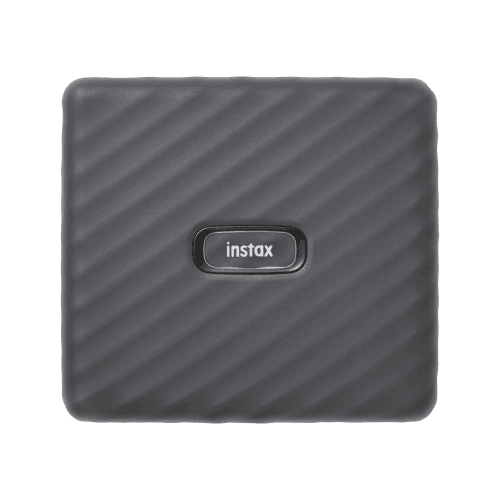
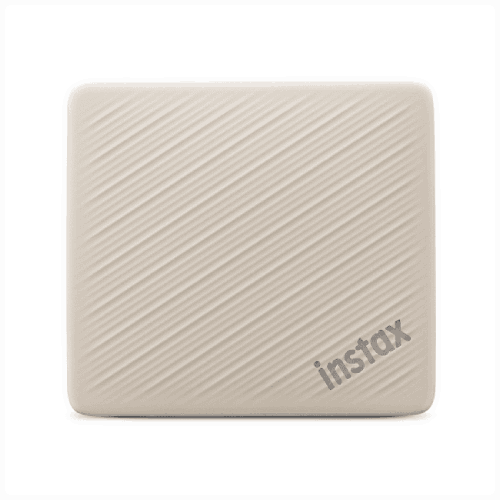
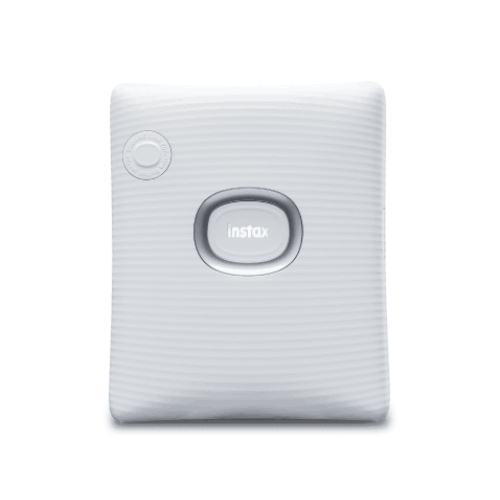
The Fujifilm instax mini Link 3 is designed to look and feel modern yet friendly. It comes in three soft pastel colours:
- Sage Green
- Clay White
- Rose Pink
Each colour gives off a different vibe—from calm and natural to clean and minimal or sweet and playful—so you can pick the one that matches your style or room aesthetic.
The body has a textured finish for better grip, making it comfortable to hold and less likely to slip from your hands. It’s small enough to fit in most handbags, backpacks, or even a larger coat pocket, which is perfect for city life in Dhaka or travel across Bangladesh.
On the front, you’ll find three small LED lights that pulse and change colour according to the printer’s status:
- Power on/off
- Connecting
- Printing
- Error alerts
Instead of relying on beeps or cryptic codes, the LED lights give you visual feedback that feels simple and stylish.
Image Quality – Natural or Rich, Your Choice
Inside the app, you can choose between two main image modes:
- instax-Natural Mode – delivers a classic film look with subtle, slightly desaturated tones. Think timeless, gentle colours that look great for portraits and quiet moments.
- instax-Rich Mode – adds more colour punch, contrast, and vibrancy, ideal for bright outdoor scenes, party shots, and anything where you want the colours to stand out.
This flexibility matters when printing in different environments across Bangladesh—bright sunny days, indoor events with warm lighting, cloudy afternoons, café interiors, etc. You can quickly pick the style that fits the mood of your shot without complicated menus.
Match Test – Fun Personality Prints
The Match Test feature adds a playful, social twist to instant printing. You and a friend (or partner) answer a series of fun questions in the app. Then, your answers are “analyzed,” and the result is printed onto an instax mini photo along with your picture.
The printed result might show scores, comments, or playful indicators of how well you “match.” It’s a light-hearted, engaging activity for:
- Couples on date nights.
- Friends hanging out in a dorm room.
- Ice-breaking games at parties or team-building sessions.
It’s less about scientific accuracy and more about laughter and shared moments. The printed results often end up on walls, notebooks, or inside wallets as little reminders of a fun time.
Powered Up – USB Type-C Charging
The instax mini Link 3 uses a USB Type-C port for charging, which is a big plus for modern users in Bangladesh since many smartphones and gadgets are now on USB‑C. That means:
- You can usually share chargers and cables with other devices.
- Charging is faster and more convenient than outdated ports.
Charge it up before a day out, and you’re ready to print on the go—whether you’re at a picnic in Hatirjheel, a road trip to Sylhet, or a beach day at Cox’s Bazar. You don’t need a constant power connection; the built-in battery keeps you mobile.
Real-Life Usage Scenarios in Bangladesh
Family & Festivals
During Eid, Pohela Boishakh, birthdays, and anniversaries, the mini Link 3 becomes a memory machine. You can create an instant photo wall, give elders physical photos to keep, and make small framed gifts with prints for relatives you haven’t seen in a while.
Campus & Student Life
Students at universities and colleges across Dhaka, Chattogram, Rajshahi, Sylhet, and Khulna can use the printer to document club activities, farewell parties, project teams, and hostel life. Pin prints to hostel walls, stick them on notebooks, or swap them like collectible cards.
Weddings & Events
Wedding planners and photographers can set up an instax corner where guests take photos and instantly print them. Guests can then paste their photo into a guestbook and write messages. This creates a unique, highly personal keepsake for the bride and groom.
Cafés & Boutique Shops
Cafés in Dhanmondi, Uttara, or Banani can use the Link 3 to print mini photos of regular customers, drinks, or special events. These can go on a “Wall of Fame” or be given as tokens of appreciation. Boutiques and salons can create before/after portfolios or personalised thank-you cards.
Travel & Adventure
Travelers exploring Bandarban, Rangamati, Sajek, or Saint Martin’s Island can print a photo each evening as part of a travel journal. Instead of waiting to get large prints later, you get immediate, tangible souvenirs while emotions are still fresh.
Office & Corporate Culture
Companies can use the printer for instant team photos during workshops, product launches, and corporate celebrations. These prints help build a more human, friendly office environment and make internal communications boards more engaging.
Even in situations with load-shedding, as long as the printer and your phone are charged, you can still print. Gather everyone, light some candles, and turn a power cut into a cosy photo-printing session.
Compatibility & Ecosystem
The Fujifilm instax mini Link 3 works with:
- Smartphones (iOS / Android) that support the instax mini Link app.
- instax mini instant film, widely recognised and used globally.
This keeps you within the broader Fujifilm instax ecosystem, meaning:
- Film packs are standardised, so you know what size and style you’re getting.
- You can mix prints from instax cameras and the Link 3 printer in a single album.
- Accessories like albums, frames, and display options made for instax mini prints will all work seamlessly.
As long as your phone can run the app and has Bluetooth, you’re good to go.
Maintenance & Care
Maintaining the instax mini Link 3 Smartphone Printer is simple:
- Store properly: Keep it in a pouch, drawer, or on a clean shelf to protect it from dust.
- Protect from moisture: Avoid humid conditions, water splashes, or exposure to rain.
- Use proper film: Only use genuine instax mini film and load it according to instructions. Don’t open film packs in bright direct sunlight.
- Handle prints gently: Once a photo comes out, don’t bend or scratch it. Let it develop face-up for about 90 seconds.
- Charge responsibly: Use good-quality USB Type‑C cables and reputable chargers. Avoid leaving it plugged in for extremely long periods unnecessarily.
With basic care, the device can stay reliable and fun for years.
✅ Key Features
- Simple Smartphone Printing: Print photos directly from your smartphone using the free instax mini Link app, turning digital snaps into real instax mini prints in seconds.
- Video Print Function: Select your favourite frame from any smartphone video and print it as a single instant photo to freeze the perfect moment.
- Click to Collage Mode: Capture six rapid shots and combine two, four, or six images into one creative collage print for a photo booth-style experience.
- instax AiR Studio AR Effects: Add 3D AR doodles, objects, and animated effects to your photos before printing for truly unique creations.
- Motion-Control Reprint: Simply turn the printer upside down and press the power button to reprint your last photo—ideal for sharing duplicates.
- Frame & Collage Print Options: Apply frames, stickers, emojis, and collages to personalise every print for events, gifts, or journaling.
- Remote Shooting Capability: Use the printer as a remote shutter for your smartphone to capture group shots and selfies without being left out.
- Compact, Textured Design: Lightweight body with an easy-to-grip texture, available in Sage Green, Clay White, and Rose Pink pastel colours.
- LED Status Lights: Three front LED lights indicate power, printing, and status, giving instant visual feedback while you use it.
- USB Type-C Charging: Modern USB Type‑C port ensures convenient, fast charging and better compatibility with current chargers and cables.
- Dual Image Modes: Choose between instax-Natural and instax-Rich modes for classic or vibrant output tailored to each scene.
- Fun Social Features: Match Test and other app tools add playful, interactive elements that make the printer the highlight of gatherings.
✅ Usage / Applications
- Home & Family: Printing family portraits, kids’ milestones, and festival memories.
- Students & Campus Life: Capturing group photos, club events, and hostel memories for scrapbooks and wall collages.
- Weddings & Parties: Creating instant guestbooks and takeaway prints at holud, mehendi, birthdays, and receptions.
- Cafés & Small Businesses: Offering customers personalised photo keepsakes or building a branded photo wall.
- Travel & Journaling: Making daily travel prints for diaries and notebooks during trips around Bangladesh and abroad.
- DIY & Crafts: Decorating planners, scrapbooks, greeting cards, and handmade gifts with mini prints.
- Office & Corporate: Documenting team events, celebrations, and training sessions on office boards.
- Photo Corners & Events: Running small photo booths at fairs, school events, and community programs.
✅ Benefits of This Product?
- Turns digital memories into tangible keepsakes, helping you preserve important moments beyond phone screens.
- Encourages creativity and play, thanks to AR effects, frames, collages, and fun in-app features.
- Makes gatherings more interactive, giving guests something to do and something to take home at the end.
- Reduces reliance on photo studios, offering instant prints wherever you are without complex equipment.
- Supports personal and business branding, letting you create unique, on-the-spot photo experiences for customers or clients.
- Compact and travel-friendly, easily fitting into the busy, mobile lifestyles common in Bangladesh.
- Works seamlessly with existing smartphones, so you don’t need an additional camera to join the instax ecosystem.
✅ Ideal For
The Fujifilm instax mini Link 3 Smartphone Printer is ideal for a wide range of users across Bangladesh. Students and young adults who love capturing everyday life on their phones will enjoy turning their best shots into creative, tangible prints for hostel walls, study desks, and scrapbooks. Families will find it perfect for documenting kids’ growth, family get-togethers, and special festivals like Eid or weddings, especially when sharing printed photos with relatives who prefer something they can hold.
It’s also an excellent tool for content creators, influencers, and hobby photographers who want to bridge the gap between online aesthetics and offline keepsakes. Wedding planners, photographers, cafés, and boutique businesses can use it to add unique instant-print experiences for guests and customers. Even corporate teams and HR departments can benefit from using it to make office life more visually engaging. If you value memories, creativity, and the charm of instant film, the instax mini Link 3 is designed with you in mind.
✅ Why Choose the Fujifilm instax mini Link 3 Smartphone Printer?
Choosing the instax mini Link 3 means choosing a device that actively enhances how you experience your photos. Compared to typical compact photo printers, the Link 3 is not just about printing—it’s about interaction and creativity. Features like instax AiR Studio, Click to Collage, Video Print, and Match Test give you more ways to play with your photos before they become permanent prints. You’re not limited to plain images; you’re encouraged to create mini artworks and personalised mementos.
The switch to USB Type‑C, improved app features, and thoughtful design updates make the Link 3 a more polished and future-ready device compared to older models in the instax lineup. You get better connectivity, modern aesthetics, and user-friendly operation that fit perfectly into today’s smartphone-first lifestyle. And because it uses instax mini film, your prints carry that recognisable, high-quality Fujifilm look that sets them apart from low-resolution, ink-based instant printers.
For the Bangladesh market, where social gatherings, festivals, and family bonds are so important, the Link 3 offers something unique: an easy, reliable way to share physical memories on the spot. Whether you’re using it at home, on campus, at work, or at events, the Fujifilm instax mini Link 3 Smartphone Printer stands out as a fun, reliable, and feature-rich choice that will stay relevant for years to come.
✅ Why Buy This Product from BME?
When you buy the Fujifilm instax mini Link 3 Smartphone Printer from Business Machine & Equipment (BME), you’re purchasing from a specialised technology and office equipment supplier in Bangladesh that focuses on genuine, branded products. That means you can avoid the risks of grey imports and unknown-quality gadgets, and instead enjoy peace of mind that your unit is authentic and sourced through proper channels.
BME understands the needs of both individual users and organisations. If you’re a student, family, or hobbyist, BME aims to provide clear product information and pre-purchase guidance so you know exactly what you’re getting and how it fits your lifestyle. If you’re a business, café, event company, or corporate buyer, BME can support you with formal quotations, bulk purchase discussions, and procurement-friendly documentation, making it easier to integrate the instax mini Link 3 into your service offerings or branding activities.
Delivery services are arranged to reach customers across Dhaka and other regions in Bangladesh through trusted logistics partners. While specific service levels and timelines may vary, BME’s goal is to make it straightforward for you to receive your product and start using it quickly. Post-purchase, you can also reach out to BME for basic setup assistance and product-related questions, ensuring you get the most from your new instant printer in real Bangladeshi conditions.
✅ Buying Guide
To choose and use the Fujifilm instax mini Link 3 effectively, consider the following points:
1. Define Your Purpose
- Personal use: Think about how often you’ll print—once in a while for special occasions, or regularly for journaling and décor?
- Events and business: Estimate how many prints you may need per event and plan film stock accordingly.
2. Check Device Compatibility
- Confirm that your Android or iOS smartphone can install and run the instax mini Link app.
- Make sure Bluetooth is working properly on your phone, as it’s needed to connect to the printer.
3. Plan for Film Usage
- The printer uses instax mini instant film (sold separately).
- Decide whether you want standard white-border film or special designs (depending on availability in Bangladesh).
- Store film in a cool, dry place, and try not to stock far beyond your expected use window.
4. Choose the Right Colour Variant
- Pick from Sage Green, Clay White, or Rose Pink depending on your personal style or brand image.
- If using in a café or store, consider which colour best matches your interior branding.
5. Consider Mobility and Space
- The printer is small, but you still need a stable, clean surface for printing and for letting prints develop.
- For travel or events, plan a safe spot to keep film packs and the printer away from food and drinks.
6. Power & Charging Setup
- Ensure you have a USB Type‑C cable and a reliable charger.
- Fully charge before long outings or events; consider having a power bank as backup if you’ll be printing heavily.
7. Connectivity & Usage Environment
- Use the printer in environments where your phone and printer can stay relatively close for stable Bluetooth connection.
- Avoid using the printer in extremely dusty, wet, or overly hot conditions.
8. Common Mistakes to Avoid
- Don’t open film packs under harsh direct sunlight or bright lights.
- Don’t bend, cut, or write heavily on the print immediately after printing.
- Don’t use third-party apps that are not designed for the Link 3; stick to the official instax mini Link app.
- Don’t forget to check film count in the app to avoid running out at key moments.
By considering these points before buying, you’ll be better equipped to pick the right colour, set the right expectations for film usage, and ensure a smooth and enjoyable experience with your instax mini Link 3.
✅ Customers Ask About / Frequently Asked Questions
Q1: Does the Fujifilm instax mini Link 3 work in Bangladesh without any special adapter?
Yes. The printer is battery-powered and charges via USB Type‑C. You just need a compatible USB charger or power source commonly available in Bangladesh.
Q2: Can I use it with any smartphone?
It works with most modern Android and iOS smartphones that can install the instax mini Link app and support Bluetooth. Always check the app’s compatibility requirements on your app store.
Q3: What film does the instax mini Link 3 use?
It uses Fujifilm instax mini instant film, which comes in small cartridges. Each film pack provides a set number of credit-card-sized prints.
Q4: How long does it take for a photo to appear fully?
The image is printed quickly, but full development takes roughly 90 seconds. During this time, the print should be kept flat and handled carefully.
Q5: Does it support Wi‑Fi or USB printing?
The standard workflow is wireless via Bluetooth through the instax mini Link app. It’s designed primarily for smartphone printing, not USB cable printing from a PC.
Q6: Is there a warranty in Bangladesh?
Warranty coverage depends on the seller and regional policies. When buying from BME, ask about the current warranty terms and what type of support is available.
Q7: Can I print photos from WhatsApp, Facebook, or Instagram?
Yes. Save the photo from WhatsApp or social media to your phone’s gallery, then open it in the instax mini Link app and print as usual.
Q8: How many prints can I make on one charge?
The exact number depends on usage patterns and battery health. The built-in battery is designed for multiple prints per charge, but for heavy event use you should fully charge beforehand and consider carrying a power bank.
Q9: Does the printer need ink cartridges?
No. It uses instax mini instant film, which has chemicals built into the film. There’s no ink or toner to replace—just film packs.
Q10: Can I use it for commercial photo booths at events?
Yes. Many event organisers use smartphone instant printers like the instax mini Link 3 for photo corners, guestbooks, and souvenir prints. Just plan your film quantity and charging requirements carefully.
Q11: What’s different between instax mini Link 3 and older Link models?
The mini Link 3 adds updated features such as USB Type‑C charging, instax AiR Studio AR effects, enhanced app options, and refined design/LED indicators, making it more advanced and future-ready than earlier generations.
✅ Why Buy This Product
The Fujifilm instax mini Link 3 Smartphone Printer is a powerful way to bring your memories off the screen and into the real world. It combines Fujifilm’s trusted instant film technology with modern smartphone convenience, creative AR features, and playful social tools. Instead of photos disappearing into endless galleries, you get physical prints that tell stories—on your walls, in your journals, and in the hands of the people you care about.
For Bangladesh users, where gatherings, celebrations, and shared experiences are at the heart of everyday life, this printer fits naturally. It’s small enough to carry anywhere yet versatile enough to be used at home, in cafés, at weddings, in offices, and on the road. With no ink hassle, straightforward app controls, and fun extras like Match Test and Click to Collage, it turns every session into an experience.
If you’re ready to make your favourite digital photos truly unforgettable, order the Fujifilm instax mini Link 3 Smartphone Printer from BME today and start transforming your moments into colourful instant prints you’ll treasure.
What is the price of Fujifilm instax mini Link 3 Smartphone Printer in Bangladesh?
Write a review
Question Answer
Have question about this product? Get specific details about this product from expert.
Fujifilm ASK300 Thermal Photo Printer


