

Fujifilm instax SQUARE Link Smartphone Printer
Regular Price:৳0.00Availability: SKU: 1.4.112.9359
Quick Overview
-
Support
Saturday – Thursday: 09 AM - 06 PM. -
Payment
Cash on Delivery | Card | Online Payment -
Shipping Cost
Inside Dhaka 100tk | Outside Dhaka 150tk -
Warranty Policy
Read More
Description
Fujifilm instax SQUARE Link Smartphone Printer in Bangladesh
The Fujifilm instax SQUARE Link Smartphone Printer takes instant printing in Bangladesh to a new dimension—literally. Built around the larger instax SQUARE film format and packed with interactive AR (augmented reality) features, this printer is designed for people who want their memories to go “beyond the frame™”.
Instead of letting your best photos get buried in your phone or stuck in Instagram grids, the instax SQUARE Link turns them into square, gallery-style prints with an extra digital layer hidden inside a QR-enabled AR code. Scan the code with your smartphone, and the print comes alive with text, doodles, extra photos, animated effects, or secret messages.
For users in Bangladesh—where celebrations, social gatherings, and creative expression are part of daily life—this printer is perfect for making memories more meaningful, both physically and digitally. Whether you’re documenting a wedding holud in Dhaka, a café meet-up in Dhanmondi, a university festival in Chattogram, or a family picnic in Sylhet, the SQUARE Link brings a modern, interactive twist to instant photography.
instax SQUARE Link Smartphone App – Print, Scan, Connect
Everything starts with the instax SQUARE Link Smartphone App, available for compatible Android and iOS devices. This free app is your control centre for:
- Selecting photos from your phone
- Adding effects, text, and frames
- Embedding AR features via QR codes
- Printing to the instax SQUARE Link over Bluetooth
- Sharing your instax images digitally via instax Connect™
The workflow is simple and designed for real-life convenience in Bangladesh:
- Open the app and choose any photo from your gallery.
- Edit, crop, and style the image.
- Add AR Print effects or frames if you like.
- Connect to your SQUARE Link printer via Bluetooth.
- Swipe up to print.
- When you or your friends scan the QR code on the print, the AR content appears on your phones.
This combination of physical print plus digital layer is what makes the SQUARE Link stand out from standard instant printers. You’re not just printing; you’re creating an interactive experience.
AR Print Modes – Scan the QR, See the AR
AR Print is the signature feature of the Fujifilm instax SQUARE Link. Before you print, you can attach AR content to your photo. The app generates a QR code that gets printed along with the image. Later, anyone can scan this code with their smartphone to reveal the hidden AR layer.
There are several AR modes, each suited to different situations:
Mode: Add Special FX – Tempting Templates
In this mode, you can layer animated special effects over your photo:
- Floating birthday cakes for celebrations
- Rainbows for dreamy, colourful vibes
- Bubbles, sparkles, and other playful graphics
These effects dance around your photo when viewed in AR, giving a dynamic, animated feel that goes far beyond a simple still frame. For birthdays, anniversaries, farewells, or office parties in Bangladesh, these AR templates add a fun, surprising touch that guests love to discover when they scan the print.
Mode: Add Text – Say More
Sometimes a picture needs words. With Add Text, you can embed a written message that animates when the QR code is scanned. It could be:
- A heartfelt note to someone special
- A caption describing where and when the photo was taken
- A jokey comment or inside joke for your friend group
- An announcement (e.g., “We’re engaged!”, “New baby!”, “Grand opening!”)
On the printed image, the message isn’t immediately visible. It comes alive in AR, which makes it perfect for hidden messages, small surprises, and more intimate communication—very fitting for close friends, partners, and family members.
Mode: Add Photos – Photo-in-Photo
With this mode, you’re no longer limited to a single still image. You can:
- Add another photo on top of the main print in AR
- Create a “world within a world” effect
- Embed a meme or extra frame inside your main picture
Imagine printing a serene travel shot from Sajek Valley, then attaching behind-the-scenes selfies or funny bloopers as AR content. Or, for weddings in Bangladesh, print a formal couple portrait but hide candid moments inside for the couple to discover later. It’s a powerful storytelling tool in a tiny square.
Mode: Add Background – Eye-Popping Edge
Here, you add a translucent colour block or backdrop to your photo to give it more impact. It might:
- Complement the image with a matching colour tone
- Contrast sharply to make the main subject stand out
- Act as a stylish graphic frame that fits a brand or theme
This is especially useful for cafés, boutiques, and brands in Bangladesh who want printable content that feels more like mini posters or promotional art while still staying playful and personal.
Mode: Add Doodle – Give a Little Freedom
With Add Doodle, you can scribble directly over your photo in AR:
- Draw moustaches, hats, or silly faces for humour
- Add arrows, hearts, or highlights around important details
- Write addresses, phone numbers, or simple notes
- Let kids draw on family photos as a fun activity
The doodles appear when the print is scanned, turning a static photo into an interactive sketchpad. This mode is popular for casual hangouts, kids’ parties, and creative workshops.
Simple Print – Let’s See Those Prints
Beneath the advanced AR features, the SQUARE Link still gives you an incredibly easy Simple Print option. This is for those times when you just want a clean, beautiful square print with maybe some text or a simple frame—no AR required.
You:
- Pick any photo on your phone.
- Adjust the crop to match the square format.
- Add filters, basic text, or border if you like.
- Tap to print via Bluetooth.
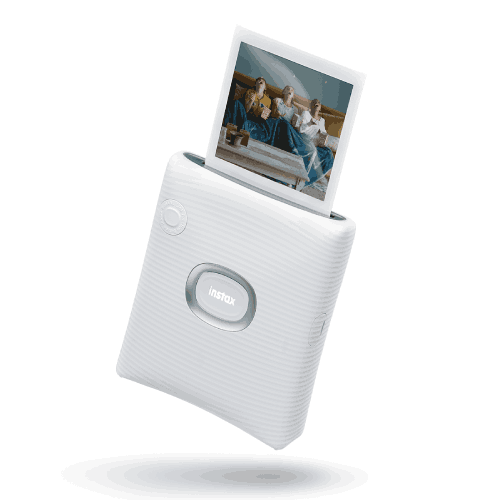
Within seconds, your instax SQUARE instant film print starts coming out. Over the next minute or two, the colours and details appear as the film develops. The square format offers more compositional room than instax mini—great for portraits, landscapes, food photography, and artistic shots.
In Bangladesh, where people love sharing food pics, travel views, and OOTD (outfit of the day) shots, that extra space makes a huge difference in how polished your print looks.
instax Connect™ – Share Across Borders
One big advantage of the instax SQUARE Link app is instax Connect™, which lets you share your instax-style photos with friends digitally—even if they’re not nearby.
You can:
- Design an image in the app with text and effects.
- Send it through the app to friends using messaging or social platforms.
- They receive a digital instax-style picture that they can view or even print if they have a compatible printer.
This is helpful for staying connected with friends and relatives abroad, or between different cities in Bangladesh. Maybe you’re in Dhaka and a friend is in Sylhet—you can still share an “instax moment” instantly, while physical prints can be kept in your own space.
Design & Build – Minimal, Modern, SQUARE
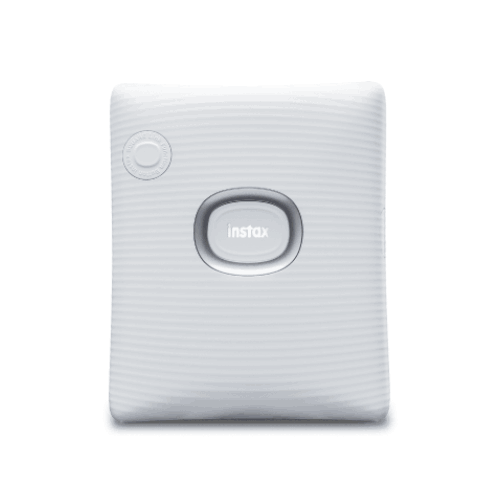
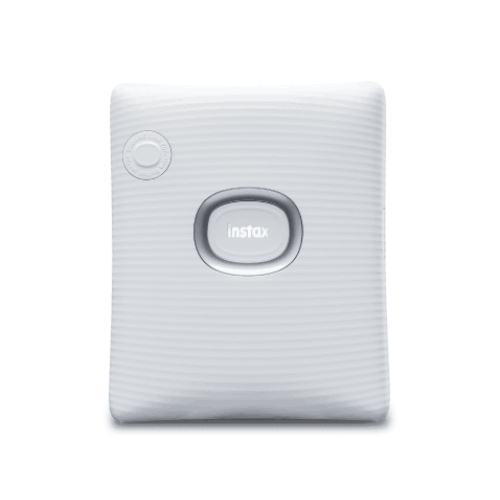
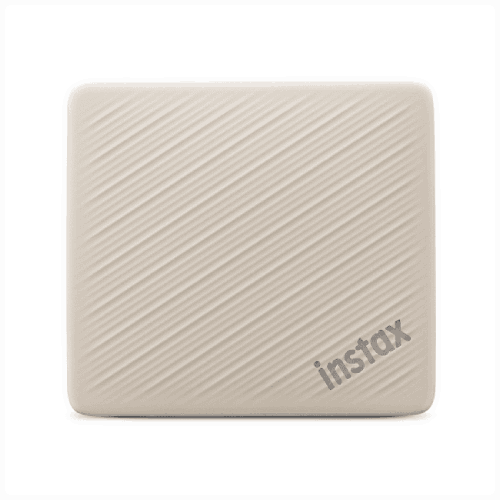
The instax SQUARE Link Smartphone Printer is designed with a clean, modern aesthetic. In global listings it appears for example in Ash White, a soft and stylish shade that fits into almost any interior—whether it’s a minimalist desk in Gulshan or a cosy bedroom in Mirpur.
The body is lightweight and compact, easy to slip into a bag and carry to parties, offices, or outdoor events. Textured surfaces and curved edges make it comfortable to hold and reduce the chance of accidental slips.
While the local Bangladeshi market may focus primarily on Ash White, Fujifilm’s square-line design language tends to lean into understated, contemporary looks—ideal for users who want a device that complements their décor, not clashes with it.
Performance & Everyday Usability
From a performance standpoint, the instax SQUARE Link is designed for:
- Fast wireless printing from smartphones via Bluetooth.
- Simple operation through a dedicated smartphone app.
- Reliable output on instax SQUARE film, which is known for its rich colours and classic film aesthetic.
Because it’s battery-powered (rechargeable via USB, as per instax family conventions), you can use it on the move. Charge it at home or at the office in Bangladesh, then take it to the venue, café, or client site. You don’t need to sit near a wall socket while printing, which is extremely useful during events and in places where power outlets are limited.
Real-Life Usage Scenarios in Bangladesh
1. Weddings & Engagements
Use the SQUARE Link as a live activation at:
- Mehendi nights
- Reception photo corners
- Engagement parties
Guests take pictures, you print them in SQUARE format, and they can scan the QR code to see extra AR moments—like short notes from the couple, mini slideshows, or fun doodles. You can also create a physical guestbook where guests stick their print and write around it.
2. Cafés, Boutiques & Salons
Business owners in Dhanmondi, Banani, Gulshan, and other busy areas can:
- Print customer photos with dishes, drinks, or new looks.
- Use AR text or doodles to add promo codes or thank-you messages.
- Create a branded wall of customers and staff with AR surprises.
Square prints are perfect for Instagram-style layouts, making them a natural fit for trendy locations.
3. Universities & Campus Life
Students at DU, NSU, AIUB, IUT, BRAC, RUET, CUET and others can:
- Make SQUARE collages of batchmates and club members.
- Create interactive prints of department events with AR text about time and place.
- Use prints to decorate hostel rooms, class notice boards, and project displays.
4. Creative Studios & Content Creators
For photographers, vloggers, and digital artists across Bangladesh:
- Turn digital works into instant square prints for mood boards, client previews, or limited souvenirs.
- Add AR doodles and text as a signature or behind-the-scenes layer for fans who scan the prints.
5. Family, Kids & Home Memories
Parents can:
- Print family portraits, Eid photos, school events, or birthdays.
- Hide small AR messages or doodles for kids to discover later by scanning.
- Use the square format for more detailed group shots and scenic backgrounds.
6. Corporate & Branding
Companies can:
- Use the printer at product launches, trade fairs, or internal events.
- Add AR-based product info or campaign messages on prints.
- Hand out branded, interactive keepsakes that feel more memorable than standard flyers.
Compatibility & Ecosystem
The Fujifilm instax SQUARE Link belongs to the instax SQUARE ecosystem and is designed to work with:
- instax SQUARE instant film
- Smartphones (Android/iOS) via the instax SQUARE Link app
This means:
- Your prints follow a consistent, stylish square format.
- You can use existing instax SQUARE albums, frames, and accessories.
- You’re supported by Fujifilm’s long-term experience and colour science in instant film.
As long as your smartphone supports the app and Bluetooth, you can join the SQUARE Link world.
Maintenance & Care
Taking care of the SQUARE Link is straightforward:
- Protect from dust and moisture: Store it in a pouch, drawer, or clean shelf when not in use.
- Handle film correctly: Don’t open film packs in bright sun; follow the arrows and instructions when loading film.
- Keep within recommended temperature: Avoid very hot car interiors or extremely humid environments.
- Charge with quality chargers: Use a reputable USB power source to avoid damage to the internal battery.
- Be gentle with prints: Let them develop naturally; avoid scratching or bending fresh prints.
With basic care, you can expect consistent output and reliable performance for a long time.
✅ Key Features
- Square Format Printing: Outputs stylish square photos on instax SQUARE instant film for a modern, gallery-like look.
- AR Print with QR Codes: Attach AR content to your prints so friends can scan a QR code and see special effects, text, photos, or doodles come alive.
- Multiple AR Modes: Add Special FX, Text, Photos, Background, or Doodles to create uniquely interactive prints.
- Simple Bluetooth Printing: Print photos easily from your smartphone via the dedicated instax SQUARE Link app and a stable Bluetooth connection.
- instax Connect™ Sharing: Send instax-style images digitally to friends anywhere, keeping you connected across cities and countries.
- Creative Frame Print: Add decorative graphic frames and text for events, branding, or personal style.
- Dedicated Smartphone App: Intuitive app interface for editing, AR features, and print management, tailored to the SQUARE Link printer.
- Compact, Minimal Design: Sleek, portable body (including Ash White variant) that fits well into home, office, and café settings.
- Battery-Powered Portability: Rechargeable internal battery lets you print on the go without depending on a constant power socket.
- High-Quality Fujifilm Colour: Uses Fujifilm’s instant film technology for vibrant, pleasing colours and classic film-like tones.
✅ Usage / Applications
- Wedding photography and guestbooks with interactive AR messages from the couple.
- Birthday parties and family events to create fun, scannable keepsakes for guests.
- Cafés and boutique shops to build branded photo walls and personalised customer souvenirs.
- University festivals and club events for creative promotions and memory boards.
- Travel journals and scrapbooks featuring larger square prints with location notes in AR text.
- Corporate branding and product launches using interactive prints as premium giveaways.
- Art projects and portfolios where physical prints carry hidden AR stories or process videos.
- Kids’ activities to encourage drawing and interactive storytelling with doodle-enabled AR prints.
✅ Benefits of This Product?
- Transforms ordinary photos into interactive experiences, combining physical prints with AR effects and QR codes.
- Gives you more creative canvas through the square format, ideal for portraits, food, landscapes, and art shots.
- Brings people together, as scanning and discovering hidden AR content becomes a shared activity.
- Adds value for events and businesses, making prints more memorable than standard photos or flyers.
- Supports storytelling and education, letting you add notes, background info, or layered images that appear on scan.
- Fits modern smartphone-centric lifestyles, integrating seamlessly with how people in Bangladesh already capture and share pictures.
✅ Ideal For
The Fujifilm instax SQUARE Link Smartphone Printer is ideal for anyone in Bangladesh who wants to push instant photography beyond simple prints. Event organisers and wedding photographers will love its ability to add QR-linked AR content to each print, turning guestbooks, thank-you cards, and table décor into interactive experiences. Cafés, boutique shops, salons, and small brands can use it to create a unique customer journey—snap, print, scan, and discover hidden offers or messages.
It’s equally perfect for students, creatives, and social media enthusiasts who want physical copies of their favourite square-format shots without losing the playful digital aspects they enjoy online. Families and parents can create richer memory archives for children, with AR notes and doodles that will be fun to rediscover years later. In short, if you value creativity, storytelling, and the mix of online and offline experiences, the instax SQUARE Link is an excellent fit.
✅ Why Choose the Fujifilm instax SQUARE Link Smartphone Printer?
The instax SQUARE Link stands apart from typical smartphone printers by giving you an extra digital dimension. Most instant printers stop at producing a physical photo; SQUARE Link goes further with AR Print and instax Connect™, letting your images carry hidden layers of animation, messages, and additional photos accessible via QR codes. This turns every print into a small interactive story rather than just a static image.
With its square format, the SQUARE Link is especially suited to people who love aesthetically pleasing compositions—similar to social media grids but now in your hand. The printer is compact, easy to carry, and powered by a rechargeable battery, making it great for use across Bangladesh at home, in cafés, at weddings, or during corporate events. The dedicated app is designed to be user-friendly, so even beginners can start printing quickly while advanced users dive into AR and design features.
Because it’s backed by Fujifilm’s instax system, you benefit from proven instant film quality and a well-established ecosystem of films and accessories. Over time, as AR and digital storytelling continue to grow, the SQUARE Link’s ability to blend physical and digital experiences will only become more relevant, making this printer a future-forward choice.
✅ Why Buy This Product from BME?
Purchasing the Fujifilm instax SQUARE Link Smartphone Printer from Business Machine & Equipment (BME) means buying from a local technology specialist with strong experience in imaging, office, and business equipment for the Bangladesh market. BME focuses on providing genuine, brand-new products, helping you avoid the uncertainty of unofficial or used imports.
For individual buyers, BME offers product guidance, helping you understand the features and real-world applications of the SQUARE Link before you make a decision. If you’re a corporate customer, event company, creative agency, or café owner, BME can support you with formal quotations, documentation, and procurement-friendly communication, making bulk or project-based purchasing smoother.
Delivery is arranged through reliable logistics partners to reach customers in Dhaka and across Bangladesh. While specifics will vary based on location, BME aims to make the buying process straightforward, from enquiry to receiving the product. After purchase, you can also turn to BME for basic usage information and product-related questions, aligning the SQUARE Link with your planned use—whether that’s weddings, promotions, or personal creative projects.
✅ Buying Guide
To make the most of the Fujifilm instax SQUARE Link Smartphone Printer, consider the following before buying:
1. Decide Your Primary Use
- Events & weddings: Plan for high film usage and consider how AR features will fit your theme.
- Cafés & businesses: Think about branding, where the printer will be placed, and how customers will interact with prints.
- Personal & creative: Estimate how many prints you’ll make monthly so you can budget for film packs.
2. Check Smartphone Compatibility
- Ensure your Android or iOS phone supports the instax SQUARE Link app and has Bluetooth.
- Confirm you have enough storage for the app and plenty of photos.
3. Understand Film Requirements
- This printer uses instax SQUARE instant film (not mini).
- Square film offers a larger print area; choose based on how you want your photos to look.
- Store film in a cool, dry place and avoid overheating and humidity.
4. Plan AR Use Cases
- Decide whether you’ll use AR Print for hidden messages, extra photos, doodles, or background effects.
- Think about who will be scanning the QR code—friends, customers, wedding guests, or clients.
5. Consider Location & Portability
- At home or office, set aside a stable space where prints can develop without being disturbed.
- For outdoor or event use in Bangladesh, plan where you will safely keep film and how people will access prints.
6. Power & Connectivity
- Make sure you have a reliable USB charger and cable.
- For long events or travel, consider carrying a power bank to keep the printer charged.
7. Avoid Common Mistakes
- Do not confuse SQUARE film with instax mini film—they are not interchangeable.
- Don’t open film packs in bright direct sunlight.
- Don’t leave prints in very hot, humid conditions immediately after printing.
- Don’t forget to explain to guests how to scan the QR code to see AR content if you’re using that feature.
By thinking through these points before purchasing, you’ll be better prepared to integrate the instax SQUARE Link into your personal or professional life smoothly.
✅ Customers Ask About / Frequently Asked Questions
Q1: Does the Fujifilm instax SQUARE Link work in Bangladesh without any special setup?
Yes. It’s a globally designed printer that works in Bangladesh as long as you have a compatible smartphone, instax SQUARE film, and a standard USB charging source.
Q2: What type of film does it use?
The SQUARE Link uses Fujifilm instax SQUARE instant film, which is a square-format film different from instax mini.
Q3: Is it compatible with all smartphones?
It works with most modern Android and iOS smartphones that can install and run the instax SQUARE Link app and support Bluetooth. Check the app listing for specific OS version requirements.
Q4: How does the AR Print feature work?
When you enable AR Print in the app, it adds AR content and generates a QR code on the print. Anyone can scan that code with a smartphone to view the associated AR animation, text, photos, background, or doodles.
Q5: Do I need internet to use AR features?
You typically need internet access to download the app and possibly to share or view some AR content, but printing from phone to printer mainly relies on Bluetooth.
Q6: Does it require ink cartridges?
No. Like other instax products, it uses instant film, which contains the chemicals needed to develop the image. There’s no separate ink to replace.
Q7: Can I use it for professional events and commercial projects?
Yes. Many professionals use SQUARE Link-style printers for weddings, corporate events, activations, and branded experiences. Just ensure you plan your film stock and battery charging for each event.
Q8: How durable are the prints?
instax SQUARE prints are designed to be long-lasting, with a protective surface resistant to casual handling. For best longevity, keep them away from extreme heat, moisture, and direct sunlight for prolonged periods.
Q9: Is warranty available in Bangladesh?
Warranty terms depend on regional arrangements and the seller. Check with BME at the time of purchase for the latest information on available warranty and support options.
Q10: Can I print photos from WhatsApp or social media?
Yes. Save the desired image to your phone’s gallery, then open it in the instax SQUARE Link app and print.
✅ Why Buy This Product
The Fujifilm instax SQUARE Link Smartphone Printer is a perfect blend of analogue charm and digital innovation. It doesn’t just give you square instant photos; it gives those photos a hidden digital life through AR and QR technology. That means more storytelling, more creativity, and more reasons to pick up a print, scan it, and smile.
For users in Bangladesh—families, students, creatives, event organisers, and businesses—this printer offers a fresh, engaging way to make memories and connect with others. It’s compact, portable, and deeply integrated with your smartphone workflow, yet every output feels premium and tangible in your hands.
If you’re ready to move beyond standard prints and explore interactive instant photography, order the Fujifilm instax SQUARE Link Smartphone Printer from BME today and start creating square prints that truly go beyond the frame.
What is the price of Fujifilm instax SQUARE Link Smartphone Printer in Bangladesh?
Write a review
Question Answer
Have question about this product? Get specific details about this product from expert.

Fujifilm ASK300 Thermal Photo Printer


