Hanvon FaceGo FA600 Facial Recognition Access Control
Regular Price:৳0.00Availability: SKU: 5.48.280.9252
Quick Overview
-
Support
Saturday – Thursday: 09 AM - 06 PM. -
Payment
Cash on Delivery | Card | Online Payment -
Shipping Cost
Inside Dhaka 150tk | Outside Dhaka 200tk -
Warranty Policy
Read More
Description
Hanvon FaceGo FA600 Facial Recognition Access Control in Bangladesh
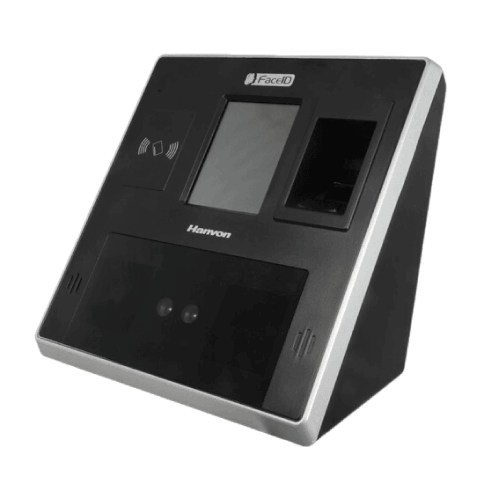
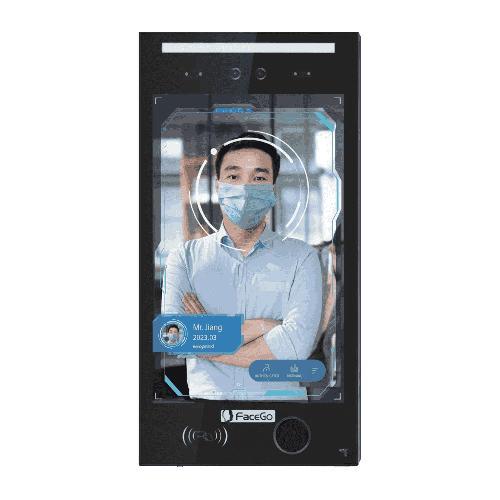
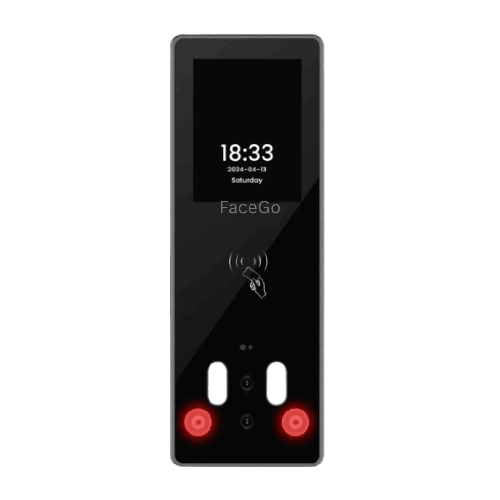
The Hanvon FaceGo FA600 Facial Recognition Access Control system is a compact yet powerful biometric device designed for Bangladeshi businesses that want reliable, secure, and contactless access control combined with time attendance. It brings Hanvon’s facial recognition expertise into an affordable, practical form factor suited for offices, factories, schools, and institutions across Bangladesh.
This device is not just a simple attendance machine. It’s a Biometric Attendance & Access Control terminal that can manage door locks, door sensors, and doorbells, while accurately recording who enters, when they arrive, and when they leave. With support for face, ID + face, card + face, card/face, card, and card + photo authentication modes, it offers a flexible and secure way to manage staff and visitors.
The Hanvon FaceGo FA600 supports up to 1,000 face users and 1,000 card users, with a generous log capacity of 100,000 records (and extended record capacity noted in the detailed overview). That capacity makes it ideal for small and medium-sized organizations, as well as individual branches or departments in larger enterprises.
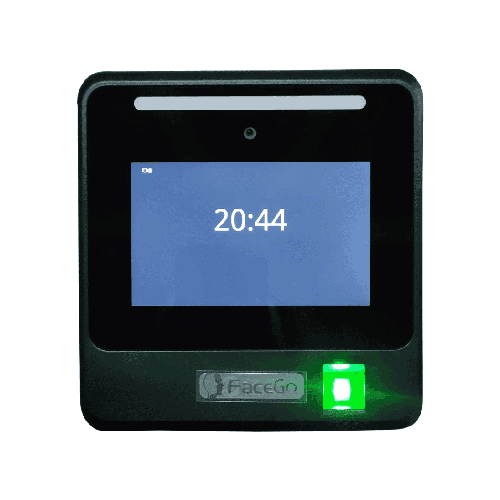
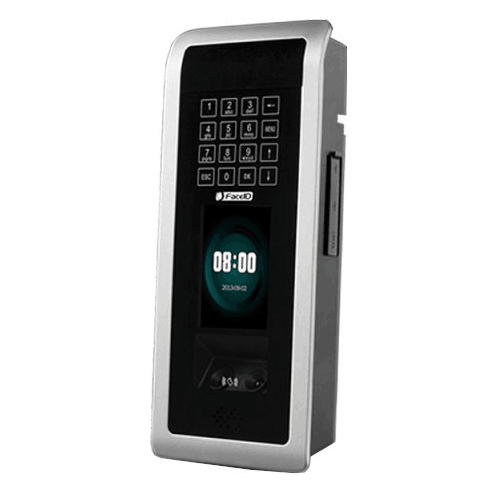
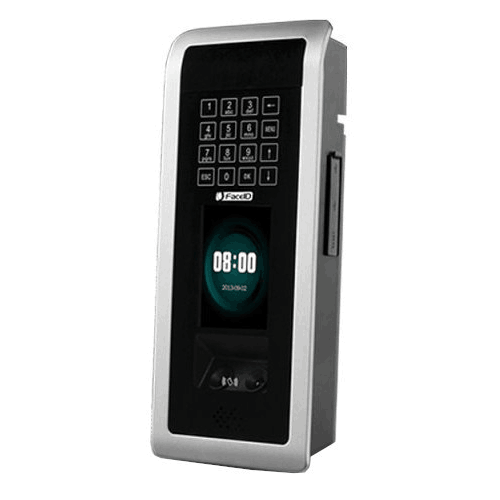
A 2.8 inch LCD TFT color screen, a 4 × 4 touch keypad, and a scan distance of 30–80 cm provide a straightforward, user-friendly experience. Staff simply stand in front of the device within the designated distance, and the system verifies their face—often in less than 1 second—and triggers the built-in door relay to release a 3rd-party EM lock if authorized.
For Bangladeshi organizations looking to step up from manual registers and card-only systems to a modern, biometric access solution, the FA600 hits a sweet spot between performance, security, and cost.
Advanced Facial Recognition for Everyday Security
The Hanvon FaceGo FA600 is built for facial recognition-based security, enhanced by dual sensor technology and support for multiple light conditions. It is specified with lighting up to 5000 LUX, which means it can handle typical indoor lighting in offices, factories, and corridors where light varies throughout the day.
This device uses face templates to recognize individuals, with typical verification speed less than 1 second under normal conditions. For busy entry points, this speed matters—long queues at the start of the workday or during shift changes can significantly affect productivity and employee satisfaction. The FA600’s rapid recognition helps minimize that bottleneck.
Security is reinforced through multiple authentication combinations:
- Face only – ideal for contactless, hygienic operation.
- ID + Face – user enters an ID and then verifies by face, improving security.
- Card + Face / Card / Card + Photo – combines RFID card with facial recognition or photo checks for dual-factor security.
This flexibility lets you choose the right balance between convenience and security for each group of users. For example, regular staff might use face-only, while sensitive areas could demand card + face.
Face, Card, and Multi-Mode Authentication
The overview for the FA600 makes it clear that this device is more than just a face reader. It also supports RFID cards (with optional Mifare card compatibility) and multiple verification modes.
Key capacities and features include:
- Face Capacity: 1,000 faces
- Card Capacity: 1,000 cards
- Record Capacity: 100,000 logs (with extended 150,000 record capacity and 150,000 security photo images as per overview)
Multiple verification modes allow practical scenarios like:
- Verification face – simple, fast face recognition.
- ID + face – employees type their ID first, adding a layer of confirmation.
- Card + face – card plus biometric for stronger security.
- Card / face – either card or face for flexible environments.
- Card + photo – card presented and photo logged or verified visually for auditing.
For organizations in Bangladesh that are transitioning from card-based systems, this multi-mode support is extremely helpful. They can maintain continuity with existing cards while rolling out face recognition gradually, ensuring a smooth changeover rather than a disruptive overnight switch.
Access Control Hardware Integration
The Hanvon FaceGo FA600 is built with access control at its core, not as an afterthought. It includes:
- Door sensor input – to detect door status (open/closed) and manage alarms or events.
- Built-in relay contact door lock – for direct control of a 3rd-party EM lock, making it a true access controller.
- Doorbell support – integrates into your entrance workflow, allowing visitors to ring and staff to manage access.
- Exit button input – supports a standard door exit button connection for easy exit from secured areas.
By connecting to a 12V DC power supply, the FA600 becomes the central brain at your door. When a user is authenticated, it activates the built-in relay, which controls the 3rd-party EM lock to release the door. The door sensor ensures the system knows if the door actually opened, which is important for security and compliance.
This is especially valuable in Bangladesh where many organizations want to integrate basic electronic access control with attendance, but don’t want the complexity of large, multi-component systems. The FA600 lets you manage both in a compact, single-device solution.
Connectivity and Data Handling
For data connectivity and integration, the Hanvon FaceGo FA600 supports:
- TCP/IP – for network communication over LAN; ideal for offices where the device needs to be integrated with a central server, attendance software, or monitoring system.
- USB – for manual data export, firmware updates, or configuration.
This combination works well for a range of Bangladeshi setups:
- Small offices without IT departments can simply export logs via USB and import them into Excel or HR tools.
- Larger organizations can connect via TCP/IP, centralize data from multiple FA600 devices (and other terminals), and feed attendance information directly into HR/payroll systems.
The 100,000 log capacity (and referenced 150,000 record and photo capacity) ensures that log storage is not an immediate concern. Even with high daily traffic, the device can store a long history of attendance records and related security images before any data management is required.
Display, Keypad, and User Interaction
The FA600 comes with a 2.8 inch LCD TFT color screen and a 4 × 4 touch keypad. While compact, this combination is highly practical:
- The color screen displays menus, user prompts, attendance status, and, if configured, attendance photos or user information.
- The touch keypad is used for entering ID numbers, managing menu navigation, setting parameters, and performing administrative tasks.
For employees, the process is simple:
- Stand in front of the device at a distance of 30–80 cm.
- The camera detects and recognizes their face.
- Depending on the mode, they may present a card or enter an ID.
- The screen confirms success, and the door unlocks if access is granted.
For administrators, the screen and keypad are used to enroll users, assign ID/card/face credentials, configure time zones, set scheduled bells, and manage work status/work codes.
Time Attendance Functions for HR Teams
Beyond access control, the FA600 is a proper time attendance terminal. It includes features designed for HR workflows:
- Attendance photo ID – logs a photo during attendance to strengthen audit trails.
- Scheduled bell – can trigger alarms or bells according to your schedule (e.g., shift start, break times).
- Work status – track different work states (in, out, break, overtime, etc.).
- Work code – categorize time by work codes, useful in multi-project or multi-department environments.
- Daylight saving – time adjustment support where required.
- Time zone – manage who can access at what time, important for shift and security policies.
HR departments in Bangladesh often struggle with unstructured in/out times and manual corrections. By implementing the Hanvon FaceGo FA600, they get clean, digital records that minimize human error and provide strong evidence during salary calculation or disputes.
Certification and Reliability
The FA600 carries CE / FCC / Class A ROHS certifications, signaling that it meets international standards for safety, electromagnetic compatibility, and environmental friendliness (restriction of hazardous substances). For organizations concerned about importing or deploying compliant technology—especially multinationals, NGOs, and institutions—this reassurance is important.
This level of certification also suggests a certain standard of build quality and reliability, suitable for long-term daily use in Bangladeshi conditions when installed properly.
Typical Use Cases in Bangladesh
The Hanvon FaceGo FA600 fits naturally into several common scenarios:
-
Corporate Offices in Dhaka & Chattogram
Install at main entry doors or floor-level gates to control staff access and capture attendance data. Departmental managers and HR teams use logs for monitoring and payroll. -
Garments Factories and Light Industries
Use at main factory gates or key internal doors to reduce proxy punching and control entry to sensitive production or warehouse areas. Time zones and work codes support shift-based operations. -
Schools, Colleges, and Training Institutes
Deploy at staff entry points to manage teacher and staff attendance. Scheduled bells can help automate class start/end notifications, while access control secures staff-only zones. -
Clinics, Diagnostic Centers, and Hospitals
Implement for staff entry into treatment areas, labs, or administrative offices. Contactless face recognition is more hygienic than fingerprint systems. -
Warehouses and Logistics Hubs
Control access to storage areas, ensure only authorized workers enter high-value zones, and maintain attendance logs for shift operations.
In each of these environments, the FA600 provides a blend of security, attendance tracking, and convenience with minimal disruption to daily routines.
Maintenance & Care Tips
To keep your Hanvon FaceGo FA600 working optimally in Bangladesh:
- Clean the camera area regularly with a soft, dry cloth to remove dust and smudges.
- Wipe the screen gently to keep prompts visible and professional in appearance.
- Mount securely at an ideal height (typically around face level) on a stable wall.
- Avoid direct sunlight and rain – install under a shade or inside a lobby to protect electronics and maintain stable recognition quality.
- Ensure stable power using a good-quality 12V DC supply; consider surge protection or UPS in areas with unstable electricity.
- Train employees briefly on where to stand (30–80 cm) and how to look at the device during verification.
- Back up data regularly via USB or software to prevent data loss and to keep historical records safe.
Following these practices, Bangladeshi businesses can enjoy consistent, long-term performance from the FA600.
✅ Key Features
- 1,000 Face Capacity: Supports up to 1,000 face users, ideal for small and medium-sized offices, factories, and institutions.
- 1,000 Card Capacity with RFID/Mifare Option: Manages 1,000 card users with optional Mifare support, enabling card-only or card + face verification.
- High Log & Photo Capacity: Stores around 100,000 logs (up to 150,000 record capacity and 150,000 security photo images as per overview), providing long-term data storage.
- 2.8 inch TFT Color Screen: Compact yet clear LCD screen for user prompts, status messages, and admin menu navigation.
- Multiple Verification Modes: Supports face, ID + face, card + face, card/face, card, and card + photo for flexible security policies.
- Built-in Relay for EM Lock Control: Integrated relay contact for direct control of 3rd-party EM locks, transforming it into a complete access control point.
- Door Sensor and Exit Button Support: Inputs for door sensor and exit button enhance security and user convenience.
- Fast Verification (<1 Second): Quick identification reduces queues and speeds up entry during peak times.
- TCP/IP and USB Connectivity: Network and USB connections make it easy to integrate with software or export data manually.
- 4 × 4 Touch Keypad: On-device numeric and function keypad for user ID entry and administrative configuration.
- Scan Distance 30–80 cm: Comfortable operating range for users of different heights and body builds.
- Certified Quality: CE / FCC / Class A ROHS certifications reflect compliance with international safety and environmental standards.
✅ Usage / Applications
- Small and medium corporate offices for access control and attendance in entrances and key internal doors.
- Garments and light manufacturing units to secure factory gates and record staff in/out times.
- Schools, colleges, and training centers for staff attendance and controlled access to teachers’ rooms and offices.
- Clinics, diagnostic centers, and hospitals where non-contact identity verification is preferred.
- Showrooms and retail outlets to manage staff entry and shift timings.
- Warehouses and logistics facilities that require secure entry to storage zones and loading areas.
- Branch offices and regional facilities of banks, insurance companies, and service providers needing local access control.
✅ Benefits of This Product?
- Reduces Proxy Attendance and Time Theft: Face and card-based authentication minimize buddy punching and unauthorized entries.
- Improves Workplace Security: Integrated door lock control, door sensor, and doorbell support provide robust access management.
- Streamlines HR Processes: Digital, biometric logs simplify attendance tracking and payroll calculations.
- Supports Flexible Authentication Policies: Choose from face, card, or combined modes to match different risk levels and user groups.
- Enhances Hygiene and User Comfort: Face-based authentication limits physical contact, especially useful in hospitals and shared offices.
- Scales Well for Branch-Level Deployment: Ideal capacity and features for individual branches or departments across multiple locations.
- Delivers Strong Audit Trails: Security photo images and detailed logs support investigations, compliance, and dispute resolution.
✅ Ideal For
The Hanvon FaceGo FA600 Facial Recognition Access Control is ideal for Bangladeshi organizations that need a reliable, mid-capacity biometric system for both access control and attendance—without the complexity or price tag of large enterprise platforms.
It is particularly well-suited to small and medium-sized businesses, branch offices, and individual units within larger companies. A corporate branch in Dhaka, a garments unit in Gazipur or Narayanganj, a private school in Chattogram, or a clinic in Sylhet can all rely on the FA600 to manage daily staff movement and attendance.
Factories and warehouses that need basic but robust door control—EM locks, door sensors, exit buttons—benefit from the FA600’s built-in relay and access control features. Educational and medical institutions appreciate the multi-mode authentication: cards for long-time staff, face for contactless convenience, and ID + face for sensitive areas.
If you are an HR manager, admin officer, IT/security coordinator, or business owner in Bangladesh looking for a balanced mix of security, functionality, and cost-effectiveness, the FA600 is a very strong fit.
✅ Why Choose the Hanvon FaceGo FA600 Facial Recognition Access Control?
Choosing the Hanvon FaceGo FA600 means opting for a proven, versatile device that combines facial recognition, RFID cards, and genuine access control features in one compact unit. Many low-end devices in the market only log attendance; the FA600 goes further, directly controlling 3rd-party EM locks, handling door sensor input, and supporting exit buttons and doorbells.
With 1,000 face capacity and 1,000 card capacity, it is perfectly sized for the majority of Bangladesh’s small and medium organizations. You’re not over-paying for capacity you’ll never use, but you have plenty of headroom for growth.
The fast (<1 second) verification speed, 2.8 inch color TFT display, and 4 × 4 touch keypad deliver a professional user experience that’s intuitive and efficient. Staff quickly get used to standing 30–80 cm away, looking at the device, and walking through once their identity is confirmed.
The device is backed by CE, FCC, and ROHS certifications, providing assurance about its electrical and environmental standards—a major consideration for institutions, government bodies, and quality-conscious businesses.
In short, you choose the FA600 when you want:
- Stronger security than card-only systems
- More reliable attendance data than manual registers
- Real access control features without a complicated, multi-component architecture
It is a future-ready step into biometric access and attendance for organizations across Bangladesh.
✅ Why Buy This Product from BME?
Buying the Hanvon FaceGo FA600 from Business Machine & Equipment (BME) gives you a partner that understands both the technology and the local context in Bangladesh.
BME focuses on supplying genuine, spec-matched devices that are suitable for real-world offices, factories, schools, and clinics. When you discuss the FA600 with BME, you can explain your staff size, number of doors, preferred authentication modes, and they can help you verify that this model fits your scenario.
For corporate, industrial, and institutional buyers, BME can provide formal quotations and documentation that align with your internal procurement, audit, and compliance processes. This is especially important for tenders, framework agreements, and multi-branch rollouts.
Because BME works with biometric attendance and access control solutions regularly, they can also offer practical guidance on:
- Where to position the FA600 for best performance
- How to think about EM locks, door sensors, and exit button wiring (from a planning perspective)
- How to plan data export or integration with your existing HR tools or software
While specifics of delivery, configuration, and on-site services will depend on your location and agreement, BME’s overall approach is to help Bangladeshi clients deploy technology that truly fits their needs, not just sell hardware boxes.
Choosing BME for your Hanvon FaceGo FA600 means choosing a local, knowledgeable supplier you can talk to in the same time zone, with a practical understanding of how Bangladeshi workplaces operate.
✅ Buying Guide
To decide whether the Hanvon FaceGo FA600 is the right solution and to deploy it effectively, follow this step-by-step guide:
1. Clarify Your Objectives
- Do you want access control only, attendance only, or both at the same points?
- Identify which doors or gates should be controlled and which staff should be tracked.
2. Check Capacity Requirements
- Count the total number of staff and card users.
- The FA600 supports 1,000 faces and 1,000 cards; if this covers your current staff with some growth room, it’s a good match.
3. Map Out Doors and Zones
- Decide how many FA600 units you need (e.g., main entrance, internal secure doors, separate building).
- Plan where EM locks, door sensors, and exit buttons will be installed.
4. Assess Infrastructure
- Ensure 12V DC power is available near each intended installation point.
- Coordinate with your IT team for TCP/IP network access if you plan to integrate with a central server or software.
5. Select Authentication Modes
- For general staff: face-only, card-only, or card/face modes.
- For sensitive areas: ID + face or card + face for higher security.
- For visitors or temporary staff: card-only modes if you prefer not to enroll faces.
6. Plan Enrollment & Training
- Schedule enrollment sessions to capture face templates and register cards.
- Train administrators on using the 2.8" TFT screen and 4 × 4 keypad for user management.
- Brief staff on how to stand and look at the device for quick verification.
7. Design HR & Security Processes
- Decide how often you’ll export attendance data (daily, weekly, monthly).
- Set time zones, work codes, and scheduled bells according to your shift patterns.
- Define escalation rules for repeated late arrivals or unauthorized access attempts.
8. Common Mistakes to Avoid
- Underestimating the number of users leading to capacity issues later.
- Installing devices where lighting is too poor or where heavy glare from sunlight affects the camera.
- Ignoring power stability—sudden outages without protection can cause inconvenience.
- Deploying without proper communication to staff, creating confusion and misuse.
Following this buying guide ensures your Hanvon FaceGo FA600 deployment is smooth, effective, and aligned with your organizational policies.
✅ Customers Ask About / Frequently Asked Questions
Q1: How many users can the Hanvon FaceGo FA600 handle?
The FA600 supports 1,000 face users and 1,000 card users, suitable for small to medium organizations or branch-level deployments.
Q2: What authentication methods are available?
It supports face, ID + face, card + face, card/face, card, and card + photo modes, giving you flexibility to set different security levels.
Q3: Can the FA600 control a door lock?
Yes. It has a built-in relay contact for controlling a 3rd-party EM lock, and supports door sensor and exit button inputs.
Q4: What is the display size on the FA600?
It features a 2.8 inch LCD TFT color screen for status messages, menu navigation, and user prompts.
Q5: How fast is the facial recognition?
Verification speed is typically less than 1 second under normal conditions.
Q6: How far should users stand from the device?
The recommended scan distance is 30–80 cm, which is comfortable for most users.
Q7: How is data transferred from the device?
The FA600 supports TCP/IP for network-based transfer and USB for manual export and configuration.
Q8: Is it suitable for Bangladesh office and factory environments?
Yes. Its capacity, access control features, and certifications make it well-suited for offices, factories, schools, and clinics in Bangladesh.
Q9: Does it support scheduled bells and shift functions?
Yes. It includes scheduled bell, work status, work code, daylight saving, and time zone features to support various shift patterns.
Q10: What certifications does the FA600 have?
It is CE / FCC / Class A ROHS certified, indicating compliance with international safety and environmental standards.
Q11: Can it be integrated with our HR or attendance software?
In most cases, yes, if your software supports data from biometric devices. Integration details depend on your specific software and should be discussed with your IT team or solution provider.
Q12: What about warranty and after-sales in Bangladesh?
Warranty and support depend on the seller. When buying from BME, you can clarify available support and service options at the time of purchase.
✅ Why Buy This Product
The Hanvon FaceGo FA600 Facial Recognition Access Control system is a smart choice for organizations across Bangladesh that need secure access control and accurate attendance in a single, compact device. It offers a strong combination of features: 1,000 face capacity, 1,000 card capacity, fast recognition, built-in EM lock control, door sensor support, scheduled bells, and comprehensive attendance functions.
By shifting from manual or card-only systems to biometric facial recognition, you gain better control over who enters your premises, stronger protection against proxy attendance, and cleaner digital data for HR and management. The device’s TCP/IP and USB connectivity, together with large log capacity and certified quality, make it suitable for long-term, professional use.
If you want to modernize your workplace security and attendance without overcomplicating the solution, the FA600 is an excellent fit. Order the Hanvon FaceGo FA600 Facial Recognition Access Control from BME today and take a confident step towards secure, contactless, and efficient staff management.
What is the price of Hanvon FaceGo FA600 Facial Recognition Access Control in Bangladesh?
Write a review
Question Answer
Have question about this product? Get specific details about this product from expert.

Takstar E126 Wired Portable Amplifier