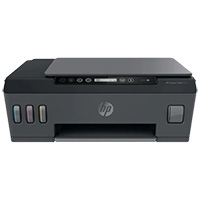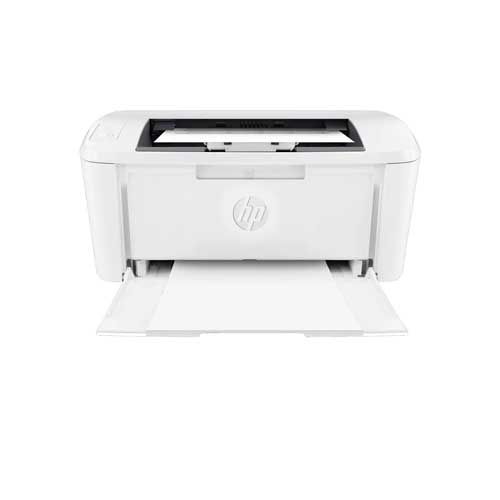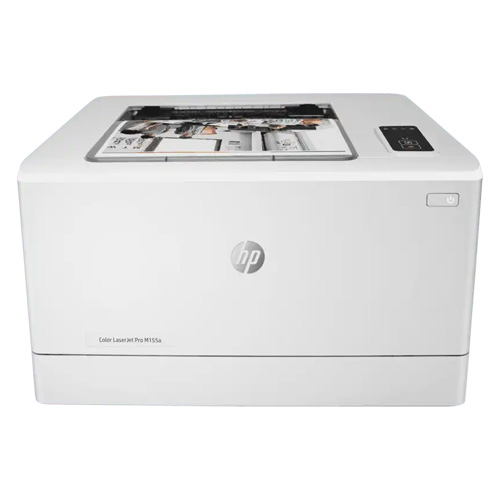
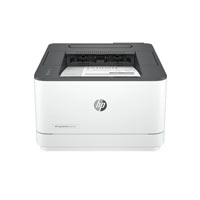
HP Color LaserJet Pro M155a Laser Printer
Cash Price: ৳36,950.00 Regular Price:৳39,500.00Availability: In Stock SKU: 1.3.5.933
Quick Overview
-
Support
Saturday – Thursday: 09 AM - 06 PM. -
Payment
Cash on Delivery | Card | Online Payment -
Shipping Cost
Inside Dhaka 250tk | Outside Dhaka 350tk -
Warranty Policy
Read More
Specification
General Information
| Brand | HP |
| Model | Colour LaserJet Pro M155a |
| Power | 110-volt input voltage: 110 to 127 VAC (+/- 10%), 50 Hz (+/- 3 Hz) , 60 Hz (+/- 3 Hz); 220-volt input voltage: 220 to 240 VAC (+/- 10%), 50 Hz (+/- 3 Hz), 60 Hz (+/- 3 Hz) (Not dual voltage, product varies by part number with # Option code identifier) |
| Power Consumption | 336 watts (active printing), 6.0 (ready), 0.5 watt (sleep), 0.05 (Manual-Off), 0.05 (Auto-off/Manual-on), 0.3 (Auto-Off/Wake on USB) |
| Dimensions | Maximum dimensions: 392 x 435 x 244.2 mm Dimensions without stand: 392 x 379.6 x 244.2 mm |
| Weight | 13.3 kg |
| Color | White |
| Print Technology | Print speed black (normal, letter): Up to 17 ppm Print speed black (normal, A4): Up to 16 ppm Print speed colour (normal, A4): Up to 16 ppm Print speed: up to 17 ppm (black) and 17 ppm (color) Print speed color (normal, letter): Up to 17 ppm Print speed b |
| Print Resolution | Up to 600 x 600 dpi |
| Warm-Up Time | As fast as 28 sec |
| First Print Out Time | First page out black (letter, ready): As fast as 11.7 sec First page out black (A4, ready): As fast as 11.9 sec First page out color (A4, ready): As fast as 13.6 sec First page out color (letter, ready): As fast as 13.5 sec First page out black (letter, s |
Paper Handling
| Input Capacity | Up to 150 sheets |
| Output Capacity | Up to 100 sheets |
| Paper Size | Letter; Legal; Executive; Oficio; 4 x 6; 5 x 8; A4; A5; A6; B5 (JIS); B6 (JIS); 10x15cm; Oficio; 16K; 16K; 16K; Postcard (JIS); Double Postcard (JIS); Envelope #10; Envelope Monarch; Envelope B5; Envelope C5; Envelope DL; A5-R |
| Monthly Print Volume | 150 to 1500 pages |
| Duty-Cycle | Up to 30,000 pages |
Connectivity
| USB | Hi-Speed USB 2.0 port |
Refill Supplies
| Toner | HP 215A Black Laser Toner W2310A, HP 215A Cyan Laser toner W2311A, HP 215 Yellow Laser Toner W2312A, HP 215A Magenta Laser Toner W2312A |
Warranty
| Warranty | 1 Year |
Description
Buy HP Colour LaserJet Pro M155a Color Printer Price in Bangladesh.
The HP LaserJet Pro M155a is a compact colour laser printer designed for businesses, offices, workgroups and professional users who need reliable, high-quality colour document printing without occupying significant workspace. Its laser printing technology delivers sharp text, clean graphics and professional-looking colour documents, making it suitable for everyday business printing as well as customer-facing materials.
Designed around the needs of small offices and professional work environments, the HP M155a combines a relatively compact footprint with the consistency expected from an HP LaserJet printer. It is suitable for users who primarily need printing functionality rather than scanning, copying or faxing.
For businesses in Bangladesh looking for an HP colour laser printer for invoices, reports, proposals, presentations, forms, letters, marketing documents and other office materials, the HP LaserJet Pro M155a offers a practical desktop printing solution.
The HP LaserJet Pro M155a Colour Laser Printer is engineered for professional users who require dependable colour printing in a compact desktop format. Unlike multifunction printers, the M155a focuses specifically on printing, making it a suitable choice for offices where scanning and copying functions are not required or are already available through separate equipment.
Its colour laser printing system is designed to produce professional-looking documents with crisp black text and clear colour graphics. This makes the printer useful for everyday office documents where presentation quality matters, including business proposals, reports, presentations, correspondence, forms, product information sheets and internal documentation.
The compact design makes the HP LaserJet Pro M155a suitable for desks, counters, individual workstations and smaller office environments where available space is limited. Its straightforward printer-focused configuration also makes it easy to integrate into regular office workflows.
The M155a supports standard paper handling suitable for typical office printing requirements and is designed to work with HP LaserJet toner supplies. For organizations that print regularly, using genuine or compatible supplies appropriate for the printer can help maintain consistent print quality and reliable operation.
For Bangladesh-based businesses, corporate offices, educational institutions, retail operations, professional firms and home-office users, the HP LaserJet Pro M155a can serve as a dedicated colour printing device where dependable document output and compact design are important considerations.
This Printer Model HP Color LaserJet Pro M155A Print speed Black Up to 16 ppm, Print resolution up to 600 x 600 dpi, Color Up to 16 ppm, Processor speed 800 MHz, and Print Memory 128 MB NAND Flash. This printer Control Panel Button, LED control panel. and monthly Duty Cycle Up to 30,000 pages. Printer Media Sizes Letter , Legal Executive,Oficio, 4 x 6, 5 x 8,A4, A5, A6, B5 (JIS), B6 (JIS),10x15cm, Oficio, 16K,16K, 16K, Postcard (JIS); Double Postcard (JIS), Envelope #10,Envelope Monarch,Envelope B5; Envelope C5, Envelope DL,A5-R.It is Media weight 60 to 163 g/m², Paper Input 150-sheet input tray, and Paper Output 100-sheet output bin, Easily share resources Ethernet networking access and print.
Navigate and configure the printer setting easily with the 5-line LCD display. Information can be displayed at a glance, facilitating easy device management and maintenance. Do away with unsightly cables as the imageCLASS LBP623Cdw can be shared wirelessly within your network. The printer also has built in Access Point capability, enabling easy connection to mobile devices without a router With Canon's latest mobile business solution, you can print documents, photos and web pages with just one app.
The HP LaserJet Pro M155a is a compact and efficient color laser printer designed for individuals or small businesses that need professional-quality color output in a budget-friendly package. While primarily focusing on simplicity and ease of use, it offers reliable performance, making it an excellent choice for low-to-medium-volume printing needs.
Key Features and Benefits:
✅ Compact and Space-Saving Design
The M155a is designed to fit easily into tight spaces, such as home offices or small workspaces:
- Dimensions: A compact footprint that doesn’t take up much desk space.
- Lightweight: Easy to move and set up, perfect for personal or shared use.
✅ Reliable Print Performance
While compact, the M155a delivers professional-quality output:
- Print Speed: Up to 19 pages per minute (ppm) for both black-and-white and color (A4 size).
- Resolution: Prints at 600 x 600 dpi, enhanced by HP ImageREt technology for sharper text and vibrant colors.
- First Page Out: As fast as 11.8 seconds (black) and 13.5 seconds (color).
✅ Affordable Color Printing
This model offers affordable access to high-quality color printing, making it ideal for creating business documents, marketing materials, or school projects.
✅. Paper Handling and Media Support
Despite its size, the M155a is versatile in its media handling:
- Input Tray: A 150-sheet input tray accommodates a variety of paper sizes and types.
- Output Tray: Holds up to 100 sheets.
- Supported Media: Handles media sizes ranging from 76 x 127 mm to 216 x 356 mm, making it suitable for standard A4, envelopes, labels, and more.
✅ Energy Efficiency
The M155a incorporates HP's eco-friendly features to minimize its environmental footprint:
- Auto-On/Auto-Off Technology: Saves energy by turning the printer on only when needed.
- Energy Star Certified: Meets strict energy efficiency guidelines.
✅ Toner and Consumables
This printer uses HP's JetIntelligence cartridges for improved efficiency:
- Standard Yield:
- Black: 1,100 pages.
- Cyan, Magenta, Yellow: 700 pages each.
- Replacement Toner Cartridges: Ensure consistent, high-quality output with anti-fraud protection.
✅ Simple Setup and Connectivity
The M155a emphasizes ease of use:
- USB Connectivity: Offers a straightforward, reliable connection to your PC or laptop.
- User-Friendly Operation: Intuitive control panel simplifies daily tasks.
Key Features & Technical Highlights
1. Colour Laser Printing
The printer uses colour laser technology to produce professional-looking documents with sharp text and clear colour elements.
2. Dedicated Printing Function
The M155a is designed specifically for printing, making it a good fit for organizations that do not require integrated scanning or copying.
3. Compact Form Factor
Its desktop-oriented design makes it easier to position in offices with limited desk or workspace availability.
4. Professional Output
Laser printing provides the crisp text and consistent graphical output expected for professional business documentation.
5. Business-Oriented Design
The printer is suitable for regular document production in offices, professional workplaces and small business environments.
6. USB Connectivity
A direct USB connection provides a simple way to connect the printer to a compatible workstation.
7. Colour Document Capability
The printer can produce colour documents where colour charts, graphics, logos and visual elements need to be reproduced professionally.
8. Black-and-White Document Printing
For everyday letters, forms, reports and text-heavy documents, the printer can also produce standard monochrome output.
9. HP Toner Support
The printer is designed around HP's toner-based printing ecosystem, helping users source appropriate consumables for ongoing operation.
10. Desktop Office Solution
The M155a is particularly suitable for individual departments, small workgroups and professional users who need their own dedicated colour printer.
Usage / Applications
The HP LaserJet Pro M155a can be used in a wide range of professional environments, including:
- Corporate offices
- Small and medium-sized businesses
- Home offices
- Accounting firms
- Law offices
- Consultancy firms
- Educational institutions
- Training centres
- Retail businesses
- Showrooms
- Real estate offices
- Healthcare administration offices
- NGOs and development organizations
- Government and semi-government offices
- Sales and marketing departments
- Reception and administration departments
- Professional service companies
Typical Printing Applications
- Business letters
- Office reports
- Colour presentations
- Proposals
- Invoices
- Forms
- Company profiles
- Product information sheets
- Internal documents
- Charts and graphs
- Marketing documents
- Customer-facing documents
- Administrative paperwork
Benefits of the HP LaserJet Pro M155a
Professional Colour Documents
Colour printing helps businesses produce documents that look more polished when colour logos, graphics, charts or highlights are required.
Space Efficient
The compact design makes it easier to install the printer in smaller offices and individual workstations.
Dedicated Printing
Users who already have a scanner or multifunction printer can use the M155a as a dedicated colour printing device.
Consistent Laser Output
Laser technology is well suited to producing crisp text and consistent business documents.
Suitable for Business Use
The printer is designed around the everyday requirements of professional document printing.
Easy Office Integration
USB connectivity allows straightforward connection to a compatible computer.
Recognized HP Ecosystem
HP's established printer and consumables ecosystem makes the product familiar to many business users.
Why Choose HP LaserJet Pro M155a?
The HP LaserJet Pro M155a is worth considering when you need a compact dedicated colour laser printer rather than an all-in-one device. It is particularly relevant for offices that already have separate scanning and copying facilities but need reliable colour printing at a workstation or departmental level.
Its combination of colour laser technology, compact design, HP branding and dedicated printing functionality makes it suitable for professional document production without adding unnecessary multifunction features.
Why Buy HP LaserJet Pro M155a from BME?
When purchasing an HP printer in Bangladesh, the product itself is only one part of the decision. Availability, product authenticity, pricing, warranty support and after-sales assistance are also important.
BME supplies ICT and office equipment to businesses, organizations and individual customers across Bangladesh.
BME Advantages
- Authentic Product Sourcing: BME focuses on supplying genuine ICT and office equipment.
- Bangladesh Market Support: Product and purchasing guidance tailored to local business requirements.
- B2B & B2C Sales: Suitable for individual buyers as well as corporate and institutional requirements.
- Technical Knowledge: BME has extensive experience in printers, copiers, scanners and office equipment.
- After-Sales Support: Assistance is available for product setup, troubleshooting and service requirements.
- Corporate Procurement: Suitable for companies, offices, institutions and project-based procurement.
- Nationwide Customer Support: BME serves customers beyond Dhaka through its established business operations.
- Professional Consultation: Customers can discuss their printing volume and application before purchasing.
Buying Guide: Is HP LaserJet Pro M155a Right for You?
Before purchasing the HP M155a, consider the following:
1. Do You Need Colour Printing?
If your documents include company logos, graphics, charts or colour presentations, a colour laser printer can be more suitable than a monochrome printer.
2. Do You Need Scanning or Copying?
The M155a is a single-function printer. If you need scanning and copying, consider an HP multifunction model instead.
3. What Is Your Monthly Printing Volume?
Estimate your average monthly pages before purchasing. Businesses with significantly higher workloads may benefit from a higher-capacity business printer.
4. Do You Need Wireless Printing?
Check your connectivity requirements before ordering. If Wi-Fi or network printing is essential, consider an HP model specifically equipped with the required connectivity.
5. Have You Considered Toner Cost?
Always consider the availability and cost of replacement toner when calculating the long-term cost of ownership.
6. Where Will the Printer Be Installed?
Measure your available desk or workstation space to ensure the printer can be comfortably installed and operated.
Customers Ask About HP LaserJet Pro M155a
Is the HP LaserJet Pro M155a a colour printer?
Yes. The HP LaserJet Pro M155a is a colour laser printer.
Is HP M155a a multifunction printer?
No. It is a single-function printer designed primarily for printing.
Can the HP M155a print black-and-white documents?
Yes. It can print standard monochrome documents as well as colour documents.
Is the HP M155a suitable for office use?
Yes. It is designed for professional document printing and can be used in small offices, workstations and business environments.
Does HP M155a support scanning?
No. The M155a does not have an integrated scanner because it is a single-function printer.
Does HP M155a support copying?
No. Copying is not included because the M155a is a printer-only model.
What type of toner does HP M155a use?
The printer uses dedicated HP toner cartridges designed for the M155a printer series. Buyers should verify the exact cartridge number according to the printer's regional configuration before purchasing replacement toner.
Can I buy HP LaserJet Pro M155a in Bangladesh?
Yes. The HP LaserJet Pro M155a can be sourced through HP printer suppliers and ICT equipment dealers in Bangladesh, subject to current stock availability.
Where can I buy HP LaserJet Pro M155a in Bangladesh?
You can contact BME Bangladesh for current price, stock availability, product configuration, warranty information and delivery options.
Is HP M155a suitable for a home office?
Yes. Its compact colour laser format can be useful for a home office or professional workstation where regular colour document printing is required.
Is HP M155a good for business documents?
It is designed for professional printing and is suitable for documents such as reports, proposals, correspondence, forms and colour business materials.
HP LaserJet Pro M155a for Bangladesh Businesses
For Bangladesh businesses searching for HP colour laser printer price in Bangladesh, the HP LaserJet Pro M155a provides a compact printer-only option for professional colour document production.
It can be considered by organizations that need a dedicated printer for a department, workstation or small office and do not need an integrated scanner or copier. Before purchase, businesses should match the printer's recommended workload, connectivity, paper requirements and toner cost with their actual printing environment.
For larger organizations or users with heavy monthly printing requirements, BME can also recommend alternative HP laser printers based on monthly page volume, colour requirements, paper size, connectivity and total printing cost.
What is the price of HP Color LaserJet Pro M155a Laser Printer in Bangladesh?
Write a review
Question Answer
Have question about this product? Get specific details about this product from expert.






HP Laser 107w Single Function Printer

HP LaserJet Pro MFP 4103fdw Printer (2Z629A)