HP USB-C G5 Essential Dock Station (5TW10AA)
Regular Price:৳26,500.00Availability: SKU: 9.105.5.5047
Quick Overview
-
Support
Saturday – Thursday: 09 AM - 06 PM. -
Payment
Cash on Delivery | Card | Online Payment -
Shipping Cost
Inside Dhaka 150tk | Outside Dhaka 300tk -
Warranty Policy
Read More
Description
Buy HP USB-C G5 Essential Dock Station Price in Bangladesh
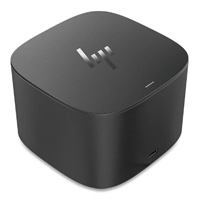
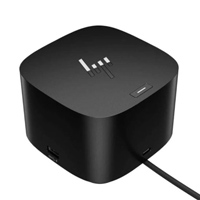
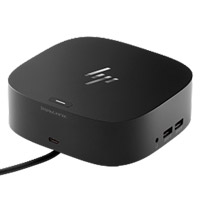
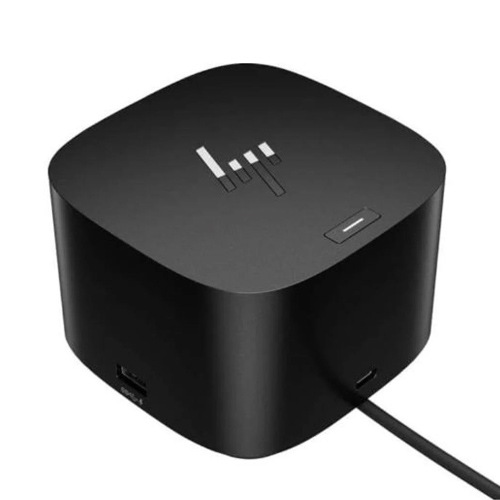
The HP USB-C Dock G5 (5TW10AA) is a compact universal docking station designed to turn a compatible laptop's single USB Type-C connection into a practical desktop workstation. It combines display connectivity, USB expansion, wired networking, audio and laptop charging through one docking solution.
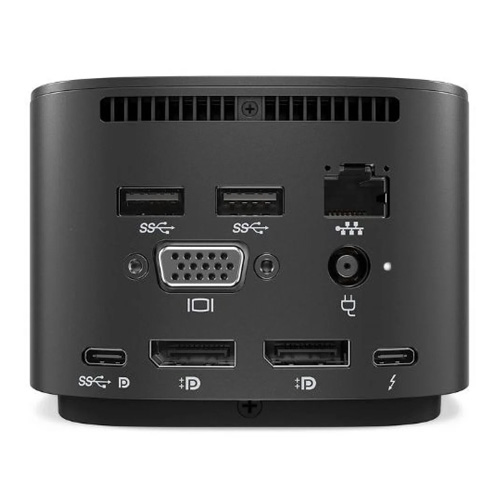
The dock provides two DisplayPort 1.4 ports, one HDMI 2.0 port, four USB-A 3.2 Gen 1 charging ports, one USB-C port, Gigabit RJ45 Ethernet and a combo audio jack. It can deliver up to 100W of power to the host system, depending on the connected computer and its supported USB-C Power Delivery capability.
For compatible systems, HP states that the dock can support multiple external displays, with capability depending on the host computer's DisplayPort version and Display Stream Compression support.
Its compact 122 × 122 × 45 mm design makes it suitable for office desks, home offices, meeting rooms and professional workstations. The unit weighs approximately 0.68–0.75 kg, depending on the specification source/region.
HP USB-C Dock G5 Technical Specifications:
| Specification | Details |
|---|---|
| Product Name | HP USB-C Dock G5 |
| Product Number | 5TW10AA |
| Product Type | USB-C Docking Station |
| Host Connection | USB-C |
| USB-C Requirement | USB Power Delivery + DisplayPort Alt Mode |
| Front USB-C | 1 × USB-C 3.2 Gen 1, data + power out up to 15W |
| USB-A Ports | 4 × USB-A 3.2 Gen 1 charging ports |
| DisplayPort | 2 × DisplayPort 1.4 |
| HDMI | 1 × HDMI 2.0 |
| Network | 1 × RJ45 Gigabit Ethernet |
| Audio | 1 × 3.5 mm combo audio jack |
| Power Delivery | Up to 100W to compatible host |
| External Displays | Up to 3 displays, depending on host capability |
| Operating Systems | Windows 10, Windows 11, macOS, Chrome OS |
| Security | Standard lock slot |
| Dock Dimensions | 122 × 122 × 45 mm |
| Weight | Approx. 0.68–0.75 kg |
| Colour | Black |
| Warranty | 1-year limited warranty |
| In the Box | Dock, AC adapter, AC power cord, documentation/quick-start materials |
HP specifies that the host computer must support USB-C Power Delivery and DisplayPort Alt Mode for the dock's full USB-C docking functionality.
✅ Key Features
-
Universal USB-C Docking: Connect compatible laptops through one USB-C connection and expand them into a full desktop-style workstation.
-
Up to 100W Power Delivery: Supplies up to 100W to compatible host systems, reducing the need for a separate laptop charger during normal docking use.
-
Dual DisplayPort 1.4: Two DisplayPort outputs provide flexible connection options for professional monitors and multi-display workstations.
-
HDMI 2.0 Connectivity: Connect an HDMI-equipped monitor, TV or compatible display without requiring a separate video adapter.
-
Multi-Monitor Support: Compatible host systems can drive multiple external displays, with the exact resolution and number of screens depending on the laptop's DisplayPort capability.
-
Four USB-A Expansion Ports: Four USB-A 3.2 Gen 1 charging ports make it easy to connect keyboards, mice, storage devices, printers and other USB peripherals.
-
Gigabit Ethernet: The integrated RJ45 network port provides wired Gigabit Ethernet connectivity for offices and environments where a stable wired network is preferred.
-
USB-C Accessory Port: The front USB-C port supports data and power output up to 15W, providing convenient access for compatible USB-C peripherals.
-
Audio Connectivity: The integrated combo audio jack provides convenient headset or audio connectivity from the docking station.
-
Compact Desktop Design: The 122 × 122 × 45 mm footprint helps keep cables and peripherals organized without occupying much desk space.
-
Broad Platform Compatibility: HP lists compatibility with HP laptops, MacBook computers and other compatible laptops using supported USB-C standards, along with Windows, macOS and Chrome OS support.
-
Integrated Security Slot: A standard lock slot allows the dock to be secured with a compatible security lock in suitable office environments.
Usage / Applications:
Office Workstations
Use the HP USB-C Dock G5 to connect a compatible laptop to monitors, keyboard, mouse, Ethernet and other office peripherals through a centralized docking setup.
Home Office
Create a more comfortable desktop workspace while keeping the laptop as the primary computer.
Dual or Multi-Monitor Work
Connect compatible external displays for spreadsheets, accounting software, programming, graphic work, research, trading dashboards and other productivity applications.
Corporate Offices
The docking station is suitable for organizations standardizing laptop-based workstations across departments.
Meeting Rooms
Connect compatible laptops to external displays or presentation screens while retaining access to USB peripherals and network connectivity.
Professional Workstations
Useful for engineers, designers, developers, analysts, managers and other users who need several peripherals connected to a laptop.
Hot-Desk Environments
A docking station can reduce the time required to connect and disconnect a laptop from a fixed workstation.
Benefits of the HP USB-C Dock G5:
One Connection for Your Workspace
Instead of connecting several accessories individually to a laptop, a compatible USB-C connection can provide access to displays, USB peripherals, network and charging.
Cleaner Desk Setup
The dock helps centralize cables and accessories around one compact device.
Better Productivity
Connecting external displays, keyboard, mouse, wired Ethernet and other peripherals can make a laptop function more like a desktop workstation.
Flexible Display Options
With two DisplayPort outputs and one HDMI 2.0 output, the dock offers multiple options for connecting external displays.
Wired Network Connectivity
Gigabit Ethernet is useful for offices where wired connectivity is preferred for stability and network performance.
Convenient Laptop Charging
Compatible host systems can receive up to 100W through USB-C Power Delivery.
Why Choose HP USB-C Dock G5?
The HP USB-C Dock G5 is a practical choice when you need more than a basic USB-C hub. It combines display outputs, USB expansion, Ethernet, audio and power delivery in one compact docking station.
The major advantage is its balance between connectivity and desk-space efficiency. Instead of carrying multiple adapters for HDMI, Ethernet and USB devices, a compatible laptop can connect to a central docking station.
For business users, the dock is particularly useful where laptops need to transition between mobile working and fixed office workstations.
Compatibility Guide:
Before purchasing, check whether your laptop's USB-C port supports the required technologies.
Your laptop should support:
USB-C Power Delivery
Required for laptop charging through the dock.
DisplayPort Alt Mode
Required for video output through USB-C.
HP specifically notes that USB-C functionality requires the host PC to support DisplayPort Alt Mode through its USB-C port.
Compatible Platforms
The HP USB-C Dock G5 is listed for compatibility with:
- HP laptops
- MacBook computers
- Compatible Windows laptops
- Compatible Chrome OS devices
- Other USB-C laptops meeting the required standards
However, USB-C ports are not all identical. A USB-C port that supports only data may not support video output or laptop charging.
Important Display Information:
The number and resolution of external monitors depend on the capabilities of the connected laptop.
HP's technical documentation indicates support for configurations including:
- Up to 3 × Full HD at 60Hz
- Up to 3 × QHD at 60Hz on supported configurations
- Up to 2 × 4K at 60Hz on certain DisplayPort 1.3/1.4 configurations
- Up to 3 × 4K at 60Hz on hosts supporting DisplayPort 1.4 with Display Stream Compression
Therefore, do not assume that every laptop will automatically support three 4K monitors. The laptop's USB-C implementation and DisplayPort capability must be checked first.
Why Buy HP USB-C Dock G5 from BME?
BME provides genuine ICT and office technology products for business, corporate and individual customers in Bangladesh.
When purchasing an HP USB-C Dock G5 from BME, customers can benefit from:
- Genuine product sourcing
- Product specification guidance
- Compatibility checking before purchase
- Professional sales support
- Suitable solutions for corporate and business users
- Reliable after-sales support
- Assistance for organizations purchasing multiple units
- Support for quotation and institutional requirements
For businesses, the most important step is not simply buying a docking station. The laptop's exact model and USB-C specifications should be checked before ordering, particularly when external monitors and USB-C charging are required.
Buying Guide:
Before buying the HP USB-C Dock G5 5TW10AA, check the following:
1. Check the Laptop USB-C Port
Confirm that the USB-C port supports DisplayPort Alt Mode and USB Power Delivery.
2. Check Laptop Charging Requirements
The dock provides up to 100W, but the actual charging capability depends on the laptop and its power requirements. HP notes that non-HP systems may receive up to 75W under specified conditions.
3. Check Monitor Requirements
Confirm whether your monitors use HDMI, DisplayPort or both.
4. Check Number of Monitors
If you need two or three external displays, check the laptop's DisplayPort version and graphics capability before purchasing.
5. Check Operating System
HP lists Windows 10, Windows 11, macOS and Chrome OS compatibility, subject to the host computer's supported USB-C functionality.
6. Check Your Accessories
Make sure the dock has the ports you need for printers, scanners, keyboards, mice, external storage, Ethernet and audio devices.
7. For Corporate Orders
For bulk purchases, provide BME with the exact laptop model numbers and monitor models so compatibility can be checked before quotation.
Customers Ask About / Frequently Asked Questions:
1. What is HP USB-C Dock G5?
The HP USB-C Dock G5 is a docking station that expands a compatible laptop's USB-C connection into multiple display, USB, Ethernet, audio and power connections.
2. What is the HP USB-C Dock G5 model number?
The main product number is 5TW10AA. HP also lists regional variants such as 5TW10UT and 5TW10ET.
3. Does HP USB-C Dock G5 support HDMI?
Yes. It has one HDMI 2.0 port.
4. Does HP USB-C Dock G5 have DisplayPort?
Yes. It provides two DisplayPort 1.4 outputs.
5. Can HP USB-C Dock G5 connect multiple monitors?
Yes, compatible host systems can support multiple external monitors. The actual number and maximum resolution depend on the laptop's DisplayPort capability.
6. Does HP USB-C Dock G5 charge a laptop?
Yes, compatible systems can receive up to 100W through USB-C Power Delivery.
7. Can I use HP USB-C Dock G5 with a MacBook?
HP lists MacBook computers among the compatible platforms, but functionality can vary according to the MacBook model and its USB-C/Thunderbolt implementation.
8. Does it work with non-HP laptops?
Yes, HP states that it is compatible with other laptops that meet the required USB-C standards. Some functions can vary on non-HP systems.
9. Does HP USB-C Dock G5 have LAN?
Yes. It has an RJ45 Gigabit Ethernet port supporting 10/100/1000 networking
10. How many USB ports does it have?
It has four USB-A 3.2 Gen 1 charging ports plus one front USB-C port.
11. Does the HP G5 Dock support Windows 11?
Yes. HP lists Windows 10 and Windows 11 among its supported operating systems.
12. Is HP USB-C Dock G5 suitable for office use?
Yes. Its combination of multiple displays, USB peripherals, Ethernet, audio and USB-C power delivery makes it well suited to business and professional workstations.
13. Can I use it with a USB-C port that does not support DisplayPort Alt Mode?
Not for full video-docking functionality. The host USB-C port needs to support DisplayPort Alt Mode for display output through the dock.
14. What comes with HP USB-C Dock G5?
The package includes the docking station, AC adapter, AC power cord and product documentation/quick-start and warranty materials.
15. What is the warranty of HP USB-C Dock G5?
HP lists a one-year limited warranty for the product.
What is the price of HP USB-C G5 Essential Dock Station (5TW10AA) in Bangladesh?
Write a review
Question Answer
Have question about this product? Get specific details about this product from expert.