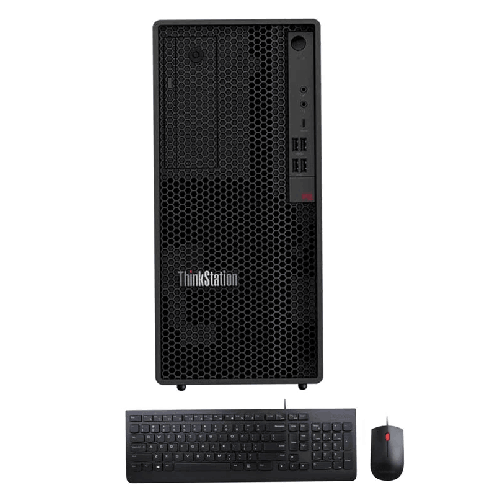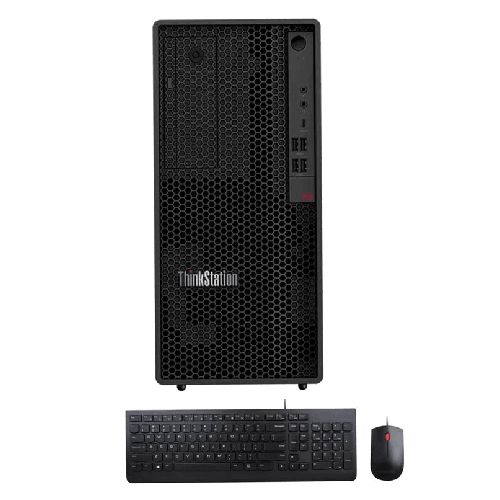
Lenovo ThinkStation P2 Tower Intel Core i7 14700 16GB DDR5 RAM 1TB SSD Black Workstation PC
Regular Price:৳0.00Availability: SKU: 2.101.6.9143
Quick Overview
-
Support
Saturday – Thursday: 09 AM - 06 PM. -
Payment
Cash on Delivery | Card | Online Payment -
Shipping Cost
Inside Dhaka 100tk | Outside Dhaka 150tk -
Warranty Policy
Read More
Description
Lenovo ThinkStation P2 Tower Intel Core i7 14700 16GB DDR5 RAM 1TB SSD Black Workstation PC Price in Bangladesh
The Lenovo ThinkStation P2 Tower Intel Core i7 14700 16GB DDR5 RAM 1TB SSD Black Workstation PC is a professional‑grade, 17‑litre tower workstation designed for engineers, architects, content creators, power office users, and IT departments in Bangladesh who need reliable performance, strong security, and long‑term stability. With a 14th Gen Intel Core i7 14700 processor, DDR5 memory, Intel W680 chipset, NVMe storage, and robust connectivity, this workstation is built to handle serious productivity workloads while remaining efficient and easy to manage.
At the heart of the Lenovo ThinkStation P2 is the 14th Generation Intel Core i7 14700 processor. This CPU offers 20 cores and 28 threads, backed by a massive 60MB cache. It can reach up to 5.40GHz Max Turbo Frequency, giving you a strong mix of multi‑threaded throughput for heavy workloads and high single‑thread performance for applications that rely on fast core speeds. For Bangladesh users working with office suites, browsers, ERP, accounting systems, development tools, engineering software, or light 3D and multimedia tasks, this CPU provides smooth multitasking and responsiveness.
The Intel W680 chipset places this workstation in Lenovo’s professional ThinkStation line, not a consumer‑grade desktop. The W680 chipset is designed for workstations and business‑critical deployment, offering enhanced reliability, better validation with professional software, and advanced manageability features. For companies in Dhaka, Chattogram, Sylhet, and other regions, that means the P2 Tower can be used comfortably as part of a larger IT environment, deployed across departments, and run 24/7 if needed.
Memory is handled by 16GB of DDR5 RAM running at 4400MHz, installed in one of four total RAM slots. The system supports up to 128GB of RAM, giving you significant scope for upgrades as your workloads grow. Out of the box, 16GB is suitable for advanced office use, web‑based systems, moderate Photoshop/Illustrator workloads, and engineering tools like AutoCAD or basic Revit usage. If your workloads evolve to include heavier 3D design, video editing, or large datasets, you can expand the RAM to 32GB, 64GB, or 128GB depending on your needs.
Storage is fast and secure. The Lenovo ThinkStation P2 Tower includes a 1TB NVMe PCIe SSD (M.2 2280 G4p TLC OPAL). NVMe PCIe storage is significantly faster than traditional SATA HDDs, especially for boot times, application launches, and loading large files. The OPAL self‑encrypting capability adds a layer of security for business data, which is important for corporates, banks, clinics, and agencies in Bangladesh handling sensitive information. There is no factory‑installed HDD, but the case offers expansion: 1 x 2.5‑inch bay and 2 x 3.5‑inch bays, so you can add additional hard drives or SSDs for archival, backup, or additional project storage as your requirements grow.
Graphics are provided by Intel UHD Graphics 770, integrated into the Core i7 14700 processor. This integrated GPU shares system memory and is suited for business productivity tasks, 2D design, basic 3D visualization, Full HD and 4K video playback, and general office graphics. It is not a dedicated professional GPU, so heavy 3D rendering, complex 3D modeling, or advanced video editing may require adding a discrete graphics card later. However, for many SMEs, corporate users, and education labs in Bangladesh, Intel UHD Graphics 770 is perfectly adequate to drive multiple displays and day‑to‑day workloads.
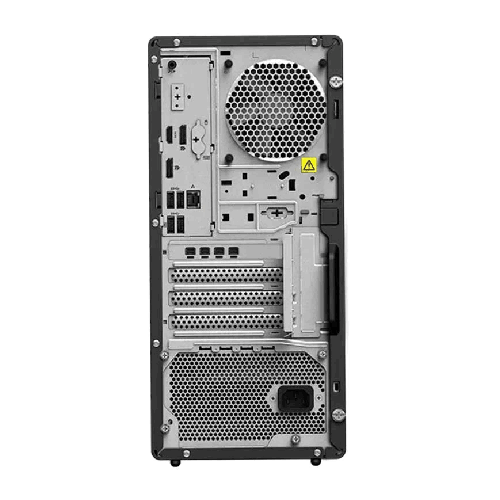
Display connectivity is modern and flexible, with 1 x HDMI 2.1 and 2 x DisplayPort 1.4 ports available. HDMI 2.1 and DP 1.4 support high‑resolution, high‑refresh displays, so you can connect dual or triple monitor setups for multitasking. For example, you might run a 27‑inch 1440p monitor as your main workspace, plus a secondary display for email, communication apps, or technical references. In a busy office environment in Dhaka or Chattogram, this greatly improves productivity.
USB connectivity is generous and well thought out:
- Front: 2 x USB 3.2 Gen 1 Type‑A, 2 x USB 3.2 Gen 2 Type‑A, 1 x USB 3.2 Gen 2 Type‑C
- Rear: 4 x USB 3.2 Gen 1 Type‑A
These ports provide plenty of options for connecting external drives, printers, scanners, webcams, audio devices, dongles, and other peripherals commonly used in business setups across Bangladesh. The front USB‑C port is especially useful for modern external SSDs and devices.
Networking and wireless connectivity are also strong. The Lenovo ThinkStation P2 Tower includes:
- LAN: Gigabit Ethernet (Intel Ethernet Connection I219‑LM, 1 x RJ‑45, Wake‑on‑LAN support)
- Wi‑Fi: Intel Wi‑Fi 6E AX211, 802.11ax 2x2, Intel vPro technology support
- Bluetooth: Bluetooth 5.3 wireless card
This means you can connect the workstation via wired LAN for maximum stability in office networks, and also use Wi‑Fi 6E when cabling isn’t convenient. Wake‑on‑LAN support is helpful for remote management and off‑hour maintenance tasks by IT departments. Bluetooth 5.3 allows convenient connection to wireless keyboards, mice, headsets, and other Bluetooth devices.
The system includes a DVD RW optical drive—still important for many offices in Bangladesh where CD/DVD media is used for legacy software, client deliverables, or secure offline storage. While many modern systems omit optical drives, having one built in can save you the cost and hassle of external drives.
Audio is powered by a High Definition (HD) Audio Realtek ALC897Q‑CG codec, with a single 2W speaker integrated. For most office usage—system sounds, video conferencing, tutorials—this is sufficient. Audio ports include:
- Front: 1 x combo headphone/microphone, 1 x microphone
- Rear: 1 x audio out
This supports headsets, standalone microphones, and external speakers easily.
Security is a core focus for the Lenovo ThinkStation P2 Tower. It features:
- Discrete TPM 2.0, TCG certified, FIPS 140‑2 certified
- Kensington Security Slot
TPM 2.0 supports modern secure boot, drive encryption, and corporate security standards, which is crucial for organizations in finance, healthcare, government, and corporate sectors. FIPS 140‑2 certification is a strong sign of compliance with strict security environments. The Kensington slot allows physical locking of the workstation to desks or stands in shared environments, reducing theft risk.
Power is delivered by a 500W fixed, 92% autosensing power supply, 80 PLUS Platinum qualified. 80 PLUS Platinum indicates high efficiency, which matters in Bangladesh where power costs are rising and energy efficiency is increasingly important. A 500W PSU is ample for the current configuration (i7 CPU, integrated graphics, SSD) and leaves room for moderate future upgrades like additional drives or a mid‑range discrete GPU.
The workstation uses a 17L tower form factor with dimensions of 170 x 315.35 x 376 mm and a weight of 9.67kg. The black chassis is compact enough for modern office desks, under‑desk placement, or lab environments. Expansion slots (4 in total) provide room for additional PCIe cards such as dedicated GPUs, specialized I/O cards, or capture cards, making the P2 adaptable to evolving needs.
This particular configuration ships with Free‑DOS, meaning no preinstalled Windows. This gives Bangladeshi businesses flexibility: you can install your preferred operating system—Windows 11 Pro, Linux distributions, or dual‑boot setups—based on your environment, licensing, and software stack.
Lenovo includes a USB keyboard and USB mouse, so you can get started immediately without needing additional input devices.
In everyday Bangladesh usage, the Lenovo ThinkStation P2 Tower Intel Core i7 14700 16GB DDR5 1TB SSD PC can serve as:
- A main workstation for office professionals managing spreadsheets, ERP, accounting, CRM, and web‑based applications.
- A reliable system for architects and engineers using AutoCAD, 2D drafting, and light 3D modeling.
- A development machine for programmers working with IDEs, compilers, local servers, and containerized workloads.
- A content workstation for graphics designers (Photoshop, Illustrator) and light video editing, especially if a discrete GPU is added later.
- A secure desktop for managers and executives who need strong performance and enterprise‑grade security.
For IT managers in Bangladesh, the Lenovo ThinkStation P2 Tower integrates well into managed environments thanks to Intel vPro support, enterprise‑oriented chipset, TPM 2.0, and robust BIOS/firmware controls. It’s a workstation that can be deployed fleet‑wide, not just as a one‑off high‑end desktop.
✅ Key Features
- 14th Gen Intel Core i7 14700 CPU: 20 cores, 28 threads, up to 5.40GHz turbo, and 60MB cache for strong multitasking and fast response in professional workloads.
- Intel W680 Workstation Chipset: Enterprise‑grade platform engineered for stability, manageability, and compatibility with professional software.
- 16GB DDR5 4400MHz RAM (Up to 128GB): High‑speed DDR5 memory with four RAM slots, providing ample upgrade potential as workloads grow.
- 1TB NVMe PCIe OPAL SSD: Fast M.2 2280 NVMe SSD with self‑encryption for quick boot, rapid file access, and efficient data security.
- Integrated Intel UHD Graphics 770: Capable integrated graphics for multi‑monitor office setups, 2D design, and general productivity tasks.
- Rich Connectivity & Expansion: Multiple USB 3.2 ports (Type‑A & Type‑C), HDMI 2.1, 2 x DisplayPort 1.4, 4 expansion slots, 2.5‑inch and 3.5‑inch bays.
- Enterprise‑Class Networking: Intel Gigabit Ethernet with Wake‑on‑LAN, Intel Wi‑Fi 6E AX211, Bluetooth 5.3, and Intel vPro technology support.
- Secure & Efficient Power: 500W 80 PLUS Platinum PSU and discrete TPM 2.0 (FIPS 140‑2 certified) for energy efficiency and enterprise‑level security.
✅ Usage / Applications
- Business & Office Workstations: Ideal for corporate staff, managers, and analysts using office suites, ERP, CRM, and web‑based business systems.
- Engineering & CAD: Suitable for AutoCAD, 2D drafting, and entry‑to‑mid‑level engineering workflows, especially with potential GPU upgrades.
- Software Development: Excellent for developers running IDEs, local databases, test environments, and containers.
- Graphic Design & Light Video Editing: Handles Photoshop, Illustrator, and light Premiere/DaVinci editing comfortably for many creative professionals.
- Education & Lab PCs: Good fit for computer labs, training centres, and university departments that require robust, manageable workstations.
- SME & Enterprise Desktops: Reliable tower PCs for front office, back office, branch offices, and departmental use.
- Secure Work Environments: Banks, healthcare providers, and government offices needing TPM 2.0, FIPS‑compliant security, and Kensington lock support.
- Multi‑Monitor Productivity: Suitable for accounting, trading, content review, and analytics setups with 2–3 monitors.
✅ Benefits of This Product?
- Strong Performance for the Price Segment: 14th Gen i7 with 20 cores and DDR5 RAM ensures fast performance in today’s demanding office and professional applications.
- Enterprise Reliability & Security: Intel W680 chipset, TPM 2.0 (FIPS certified), and 80 PLUS Platinum PSU make it a dependable choice for business.
- Upgrade‑Friendly Design: Four RAM slots, multiple drive bays, and PCIe expansion slots let you scale storage, memory, or add a discrete GPU later.
- Fast, Secure Storage: 1TB NVMe OPAL SSD enables quick startup and secure local data storage without the slowdown of mechanical drives.
- Ready for Modern Connectivity: HDMI 2.1, DP 1.4, Wi‑Fi 6E, Bluetooth 5.3, and USB‑C mean the workstation is ready for current and upcoming peripherals and displays.
- Energy Efficient Operation: 80 PLUS Platinum power supply reduces wasted energy and heat, helpful in Bangladesh’s warm climate and for reducing electricity costs.
- Flexible OS Choice: Free‑DOS gives you the freedom to install Windows or Linux distributions that match your organization’s standards.
✅ Ideal For
The Lenovo ThinkStation P2 Tower Intel Core i7 14700 16GB 1TB SSD workstation is ideal for small and medium businesses, corporate offices, and professional users in Bangladesh who need more than a typical consumer desktop. If you’re running multiple office applications, browser tabs, and corporate systems all day long, this machine keeps everything responsive. It is particularly suited for accountants, finance professionals, HR teams, operations managers, and administrative staff who frequently handle large spreadsheets, documents, and online applications.
Engineers and architects using AutoCAD, 2D drafts, and early‑stage 3D visualization will find the CPU performance and expandability useful, with potential to add a discrete graphics card later if workloads grow heavier. Software developers and IT professionals can use this workstation as a powerful development or test machine, benefitting from strong CPU performance, fast NVMe storage, and enterprise networking features. Educational institutions and training centres across Dhaka, Chattogram, Sylhet, and other cities can also use the ThinkStation P2 Tower as a robust, long‑lasting lab PC.
✅ Why Choose the Lenovo ThinkStation P2 Tower Intel Core i7 14700 16GB DDR5 RAM 1TB SSD Black Workstation PC?
Choosing the Lenovo ThinkStation P2 Tower means choosing a platform engineered from day one as a workstation, not a repurposed consumer PC. The Intel Core i7 14700, paired with the Intel W680 chipset, provides a professional‑grade foundation designed for stability, manageability, and compatibility with business applications. With 20 cores and 28 threads, you get excellent headroom for multitasking and for running CPU‑intensive workloads without system slowdowns.
The system’s DDR5 memory, fast NVMe PCIe SSD, and 80 PLUS Platinum 500W PSU show Lenovo’s focus on performance and efficiency. You get a machine that boots fast, loads files quickly, and runs cooler and more efficiently—important in Bangladesh where high temperatures and power costs are everyday concerns. The integrated Intel UHD 770 graphics, HDMI 2.1 and DP 1.4 outputs, and abundant USB 3.2 ports mean you can run modern multi‑monitor setups and connect numerous devices without extra hubs.
Security and manageability features like discrete TPM 2.0 (FIPS certified), Kensington lock, Intel vPro support, Wake‑on‑LAN, and standards‑compliant networking make the ThinkStation P2 Tower especially attractive for organizations with IT policies and compliance needs. Overall, this workstation gives you the balance of power, reliability, and expandability that businesses and professionals in Bangladesh require for long‑term deployment.
✅ Why Buy This Product from BME?
BME is a Bangladesh‑based IT and business machine specialist that focuses on genuine hardware and business‑ready solutions. When you buy the Lenovo ThinkStation P2 Tower Intel Core i7 14700 16GB DDR5 1TB SSD workstation from BME, you’re working with a local seller who understands how this class of system fits into real offices, schools, and studios across Bangladesh.
BME can help you match this workstation with the right monitors, UPS, networking gear, and accessories to build a complete, reliable setup. For example, you can order 24‑inch or 27‑inch office monitors, Wi‑Fi routers, surge protectors, or backup drives in the same purchase, simplifying procurement and installation. Customers in Dhaka and outside major cities can order online and receive delivery, avoiding the need to search multiple physical stores.
Warranty and after‑sales support follow Lenovo’s and the official distributor’s policies in Bangladesh. BME can guide you through warranty registration and service processes if needed. Buying from a focused IT retailer reduces the risk of non‑genuine parts and gives you better visibility into support and replacement options. For a professional workstation that may be used in critical roles for several years, this local backing is an important part of your investment.
✅ Buying Guide
- Define Your Workloads: List the main applications you’ll use—Office, accounting, AutoCAD, development tools, light video editing—to verify that this configuration (16GB RAM, integrated graphics) is sufficient, or whether you might plan early upgrades.
- Plan RAM Upgrades if Needed: For heavy multitasking or more advanced 3D/video workloads, consider moving to 32GB or 64GB of DDR5 RAM. The P2 Tower supports up to 128GB.
- Consider Storage Expansion: 1TB NVMe is a good starting point. If you handle large project files, databases, or archives, plan to add 2.5‑inch or 3.5‑inch drives later.
- Check Graphics Requirements: For standard office and 2D CAD, Intel UHD 770 is fine. For intensive 3D, rendering, or complex video editing, consider budgeting for a dedicated GPU later.
- Match with Suitable Monitors: Use HDMI 2.1 and DisplayPort 1.4 to connect one or more monitors. For productivity, dual displays (e.g., 24/27‑inch) greatly help.
- Plan Network & Power: Ideally, connect via wired LAN for stability, particularly in offices. Use a UPS or surge protection to safeguard against power fluctuations common in some Bangladesh areas.
- Choose Operating System: The PC ships with Free‑DOS. Decide whether you’ll install Windows 11 Pro or a Linux distribution, and ensure you have licenses and installation media ready.
- Security Setup: Enable TPM, BitLocker (if using Windows), and physical security (Kensington lock) according to your company policies.
- Coordinate with IT: If you’re deploying within a company, align BIOS settings, domain join, antivirus, and backup strategies with your IT department.
- Verify Warranty & Support with BME: Before purchasing, confirm the warranty period and the standard procedure for service or component issues.
✅ Customers Ask About / Frequently Asked Questions
Q1: Is the Lenovo ThinkStation P2 Tower good for office and accounting work in Bangladesh?
A1: Yes, the i7 14700 CPU, 16GB DDR5 RAM, and 1TB NVMe SSD provide more than enough performance for advanced office, accounting, ERP, and web applications.
Q2: Can I upgrade the RAM and storage later?
A2: Yes. The workstation has 4 RAM slots supporting up to 128GB, and includes 1 x 2.5‑inch bay and 2 x 3.5‑inch bays for adding more SSDs or HDDs.
Q3: Does it come with a graphics card?
A3: It uses integrated Intel UHD Graphics 770. This handles office tasks, 2D work, and basic 3D. For heavy 3D or video editing, you can add a dedicated GPU later.
Q4: Is Wi‑Fi built in?
A4: Yes. It includes Intel Wi‑Fi 6E AX211 (802.11ax 2x2) and Bluetooth 5.3, along with Gigabit Ethernet.
Q5: What operating system is preinstalled?
A5: It comes with Free‑DOS. You’ll need to install your desired OS (such as Windows or Linux) separately.
Q6: Is this suitable for AutoCAD and engineering software?
A6: For AutoCAD 2D and light 3D, yes. For heavier 3D and visualization workloads, adding a discrete GPU and possibly more RAM is recommended.
Q7: How many monitors can I connect?
A7: You can connect up to three displays using 1 x HDMI 2.1 and 2 x DisplayPort 1.4, depending on your monitor inputs.
Q8: Is the power supply enough if I add a graphics card later?
A8: The 500W 80 PLUS Platinum PSU is good for many mid‑range GPUs. For very high‑end GPUs, check power requirements before upgrading.
Q9: Does it include keyboard and mouse?
A9: Yes, a USB keyboard and USB mouse are included, so you can start using the PC immediately after OS installation.
Q10: How do I buy this workstation from BME?
A10: Visit BME’s website, search for “Lenovo ThinkStation P2 Tower Intel Core i7 14700 16GB DDR5 RAM 1TB SSD,” check availability and details, then place your order online or contact BME for assistance.
✅ Why Buy This Product
The Lenovo ThinkStation P2 Tower Intel Core i7 14700 16GB DDR5 RAM 1TB SSD Black Workstation PC offers an excellent balance of power, reliability, and expandability for users in Bangladesh. With a 14th Gen i7 CPU, DDR5 memory, NVMe storage, and workstation‑class W680 chipset, it delivers strong performance for day‑to‑day business operations, engineering tasks, development work, and light creative projects. Enterprise security features like discrete TPM 2.0 (FIPS certified) and efficient 80 PLUS Platinum power make it well‑suited for serious office environments.
As your needs grow, the ThinkStation P2 Tower is ready to grow with you—supporting more RAM, extra storage, and dedicated graphics cards. When you buy it from BME and integrate it with the right monitors, power protection, and network, you get a stable, long‑term workstation platform that can serve reliably for years in offices, institutions, and studios across Bangladesh.
What is the price of Lenovo ThinkStation P2 Tower Intel Core i7 14700 16GB DDR5 RAM 1TB SSD Black Workstation PC in Bangladesh?
Write a review
Question Answer
Have question about this product? Get specific details about this product from expert.