Riotouch P82 82-inch infrared Touch Sensitive Interactive WhiteBoard
Regular Price:৳0.00Availability: SKU: 4.44.74.9568
Quick Overview
-
Support
Saturday – Thursday: 09 AM - 06 PM. -
Payment
Cash on Delivery | Card | Online Payment -
Shipping Cost
Inside Dhaka 100tk | Outside Dhaka 150tk -
Warranty Policy
Read More
Description
Riotouch P82 82-inch infrared Touch Sensitive Interactive WhiteBoard in Bangladesh
The Riotouch P82 82-inch Infrared Touch Sensitive Interactive White Board is designed for modern classrooms, training centres, and meeting rooms in Bangladesh that want to shift from traditional writing boards and projectors to fully interactive, digital collaboration.
Part of the Riotouch P Series, the P82 brings an 82-inch interactive surface powered by infrared (IR) touch technology, enabling teachers, trainers, and professionals to write, draw, navigate, and interact with digital content using fingers or pens. While an interactive flat panel combines display and touch in one unit, this P82 is a classic IWB (interactive whiteboard): it works with a projected image from a projector and a connected PC, turning any projection into a touch-capable, digital workspace.
The P Series is described as “a leap forward in collaborative technology” because it takes familiar whiteboard usage and adds seamless digital tools—screen annotation, saving notes, replaying sessions, integrating multimedia, and enabling real-time group participation.
82-inch Large Writing and Collaboration Area
At 82 inches diagonal, the Riotouch P82 offers a big canvas, suitable for:
- Standard Bangladeshi classrooms with 30–50 students
- Training labs where several participants gather around the board
- Medium to large meeting rooms and conference spaces
The large active area gives you:
- Enough space to write multiple lines of text, formulas, or steps without constant erasing
- Room to place text on one side and diagrams, charts, or images on the other
- Flexibility to show projected content (e.g., slides or web pages) and still have sections available for handwritten notes
Because it is a projection-based system, you can pair the P82 with a standard, short-throw, or ultra-short-throw projector. The quality of the visible image will depend on your projector’s resolution and brightness, but the board size ensures students and colleagues at the back of the room can still read comfortably when the projection is properly set up.
Infrared Touch Technology: Intuitive and Durable
The Riotouch P82 uses infrared (IR) touch technology, which has become a standard for many large interactive surfaces due to its:
- Durability – no resistive layers or fragile capacitive grids directly under pressure
- Versatility – works with fingers, passive pens, or many non-sharp objects
- Scalability – handles large surfaces like 82 inches without losing accuracy
IR touch works by creating an invisible grid of light beams across the surface. When a finger or pen blocks the beams, the system detects the touch position. In practice:
- Teachers can write naturally with a stylus or even their finger.
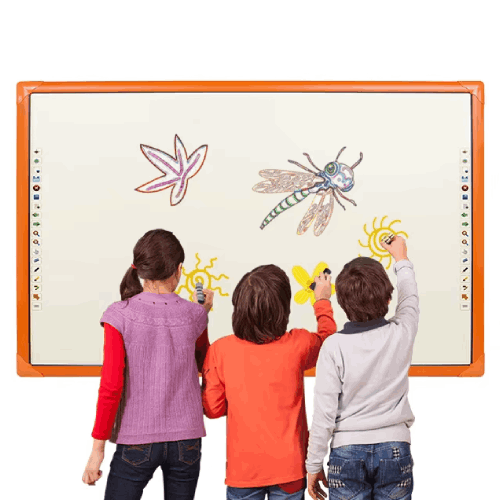
- Students can come up together to solve problems or move objects.
- Presenters can tap, drag, and interact with applications just like using a large touchscreen monitor.
In busy Bangladeshi classrooms or training rooms, IR touch is a practical choice because it handles frequent, varied use with minimal wear.
Interactive Whiteboarding with Your Existing PC and Projector
The Riotouch P82 is not a display by itself—it’s an interactive surface that combines:
- Your projector: projects the image (Windows, macOS, Linux, etc.) onto the whiteboard surface.
- Your PC or laptop: runs the operating system and software (PowerPoint, PDFs, browsers, interactive apps).
- The P82 board: provides touch detection that sends signals back to the PC.
With suitable driver/software installed, your PC will interpret the board’s touch as:
- Mouse clicks and drags
- Whiteboard pen tools, erasers, shapes, etc.
- Gesture-style interactions (depending on software)
This means:
- You can keep using familiar software such as Microsoft Office, PDF viewers, browsers, and specialized teaching software.
- The P82 simply adds a new way to control it—directly on the board instead of through a mouse or trackpad.
For schools and offices that already own projectors and PCs, this makes the Riotouch P82 a cost-effective way to add advanced interactivity without replacing existing AV equipment.
Riotouch P Series: Built for Collaborative Group Engagement
The P Series is described as providing advanced solutions for dynamic, interactive group engagement, tailored for:
- Modern classrooms: where teachers want to mix chalk-and-talk style with multimedia and live annotation.
- Boardrooms and meeting spaces: where teams need to visually map ideas, plans, and discussions.
Key experiential elements typically associated with this series:
- Intuitive writing experience: Feels similar to writing on a traditional whiteboard but with digital ink that can be saved or shared.
- Multiple users: IR technology generally supports multi-touch, enabling more than one person to work on the board concurrently (specific number of points is not provided, so we avoid exact figures).
- Seamless digital collaboration: Notes can be saved, printed, emailed, or exported as image/PDF, depending on installed software.
In a Bangladeshi classroom, for example:
- A teacher explains a concept using a slide, then switches to whiteboard mode to derive a formula.
- Students come up in pairs to work through a problem, one writing equations, another drawing diagrams.
- At the end, the teacher saves the screen and shares it with students via LMS, email, or a class group.
In a corporate setting:
- A facilitator opens a presentation, annotates key points, then moves into a brainstorming session.
- Meeting notes are captured directly on the board instead of on paper sticky notes.
- At the end, the annotated board is saved and distributed to all participants, preserving decisions and action items.
Encouraging Creativity and Innovation
By turning the front-of-room board into a digital canvas, the Riotouch P82 encourages:
- Visual thinking: Mind maps, flowcharts, wireframes, and process diagrams become quick to create and easy to modify.
- Interactive problem solving: Teachers and trainers can engage students more actively, asking them to manipulate digital objects, sort items, or match pieces.
- Content mashups: Combine projected text, images, web content, and freehand annotation seamlessly during a single session.
The result is a more creative and flexible environment than what a static whiteboard or printed handouts can offer.
Modern Classrooms and Boardrooms in Bangladesh
The Riotouch P82 is particularly relevant for Bangladesh because many schools, colleges, universities, and offices already use projectors and PCs but have not fully transitioned to interactive flat panels.
This board lets them:
- Upgrade existing rooms gradually—start by adding interactive whiteboards, then later move to integrated displays if needed.
- Use current projectors (including older VGA/HDMI models) and PCs, reducing initial investment.
- Standardize teaching and meeting workflows across multiple rooms using familiar software on their existing computers.
Typical deployment:
- In a school in Dhaka, each classroom might have a projector, a PC, and a Riotouch P82 board. Teachers log into their accounts and use it as their main teaching tool throughout the day.
- In a corporate office, key meeting rooms are equipped with P82 boards and short-throw projectors, allowing teams to use them as interactive brainstorming walls.
Practical Benefits Over Traditional Whiteboards
Compared to old-style whiteboards or chalkboards, the Riotouch P82 offers:
- No dust and minimal cleaning requirements.
- Ability to save notes rather than erasing everything at the end.
- Integration with digital content—web, documents, multimedia—within one workflow.
- Better visibility of coloured inks and high-contrast templates even at the back of the room (assuming good projector brightness).
For many Bangladeshi institutions that still rely heavily on marker boards, adopting the P82 is a major step toward smart classroom or smart office environments.
Basic Maintenance and Care
The P82 board is relatively low-maintenance:
- Clean the surface with a soft, dry cloth or a slightly damp cloth if needed—avoid harsh solvents and abrasives.
- Keep projector brightness and alignment calibrated for a good picture on the board surface.
- Ensure cables (USB from board to PC, video from PC to projector) are routed neatly and safely.
As with any interactive whiteboard, it’s important to install the board at an appropriate height:
- For primary schools, mount lower so children can reach the main writing area.
- For secondary schools and adults, standard height to suit average standing users.
- Consider adjustable mounting solutions if the same room serves diverse users.
✅ Key Features
- 82-inch Large Interactive Surface: Provides ample space for teaching, training, and collaborative work in medium to large rooms.
- Infrared Touch Technology: Robust IR touch system allows fingertip and stylus input for intuitive writing and control.
- Projection-Compatible Board: Designed to work with an external projector and PC, turning projected images into interactive content.
- Part of Riotouch P Series: Engineered for dynamic group engagement and interactive collaboration in classrooms and boardrooms.
- Digital Whiteboarding and Annotation: Supports writing, drawing, and annotating on top of displayed content (via connected software).
- Encourages Creativity and Innovation: Ideal for brainstorming, visual thinking, and interactive problem-solving sessions.
- Seamless Integration with Existing Systems: Works with Windows and common software applications through the connected computer.
✅ Usage / Applications
- School Classrooms for interactive lesson delivery, problem solving, and student participation.
- Colleges and Universities for seminars, tutorials, and lab theory sessions.
- Coaching Centres and Tuition Classes for engaging exam preparation and concept explanation.
- Corporate Meeting Rooms for presentations, brainstorming, and strategic planning.
- Training Institutes for skill development workshops and corporate training.
- Government and NGO Offices for policy presentations, stakeholder meetings, and community training.
- Libraries and Learning Labs as shared interactive boards for workshops and study groups.
✅ Benefits of This Product?
- Transforms Existing Projector Setups into Interactive Systems: Adds touch and annotation without replacing your projector and PC.
- Boosts Engagement and Participation: Students and participants can come up to the board and interact physically with content.
- Makes Lessons and Meetings More Visual: Supports diagrams, mind maps, and multimedia-rich explanations easily.
- Saves Time and Effort: Digital notes can be saved, reused, or shared rather than rewritten from scratch.
- Supports Familiar Software: Works with your existing Windows or PC applications, reducing the learning curve.
- Cost-Effective Path to Smart Classrooms: Utilises current hardware investments, making it easier for Bangladeshi institutions to upgrade.
✅ Ideal For
The Riotouch P82 82-inch Infrared Touch Sensitive Interactive White Board is ideal for schools, colleges, universities, coaching centres, and corporate offices in Bangladesh that already have projectors and PCs but want to add powerful interactivity.
It suits ICT labs, science labs, and general classrooms where teachers want to mix presentation slides with hand-drawn explanations. Coaching centres can use it to deliver problem-solving sessions, highlight key exam techniques, and replay annotated solutions. Businesses and training providers find it valuable for brainstorming and planning, especially when teams need to visualise workflows and ideas on a large shared surface.
If your priority is to upgrade existing projector-based classrooms or meeting rooms into interactive environments without jumping immediately to expensive all-in-one flat panels, the P82 offers an attractive, practical solution.
✅ Why Choose the Riotouch P82 82-inch Infrared Interactive Whiteboard?
Choosing the Riotouch P82 means selecting a proven, flexible approach to interactive teaching and collaboration that fits real-world Bangladeshi setups.
Instead of discarding your projector investment, the P82 lets you add touch and digital ink to your current AV stack. The 82-inch size is generous enough for most classrooms and meeting rooms, ensuring that writing and projected content are visible at the back when combined with a suitable projector.
The use of infrared touch technology gives the board robustness and versatility, handling busy classrooms, continuous touch, and various users without needing special pens or pressure sensitivity. As part of the Riotouch P Series, it’s designed with group collaboration in mind, enabling multiple people to engage at the board and contribute ideas in real time.
For institutions looking to move step-by-step into smart classrooms or interactive meeting environments, the P82 is a natural starting point—bridging the gap between traditional boards and full interactive flat panels, while retaining compatibility with existing PCs, networks, and software.
✅ Why Buy This Product from BME?
Buying the Riotouch P82 82-inch Infrared Interactive Whiteboard from Business Machine & Equipment (BME) connects you with a Bangladesh-based IT and AV specialist that understands local education and business needs.
BME focuses on genuine, brand-specific hardware, ensuring you receive the authentic Riotouch P82 model—not generic alternatives. For interactive whiteboards, correct sensor quality and driver support are crucial for stable classroom and meeting experiences.
For schools, universities, coaching centres, corporations, NGOs, and government offices, BME can:
- Provide B2B quotations and help you plan upgrades across multiple rooms or branches.
- Advise on projector compatibility, PC requirements, and recommended mounting heights.
- Share best-practice insights from other Bangladeshi installations regarding content workflows and training.
Because BME works day-to-day with institutions across Bangladesh, they understand classroom sizes, teaching patterns, and infrastructural constraints. They can recommend whether an interactive whiteboard like the P82 or an interactive flat panel is a better match for each specific room, and help you phase deployments according to budget and priorities.
By choosing BME, you gain more than a board—you gain a local partner invested in helping your interactive teaching or collaboration project succeed.
✅ Buying Guide
Before purchasing and installing the Riotouch P82 82-inch Interactive Whiteboard, consider these key points:
1. Check Existing Equipment
- Confirm you have or plan to have a projector (preferably short-throw or ultra-short-throw for reduced shadows).
- Ensure you have a PC or laptop with compatible video output (HDMI/VGA as required by your projector) and a spare USB port for the board’s touch connection.
2. Room Size and Layout
- An 82-inch board suits medium-sized classrooms and meeting rooms.
- Make sure the wall has enough space for the board and projector image without obstructions (fans, windows, pillars).
3. Mounting Height and Positioning
- For younger students, mount lower so they can reach key areas; for adult-only rooms, mount at standard whiteboard height.
- Align the projector so the image fits entirely within the board’s interactive area.
4. Connectivity and Cable Management
- Plan routes for:
- Video cable (PC → projector)
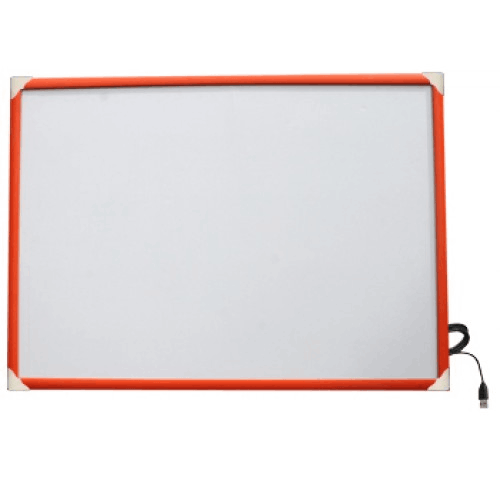
- USB cable (board → PC)
- Power cables for projector and PC
- Use cable channels, trunking, or raceways to avoid messy and dangerous cable runs.
5. Software and Driver Installation
- Install the Riotouch-provided drivers and whiteboard software on the connected PC.
- Test calibration, touch accuracy, and annotation tools before regular use.
6. Teacher/Staff Training
- Provide short sessions to show teachers and staff how to:
- Switch between whiteboard and annotation modes
- Save and share their notes
- Use different pen colours, shapes, and erasers
- Encourage them to experiment gradually, adding more features over time.
7. Common Mistakes to Avoid
- Mounting the board where projector shadows are frequent (too far from projector).
- Ignoring driver installation on the PC, leading to non-responsive touch.
- Poor cable management that creates clutter or trip hazards.
- Skipping calibration, which can cause inaccurate touch detection.
Planning with these points in mind will ensure your Riotouch P82 deployment is smooth and effective.
✅ Customers Ask About / Frequently Asked Questions
Q1: Does the Riotouch P82 have a built-in display?
A: No. It is an interactive whiteboard surface that requires a separate projector to display images and a PC/laptop to provide content and processing.
Q2: What devices do I need to use this board?
A: You need a projector, a PC or laptop, and appropriate video + USB cables. The projector displays the PC image on the board, and the board sends touch signals to the PC via USB.
Q3: Can multiple people use the P82 at the same time?
A: The P82 uses infrared touch, which generally supports multi-touch. Exact maximum touch points are not specified here, but it is designed for interactive group engagement.
Q4: Is it suitable for Bangladeshi school classrooms?
A: Yes. The 82-inch size and IR touch make it well-suited for typical classrooms, especially where projectors and PCs are already in use.
Q5: Can I use it with Windows or only with special software?
A: You can use it with Windows (and other PC OS). It typically works as a large touch input/mouse for any application, plus extra features through Riotouch’s whiteboard software.
Q6: What if the projector is older?
A: As long as the projector can project onto the board’s surface and your PC supports the projector’s input (VGA/HDMI), you can use it. Image quality will depend on the projector, not the board.
Q7: Do I need special pens?
A: Usually, IR boards work with simple styluses or even fingers. No expensive, battery-powered pens are required.
Q8: How do I keep the surface clean?
A: Use a soft, dry or slightly damp cloth. Avoid abrasive materials and strong chemicals that might damage the surface.
Q9: Can BME help us decide between an interactive whiteboard and an interactive flat panel?
A: Yes. BME can advise based on your room size, existing equipment, budget, and usage goals.
✅ Why Buy This Product
The Riotouch P82 82-inch Infrared Touch Sensitive Interactive White Board is an excellent choice for institutions in Bangladesh that want a powerful interactive front-of-room tool while continuing to use their existing projectors and PCs.
It offers a large, familiar writing surface that becomes truly digital—supporting touch, handwriting, annotation, and content sharing. This helps teachers, trainers, and presenters make lessons and meetings more visual, interactive, and memorable, without forcing a complete AV infrastructure overhaul.
Order the Riotouch P82 from Business Machine & Equipment (BME) to bring interactive capabilities to your classrooms, training labs, or meeting rooms in an affordable, scalable way. Turn your existing projection setups into dynamic collaboration spaces and move one big step closer to full smart classroom or smart office functionality.
What is the price of Riotouch P82 82-inch infrared Touch Sensitive Interactive WhiteBoard in Bangladesh?
Write a review
Question Answer
Have question about this product? Get specific details about this product from expert.