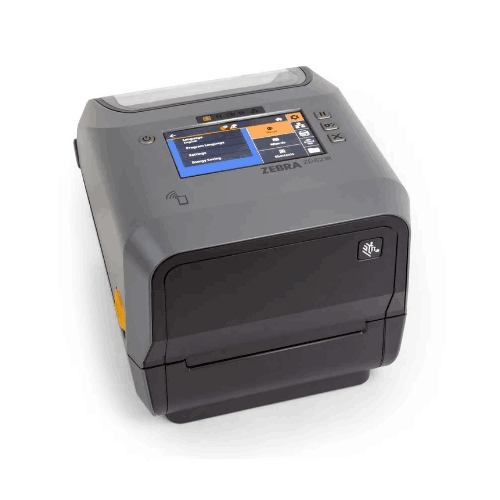
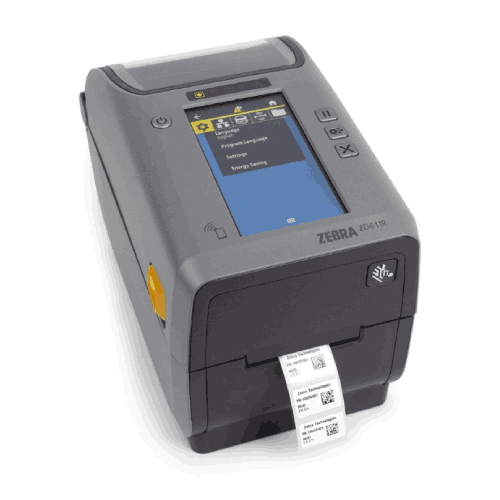
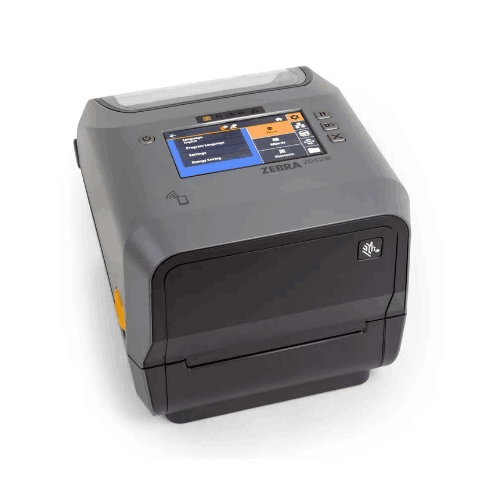
Zebra ZD621R RFID Thermal Transfer Desktop Printer
Regular Price:৳0.00Availability: SKU: 1.10.19.9367
Quick Overview
-
Support
Saturday – Thursday: 09 AM - 06 PM. -
Payment
Cash on Delivery | Card | Online Payment -
Shipping Cost
Inside Dhaka 100tk | Outside Dhaka 150tk -
Warranty Policy
Read More
Description
Zebra ZD621R RFID Thermal Transfer Desktop Printer in Bangladesh
The Zebra ZD621R RFID Thermal Transfer Desktop Printer is a high‑performance desktop printer designed for organisations in Bangladesh that are ready to modernise from simple barcodes to full RFID-enabled labelling—without moving to a bulky industrial floor printer. It combines 4-inch thermal transfer printing with UHF RFID encoding in a compact, powerful chassis that fits easily on a desk, counter, or small workstation.
If you’re in garments, retail, healthcare, logistics, manufacturing, or asset-heavy environments, the ZD621R gives you the ability to print crisp barcodes and text on labels, while also encoding RFID inlays inside those labels. Your labels can then be read visually, scanned by barcode scanners, and captured wirelessly by RFID readers for fast, accurate tracking.
Built on Zebra’s flagship ZD620/ZD621 platform, this printer offers advanced connectivity, manageability via Link‑OS, robust security options, and premium print quality—making it ideal for demanding, multi‑shift operations in Bangladesh.
RFID + Barcode in One Powerful Desktop Unit
At the heart of the Zebra ZD621R is its ability to print and encode RFID in one pass. Every label can carry:
- Human-readable text (product names, SKUs, dates, batch numbers)
- 1D/2D barcodes for legacy scanners
- UHF RFID data for long‑range, non line‑of‑sight reading
That triple capability is critical where:
- Speed matters (counting thousands of items quickly in a warehouse or stockroom)
- Errors are costly (shipping wrong garments or medicine batches)
- Visibility is crucial (knowing where your assets and products are at all times)
In Bangladesh, where garment exports, retail chains, pharma distribution, and logistics continue to scale, combining RFID with standard labels gives businesses a serious operational edge.
Thermal Transfer Printing: Durable, Long-Lasting Labels
The ZD621R is a thermal transfer (TT) printer, meaning it can print via ribbon onto a wide range of label materials for maximum durability, while still supporting direct thermal labels when appropriate.
Benefits of thermal transfer with ZD621R:
- More durable prints than direct thermal (resistant to heat, light, and many chemicals)
- Ideal for long-term inventory labels, equipment tags, asset labels, rack labels, and ID tags
- Supports a variety of synthetic media (e.g., polyester) used in harsh environments
This is particularly important in Bangladesh for:
- Garment factories (labels might face friction, handling, or long storage)
- Logistics and warehousing (labels are exposed to stacking, shrink wrap, and varying climates)
- Healthcare and labs (labels exposed to disinfectants and cleaning agents)
- Industrial manufacturing (labels on parts, bins, or tools under harsh conditions)
You’re not locked into short‑life labels. With the right ribbons and media, the ZD621R gives you highly robust, long‑lasting identification.
Premium Desktop Performance from Zebra’s ZD621 Platform
The ZD621R is part of Zebra’s top‑tier 4‑inch desktop lineup. Compared to earlier G‑series or basic desktop models, it offers:
- More processing power for complex label formats and RFID encoding tasks
- Larger memory for fonts, graphics, and stored formats/templates
- Enhanced print quality and calibration features
- Better security and device management options via Link‑OS
This matters in real operations:
- Complex labels with logos, barcodes, and multiple data fields print faster and more consistently
- Your IT team can remotely configure, monitor, and update the printer fleet across different sites
- Security settings help protect against unauthorized access or misconfiguration
For Bangladesh businesses running multiple branches or warehouses, this kind of manageability is a big productivity and reliability win.
Connectivity & Integration
While exact ports vary by specific configuration, the Zebra ZD621R RFID Thermal Transfer Desktop Printer is designed to plug naturally into modern IT and OT setups. Zebra’s ZD621 family typically offers:
- USB as standard for direct PC connection
- Ethernet (LAN) on many models for network printing across departments and sites
- Serial interface options for legacy system integration
- Optional Wi‑Fi and Bluetooth configurations for mobile carts, wireless workstations, or tablet-based workflows
On the protocol side, Zebra desktop printers commonly support:
- ZPL (Zebra Programming Language) – the de facto standard for Zebra printing
- EPL legacy language – for older Zebra setups
- Emulations for some third-party command languages (depending on firmware)
They’re also part of Zebra’s Link‑OS ecosystem, which opens up:
- Printer Profile Manager / Printer Setup Utilities for central control
- Integration with Zebra industrial scanners, mobile computers, and RFID readers
- Support for cloud printing and remote management systems
In Bangladesh, where a single enterprise may be running older systems in one facility and modern cloud software in another, this versatility protects your investment and eases migrations.
RFID Capabilities & Calibration
ZD621R is dedicated to UHF RFID encoding (typically EPC Gen2/ISO 18000‑6C standard, widely used globally). Zebra’s RFID desktop printers usually feature:
- Adaptive encoding technology to handle a variety of inlay positions and label constructions
- Automated RFID calibration routines to quickly align printing and encoding zones
- Support for both RFID tags and standard non‑RFID labels from the same device
For a garment exporter in Gazipur, a 3PL warehouse in Narayanganj, or a large retailer in Dhaka, that means:
- You can work with different RFID label suppliers (assuming they follow Zebra guidelines)
- You can quickly tune the printer to new label designs or roll changes
- You can verify encoded data meets your applications’ standards
You’re not locked into a single media vendor, but you should always use quality, compatible RFID labels for best reliability.
User Experience & Media Handling
Zebra’s desktop printers are known for simple, operator‑friendly designs, and the ZD621R continues that trend:
- Clamshell design – the entire top opens up to access label and ribbon paths
- Clear media guides and sensors help maintain alignment
- Colour status indicators and intuitive control buttons (and in some configurations, a colour LCD) help staff understand printer status at a glance
In practice, this reduces:
- Setup and training time for staff
- Errors during label and ribbon changes
- Downtime caused by misfeeds or incorrect loading
In a busy Bangladeshi warehouse, retail stockroom, or production floor, you don’t want label printers that require constant technical intervention. The ZD621R is designed so everyday operators can manage routine tasks.
Security & Fleet Management
For businesses rolling out printers across multiple branches or departments, ZD621R’s security and management capabilities are crucial:
- Zebra’s newer devices typically support secure protocols and user permissions
- Centralised tools let IT teams push configuration profiles, track printer health, and schedule firmware updates
- This greatly reduces the risk of misconfigured devices causing bad labels or downtime
For banks, healthcare networks, retail chains, and large manufacturing/export organisations in Bangladesh, managing a fleet of printers like the ZD621R via central policy is far more efficient than handling each unit manually.
Real-Life Use Cases in Bangladesh
Garments & Textiles (Export & Local)
- Tag each garment or carton with an RFID‑enabled label printed by ZD621R
- Use RFID gates or handheld readers to perform rapid stock checks
- Speed up packing and loading processes, reduce shipping errors, and enhance traceability
Retail & Supermarkets
- Label apparel, electronics, or premium FMCG with barcode + RFID tags
- Simplify inventory counts, reduce labour on stock checks, and improve replenishment accuracy
- Prepare for future RFID‑based checkout or anti‑theft solutions
Logistics & 3PL Providers
- Print RFID shipping labels for cartons and pallets
- Quickly identify and verify shipments moving between hubs and clients
- Offer value‑added RFID services to customers who require advanced tracking
Healthcare & Pharmaceuticals
- Label medicine cartons and pallets with RFID for batch tracking
- Track capital equipment and critical assets (wheelchairs, monitors, pumps) in hospitals
- Use durable TT labels in labs for sample tracking and asset marking
Manufacturing & Industrial
- Tag work‑in‑progress, bins, tools, and finished goods
- Integrate with MES or ERP to automate stage scanning and QA checks
- Use TT labels that withstand oils, dust, or cleaning agents
IT & Corporate Asset Management
- Label laptops, desktops, servers, and network gear with RFID + barcode labels
- Speed up physical asset audits across floors and branch offices
- Combine visual ID with quick RFID scans for verification
Maintenance & Care
To keep the Zebra ZD621R running at its best:
- Clean the printhead regularly with Zebra‑approved cleaning materials to maintain print quality
- Use high‑quality labels and ribbons, especially for RFID, to reduce debris and misreads
- Keep the printer in a dust‑controlled, moderate-temperature environment where possible
- Train operators in proper media loading and basic troubleshooting
- Check periodically for firmware updates and apply them using Zebra’s utilities for performance and security improvements
With proper maintenance, a ZD621R can easily become a long‑term core device in your labelling and tracking infrastructure.
✅ Key Features
- RFID & Barcode in One: Simultaneously prints labels and encodes UHF RFID inlays in a 4‑inch desktop form factor.
- Thermal Transfer & Direct Thermal: Supports durable TT printing with ribbons as well as direct thermal media.
- Premium Desktop Performance: Part of Zebra’s ZD621 platform with enhanced processing power, memory and print quality.
- Flexible Connectivity: USB plus options for Ethernet, serial, Wi‑Fi, and Bluetooth (depending on model) for easy integration.
- Link-OS & Manageability: Works with Zebra’s Link‑OS tools for remote configuration, monitoring and firmware updates.
- Easy Operation: Clamshell design, guided media paths, and clear status indicators minimise user errors and training time.
- Compact Industrial Design: Desktop footprint suitable for back offices, labs, warehouses and production lines in Bangladesh.
✅ Usage / Applications
- RFID labelling of garments, cartons, and pallets for apparel exporters
- Retail stock tagging for inventory accuracy and anti‑shrink initiatives
- Pharma and healthcare asset and batch labelling
- Warehouse and logistics RFID shipping labels
- Manufacturing work‑in‑progress and finished goods tagging
- IT asset management in enterprises, banks, and telecoms
- Laboratory sample and equipment tracking with durable TT labels
✅ Benefits of This Product?
- Boosts inventory and asset visibility by combining barcodes and RFID in a single label
- Reduces manual scanning time and human error, especially during large stock counts
- Supports long‑lasting labels with thermal transfer printing for harsh or long‑term applications
- Fits into tight spaces while delivering performance typical of larger industrial printers
- Protects your investment through Zebra’s strong platform, security features, and manageability tools
- Scales with your growth, suitable for pilot RFID projects up to full enterprise deployments
✅ Ideal For
The Zebra ZD621R RFID Thermal Transfer Desktop Printer is ideal for businesses and institutions in Bangladesh that are serious about:
- Upgrading from simple barcode only tracking to RFID‑enabled operations
- Needing more durable, professional labels than entry‑level desktop printers can provide
- Operating in space‑constrained environments like back offices, labs, or compact warehouses
- Managing multiple branches or sites, and wanting printers that can be centrally configured and monitored
It’s especially suited to garment exporters, national retail chains, logistics companies, hospital networks, large manufacturers, and corporate IT departments looking for a future‑ready solution that bridges their current barcode systems and upcoming RFID initiatives.
✅ Why Choose the Zebra ZD621R RFID Thermal Transfer Desktop Printer?
Choosing the ZD621R means you’re picking a premium desktop device from Zebra’s leading 4‑inch lineup, not a basic label printer with RFID added as an afterthought. It’s built for long‑term, multi‑shift environments where uptime, print quality, and encoding accuracy matter every single day.
Compared to simpler desktop printers, you gain:
- RFID encoding without stepping up to a large industrial footprint
- Better performance and memory, handling sophisticated labels and rapid workflows
- Improved security and manageability, critical if you’re scaling to dozens of devices
For Bangladeshi organisations where margins, compliance, and speed matter—like garments, pharma, retail and logistics—the ZD621R provides a robust foundation for modern labelling and tracking strategies that will stay relevant for years.
✅ Why Buy This Product from BME?
Buying the Zebra ZD621R RFID Thermal Transfer Desktop Printer from Business Machine & Equipment (BME) means working with a local specialist who understands enterprise printing, barcoding, and RFID in the Bangladesh market.
When you source through BME, you get:
- Genuine Zebra hardware, reducing risks associated with counterfeit or unsupported units
- Pre‑sales guidance on model selection, media compatibility, and network connectivity in the context of your existing systems
- B2B‑friendly service, including formal quotations, documentation, and support for bulk or multi‑site procurement
- Help aligning the ZD621R with your barcoding/RFID strategy, whether you’re running a small pilot or planning a wider rollout
BME coordinates delivery across Dhaka and other regions using established logistics channels. Post‑purchase, your team can also seek product‑level guidance from BME as you integrate the printer into your warehouse, retail, lab, or factory workflows.
✅ Buying Guide
Before purchasing the Zebra ZD621R RFID Thermal Transfer Desktop Printer, consider:
1. Application Scope
- What will you tag—items, cartons, pallets, assets, or all of these?
- Are your labels short‑term (shipping) or long‑term/durable (equipment, racks, assets)?
2. RFID Infrastructure
- Confirm your RFID readers, antennas, and middleware match the UHF EPC Gen2‑type tags the ZD621R encodes.
- Decide on tag formats (on‑carton labels, hang tags, on‑metal labels, etc.) with a media supplier experienced in RFID.
3. Media & Ribbon Choices
- Select RFID label constructions appropriate for your environment (e.g., on‑metal vs paper, synthetic vs paper).
- Choose ribbons that match your label material and durability requirements.
4. Connectivity Requirements
- Decide whether you need USB only or network (Ethernet/Wi‑Fi/Bluetooth) connectivity.
- Confirm your ERP/WMS/POS/LIS can output labels in ZPL or integrate via drivers or middleware.
5. Fleet & Management
- If deploying multiple ZD621R units, plan how to use Zebra’s Link‑OS tools for centralised configuration and monitoring.
6. Environment & Placement
- Allocate a stable, clean bench or desk with space to open the clamshell for loading labels and ribbons.
- Keep away from extreme heat, moisture, or heavy dust where possible.
7. Training & Support
- Organise basic user training for loading media, cleaning, and reading status indicators.
- Clarify who in your team (IT, operations) will manage configuration and firmware updates.
✅ Customers Ask About / Frequently Asked Questions
Q1: Can the Zebra ZD621R print normal barcode labels in addition to RFID labels?
Yes. It prints standard barcode labels (with or without RFID inlays) and, when using RFID media, can also encode the inlays simultaneously.
Q2: What RFID standard does the ZD621R support?
The ZD621R is designed for UHF RFID encoding, commonly following EPC Gen2 / ISO 18000‑6C standards. Always verify exact specs against your RFID system requirements.
Q3: Do I need special labels for RFID?
Yes. You must use RFID labels or tags that contain UHF inlays compatible with the printer. Ordinary non‑RFID labels work for barcodes/text but carry no RFID data.
Q4: Can I use the ZD621R with my existing warehouse or ERP software?
Generally yes, as long as your system can output labels in ZPL or a supported language, or you have middleware that supports Zebra printers. Consult your software vendor or IT team.
Q5: Does the ZD621R support Wi‑Fi or Bluetooth?
ZD621 line offers models with wired and wireless options. Check your selected configuration with BME to confirm if it includes Wi‑Fi and/or Bluetooth.
Q6: What’s the difference between ZD621R and a non‑RFID ZD621?
The ZD621R includes RFID encoding hardware and firmware, allowing it to encode UHF RFID labels; the non‑RFID ZD621 cannot encode RFID, only print barcodes and text.
Q7: Is this printer suitable for continuous, multi‑shift use?
Yes. The ZD621 series is designed as a premium desktop line for demanding environments. Proper media choice, cleanliness, and maintenance are still essential.
Q8: Is there a warranty if I buy the ZD621R from BME in Bangladesh?
Warranty terms depend on Zebra’s regional policy and BME’s current offering. Confirm warranty duration and coverage directly with BME at the time of purchase.
✅ Why Buy This Product
The Zebra ZD621R RFID Thermal Transfer Desktop Printer gives Bangladeshi businesses a serious advantage: industrial‑grade RFID labelling in a desktop footprint. It’s strong enough for busy warehouses and production environments, yet compact enough for retail back rooms, hospital labs, and offices.
By combining durable thermal transfer printing, high‑quality Zebra engineering, and UHF RFID encoding, the ZD621R supports faster inventory counts, more reliable asset tracking, and smoother logistics. It integrates into modern networks and legacy systems alike, making it a smart, future‑ready investment.
If you’re ready to move beyond barcodes and start building an RFID‑enabled operation—without overspending on huge industrial units—order the Zebra ZD621R RFID Thermal Transfer Desktop Printer from BME today and take a decisive step toward smarter, more efficient tracking and identification.
What is the price of Zebra ZD621R RFID Thermal Transfer Desktop Printer in Bangladesh?
Write a review
Question Answer
Have question about this product? Get specific details about this product from expert.


GoDEX G530 Desktop Barcode Label Printer




Zebra ZT230 203dpi Barcode Label Printer

Zebra ZD230 Desktop 4" Barcode Label Printer

Zebra ZD421 300dpi Desktop Barcode Printer