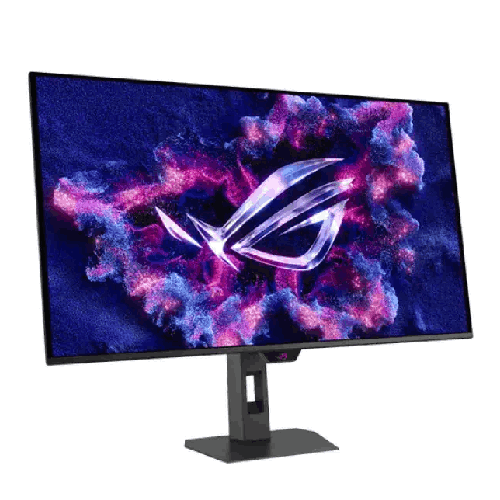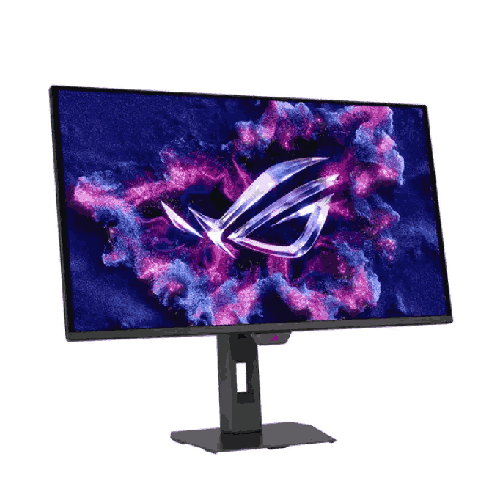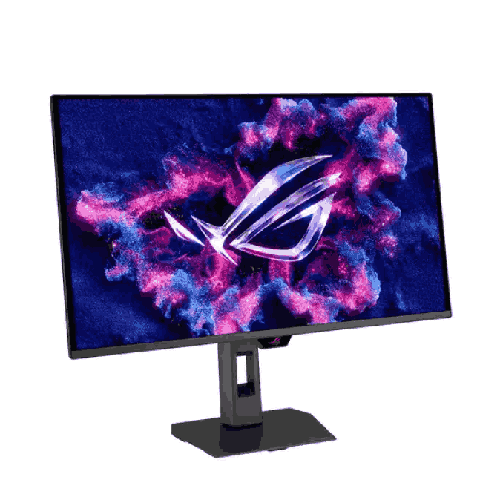
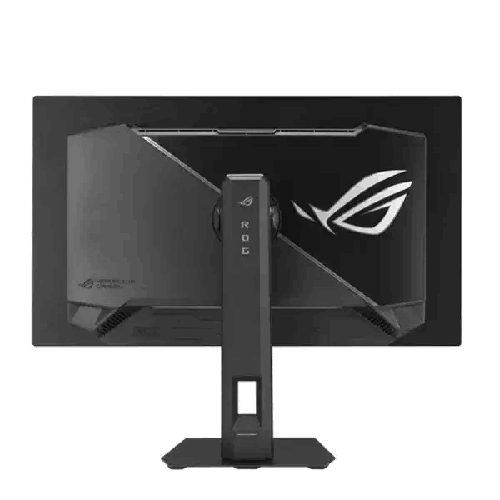
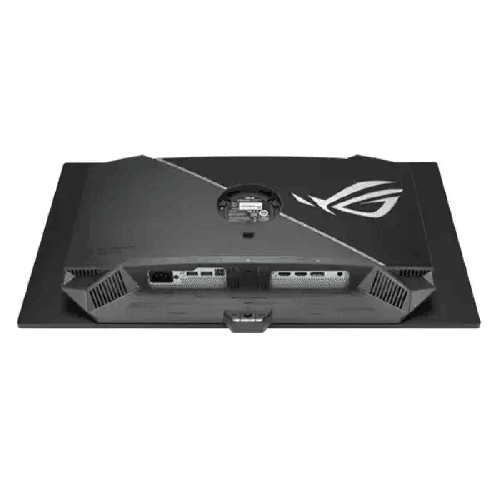
Asus ROG Strix OLED XG27UQDMS 27-inch 240Hz QD-OLED Gaming Monitor
Regular Price:৳175,000.00Availability: SKU: 9.60.13.9695
Quick Overview
-
Support
Saturday – Thursday: 09 AM - 06 PM. -
Payment
Cash on Delivery | Card | Online Payment -
Shipping Cost
Inside Dhaka 100tk | Outside Dhaka 150tk -
Warranty Policy
Read More
Description
Asus ROG Strix OLED XG27UQDMS 27-inch 240Hz QD-OLED Gaming Monitor Price in Bangladesh
The Asus ROG Strix OLED XG27UQDMS 27-inch 240Hz QD-OLED Gaming Monitor obliterates those limitations, bringing self-emissive pixel perfection, hyper-dense 4K UHD sharpness, and tournament-grade 240Hz speed together onto a single 27-inch desktop canvas.
Whether you are building a dream RTX 4080/4090 or RTX 50-series gaming battle-station in Dhaka, grading cinema-quality 4K HDR commercial films in a Gulshan production studio, or dominating late-night competitive Valorant and Counter-Strike 2 lobbies in Chattogram, this monitor changes how you see digital worlds. Every single one of its over 8.29 million pixels is its own independent light source—capable of igniting with dazzling quantum-dot vibrancy or switching off completely to achieve true, pitch-black darkness right next to a blinding highlight.
Combined with an instantaneous 0.03ms Gray-to-Gray (GtG) response time, a custom passive thermal heatsink engineered for long-term endurance in warm climates, and ASUS’s intelligent OLED Care protection suite, the Asus ROG Strix OLED XG27UQDMS 27-inch 240Hz QD-OLED Gaming Monitor stands as the ultimate visual centerpiece for uncompromising users across Bangladesh.
Key Technology & Next-Gen 4K UHD QD-OLED Visual Supremacy
Early generations of OLED desktop monitors were mostly limited to 1440p resolution or giant 42-inch television footprints that overwhelmed standard computer desks and exhibited subtle color fringing around small desktop fonts. The Asus ROG Strix OLED XG27UQDMS 27-inch 240Hz QD-OLED Gaming Monitor harnesses next-generation high-density 4K UHD (3840 x 2160) QD-OLED panel technology, packing an extraordinary 166 pixels per inch (PPI) into a sleek 27-inch (26.5-inch viewable) form factor.
At 166 PPI with an advanced next-gen sub-pixel layout, text in Windows 11, macOS, code editors, and financial terminals looks razor-sharp and completely free of halo artifacts. In games and movies, that extreme pixel density renders fine fabric textures, distant foliage, and intricate architectural details with lifelike three-dimensional depth that makes looking at the screen feel like peering through a clean glass window.
Because Quantum Dot OLED technology pairs self-illuminating organic diodes with a precision quantum-dot color conversion layer rather than traditional brightness-robbing color filters, it maintains pure chromatic saturation even at peak luminance. Where standard monitors wash out bright explosions into pale white, this QD-OLED panel preserves rich fiery oranges, deep neon magentas, and electric blues across the entire dynamic range.
Performance, 240Hz Refresh Rate & Instantaneous 0.03ms (GtG) Response Engine
In competitive gaming, motion clarity is determined by two things: how many frames per second your monitor displays, and how quickly each pixel transitions from one shade to the next without leaving a smear behind. On paper, many fast LCD monitors claim a 1ms response time, yet in real-world pixel transitions they often average 3ms to 6ms. The Asus ROG Strix OLED XG27UQDMS 27-inch 240Hz QD-OLED Gaming Monitor operates on an entirely different physical plane, achieving a staggering 0.03ms (GtG) response time.
Because organic light-emitting diodes change state almost instantaneously—over 30 times faster than the fastest liquid crystal panels—motion blur between frames practically ceases to exist. When combined with the blistering 240Hz refresh rate, moving objects at 240 frames per second on this QD-OLED screen look clearer and sharper than 360Hz or even 480Hz on traditional LCD panels. Whether you are tracking a strafing opponent across a narrow corridor, reading player nameplates while panning rapidly in an RTS/MOBA, or weaving through high-speed traffic in a racing simulator, every single frame is etched with photographic clarity.
To keep frame delivery buttery-smooth when GPU loads fluctuate in demanding 4K titles, the monitor features full support for NVIDIA G-SYNC Compatible, AMD FreeSync Premium Pro, and VESA AdaptiveSync technologies. Better still, ASUS integrates exclusive ROG OLED Anti-Flicker technology, which provides selectable refresh-rate range compensation modes (High, Mid, Off) to drastically reduce the subtle VRR brightness flicker that can occasionally occur on standard OLED panels during sharp frame-time swings. And for lower-frame-rate or console gaming scenarios, ASUS Extreme Low Motion Blur (ELMB) utilizes intelligent black-frame insertion to make 120Hz action look as crisp as 240Hz.
Studio-Grade Color Accuracy, Infinite Contrast & True Black HDR Immersion
For movie lovers, digital artists, and HDR gamers in Bangladesh, contrast is the single most impactful pillar of image quality. Conventional IPS panels typically deliver a 1,000:1 contrast ratio—meaning that in a dark room, black bars and night scenes glow with a murky gray haze. The Asus ROG Strix OLED XG27UQDMS 27-inch 240Hz QD-OLED Gaming Monitor delivers an astounding 1,500,000:1 contrast ratio paired with VESA DisplayHDR True Black 400 certification.
When you explore a pitch-black underground cavern in Elden Ring, walk down a rain-slicked neon street in Cyberpunk 2077, or watch a space thriller in 4K HDR, the unlit pixels turn completely off. Stars pinpoint brightly against an ink-black cosmos with zero haloing or blooming—something even expensive Mini-LED monitors with local dimming zones cannot replicate without visible light bleed around small bright objects like mouse cursors or subtitles.
For professional content creators in Dhaka and Chattogram, the color credentials are reference-grade right out of the box:
- True 10-Bit Color Depth: Renders over 1.07 billion individual color shades for silky-smooth sky gradients and shadow transitions without color banding.
- Cinema-Wide 99% DCI-P3 & 145% sRGB Gamut: Covers the full digital cinema spectrum required for commercial video grading, film post-production, and high-end photography.
- Factory Pre-Calibrated Delta E < 2 Accuracy: Every single unit undergoes rigorous factory color calibration before leaving the production line so your timeline colors match final broadcast and print standards accurately.
- ROG Uniform Brightness Setting: When working on bright white documents, spreadsheets, or browser windows all day, OLED Automatic Brightness Limiter (ABL) shifts on lesser monitors can be distracting. Flipping on the ROG-exclusive Uniform Brightness setting locks peak brightness at a consistent, comfortable level regardless of how large or small your white desktop windows are.
Smart Features, ASUS OLED Care Protection & Intelligent Controls
Many buyers in Bangladesh researching their first OLED monitor naturally ask about long-term panel health and image retention. ASUS engineered the Asus ROG Strix OLED XG27UQDMS 27-inch 240Hz QD-OLED Gaming Monitor with an extensive, multi-layered ASUS OLED Care system managed effortlessly through the ASUS DisplayWidget Center desktop app:
- Automated Pixel Cleaning & Refresh: Automatically runs pixel calibration cycles when the monitor enters standby after several hours of use, ensuring uniform pixel luminance over years of service without interrupting you mid-game.
- Screen Move (Pixel Orbiting): Imperceptibly shifts the pixel coordinates by microscopic increments periodically so static UI elements remain fresh.
- Target Mode, Taskbar & Boundary Detection: Intelligently identifies static logos, Windows taskbars, HUD health bars, and split-screen borders, subtly reducing localized luminance only on those static areas while keeping the main action at full brilliance.
- ASUS DisplayWidget Center: Lets you tweak GameVisual modes, OLED Care settings, Uniform Brightness, contrast, and multi-screen layouts directly with your mouse inside Windows instead of reaching for the rear OSD joystick.
- AI-Powered GamePlus Suite: Features real-time Dynamic Shadow Boost (which brightens dark map areas without washing out bright highlights) alongside Dynamic Crosshairs that automatically invert color against bright backgrounds for pinpoint aim accuracy.
- Esports Aspect Ratio Control: Prefer a classic 24.5-inch competitive viewport for tournament shooters? With a click, the monitor simulates a pixel-perfect 24.5-inch display window surrounded by pitch-black unlit OLED borders that blend seamlessly into the bezel in a dark room.
Gaming, Content Creation & Professional Workstation Capabilities
Because it combines 3840 x 2160 (4K UHD) resolution, 240Hz speed, and Delta E < 2 color accuracy in one display, the Asus ROG Strix OLED XG27UQDMS 27-inch 240Hz QD-OLED Gaming Monitor replaces multiple specialized monitors for demanding Bangladeshi power users:
- AAA Ray-Traced & HDR Gaming: Experience modern masterpieces like Black Myth: Wukong, Alan Wake 2, Ghost of Tsushima, Forza Horizon 5, and Horizon Forbidden West in native 4K HDR with per-pixel lighting that makes ray-traced reflections and torchlight look astonishingly real.
- Elite 240Hz Competitive Esports: Dominate Valorant, Counter-Strike 2, Apex Legends, Overwatch 2, and Dota 2 with instantaneous 0.03ms pixel transitions and virtually zero input lag—spotting enemy peeks milliseconds faster than players on LCD panels.
- Professional 4K Video Editing & HDR Color Grading: Edit native 4K timelines in DaVinci Resolve Studio, Adobe Premiere Pro, and Final Cut Pro with true black reference accuracy and 99% DCI-P3 coverage.
- 3D CGI, Unreal Engine 5 & Game Development: Inspect real-time Lumen lighting, PBR material shaders, and dark environment textures in Blender, Maya, and Unreal Engine with true-to-life contrast.
Design, Custom Passive Heatsink Thermal Engineering & Compact Ergonomics
Heat is the primary enemy of organic light-emitting diodes, and in Bangladesh’s warm ambient climate—where summer room temperatures frequently pass 32°C—thermal management inside an OLED monitor is critical. Many competing OLED monitors rely on tiny, high-RPM internal cooling fans that gradually suck in urban dust and develop an annoying high-pitched whine after a year of use.
The Asus ROG Strix OLED XG27UQDMS 27-inch 240Hz QD-OLED Gaming Monitor solves this brilliantly with a custom-engineered passive heatsink and high-efficiency top ventilation airflow channels. By pulling heat away from the QD-OLED panel and internal driver boards silently through conductive metal thermal dissipation without moving fan parts, the monitor stays cool, whisper-quiet (0dB noise), and impervious to internal fan dust clogs even in warm Bangladeshi rooms.
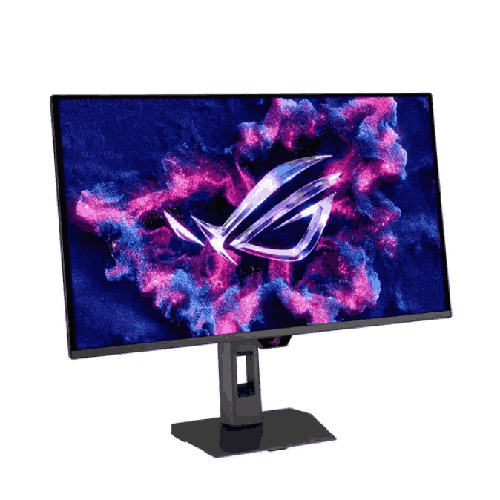
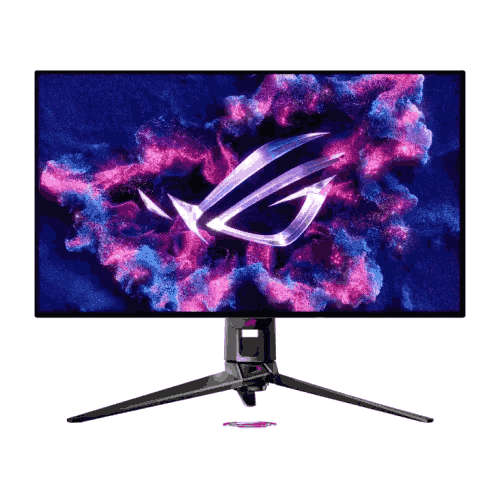
Externally, the monitor showcases the modern, streamlined ROG Strix industrial aesthetic. Ultra-thin metallic borders frame the razor-slim OLED panel profile. Down below, ASUS replaced the wide, bulky V-shaped tripod legs of older monitors with a compact, super-flat square base that reclaims massive desk space for angled esports keyboards and large mousepads. The stand even incorporates a machined mobile phone groove right in the base so you can prop up your smartphone in view while working or gaming, plus a built-in 1/4-inch tripod socket on the top of the stand post for mounting a streaming webcam, DSLR camera, or key light directly above your screen.
Full 4-way ergonomic adjustability—including smooth Height Adjustment, Tilt, Swivel, and 90-degree Portrait Pivot—lets you dial in ideal posture comfort, while standard 100 x 100mm VESA mount compatibility makes attaching the monitor to a heavy-duty gas-spring desk arm effortless.
Real-Life Usage Scenarios Tailored for the Bangladesh Context
Owning a flagship monitor in Bangladesh brings unique environmental and practical considerations where the Asus ROG Strix OLED XG27UQDMS 27-inch 240Hz QD-OLED Gaming Monitor truly shines:
- Fanless Custom Heatsink for Dusty & Warm Bangladeshi Rooms: In cities like Dhaka, Chattogram, and Narayanganj, airborne dust quickly clogs monitors that use small internal blower fans. The XG27UQDMS’s fanless custom heatsink keeps panel temperatures low to prevent burn-in while remaining 100% silent and dust-free inside.
- Lower Power Draw in Dark Mode During UPS Load-Shedding: Unlike traditional LCD monitors whose backlights draw constant maximum power even when displaying a completely black screen, every dark pixel on a QD-OLED panel draws virtually zero power. If load-shedding strikes while you are working on dark-mode code editors, grading timelines, or gaming, your monitor consumes significantly less energy on dark scenes—helping extend your Pure Sine Wave UPS battery runtime.
- Space-Saving Base for Compact Apartment Desks: Whether your setup sits on a custom wooden table in Dhanmondi or a compact gaming desk in Uttara, the compact square footprint leaves plenty of room for low-DPI mouse sweeps without banging your mouse against monitor legs.
- One Screen for Daytime Studio Client Work & Nighttime Cinema/Esports: Instead of buying a separate professional reference monitor for client color grading and a separate high-refresh gaming screen, this single 27-inch 4K 240Hz QD-OLED panel handles commercial studio deliverables and late-night entertainment with equal mastery.
Compatibility & High-Bandwidth Multi-Platform Ecosystem
The Asus ROG Strix OLED XG27UQDMS 27-inch 240Hz QD-OLED Gaming Monitor is built to serve as the central command hub for your entire collection of high-performance devices:
- High-Bandwidth DisplayPort 1.4 (with DSC): Connects directly to modern NVIDIA GeForce RTX and AMD Radeon RX desktop graphics cards using Display Stream Compression (DSC) to deliver visually lossless 4K UHD (3840 x 2160) at the full 240Hz refresh rate with 10-bit HDR color.
- HDMI 2.1 High-Speed Connectivity: Unlocks native 4K @ 120Hz with VRR and ALLM on PlayStation 5, PS5 Pro, and Xbox Series X consoles, as well as full 4K @ 240Hz from modern HDMI 2.1 PC graphics cards.
- Versatile Audio & Accessory Connectivity: Includes a dedicated 3.5mm Earphone Jack for connecting audiophile headphones, studio monitors, or gaming headsets directly to the display.
Maintenance & Care for Long-Term QD-OLED Panel Longevity
A next-generation QD-OLED panel rewards gentle, informed care with years of breathtaking visual performance. Follow these essential maintenance guidelines in Bangladesh:
- Never Unplug Mains/UPS Power Immediately After Turning Off the PC: When you shut down your PC or put the monitor into standby after several hours of use, the monitor automatically performs a short 5-to-6-minute Pixel Cleaning cycle. Keep your UPS or wall switch powered on for a few minutes after shutting down so this automated maintenance cycle can finish uninterrupted.
- Clean Only When the Panel is Cool Using Distilled Water & Clean Microfiber: Always turn off the monitor and let the panel cool completely for 15 minutes before wiping. Use a brand-new, ultra-soft optical microfiber cloth dry to remove loose dust. For smudges, use only a tiny amount of distilled water (or 70% ethanol specifically if recommended by QD-OLED care guides, avoiding harsh ammonia or generic household window sprays) applied lightly to the cloth—never sprayed directly onto the screen—and buff dry immediately with a second clean microfiber cloth.
- Control Direct Sunlight & Ambient Glare: Position your desk so direct midday sunlight or bare bulbs do not shine straight onto the screen face; controlled indoor or bias lighting lets the QD-OLED’s infinite black levels look their absolute deepest.
- Always Use an AVR-Equipped Pure Sine Wave UPS: Protect your flagship monitor against sudden grid voltage surges after load-shedding by connecting it through a quality surge protector and voltage-regulated UPS.
✅ Key Features
- 27-Inch 4K UHD (3840 x 2160) QD-OLED Panel: Packs an ultra-sharp 166 PPI pixel density into a 26.5-inch viewable Quantum Dot OLED canvas for razor-sharp desktop text and lifelike 4K gaming detail.
- Blistering 240Hz Refresh Rate: Delivers ultra-fluid high-frame-rate motion clarity across both fast-twitch competitive esports titles and next-generation AAA blockbusters.
- Instantaneous 0.03ms (GtG) Response Time: Virtually eliminates motion blur, ghosting, and pixel trailing thanks to self-emissive OLED diodes that transition over 30 times faster than traditional LCD panels.
- Infinite 1,500,000:1 Contrast & DisplayHDR True Black 400: Renders ink-deep true blacks right alongside dazzling specular highlights with zero backlight bleed or local-dimming halo artifacts.
- Studio-Calibrated 99% DCI-P3 & True 10-Bit Color: Factory pre-calibrated to Delta E < 2 accuracy with over 1.07 billion colors, making it ready for professional 4K HDR video editing and color grading out of the box.
- Custom Passive Heatsink & Fanless Thermal Design: Keeps internal OLED panel temperatures cool to maximize lifespan and prevent burn-in without noisy, dust-attracting internal cooling fans.
- Comprehensive ASUS OLED Care Protection Suite: Safeguards panel longevity through automated Pixel Cleaning, Screen Move, Logo Detection, Taskbar Dimming, and easy management via ASUS DisplayWidget Center.
- ROG OLED Anti-Flicker & G-SYNC / FreeSync Premium Pro: Ensures tear-free, stutter-free Variable Refresh Rate gameplay while minimizing VRR luminance flicker during frame-rate fluctuations.
- ROG-Exclusive Uniform Brightness Mode: Maintains consistent white luminance when resizing bright desktop windows for comfortable all-day coding, reading, and office productivity.
- Space-Saving Stand with Phone Slot & Tripod Socket: Features full 4-way ergonomic adjustment (Height, Tilt, Swivel, Pivot), a compact footprint, a built-in smartphone holder, and a top 1/4-inch camera/light mount.
✅ Usage / Applications
- Flagship 4K HDR PC Gaming: Experience ray-traced open-world games at 3840 x 2160 resolution with per-pixel self-emissive lighting, infinite contrast, and up to 240Hz fluidity.
- Tournament-Level Competitive Esports: Gain a decisive visual reaction edge in Valorant, Counter-Strike 2, Apex Legends, Overwatch 2, and Dota 2 with 240Hz refresh speed, 0.03ms GtG response, and 24.5-inch Esports Aspect Ratio mode.
- Professional 4K Video Post-Production & HDR Grading: Color-grade commercial films, documentaries, and YouTube productions in DaVinci Resolve and Premiere Pro using 99% DCI-P3 coverage and Delta E < 2 factory calibration.
- Next-Gen Console Gaming (PS5 Pro / PS5 / Xbox Series X): Connect via HDMI 2.1 to enjoy native 4K @ 120Hz HDR console gaming with Variable Refresh Rate (VRR) and Auto Low Latency Mode (ALLM).
- 3D Animation, Game Design & Visual Effects: Build and preview realistic lighting environments in Unreal Engine 5, Blender, Cinema 4D, and Substance Painter with true black shadow accuracy.
- Live Streaming & Content Creation Studios: Mount your webcam or key light directly onto the monitor stand’s integrated 1/4-inch tripod socket while keeping your chat phone docked in the base groove.
- High-Density Coding, Trading & Executive Workstations: Take advantage of 166 PPI 4K text clarity and Uniform Brightness mode to view four crisp 1080p-equivalent windows simultaneously without eye fatigue.
✅ Benefits of This Product?
- Zero Backlight Bleed or IPS Glow Forever: Because every pixel generates its own light, dark games and letterboxed movies look genuinely pitch-black even in a completely dark room at night.
- Unrivaled Motion Sharpness at Any Speed: The 0.03ms GtG pixel response makes 240Hz on this QD-OLED look significantly clearer in motion than higher refresh rates on conventional IPS or VA monitors.
- Razor-Sharp Text & UI Clarity at 166 PPI: Solves the text-fringing complaints of older 1440p OLED screens, giving you crisp, print-like fonts for daytime coding, writing, and design work.
- One Display for Both Studio Creation & Hardcore Gaming: Factory Delta E < 2 accuracy and 99% DCI-P3 color let creative professionals use the exact same monitor for paid client color work and elite 240Hz gaming.
- Silent, Dust-Proof Thermal Reliability in Bangladesh: The fanless custom heatsink keeps the panel cool during warm summer days without sucking Dhaka dust into noisy internal blower fans.
- Built-In Peace of Mind Against Burn-In: Intelligent ASUS OLED Care features work silently in the background to protect pixel health year after year.
- More Usable Desk Space for Mouse & Peripherals: The compact square stand base replaces sprawling tripod legs, giving competitive gamers maximum room for wide mouse sweeps.
- TÜV Rheinland Eye Comfort Certification: Hardware-level Low Blue Light emission and Flicker-Free engineering keep your eyes comfortable during marathon creative and gaming sessions.
✅ Ideal For
The Asus ROG Strix OLED XG27UQDMS 27-inch 240Hz QD-OLED Gaming Monitor is built for uncompromising PC gamers, esports competitors, HDR cinema enthusiasts, and professional content creators across Bangladesh who want the absolute pinnacle of modern display engineering on their desk. If you own—or are building a new rig around—a high-performance graphics card (such as an NVIDIA GeForce RTX 4070 Ti Super, RTX 4080 Super, RTX 4090, RTX 50-series, or AMD Radeon RX 7900 XT/XTX) or a PlayStation 5 Pro, this monitor unlocks visual fidelity that standard LCD screens simply cannot touch.
It is also the dream display for colorists, video editors, 3D artists, and software engineers in Dhaka, Chattogram, and Sylhet who wanted the infinite contrast of OLED in the past but waited for a true 27-inch 4K (166 PPI) panel that renders desktop text and fine UI lines with Tack-sharp precision.
✅ Why Choose the Asus ROG Strix OLED XG27UQDMS 27-inch 240Hz QD-OLED Gaming Monitor?
When shopping at the flagship tier of the gaming monitor market in Bangladesh, you generally encounter three options: Mini-LED IPS monitors that suffer from halo blooming around bright objects, 27-inch 1440p OLED monitors that lack 4K pixel density for productivity and text, or massive 32-inch/42-inch 4K OLED screens that are too large for competitive FPS gaming on a standard desk. The Asus ROG Strix OLED XG27UQDMS 27-inch 240Hz QD-OLED Gaming Monitor hits the golden bullseye by delivering native 4K UHD (3840 x 2160) resolution inside a sharp 27-inch QD-OLED panel at 240Hz.
At 166 PPI, it delivers the sharpest image density in the OLED gaming world—making every game texture pop while rendering desktop fonts with crystal clarity. More importantly, ASUS ROG elevates the raw QD-OLED panel with proprietary engineering that competitors leave out: a custom fanless heatsink that prevents thermal throttling and burn-in silently in warm Bangladeshi rooms, ROG OLED Anti-Flicker technology that stabilizes VRR brightness, Uniform Brightness mode for comfortable desktop work, and ASUS DisplayWidget Center for effortless mouse-driven control over OLED Care. Backed by ASUS Republic of Gamers’ unmatched engineering pedigree, it is a future-proof investment that elevates every single second you spend at your PC.
✅ Why Buy This Product from BME?
Investing in a flagship QD-OLED monitor like the Asus ROG Strix OLED XG27UQDMS 27-inch 240Hz QD-OLED Gaming Monitor calls for a dependable, established retail partner who treats premium hardware with the care it deserves. At Business Machine & Equipment (BME), we deliver an industry-leading buying experience across Bangladesh:
- 100% Authentic & Factory-Sealed ROG Hardware: BME sources ASUS ROG monitors through verified, official channels in Bangladesh—ensuring you receive a brand-new, factory-sealed unit complete with its factory calibration report, original high-speed cables, and official manufacturer warranty coverage.
- Expert High-End PC & Studio Consultation: Whether you want advice on DisplayPort 1.4 DSC settings, HDMI 2.1 console configuration, or matching this 4K 240Hz monitor with a custom workstation build, our experienced technical specialists provide clear, accurate guidance.
- Ultra-Safe Handling & Nationwide Delivery: High-end QD-OLED panels require careful transit protection. Whether you are ordering in Dhaka, Chattogram, Sylhet, Rajshahi, Khulna, or anywhere in Bangladesh, BME ensures secure, cushioned logistics right to your door or office.
- Corporate, Studio & B2B Procurement Support: For post-production houses, VFX studios, game development firms, and corporate clients, BME provides formal B2B quotations, VAT-compliant invoices, and dedicated after-sales warranty assistance.
✅ Buying Guide
To ensure you extract 100% of the visual magic and longevity from your Asus ROG Strix OLED XG27UQDMS 27-inch 240Hz QD-OLED Gaming Monitor, review this practical checklist before and during setup:
- Check Your GPU for DisplayPort 1.4 with DSC or HDMI 2.1:
- To drive 3840 x 2160 (4K) at 240Hz with 10-bit color, your graphics card uses Display Stream Compression (DSC) over DisplayPort 1.4 or HDMI 2.1. NVIDIA GeForce RTX 20, 30, 40, and 50-series cards as well as AMD Radeon RX 6000, 7000, and 9000-series cards support DSC natively. Always use the certified high-speed cables included inside the ROG box.
- Configure Windows 11 for 4K QD-OLED Excellence:
- Set your resolution to 3840 x 2160, refresh rate to 240Hz, and Windows Display Scaling to 150% for razor-sharp, comfortable UI sizing.
- Download the Windows HDR Calibration App from the Microsoft Store to calibrate your HDR peak luminance profile accurately for Windows 11 Auto HDR and native HDR games.
- Enable Uniform Brightness for Daytime Office/Creative Work:
- If you spend hours writing code, working in Excel, or browsing white web pages, open ASUS DisplayWidget Center and toggle Uniform Brightness ON so the screen maintains steady, eye-friendly brightness regardless of window size. Toggle it off when launching HDR movies or games for maximum specular punch.
- Follow Best Practices for ASUS OLED Care:
- Keep Screen Move and Logo Brightness Adjustment active in the OSD menu.
- Set your Windows Taskbar to auto-hide and set a dark or animated wallpaper (or a 5-minute screen sleep timer) when stepping away from your desk.
- Leave the monitor connected to standby power for 5–10 minutes after turning off your PC so the automated Pixel Cleaning cycle can run smoothly.
- Pair with a Pure Sine Wave UPS:
- In Bangladesh, always connect your flagship PC and QD-OLED monitor through a quality Pure Sine Wave UPS with AVR to protect sensitive internal power electronics and ensure uninterrupted standby pixel refresh cycles during brief power flickers.
✅ Customers Ask About / Frequently Asked Questions
1. Why is a 27-inch 4K QD-OLED monitor like the Asus ROG Strix OLED XG27UQDMS better for text clarity than 27-inch 1440p OLED monitors?
Because it packs 3840 x 2160 (4K UHD) pixels into a 27-inch screen, it achieves a massive 166 PPI pixel density—nearly double the pixel count of 1440p. Combined with the updated QD-OLED sub-pixel structure, small fonts in code editors, documents, and web browsers look razor-sharp and virtually indistinguishable from traditional high-DPI IPS monitors.
2. Does the Asus ROG Strix OLED XG27UQDMS have an internal cooling fan that can get noisy or clogged with dust?
No. ASUS engineered this monitor with a custom passive heatsink and optimized rear airflow vents instead of a mechanical cooling fan. This means it operates at 0dB (completely silent) and will never suffer from fan bearing whine or dust-clogged fan blades in Bangladesh’s dusty environment.
3. How does ASUS protect the QD-OLED panel against burn-in over long-term use?
The monitor includes ASUS OLED Care, which features automated Pixel Cleaning (running automatically during standby), Screen Move (microscopic pixel shifting), Logo Detection, Taskbar Dimming, and Boundary Detection—all easily controlled via the ASUS DisplayWidget Center software.
4. What is ROG OLED Anti-Flicker technology, and when should I use it?
On standard OLED monitors, rapid frame-rate swings during Variable Refresh Rate (G-SYNC / FreeSync) gaming can occasionally cause slight brightness flickering in dark loading screens or menus. ROG OLED Anti-Flicker narrows the dynamic refresh window intelligently (with High and Mid presets) to keep luminance smooth and flicker-free.
5. Is this monitor suitable for professional video editing and color grading in Bangladesh?
Yes, it is exceptional for studio post-production. It delivers true 10-bit color, 99% DCI-P3 cinema gamut coverage, 1,500,000:1 true black contrast, and comes factory pre-calibrated to Delta E < 2 accuracy for reliable work in DaVinci Resolve, Premiere Pro, and Photoshop.
6. Can I use the Asus ROG Strix OLED XG27UQDMS with a PlayStation 5 or Xbox Series X?
Absolutely. Through its high-bandwidth HDMI 2.1 interface, it supports native 4K UHD at 120Hz with HDR, Variable Refresh Rate (VRR), and Auto Low Latency Mode (ALLM) on PS5, PS5 Pro, and Xbox Series X.
7. What if I want a smaller screen size when playing competitive shooters like Valorant or CS2?
You can activate Aspect Ratio Control in the OSD or DisplayWidget Center, which creates a pixel-perfect 24.5-inch esports viewing area in the center of the screen. Because unlit OLED pixels turn completely off, the surrounding black borders are invisible in a dim room.
8. How should I clean the QD-OLED screen safely in Bangladesh?
Always turn off the monitor and let it cool for 15 minutes first. Gently dust with a clean, dry microfiber optical cloth. For smudges, lightly dampen a clean microfiber cloth with distilled water (never spray liquid directly onto the screen and never use household glass cleaners containing ammonia), wipe gently in circular motions, and buff dry immediately with a dry microfiber cloth.
9. Can I mount this monitor onto a VESA desk arm?
Yes, the monitor supports standard 100 x 100mm VESA mounting, allowing you to attach it to any quality gas-spring monitor arm or wall bracket that supports a 27-inch display.
10. What warranty coverage is provided when buying the Asus ROG Strix OLED XG27UQDMS from BME?
When purchased from Business Machine & Equipment (BME), you receive a 100% genuine, factory-sealed unit backed by official brand warranty support in accordance with ASUS Bangladesh warranty policies, complete with official invoice documentation.
✅ Why Buy This Product
Once you see your favorite worlds rendered on a 166 PPI 4K Quantum Dot OLED screen moving at 240 frames per second, ordinary monitors become a thing of the past. The Asus ROG Strix OLED XG27UQDMS 27-inch 240Hz QD-OLED Gaming Monitor represents the pinnacle of desktop display engineering—uniting the jaw-dropping depth of 3840 x 2160 4K UHD resolution, an instantaneous 0.03ms (GtG) response time, 1,500,000:1 true-black contrast, and studio-calibrated 99% DCI-P3 (Delta E < 2) color accuracy inside a silent, fanless custom-heatsink chassis.
Whether you are chasing Radiant ranks in competitive esports, exploring ray-traced HDR masterpieces, or grading commercial 4K films, this monitor transforms every pixel into pure visual adrenaline while safeguarding panel health with ASUS OLED Care. Do not let a conventional display bottleneck your flagship GPU. Order the Asus ROG Strix OLED XG27UQDMS 27-inch 240Hz QD-OLED Gaming Monitor today from Business Machine & Equipment (BME) and experience true next-generation OLED supremacy anywhere in Bangladesh.
What is the price of Asus ROG Strix OLED XG27UQDMS 27-inch 240Hz QD-OLED Gaming Monitor in Bangladesh?
Write a review
Question Answer
Have question about this product? Get specific details about this product from expert.

LG 27UP600-W 27" 4K UHD IPS Monitor

Xiaomi Redmi A27U 27" 4K UHD IPS Monitor


LG 27UP600-W 27" 4K UHD IPS Monitor


HP E27K G5 27" 4K UHD IPS Type-C Monitor


BenQ EX270QM 27" 2K 240Hz IPS Gaming Monitor




BenQ EX321UX 32" 4K 144Hz IPS Gaming Monitor