

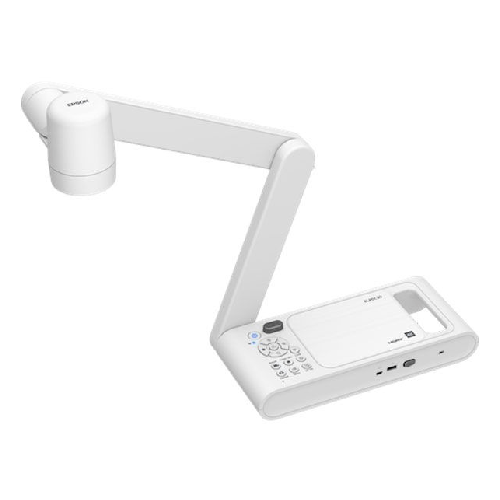
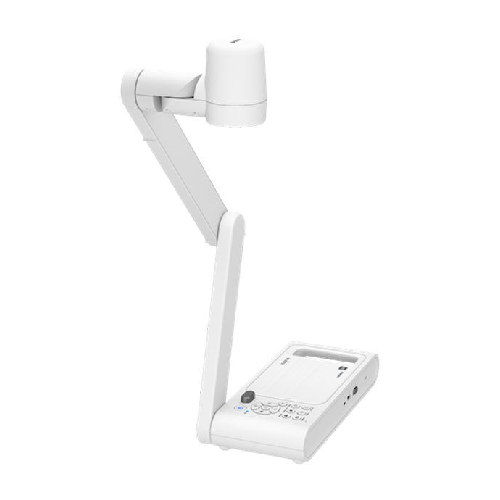
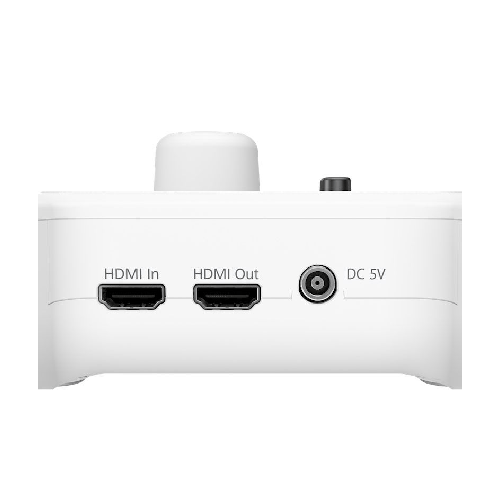
Epson ELPDC30 4K Document Camera
Regular Price:৳135,000.00Availability: SKU: 7.29.8.9539
Quick Overview
-
Support
Saturday – Thursday: 09 AM - 06 PM. -
Payment
Cash on Delivery | Card | Online Payment -
Shipping Cost
Inside Dhaka 100tk | Outside Dhaka 150tk -
Warranty Policy
Read More
Description
Epson ELPDC30 4K Document Camera in Bangladesh
The Epson ELPDC30 4K Document Camera/Visualizer is designed to be the teacher’s right-hand tool in modern classrooms, training rooms, and university lecture halls across Bangladesh. It takes what you place under its camera—textbooks, student work, lab experiments, 3D models, microscope slides—and projects them in crisp 4K detail, live and in real time.
With a 13MP (4208 × 3120) camera, 1/3.2" CMOS sensor, 10x optical + 23x digital zoom, up to 60 frames per second, and versatile outputs up to 4K (3840 × 2160), the Epson ELPDC30 turns any flat surface into an instant display surface. Teachers can walk into class, place a page, specimen, or object beneath the camera, and immediately share it with every student on the big screen.
For Bangladesh’s growing number of smart classrooms, coaching centres, schools, colleges, medical institutions, madrasahs and universities, the ELPDC30 is a natural partner for Epson projectors and interactive solutions, helping you explain complex topics more visually and interactively.
4K Clarity and 13MP Detail – See What Textbooks Can’t Show Alone
At the heart of the Epson ELPDC30 is a 13‑megapixel camera with a 1/3.2" CMOS sensor, capable of outputting up to 4K resolution. This high-resolution imaging brings clear benefits:
- Text and diagrams from printed books or handouts remain sharp and easy to read, even when zoomed in.
- Fine details—like small labels on circuit boards, delicate structures in biology specimens, or handwritten equations—stay clear on the projector or display.
- Colour accuracy helps show charts, experiments, and art work the way they were meant to be seen.
In a crowded classroom in Dhaka or Chattogram, students at the back often struggle to see the teacher’s small writing or tiny details on a whiteboard. By placing materials under the ELPDC30 and projecting in 4K, everyone gets an equally clear view, reducing strain and improving engagement.
Powerful Zoom: 10x Optical + 23x Digital (Total up to 230x)
The ELPDC30 combines 10x optical zoom with 23x digital zoom, offering up to 230x total zoom capability. Optical zoom allows you to enlarge without losing image quality, while digital zoom lets you push even deeper when needed.
In practical classroom use, this means you can:
- Zoom into a small paragraph or formula on a page so all students can read it clearly.
- Focus tightly on a specific part of a diagram or chart during step‑by‑step explanations.
- Magnify objects like insects, plant samples, coins, or electronic components until they fill the entire screen.
When combined with the microscope attachment support, even tiny particles or cells can be magnified to a size where the entire class can observe them comfortably—perfect for science labs and medical training in Bangladesh.
Smooth, Real-Time Video – Up to 60 fps
The Epson ELPDC30 supports a frame rate of up to 60 frames per second (fps). This matters when you’re:
- Demonstrating live experiments—like mixing chemicals, moving objects, or showing reactions.
- Writing or drawing in real time under the camera.
- Showing moving subjects or rotating 3D objects.
High frame rates mean smooth movement without choppiness or delay. Students see the teacher’s hand, pen, and materials move naturally, making demonstrations feel much more direct and intuitive. This is especially important for mathematics derivations, handwriting demonstrations, or detailed drawing and design classes, which are common in Bangladesh’s engineering, architecture, and art programs.
Flexible Mechanical Head – Easy Positioning & 180° Adjustment
The ELPDC30 features a flexible mechanical head that can be adjusted easily, with up to 180‑degree rotation. For teachers, this flexibility goes a long way:
- Quickly change between showing a book on the table, a 3D object, or writing on a sheet without re‑arranging the whole setup.
- Tilt and rotate to avoid glare from classroom lights.
- Adjust angles to accommodate hybrid or online classes where the camera feed is also going to a video conferencing platform.
In Bangladesh classrooms, where space around the teacher’s desk is often limited, being able to position and move the visualizer head freely makes teaching smoother and less frustrating.
Hassle-Free Compatibility with Epson Projectors and EIT
The Epson ELPDC30 is designed to integrate seamlessly with:
- Epson interactive projectors
- Epson Interactive Tool (EIT)
This integration allows:
- Direct plug-and-play use with compatible Epson projectors—just turn on and teach.
- Use of interactive features for annotating over the projected document camera image.
- Simplified control via projector remote / interface in certain setups.
For schools and institutions in Bangladesh already using or planning to deploy Epson projectors in their classrooms, the ELPDC30 slots straight into the ecosystem, reducing training time and technical complexity for teachers.
Record and Share Lessons with Built-in Microphone
One of the standout features for modern, hybrid teaching is the ELPDC30’s ability to record lessons:
- Capture what the camera sees directly to USB memory.
- Use the built-in microphone to record the teacher’s voice along with the visual content.
- Playback recorded lessons later for review or remote learning.
For Bangladesh schools and coaching centres, this means:
- Students who miss class due to illness or travel can catch up with recorded sessions.
- Teachers can build a digital library of lesson recordings, especially for critical topics like exam preparation, science labs, or key mathematical concepts.
- Online and blended learning models become easier to support with ready-to-use visual content.
Recording functions such as Capture, Record, Playback, Delete, and Slide Show are accessible via the camera’s menu when a USB memory device is connected.
Microscope Support – Bring the Invisible to the Big Screen
The ELPDC30 supports microscope attachment, which transforms it into a powerful teaching aid for:
- Biology and life sciences: Cells, tissues, microorganisms.
- Material science: Surface textures, small mechanical parts.
- Medical and nursing education: Slide observations and pathology samples.
With the microscope attachment, tiny content can be viewed at the largest scale, projected in 4K for an entire class or lecture theatre to see. This is particularly valuable in universities, medical colleges, and science-focused coaching centres in Bangladesh, where group observation around a single microscope has always been a challenge.
Comprehensive Basic Functions for Everyday Teaching
The Epson ELPDC30 is equipped with a wide range of practical features:
-
Zoom Controls:
- Total: up to 230x
- Optical: up to 10x
- Digital: up to 23x
- 1x zoom reset for quick return to normal view
-
Image & Display Controls:
- Brightness control
- Auto Focus for quick, sharp images
- Freeze/Stop to hold an image while you move materials
- Lamp on/off for additional illumination
- Image Rotation (0° / 180°) to orient content upright
-
Audio & Recording:
- Volume control
- Record and Capture (with USB memory)
- Playback for reviewing recorded content
-
Output Resolution Options:
- 4K / 1080p / 720p / XGA
-
Convenience Features:
- AE Lock (Auto Exposure Lock) to hold exposure under changing light
- Default/Reset settings
- Full Menu control from the unit itself
These functions make day-to-day operation intuitive and reduce the need to rely on a PC for basic visual tasks.
Advanced Image Adjustment & System Settings
For more demanding classroom and training environments, the ELPDC30 offers detailed adjustment options:
-
Image Adjustments:
- Brightness: 0–255
- Contrast: 0–255
- Saturation: 0–255
- Image Modes: Normal / Motion / Wide Angle / Microscope / Macro / Infinity
- Image Rotation: Normal / 180°
- Exposure: Auto / Manual (0–99)
-
White Balance:
- Auto
- Presets: Cloudy / Daylight / Fluorescent / Incandescent
- Manual white balance: 2800–10000K
-
System Settings:
- Language: 13 languages
- Output Display Resolutions:
- 3840 × 2160 @ 60 Hz
- 3840 × 2160 @ 30 Hz
- 1920 × 1080
- 1280 × 720
- 1024 × 768
- USB Streaming: H.264 On / Off
- Flickerless: 50 Hz / 60 Hz (important for Bangladesh’s 50 Hz mains environment)
- HDMI Link: On / Off
- Sleep Mode: On / Off, with timer 1–6 hours
- Microphone Volume: 0–20
-
Playback Controls (with USB memory):
- Slide Show: Start / Stop
- Interval: 1–100 seconds
- Delete All: Yes / No
These advanced settings are especially useful for IT administrators, AV staff, and tech-savvy teachers in Bangladesh who want to fine-tune performance to specific classrooms, lighting conditions, display equipment, and teaching styles.
Real-Life Classroom and Training Scenarios in Bangladesh
-
Primary and Secondary Schools
Teachers project pages from textbooks, show handwriting and math steps, or display student work for group feedback. The 4K clarity and zoom help every student see clearly, even in large classes. -
College and University Lecture Halls
Lecturers in science, engineering, and medicine use the ELPDC30 to show lab notes, circuit boards, architectural drawings, or microscope slides. The high resolution and 60 fps support detailed, dynamic presentations. -
Coaching Centres and Test Prep Institutes
In Dhaka’s competitive coaching market, instructors can write solutions on paper under the camera, record the session, and share the video with students. This builds a digital archive of exam-focused lessons. -
Vocational and Technical Training
Trainers in electronics, automotive, garment, or IT labs can demonstrate components, tools, and procedures under the camera, ensuring everyone sees critical details without crowding. -
Hybrid and Online Classes
With its flexible head and integrated recording, the ELPDC30 can serve as a key camera for online or hybrid teaching, feeding into conferencing platforms via PC while also projecting locally. -
Staff Training & Corporate Presentations
Companies and training centres can use the camera to present documents, forms, design drawings, and product samples during sessions, making explanations clearer and more engaging.
Portability and Classroom Practicality
Weighing around 2.8 kg, the Epson ELPDC30 is solid enough for stable use but still manageable to move between classrooms or training rooms when necessary. Teachers and trainers in Bangladesh who share equipment across multiple rooms will appreciate:
- Manageable weight and footprint
- Simple connection and menu structure
- Reliable operation for daily use
Ensuring a clean, clutter‑free teacher’s desk while still having powerful visual tools at hand is one of the ELPDC30’s key advantages.
Maintenance & Care
For best performance and longevity:
- Placement: Keep the unit on a stable surface where it won’t be knocked or bumped.
- Lens Care: Clean the lens gently with a soft, lint-free cloth; avoid touching it with fingers.
- Dust Management: In dusty environments, cover the ELPDC30 when not in use and periodically wipe surfaces.
- Power Protection: Use a surge protector, especially in areas of Bangladesh where voltage fluctuations are common.
- Safe Storage: When moving between rooms, carry the unit carefully and avoid dragging cables.
✅ Key Features
- 13MP CMOS Camera with 4K Output: Captures documents and objects in high resolution for clear, detailed classroom projection.
- 10x Optical + 23x Digital Zoom (Total up to 230x): Provides flexible magnification from full-page overviews to ultra-close details.
- Up to 60 fps Frame Rate: Ensures smooth, real-time video for writing, demonstrations, and moving subjects.
- Flexible Mechanical Head (Up to 180°): Allows easy positioning and angle adjustment to suit different teaching setups and hybrid classes.
- Seamless Epson Integration: Works smoothly with Epson interactive projectors and Epson Interactive Tool (EIT) for enriched smart classroom use.
- Built-in Mic with Recording & Playback: Lets teachers record lessons with audio to USB memory and replay them for revision or absent students.
- Microscope Attachment Support: Enables ultra-magnified views of tiny objects and slides for science and medical education.
- Rich Image & System Controls: Offers brightness, contrast, saturation, white balance, multiple image modes, and resolution/output settings to match many environments.
✅ Usage / Applications
- Primary and secondary school classrooms for everyday teaching and textbook sharing
- Colleges and universities for lectures, lab sessions, and seminar presentations
- Coaching and test prep centres for board exam, university admission, and professional exam preparation
- Medical and nursing institutes for displaying microscope slides and clinical diagrams
- Science and engineering labs for component, specimen, and experiment demonstrations
- Technical and vocational training centres for step-by-step practical instruction
- Corporate training rooms and meeting spaces for document review and product demos
- Hybrid and online classes as a high-quality document and object camera feeding into video conferencing
✅ Benefits of This Product?
- Improves Student Visibility and Engagement: All students, even at the back of the room, can see fine details clearly on the big screen.
- Saves Time During Class: Instantly display pages, notes, and objects without redrawing everything on the board.
- Supports Hybrid and Distance Learning: Recording with audio and USB playback make lesson sharing straightforward.
- Enhances STEM and Lab Teaching: Microscope compatibility and powerful zoom help explain complex scientific and technical concepts.
- Works Smoothly with Epson Projectors: Reduces compatibility headaches and training time where Epson ecosystems are deployed.
- Highly Customizable Image Settings: Tailors brightness, contrast, colour, and modes to different classroom lighting conditions and content types.
- Future-Ready Resolution Options: 4K and multiple output resolutions ensure compatibility with current and upcoming display technology.
✅ Ideal For
The Epson ELPDC30 4K Document Camera/Visualizer is ideal for educational institutions across Bangladesh that want to enrich classroom lessons with real-time, high-quality visuals. This includes schools, colleges, universities, coaching centres, medical colleges, vocational institutes, and madrasahs embracing multimedia teaching.
It’s a strong fit for teachers and trainers who regularly use physical books, printed handouts, lab specimens, or small 3D objects in their lessons and want a more efficient, impactful way to show these to the entire class. For administrators and IT/AV teams, the ELPDC30 is attractive because it integrates cleanly with existing Epson projectors and interactive tools, and offers flexible configuration options for different rooms and use cases.
✅ Why Choose the Epson ELPDC30 4K Document Camera/Visualizer?
Choosing the Epson ELPDC30 means prioritizing visual clarity, ease of use, and future-ready connectivity in your classrooms or training spaces. Its 13MP sensor and 4K output ensure that every line of text, every diagram, and every tiny object is shown with sharpness and detail that older visualizers simply can’t match. The 10x optical + 23x digital zoom and up to 60 fps performance make it suitable not just for static documents, but also for live demonstrations, annotations, and experiments.
Epson has built the ELPDC30 to sit comfortably in their broader education ecosystem, integrating with interactive projectors and Epson Interactive Tool (EIT), so schools don’t have to reinvent workflows. Teachers with varying technical comfort levels can still operate it confidently thanks to intuitive controls, one-touch functions, and clear menus. For institutions looking to support blended and remote learning, the built-in mic and recording features offer a straightforward way to create lesson content without extra cameras and complicated setups.
In short, the ELPDC30 is not just another accessory—it’s a central tool that can transform how lessons are shown and shared in Bangladeshi classrooms, labs, and training rooms for years to come.
✅ Why Buy This Product from BME?
Buying the Epson ELPDC30 4K Document Camera/Visualizer from Business Machine & Equipment (BME) gives you the advantage of working with a Bangladesh-based provider that understands local education and training requirements. BME focuses on supplying genuine, carefully sourced equipment, which is crucial for institutions making long-term investments in classroom technology.
Because document cameras are often deployed in multiple rooms—sometimes as part of a larger project with projectors, screens, and sound systems—BME can help you:
- Plan which rooms or campuses most need visualizers like the ELPDC30
- Match the ELPDC30 effectively with your existing Epson or non‑Epson projectors
- Understand cabling, mounting, and connectivity considerations in Bangladeshi classroom infrastructures
For schools, universities, NGOs, government training centres, and private coaching institutions, BME can provide B2B-friendly quotations and documentation, making procurement and budgeting easier. With a focus on Bangladesh-ready deployment and realistic guidance rather than overselling, BME positions itself as a trusted partner when you introduce advanced visual tools like the Epson ELPDC30 into your teaching environments.
✅ Buying Guide
To make the best decision with the Epson ELPDC30, consider the following points:
1. Identify Where It Will Be Used
- Classrooms, labs, lecture halls, training rooms?
- How many rooms need a document camera now, and how many later?
2. Check Display Equipment Compatibility
- Confirm what projectors or displays you have (HD, Full HD, 4K).
- Match output resolution settings on the ELPDC30 (4K/1080p/720p/XGA) to what your devices support.
3. Think About Your Teaching Content
- Heavy use of books and handouts? The ELPDC30 is ideal.
- Science or medical labs? Plan to use the microscope attachment.
- Mathematics / design / diagrams? Consider how zoom and freeze features will help.
4. Plan for Recording and Storage
- If you want to record lessons, budget for reliable USB memory sticks or external storage.
- Decide how recordings will be shared (LMS, school website, offline distribution).
5. Consider Lighting and Room Environment
- Check if you need the built-in lamp frequently due to low light.
- Use Flickerless mode (50/60 Hz) appropriate to mains frequency to avoid screen flicker.
6. Integration with Existing Systems
- If you use Epson interactive projectors and software, ensure you align EIT and HDMI Link settings.
- Confirm cabling runs between teacher desk and projector/display points.
7. Teacher Training & Ease of Use
- Plan a short demonstration or training session for staff, focusing on zoom, focus, freeze, and record functions.
- Make quick-reference guides or labels if needed.
8. Common Mistakes to Avoid
- Buying too few units for a campus where teachers constantly have to move equipment between classes.
- Not providing suitable surge protection, leading to premature damage in unstable power conditions.
- Ignoring brightness and white balance settings and then blaming the visualizer for poor image quality.
- Forgetting to regularly back up and manage recorded lessons from USB devices.
By thinking through these points, schools and institutions in Bangladesh can integrate the Epson ELPDC30 smoothly and get maximum value from day one.
✅ Customers Ask About / Frequently Asked Questions
Q1: Is the Epson ELPDC30 suitable for large classrooms in Bangladesh?
Yes. With its 4K output, 13MP camera, and strong zoom, the ELPDC30 is ideal for large classrooms and lecture halls where students sit far from the screen.
Q2: Do I need a computer to use the ELPDC30?
Not necessarily. You can connect the ELPDC30 directly to a projector or display via HDMI and use it as a standalone document camera. A PC is only needed for specific software workflows or online classes.
Q3: Can it work with non-Epson projectors?
Yes. It outputs standard video resolutions (4K/1080p/720p/XGA) over HDMI, which most projectors and displays support. However, deeper integration features are optimized for Epson projectors.
Q4: How do I record lessons with the ELPDC30?
Connect a USB memory device, then use the Record and Capture functions from the unit’s menu. The built-in microphone captures your voice along with the visuals.
Q5: Is the microscope attachment included?
Specs confirm microscope support, but actual inclusion of an attachment may depend on the sales package. Check with BME about what’s included and available accessories.
Q6: Does it support 4K at 60Hz?
Yes. Output display options include 3840 × 2160 @ 60 Hz and 3840 × 2160 @ 30 Hz, along with lower resolutions.
Q7: Can I adjust the image for different lighting conditions?
Yes. You can adjust brightness, contrast, saturation, exposure, white balance, and choose from image modes like Normal, Motion, Wide Angle, Microscope, Macro, and Infinity.
Q8: Is the ELPDC30 good for online classes?
Yes. It can be used with a PC as a high-quality document and object camera, and its built-in mic plus recording features are very useful for hybrid and online teaching models.
Q9: What about maintenance in dusty classrooms?
Keep the lens clean with a soft cloth, avoid touching it with fingers, and consider covering the device when not in use. Regular light cleaning is usually sufficient.
Q10: What sort of warranty should I expect in Bangladesh?
Warranty terms depend on official policies at the time of purchase. When buying from BME, you can confirm current warranty coverage and any available support options.
✅ Why Buy This Product
The Epson ELPDC30 4K Document Camera/Visualizer is a powerful way to transform everyday teaching and training into something more visual, interactive, and memorable. Instead of rewriting or redrawing every example on the board, you simply place your material under the camera and share it instantly in 4K detail. With 13MP resolution, powerful zoom, 60 fps streaming, recording, microscope support, and rich adjustment options, it’s built to meet the needs of modern education and professional training in Bangladesh.
Whether you are upgrading a single smart classroom or equipping an entire campus, the ELPDC30 adds real value to your teaching tools. Order the Epson ELPDC30 4K Document Camera/Visualizer from BME today to enrich your lessons, improve student engagement, and build a future-ready visual learning environment that supports in-person, hybrid, and online education alike.
What is the price of Epson ELPDC30 4K Document Camera in Bangladesh?
Write a review
Question Answer
Have question about this product? Get specific details about this product from expert.


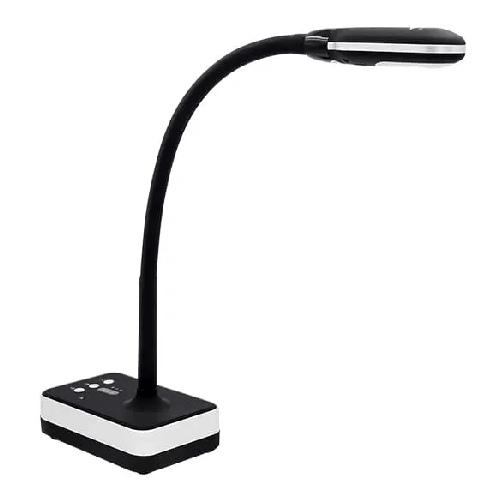
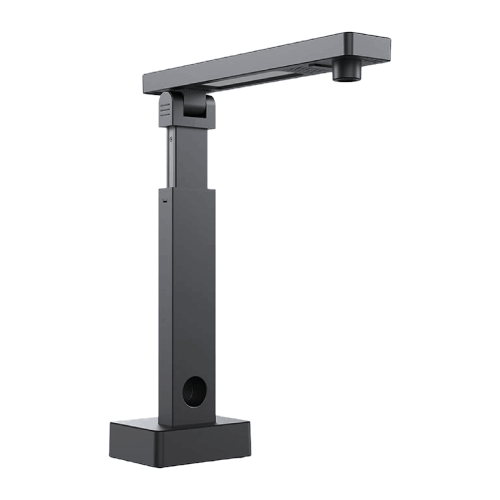
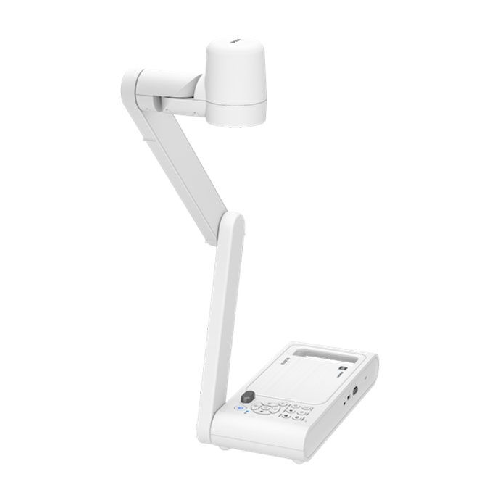
Epson ELPDC30 4K Document Camera
Eversolo Play Streaming Amplifier
Epson ELPDC30 4K Document Camera


Epson WorkForce DS-60000 A3 Auto Duplex Scanner

Epson WorkForce DS-970 A4 Document Scanner

Epson DS-870 Color Duplex Document Scanner


Epson WorkForce DS-50000 Color Scanner

Epson DS-530 Duplex Document Scanner


