

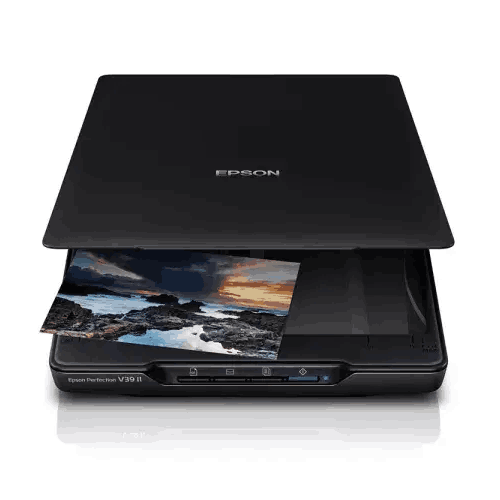
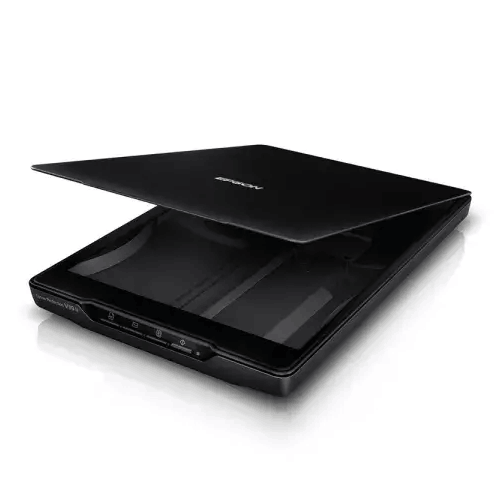
Epson Perfection V39II Flatbed Scanner
Regular Price:৳0.00Availability: SKU: 7.29.8.9219
Quick Overview
-
Support
Saturday – Thursday: 09 AM - 06 PM. -
Payment
Cash on Delivery | Card | Online Payment -
Shipping Cost
Inside Dhaka 100tk | Outside Dhaka 150tk -
Warranty Policy
Read More
Description
Epson Perfection V39II Flatbed Scanner Price in Bangladesh
The Epson Perfection V39II Flatbed Scanner is designed for those everyday scanning needs—simple, clean, and space-friendly—while still delivering high image detail. As an A4 Flatbed Color Image Scanner, it focuses on convenience and quality: high resolution capture, USB bus power (no bulky adapter), one-touch buttons for common tasks, and Epson’s photo enhancement tools that make old images look better with minimal effort.
If you want a scanner that feels easy enough to use daily—but powerful enough to produce sharp, clean scans when it matters—the V39II is a practical and popular style of device.
A4 flatbed scanning: the most forgiving scanning method
Flatbed scanners remain the “safe choice” because you’re not relying on rollers to feed paper. You place the original on the glass, align it, and scan. That’s ideal for:
- Certificates and official papers that must remain undamaged
- Old documents with thin or brittle pages
- Receipts and small items (placed carefully on the bed)
- Stapled or bound pages (scan page-by-page)
- Photos and artwork where you want more control
The V39II supports a flatbed scan area of 216 × 297 mm (8.5" × 11.7"), which covers standard A4 documents—exactly what most Bangladesh users handle daily.
High resolution for documents and photo detail: 4800 × 4800 dpi
The V39II’s resolution is specified as 4800 × 4800 dpi. For everyday paperwork, you typically scan at lower settings like 300 dpi to keep files small and fast. But having a very high maximum resolution is valuable when you scan:
- Old photos you may want to reprint later
- Small details in documents, stamps, or signatures
- Artwork and illustrations where detail matters
- Cropping scenarios (scan larger, crop later while keeping quality)
This scanner uses a CIS (Contact Image Sensor) with a stated pixel array corresponding to 4800 dpi, and a three-color RGB LED light source. In practical terms, this contributes to sharp capture and consistent illumination.
Color depth that preserves what matters
When documents include stamps, seals, colored highlights, or handwritten notes, color handling becomes important. The V39II supports:
- Color Depth: 48-bit internal / 24-bit external
- Grayscale: 16-bit internal / 8-bit external
This supports richer capture data internally, helping create more natural-looking outputs, particularly for photos and color documents.
Realistic scanning speeds for daily use
Speed specifications are provided (via USB 2.0):
- Color 300 dpi: approximately 10 seconds
- Color 600 dpi: approximately 30 seconds
These numbers are practical for home and small office scanning. In Bangladesh, many users scan a few pages at a time—applications, IDs, certificates, and forms. At 300 dpi, the experience remains quick enough to stay convenient.
USB bus power: less clutter, easier setup
One reason the V39II is popular for homes and compact workspaces is power simplicity. It uses:
- USB Interface Bus Power (Micro‑B connector): 5V, 500 mA
- Interface: Hi-speed USB 2.0
In plain terms: no separate power adapter is required. This is ideal for Bangladesh users who want a cleaner desk, fewer wires, and fewer points of failure—especially in small rooms or shared family workspaces.
Power consumption is also very low:
- Operating: 2.5 W
- Ready: 1.1 W
- Off: 0.0125 W (when PC is suspended)
Low power use is helpful in any environment, and it’s especially practical if you keep your workstation and scanner connected throughout the day.
One-touch buttons: scanning made easier for everyone
The V39II includes 4 buttons: PDF, Send, Copy and Start. This sounds simple, but it’s a major usability win in Bangladesh homes and offices where the scanner may be used by different people with different skill levels. One-touch buttons reduce the steps needed to scan, save, and share.
For example:
- PDF helps create document files quickly for email or submission portals
- Send supports a “scan and share” routine
- Copy helps when you want a quick duplicate via your printer workflow
- Start supports straightforward scanning without digging through menus
Epson Easy Photo Fix: better-looking photo scans with less effort
The V39II includes Epson Easy Photo Fix Technology. For families digitizing old albums, this can be the difference between “washed-out scans” and scans that look presentable without hours of manual editing. It’s useful for improving the appearance of faded photos or balancing color and contrast—especially when you’re scanning memories rather than perfect studio prints.
Removable lid and built-in stand: flexibility for thick or awkward items
Bangladesh users often scan more than flat paper: book pages for research, thicker documents, certificates with raised seals, or even craft materials. The V39II includes:
- Removable scanner lid for oversized and thick media
- Built-in stand for upright scanning and storage
These features make the scanner easier to store in tight spaces and easier to use with non-standard originals. Upright storage can be particularly useful for dorm rooms, home offices, and small desks in Dhaka apartments where every inch matters.
Environment suitability for Bangladesh
Operating environment is specified as:
- Temperature: 10°C to 35°C
- Humidity: 20% to 80% (no condensation)
That fits typical indoor conditions. For best results in Bangladesh, avoid placing the scanner near windows with direct sunlight, and keep it away from very humid corners or locations where condensation can form (especially during monsoon season). A clean, dust-controlled placement will also keep scans clearer over time.
OS compatibility (important for older systems)
The V39II lists support for:
- Windows: 8.1, 8, 7, Vista, XP SP2
- Mac OS X: 10.6.x through 10.10.x
This is notable because it indicates compatibility with older operating systems. If you are using a modern Windows version newer than those listed, confirm driver availability in your environment before deployment (the provided data only confirms the versions listed). For businesses and institutions in Bangladesh that still run legacy machines for certain tasks, this older OS support can be a practical advantage.
Included accessories: ready to start scanning
Included items are listed as:
- Scanner main unit
- USB 2.0 cable
- Setup guide
This is useful for buyers who want a straightforward “unbox and use” setup without hunting for a compatible cable.
Dimensions: compact and desk-friendly
The scanner’s dimensions are provided as:
- 349 mm (W) × 364 mm (D) × 39 mm (H)
This slim profile makes it easy to place in a small workstation area. In Bangladesh homes, scanning often happens on the same desk used for studying or office work; a thin flatbed is easier to live with than bulky equipment.
Bangladesh use-cases where the V39II fits perfectly
1) Students and admission paperwork
Scan certificates, marksheets, NID copies, and forms into clean PDFs for online submission or email sharing.
2) Home office and freelancer workflows
Scan signed documents, client forms, and receipts for record keeping, invoicing, and compliance needs.
3) Small business documentation
Digitize invoices, supplier paperwork, agreements, and other records without risking jams on delicate pages.
4) Photo digitization for families
Use high resolution plus Easy Photo Fix to preserve old family photos, wedding images, and childhood memories.
5) Creative scanning
Scan sketches, art, and printed materials for presentations, portfolios, and online sharing.
Practical tips to get the best scans (general, accuracy-safe)
- For documents, start with 300 dpi to balance clarity and file size.
- For photos you want to archive or reprint, try higher resolution settings.
- Clean the glass occasionally with a microfiber cloth to reduce dust spots.
- For thick items or books, use the removable lid carefully and scan in sections as needed.
- Save important documents as PDF; use JPEG/PNG for images and quick sharing.
The Epson Perfection V39II Flatbed Scanner is a simple but capable scanner designed for people who value neat results, compact design, and everyday ease. In Bangladesh, where paperwork still matters and photo preservation is becoming more popular, it’s an excellent match for homes, students, and small offices that want reliable flatbed scanning without complexity.
✅ Key Features
- High Resolution 4800 × 4800 dpi: Captures detailed scans for photos, documents, and fine print when you need extra clarity.
- A4 Flatbed Scan Area (216 × 297 mm): Handles standard documents used daily in Bangladesh homes and offices.
- USB Bus-Powered Design: Runs on 5V USB power, reducing cable clutter and eliminating a separate power adapter.
- 4 One-Touch Buttons (PDF/Send/Copy/Start): Speeds routine scanning and makes operation easy for any user.
- Epson Easy Photo Fix Technology: Helps improve the look of older photos with simple enhancement tools.
- Removable Lid for Thick Media: Allows more flexibility when scanning books, certificates, or thicker originals.
- Built-in Upright Stand: Supports vertical storage and upright scanning to save desk space.
- CIS Sensor + RGB LED Light Source: Provides consistent illumination and sharp capture for everyday scanning.
- Low Power Consumption: Keeps running costs minimal with efficient operating and ready modes.
- Hi-speed USB 2.0 Interface: Ensures stable connection for reliable scanning sessions.
- Good Color and Grayscale Depth: Preserves more detail in color documents, stamps, and photo scans.
- Complete Box Contents: Includes the scanner unit, USB cable, and setup guide for quick setup.
✅ Usage / Applications
- Student admissions and scholarship paperwork scanning into PDFs for online submission.
- Home office documentation such as signed forms, bills, and personal records.
- Small business filing for invoices, agreements, and vendor documents.
- Photo digitization for family albums and archiving printed memories.
- Creative work scanning for sketches, artwork, and portfolio building.
- Travel and visa documentation scanning (forms, copies, supporting documents).
- School project preparation where printed materials need to be digitized and edited.
- Quick copy-style workflows using the Copy button with a connected printer setup.
✅ Benefits of This Product?
- Produces cleaner, sharper scans with high resolution and strong color depth.
- Saves desk space and reduces clutter thanks to slim design and USB bus power.
- Makes scanning easier for everyone using simple one-touch buttons for common tasks.
- Improves old photo quality with Easy Photo Fix enhancement tools.
- Handles delicate and thick originals better than sheet-fed scanners with a flatbed design and removable lid.
- Keeps electricity use low with very modest operating power consumption.
- Supports quick everyday scanning with practical speed at 300 dpi for color documents.
- Ideal for home and small office routines where scanning is frequent but not industrial-scale.
✅ Ideal For
The Epson Perfection V39II Flatbed Scanner is ideal for Bangladesh users who want a compact, dependable scanner for daily personal and office needs. It’s a great fit for students and families in Dhaka who regularly scan certificates, forms, and academic documents for online submissions. It also suits freelancers and home-office users who need clean PDFs for client communication, record keeping, and compliance. Small businesses will benefit from flatbed scanning for invoices, agreements, and stamped paperwork that can be tricky for ADF scanners. If you plan to digitize printed photos, the V39II’s high resolution and Easy Photo Fix technology make it especially appealing. And if your workspace is tight, the USB-powered design and upright storage stand help keep your desk neat and organized.
✅ Why Choose the Epson Perfection V39II Flatbed Scanner?
The V39II is a smart choice when you want high scan quality without a complicated setup. Its 4800 × 4800 dpi resolution gives you the ability to capture fine detail—useful not only for photo scanning but also for documents that include stamps, signatures, or small text. The flatbed format is naturally safer for delicate originals, and it’s easier to control alignment and quality compared to feeding stacks through an ADF.
For Bangladesh homes and small offices, convenience matters. The V39II’s USB bus power simplifies installation: fewer cables, no adapter, and easy portability between desks. The four one-touch buttons are also a practical advantage, especially when multiple people use the same scanner—scan to PDF, send, copy, or start with minimal steps.
Finally, features like Easy Photo Fix, a removable lid, and a built-in upright stand show that Epson designed the V39II for real-world use: scanning photos, scanning thicker items, and storing the scanner neatly when space is limited. If you want a compact scanner that does a wide variety of everyday jobs well, the V39II delivers that balance.
✅ Why Buy This Product from BME?
Buying a flatbed scanner in Bangladesh is easiest when the seller can help you match the product to your actual usage—documents, photos, student paperwork, or small business filing. Business Machine & Equipment (BME) can help you purchase the Epson Perfection V39II with clear guidance on setup and everyday workflow, so you get the best results without trial and error.
Because users often have different computers and operating systems at home and in offices, BME can help you check compatibility based on your environment and ensure you understand how the scanner connects (USB 2.0, bus-powered via Micro‑B). For business and institutional buyers, BME can also support quotation and procurement documentation, making the buying process smoother.
Most importantly, BME can guide you on practical workflow choices: which scan resolution to use for certificates vs photos, when to choose PDF vs image formats, and how to organize files for easy retrieval later. That kind of guidance is often what turns a scanner from “another device” into a tool you actually use consistently.
✅ Buying Guide
- Step 1: Define what you scan most: For documents and certificates, an A4 flatbed is perfect; for high-volume stacks, consider ADF models instead.
- Step 2: Choose resolution based on purpose: 300 dpi is excellent for most documents; use higher resolution for photos or when you need extra detail.
- Step 3: Plan your file format workflow: Use PDF for official document submission and record keeping; use JPEG/PNG for images and quick sharing.
- Step 4: Consider your workspace: If desk space is limited, a slim scanner with upright storage is easier to live with.
- Step 5: Check power and connectivity: USB bus power is convenient, but ensure your PC has a stable USB port and you can place the scanner close enough.
- Step 6: Think about thick originals: If you scan books or thick certificates, a removable lid is a practical advantage.
- Step 7: Verify OS compatibility: Match the scanner’s listed OS support to your computer environment before ordering.
- Step 8: Avoid common mistakes: Don’t overscan everyday documents at extremely high DPI (files become large); don’t place dusty items on the glass; don’t store important records without consistent folder naming.
- Step 9: Set a simple naming system: Date + document type + person/project name improves retrieval later.
- Step 10: Maintain scan quality: Clean the glass occasionally and store the scanner upright when not in use to reduce dust buildup.
✅ Customers Ask About / Frequently Asked Questions
-
Q: Is the Epson Perfection V39II suitable for A4 documents?
A: Yes. It’s an A4 flatbed scanner with a scan area of 216 × 297 mm (8.5" × 11.7"). -
Q: What is the maximum scan resolution?
A: The scanner is specified at 4800 × 4800 dpi. -
Q: Does the V39II need a power adapter?
A: No. It uses USB interface bus power (5V, 500 mA) through a Micro‑B connector. -
Q: How fast is scanning at common settings?
A: It’s listed as approximately 10 seconds for color at 300 dpi and 30 seconds for color at 600 dpi (via USB 2.0). -
Q: Does it have one-touch buttons for scanning?
A: Yes. It has 4 buttons: PDF, Send, Copy, and Start. -
Q: Can it scan photos?
A: Yes. It’s designed for color image scanning and includes Epson Easy Photo Fix for improving photo scan appearance. -
Q: Can it scan thick books or bulky documents?
A: It includes a removable scanner lid for oversized and thick media, which helps with bulkier originals. -
Q: What connection does it use to the computer?
A: It uses Hi-speed USB 2.0. -
Q: What are the supported operating systems?
A: Windows 8.1/8/7/Vista/XP SP2 and Mac OS X 10.6.x through 10.10.x are listed as supported. -
Q: What items come in the box?
A: The package includes the scanner main unit, USB 2.0 cable, and setup guide. -
Q: What are the operating environment requirements?
A: Temperature is 10°C to 35°C, and humidity is 20% to 80% with no condensation. -
Q: Is it easy to store in small rooms?
A: Yes. It includes a built-in stand for upright scanning and storage, which helps save space.
✅ Why Buy This Product
If your daily scanning needs in Bangladesh involve certificates, forms, printed photos, and important papers that you want to handle safely, a compact flatbed scanner is one of the most dependable solutions. The Epson Perfection V39II Flatbed Scanner combines high resolution, simple USB-powered setup, and one-touch scanning buttons that make it easy for anyone in the family or office to use. With features like Easy Photo Fix for photo enhancement, a removable lid for thicker media, and a slim design with upright storage, it’s built for real home and small office life—where space is limited and convenience matters.
What is the price of Epson Perfection V39II Flatbed Scanner in Bangladesh?
Write a review
Question Answer
Have question about this product? Get specific details about this product from expert.

Canon CanoScan Lide 300 Flatbed Scanner


Avision FB5000 A3 Size Slim Flatbed Scanner




Epson WorkForce DS-60000 A3 Auto Duplex Scanner

Epson WorkForce DS-970 A4 Document Scanner

Epson DS-870 Color Duplex Document Scanner


Epson WorkForce DS-50000 Color Scanner

Epson DS-530 Duplex Document Scanner


