

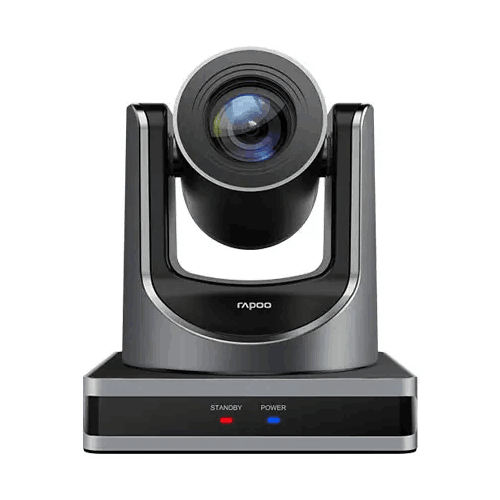
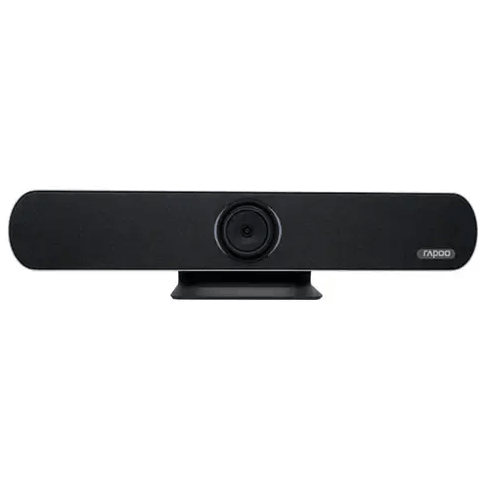
Rapoo C1612 HD Video Conference Camera
Regular Price:৳72,000.00Availability: SKU: 6.57.151.9663
Quick Overview
-
Support
Saturday – Thursday: 09 AM - 06 PM. -
Payment
Cash on Delivery | Card | Online Payment -
Shipping Cost
Inside Dhaka 100tk | Outside Dhaka 150tk -
Warranty Policy
Read More
Description
Rapoo C1612 HD Video Conference Camera in Bangladesh
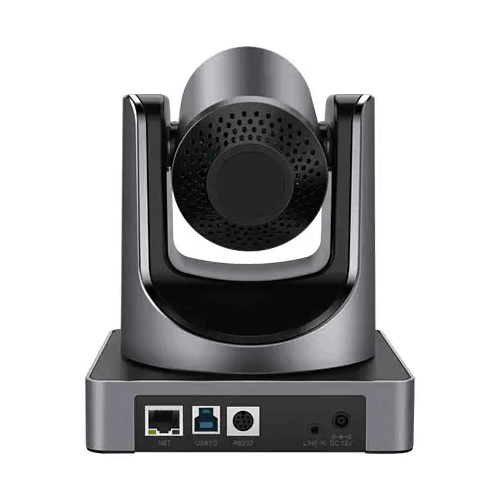
The Rapoo C1612 HD Video Conference Camera is designed for video-conferencing setups where resolution, zoom and system connections all matter. Its supplied specifications list a 2.07-megapixel Panasonic CMOS sensor, 1080P video, autofocus, 12x optical zoom and 16x digital zoom. The camera also lists HDMI, USB 3.0 and LAN interfaces for HD video output, alongside RS232, RS485, network and USB interfaces for remote control.
Those options give a system designer several details to consider when planning how the camera will connect to a computer, display or other compatible equipment. They do not, by themselves, confirm that the camera will work with every conferencing platform or network setup. The supplied information does not specify the frame rate, lens field of view, supported network-video protocol, mounting accessories or box contents. Buyers should check those points against their intended setup rather than infer them from the model name or port list.
1080P video from a Panasonic CMOS sensor
The C1612’s listed 2.07-megapixel Panasonic CMOS sensor supports 1080P video resolution. This Full HD format is a practical choice for meeting, presentation and training systems designed around 1080P displays or conferencing equipment. It provides a stated resolution to use when checking compatibility with the rest of a room’s video chain.
The result seen by participants will depend on more than the camera’s resolution. The connected computer or endpoint, selected output, cabling, conferencing software and display all have a role in the final image. For that reason, buyers planning to use the Rapoo C1612 in an existing installation should confirm which device will receive its video and whether that device accepts the required input. The product details supplied do not state a frame rate or list specific supported video formats beyond 1080P, so these should be confirmed for any project with particular recording or conferencing requirements.
Autofocus, optical zoom and digital zoom
Autofocus is listed as a feature of the Rapoo C1612. It can help keep the subject in focus as framing changes, although the supplied information does not describe focus modes, focusing speed or how focus behaves in different lighting conditions. If the camera will be used for a particular room layout or type of presentation, test the focus at the intended camera position when possible.
The camera also lists 12x optical zoom and 16x digital zoom. Optical zoom changes lens magnification; digital zoom enlarges or crops the image electronically. These options can give an operator more flexibility when framing a speaker or presentation area, but the useful result depends on camera placement, subject distance, image settings and the receiving display. The product details do not provide a lens field of view or specific room-size recommendation. Check the view at the farthest intended seat or speaking position rather than assuming the zoom figures alone determine whether the framing will suit a room.
Image adjustment for different lighting conditions
The supplied specifications list adaptive white balance and intelligent noise reduction for low-illumination images. White balance helps the camera adjust how colours appear under different lighting, while noise reduction is intended to address image noise in low-light conditions. The listed signal-to-noise ratio is 55 dB; the provided information does not state the measurement conditions or a minimum illumination rating.
These features may be useful in rooms where lighting varies between daylight, ceiling lights and presentation modes. They are not a substitute for sensible room lighting. A camera can only work with the light available to it, so avoid placing it where a bright window sits directly behind the presenter if that can be prevented. For critical installations, check the camera under the actual lighting conditions and confirm any image controls available to the operator. The supplied information does not list a lux rating or specify performance in near-dark conditions, so those capabilities should not be assumed.
Remote control options for different system designs
The Rapoo C1612 lists RS232, RS485, network and USB interfaces for remote control. This variety can be relevant when a room is controlled from a computer, a dedicated control system or another compatible device. A buyer can assess which listed interface best fits the equipment already in place and the way operators will use the camera.
The interface names do not identify supported control protocols, software, commands, cabling requirements or control-system compatibility. For example, the presence of an RS232 or RS485 interface does not confirm compatibility with a particular controller or command set. Similarly, “network” support does not identify an application, protocol or network configuration. Before purchase, confirm the exact control method required by the planned system and ask whether the C1612 supports it. This is especially important when a room depends on centralised controls or an existing control program rather than manual operation.
HDMI, USB 3.0 and LAN video output
The supplied product details state that the HDMI, USB 3.0 and LAN interfaces can output HD video at the same time. That can be useful in a design where more than one compatible video path is needed. For example, a system may be designed to connect a camera to different types of receiving equipment, subject to the requirements of each device and the chosen setup.
The phrase “at the same time” is worth confirming for a specific installation. The supplied information does not explain the supported resolutions, formats, operating modes or network-video protocol for each output, nor does it say whether every combination of endpoints is supported. A device having a LAN port does not establish that it supports a particular streaming platform or standard. If the LAN output is important to your project, ask for details about how it works with the intended network equipment and software. If USB 3.0 or HDMI is the primary connection, check the receiving device’s input requirements, cable needs and supported video modes before finalising the installation.
Slice and SVC encoding support
The C1612 is listed as supporting Slice and SVC encoding modes, with the product information describing this as suitable for advanced USB video-conferencing applications. These details may matter when an application or connected device specifies a particular encoding requirement. Buyers should check the naming and requirements against their actual conferencing software or endpoint rather than assume universal compatibility.
The supplied description does not provide technical implementation details, selectable settings or a compatibility list. For a simple room setup, the main question may be whether the camera’s output can be recognised by the computer or conferencing equipment being used. For a more specific USB workflow, confirm that the connected application supports the required mode and that any setup or driver requirements are understood before deployment.
Power choices to consider before installation
The listed power options are USB 5V, a 12V power adapter and PoE. This can give an installer more than one method to consider when planning a room, but the details provided do not specify the PoE standard, voltage or power budget. They also do not confirm whether a 12V adapter, PoE injector or other power equipment is included with the camera.
Choose the power method only after checking the manufacturer’s requirements for the exact unit and the equipment you plan to use. Do not assume that every PoE switch or injector will be appropriate just because PoE is listed. Ask BME to confirm the PoE specification and supplied accessories before ordering. The information provided also does not say whether multiple power inputs can be used at once; follow the product documentation rather than connecting power sources based on assumption.
Planning the camera around a room’s equipment
Start by deciding where the C1612 needs to send video. A system using HDMI, USB 3.0 or LAN may have different requirements for its receiving equipment, cable route and software. If simultaneous output is required, confirm the exact output combination and modes rather than designing around the port names alone. A room with an existing meeting computer or video system should be checked for input compatibility before the camera is added.
Next, assess control and power. Decide whether the installation will use RS232, RS485, network or USB remote control, then confirm the relevant protocol and connection details. For power, verify whether USB 5V, a 12V adapter or a compatible PoE setup is intended. Separating these questions early can help avoid buying extra equipment or discovering that a required cable or control system is missing during installation.
Where the C1612 may be used
The Rapoo C1612 can be considered for business meeting rooms, training spaces, classrooms, presentation areas, remote interviews and other video-conferencing setups that need a 1080P camera source. Autofocus and the listed zoom functions may help with framing a presenter or meeting participants, depending on camera placement and the viewing area. For teaching or training, a system designer might assess whether the camera’s video can be connected to the intended computer, display or compatible network workflow.
The listed interfaces may also make the camera worth evaluating in rooms that need more than one kind of video connection or a remote-control option. However, the camera is only one part of a conferencing system. Users may need a separate computer or meeting endpoint, microphones, speakers and conferencing software. No room-size rating, field of view, audio feature or app certification was supplied, so suitability should be checked against the actual room plan and equipment list.
A camera component, not a complete meeting system
The supplied specifications describe video capture, outputs, control interfaces and power options. They do not list a built-in microphone, loudspeaker, meeting software, recording function or conferencing-platform integration. Buyers should therefore plan for the rest of the system separately and avoid treating the C1612 as an all-in-one conferencing solution.
For a complete setup, consider how participants will be heard, what equipment will manage the meeting and how camera video will reach that equipment. Confirm whether additional audio devices are needed and whether the intended host or conferencing endpoint accepts the camera’s chosen output. This approach is particularly useful when replacing a webcam or integrating a camera into an existing room, because the available connections and control requirements may differ from a simple plug-and-play setup.
Warranty and purchase checks
The product information supplied for the Rapoo C1612 lists a 1-year brand warranty. Confirm the warranty terms that apply to the unit being sold in Bangladesh, including what documentation is provided and how a warranty claim is handled. The supplied details do not specify exclusions, service procedures or whether any accessories have separate coverage.
Before completing an order, check the current price, availability, exact contents of the box, power accessories and the interface details that matter to your installation. If LAN video output, PoE or a specific remote-control method is essential, ask for confirmation of the relevant technical detail. A short compatibility check before purchase can help ensure the camera fits the intended system and avoids assumptions based only on a product description.
✅ Key Features
- 2.07MP Panasonic CMOS sensor: The listed sensor provides a 1080P video source for compatible conferencing and presentation systems.
- Autofocus: Autofocus support can help keep the subject in focus as the framing changes.
- 12x optical zoom: Optical zoom gives the operator a lens-based way to adjust framing.
- 16x digital zoom: Digital zoom provides an additional electronic zoom option, with results dependent on the video workflow.
- Multiple remote-control interfaces: RS232, RS485, network and USB control options are listed for compatible setups.
- HDMI, USB 3.0 and LAN outputs: The supplied specifications state that these interfaces can output HD video at the same time.
- Adaptive white balance: This feature is listed to adjust image colour balance under different lighting conditions.
- Low-light noise reduction: Intelligent noise reduction is listed for low-illumination images, with a stated signal-to-noise ratio of 55 dB.
- Slice and SVC encoding: The camera lists support for these encoding modes for compatible advanced USB video applications.
- Flexible power options: USB 5V, a 12V power adapter and PoE are listed, with the exact PoE requirement to be confirmed.
- 1-year brand warranty: The supplied product information lists a 1-year brand warranty; confirm its local terms before purchase.
✅ Usage / Applications
- Business meetings: Use the C1612 as a camera source in a compatible meeting-room system.
- Boardroom presentations: Connect video to appropriate equipment after checking its input and output requirements.
- Training sessions: Use the camera in a compatible setup for instructor-led or remote training.
- Classroom and education use: Assess it for lessons or presentations where a 1080P video source is needed.
- Remote interviews: Pair it with compatible conferencing or recording equipment after confirming the software workflow.
- Teleconsultation environments: Consider it as a video component in a compatible system, with separate audio and platform requirements checked.
- Multi-output installations: Evaluate the listed HDMI, USB 3.0 and LAN outputs where compatible equipment needs more than one video path.
- Rooms with changing lighting: Test the adaptive white balance and listed low-light noise reduction under the actual room lighting.
✅ Benefits of This Product?
- A defined Full HD source: The listed 1080P resolution gives buyers a clear video specification to compare against their meeting equipment.
- More framing flexibility: Optical and digital zoom provide different ways to adjust the camera view for a particular setup.
- Focus support: Autofocus may reduce the need for repeated manual adjustments as framing changes.
- Choice of control connections: Multiple listed interfaces let buyers assess the control method that fits their system.
- More than one video connection option: HDMI, USB 3.0 and LAN output options broaden the interfaces available to evaluate.
- Image adjustment features: Adaptive white balance and low-light noise reduction are listed for differing lighting conditions.
- Several power methods to investigate: USB 5V, 12V adapter power and PoE are listed, subject to confirming exact requirements.
- A stated warranty period: The supplied information lists a 1-year brand warranty, which buyers can confirm with BME before purchase.
✅ Ideal For
The Rapoo C1612 is ideal for businesses, educational organisations, training providers and institutions that need a dedicated camera in a compatible conferencing or presentation system. It may suit meeting spaces where participants or presenters sit at different distances, because the listed 12x optical zoom offers more framing options than a camera with no optical zoom. The actual field of view and room suitability should still be checked at the intended camera position.
Its 1080P resolution, autofocus, adaptive white balance and listed low-light noise reduction may be useful for teams that need a video source across different room conditions. The C1612 is also worth evaluating for installations where HDMI, USB 3.0 or LAN output, or RS232, RS485, network or USB control, is required. Buyers should confirm compatibility before purchase because the supplied specifications do not name control protocols, video formats or supported conferencing applications. The C1612 is a camera component, not a complete meeting system; plan separately for a compatible host or endpoint, conferencing software and any required audio equipment.
✅ Why Choose the Rapoo C1612 HD Video Conference Camera?
The Rapoo C1612 combines several useful camera specifications in one model: a 2.07-megapixel Panasonic CMOS sensor, 1080P video, autofocus, 12x optical zoom and 16x digital zoom. That combination gives buyers a clear starting point when comparing dedicated conferencing cameras for a room where framing and connection choices matter. The optical and digital zoom options provide different ways to adjust the image, while autofocus is listed as a convenience for keeping the subject in focus.
Its range of interfaces is another reason to consider the C1612. The specifications list HDMI, USB 3.0 and LAN for HD video output, with the outputs stated to operate at the same time. They also list RS232, RS485, network and USB for remote control. These choices may be useful in systems designed around different types of video equipment or control methods, provided each connection is compatible with the equipment and software in use.
The camera also lists adaptive white balance and intelligent noise reduction for low-illumination images, as well as Slice and SVC encoding support. Its power options include USB 5V, a 12V adapter and PoE. These features give system planners several details to check against their room design.
The C1612 is not automatically the right fit for every installation: the supplied information does not state the frame rate, field of view, PoE standard, network-video protocol or included accessories. Confirm those details, along with the listed 1-year brand warranty terms, before choosing it for a specific system.
✅ Why Buy This Product from BME?
For buyers in Bangladesh, BME is a place to check the Rapoo C1612 listing and confirm purchase details before ordering. Because some installation-critical information is not included in the supplied specifications, it is useful to ask about the exact unit and its terms rather than relying on assumptions based on a product name or a general feature list.
When contacting BME, ask for the current price and availability, the exact contents of the package and whether a 12V adapter, PoE equipment or cables are included. Confirm the listed 1-year brand warranty and ask what documentation and local terms apply. If you intend to use LAN video output or PoE, ask for the precise network-video and power specifications required for your system.
You can also describe your intended setup: for example, whether video will connect over HDMI, USB 3.0 or LAN, and whether the camera needs to be controlled through RS232, RS485, network or USB. That information can help you identify which compatibility questions still need answers. Confirm any important technical details with BME before purchase, especially if the camera is being added to an existing conferencing or control system.
✅ Buying Guide
- Define the intended use: Decide whether the C1612 is for meetings, training, interviews or another application, and identify the equipment that will receive its video.
- Check the required resolution and frame rate: The supplied information lists 1080P but does not state a frame rate, so confirm that detail if it matters to your software or recording setup.
- Assess zoom and framing: Check the camera’s view from its planned position and confirm the field of view. Do not assume that 12x optical and 16x digital zoom combine into a particular total zoom figure.
- Map the video connections: Confirm whether your system will use HDMI, USB 3.0 or LAN, and ask about formats and compatibility. Verify simultaneous output requirements if you plan to use more than one interface.
- Confirm remote-control compatibility: Choose RS232, RS485, network or USB only after checking the supported control protocol, commands and connection requirements.
- Verify power before connecting: USB 5V, 12V adapter power and PoE are listed, but the exact PoE standard and included power accessories are not specified. Confirm requirements before selecting an injector or switch.
- Check accessories and warranty: Ask what is included in the box and confirm the local terms for the stated 1-year brand warranty.
- Avoid common assumptions: Do not assume 4K resolution, a particular frame rate, a specific network-streaming protocol, app certification, a built-in microphone or a particular mounting kit unless confirmed.
✅ Customers Ask About / Frequently Asked Questions
- Q: What is the Rapoo C1612 price in Bangladesh? A: The supplied information does not include a price. Check BME’s current listing or contact BME for a quote.
- Q: What video resolution does the C1612 support? A: The supplied specifications list 1080P video resolution and a 2.07-megapixel Panasonic CMOS sensor.
- Q: What zoom does this camera have? A: The C1612 lists autofocus, 12x optical zoom and 16x digital zoom. Confirm how the zoom functions behave in your intended setup.
- Q: Can HDMI, USB 3.0 and LAN output video at the same time? A: The supplied specifications say these interfaces can output HD video simultaneously. Confirm the exact output modes and receiving-device compatibility.
- Q: Which remote-control methods are listed? A: RS232, RS485, network and USB are listed. The supplied information does not identify control protocols or software.
- Q: Does the Rapoo C1612 support PoE? A: PoE is listed as a supported power option, but the specific PoE standard is not provided. Confirm it before choosing power equipment.
- Q: Can I use the C1612 with Zoom or Microsoft Teams? A: The supplied specifications do not name or certify specific meeting applications. Confirm the camera’s interface and software compatibility with your system.
- Q: What warranty is listed? A: The supplied product information states a 1-year brand warranty. Check with BME for the terms that apply to the unit being sold.
- Q: What accessories are included in the box? A: The supplied details do not list package contents. Ask BME to confirm whether cables, a power adapter or other accessories are included.
- Q: What is the camera’s frame rate and field of view? A: Neither detail is provided in the specifications supplied here. Confirm both with BME if they are important to your installation.
✅ Why Buy This Product
Choose the Rapoo C1612 if you need a dedicated 1080P video camera and want to assess a model with autofocus, 12x optical zoom, 16x digital zoom and several listed video and remote-control interfaces. The combination of HDMI, USB 3.0 and LAN output options can be relevant to different system designs, while RS232, RS485, network and USB control options give installers several methods to check for compatibility.
The C1612 also lists adaptive white balance, low-light noise reduction, Slice and SVC encoding support, and USB 5V, 12V adapter or PoE power options. These features make it a camera worth considering for compatible meeting, training and presentation setups. Suitability still depends on the room, output requirements, control method and power plan. Confirm the frame rate, field of view, network-video details, accessories and warranty terms before committing. For current product information and purchase details, contact BME and ask about the exact Rapoo C1612 model for your intended setup.
What is the price of Rapoo C1612 HD Video Conference Camera in Bangladesh?
Write a review
Question Answer
Have question about this product? Get specific details about this product from expert.

Benq DVY23 PTZ Web Video Conference Camera


Logitech Meetup Video Conference Camera
Rapoo C1630 4K AI UHD Video Conference Camera
Rapoo C1612 HD Video Conference Camera
Rapoo C5305 4K UHD ALL-IN-ONE USB Camera
Rapoo C1612 HD Video Conference Camera

