

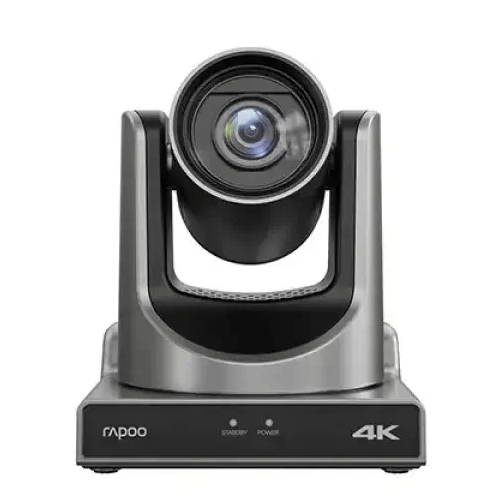
Rapoo C1630 4K AI UHD Video Conference Camera
Regular Price:৳100,000.00Availability: SKU: 6.57.151.9637
Quick Overview
-
Support
Saturday – Thursday: 09 AM - 06 PM. -
Payment
Cash on Delivery | Card | Online Payment -
Shipping Cost
Inside Dhaka 100tk | Outside Dhaka 150tk -
Warranty Policy
Read More
Description
Rapoo C1630 4K AI UHD Video Conference Camera in Bangladesh
The Rapoo C1630 4K AI UHD Video Conference Camera is a camera for video-conferencing and related video workflows. Its title describes it as 4K AI UHD, and the supplied resolution options are 2160p, 1080p and 720p. The specifications also list a 1/2.8-inch CMOS sensor, optical and digital zoom, horizontal and vertical rotation angles, up to 255 preset positions, and a range of wired and network interfaces. These details make it a model to evaluate for meeting rooms, teaching spaces and other setups that need a dedicated camera.
The camera’s listed image sensor is a 1/2.8-inch CMOS sensor with 8.42 megapixels of effective pixels. Sensor size and effective pixel count are useful points when comparing cameras, but they do not alone guarantee image quality in every room or lighting condition. The camera’s output also depends on the selected resolution, connected equipment, software and how the system is configured. If image quality is important for a particular use, check the product with the lighting and conferencing setup you plan to use.
The supported video resolutions supplied are 2160p, 1080p and 720p. The product title identifies the camera as 4K UHD, while the specification lists 2160p as its highest stated resolution. The supplied information does not state frame rates, so check those if your meetings, recordings or live-video workflows require a particular frame rate. Also confirm that the computer, display, capture equipment, network and software in your setup support the resolution you intend to use.
The camera’s zoom is specified as 12x optical and 16x digital. These figures describe two different zoom types; the supplied details do not state a combined zoom figure, so avoid treating them as a single multiplied value. Optical and digital zoom can affect framing in different ways, and the practical result depends on the camera settings and the scene. The listing places zoom under “Focus Type,” but does not specify whether focus is automatic, manual or controlled in another way. Confirm focus and zoom controls if they are important to your workflow.
The listed rotation angle is 340° horizontally and 120° vertically. This gives buyers a reference for the camera’s stated movement range when planning where to place it and which parts of a room may need to be covered. The specifications also list up to 255 preset positions. Confirm how presets are configured and selected, and which controller or software is needed to use them. The supplied information does not describe automatic subject tracking, speaker tracking or auto-framing, so do not assume those functions are included.
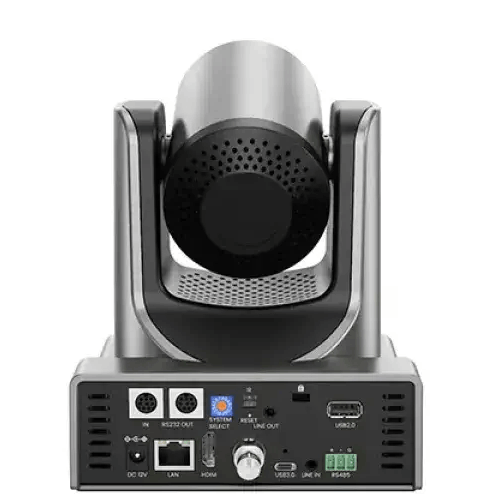
The C1630 has a broad list of interfaces: one USB 3.0 Type-C port, one USB 2.0 Type-A port, one HDMI port, one 3G-SDI port and one Gigabit Ethernet RJ45 port. It also lists a 3.5 mm line input and a 3.5 mm line output, one RS232 input and one RS232 output, and one RS485 interface. These connections give an integrator several physical interfaces to assess. However, the presence of several ports does not establish that every interface can be used at the same time or explain each port’s supported functions.
The stated connection mode is wired USB, while the interface list also includes Ethernet and video and control connections. When planning installation, confirm which connection is intended for your use and whether the needed cables, converters or other equipment are included. Do not assume that a listed HDMI, SDI or Ethernet interface has a particular input or output role beyond what the product documentation confirms. Likewise, the Gigabit Ethernet port does not by itself confirm Power over Ethernet support; the supplied specifications do not list PoE.
Network-related support includes NDI®|HX2, Free-D, SRT, TCP/IP, HTTP(S), RTSP, RTMP(S), ONVIF, DHCP, GB/T 28181 and Multicast, with other protocols also mentioned. This protocol list can help technical teams compare the camera with their network-video and conferencing environment. Before purchase, confirm which protocols are supported in the exact configuration, what software or equipment is required, and whether the features you need are enabled. Protocol support should not be treated as a guarantee that the camera connects directly to every platform or network system.
The range of listed protocols may make the C1630 relevant to installations that use a combination of local connections and IP-based video workflows. For example, a buyer might assess the listed network interfaces and protocols alongside an existing video-conferencing or production system. Compatibility depends on the other equipment, software, network settings and configuration. If your organisation uses a specific application, video-management system or streaming workflow, confirm the required protocol, connection path and camera controls with the vendor or system integrator before committing.
The HDMI and 3G-SDI ports may be relevant when comparing the camera with a room’s existing video equipment. The supplied specifications identify these interfaces but do not explain their signal direction, supported formats or whether they operate simultaneously with USB or IP connections. Check the relevant product documentation and your system requirements before planning a signal path. If you need the camera to work with capture equipment, switching hardware or a particular display, verify the connection and resolution requirements for each part of the setup.
Audio-related connections are listed as a 3.5 mm line input and a 3.5 mm line output. These ports may be relevant when coordinating the camera with an external audio arrangement, but the provided details do not confirm a built-in microphone, speaker or audio-processing function. If your meeting setup needs microphones, speakers or audio routing, check what separate equipment is required and how it connects to the camera or conferencing system. The RS232 input/output and RS485 interface are also listed, but the exact control functions and supported commands are not described here.
The “AI” wording appears in the product title, but the supplied specifications do not explain which AI features the camera provides. They do not confirm automatic tracking, speaker detection, face recognition, auto-framing or any other specific AI-assisted function. If a particular intelligent feature is essential to your meeting or production workflow, ask BME to confirm its availability on the exact model and check how it works with your chosen software and controls. This avoids assuming that the title alone specifies the camera’s AI capabilities.
The listed system requirements include Windows 7, Windows 8, Windows 10 or above, Mac OS X, and Linux 2.4.6 or above. Android is listed with a condition: the version must support a UVC-related driver. The supplied information does not state specific versions of Mac OS X or Android, and it does not list iOS. Confirm current driver and application compatibility for the computer, mobile device and software you intend to use. A listed operating system alone does not ensure that every protocol or camera feature will work in every application.
For an office meeting room, the C1630 can be considered as a dedicated camera for a compatible conferencing setup. Its resolution options, zoom specifications, rotation angles and preset-position count are relevant when evaluating how a room may be framed. The right choice depends on room size, camera placement, seating layout, display and software. Check how the camera will be controlled and whether the listed connections align with your room system. Do not assume the camera includes a microphone, speaker, mounting hardware or conferencing software, as these are not identified in the supplied details.
Training rooms, classrooms and presentation spaces may also be considered where a movable camera is needed to frame different parts of a room. The stated horizontal and vertical rotation and preset positions provide reference points for planning different views, subject to the control system and installation. The camera’s actual suitability depends on factors such as room layout, distance, lighting, required framing and the capabilities of connected equipment. If you need a specific automated camera behaviour, verify that capability rather than inferring it from the rotation range or the “AI” wording.
Some buyers may evaluate the C1630 for live-video or networked production workflows because the specifications list HDMI, 3G-SDI, Gigabit Ethernet and several network protocols. That list can help start a compatibility check, but it does not establish direct streaming to any particular platform or simultaneous use of all interfaces. Confirm the camera’s actual signal paths, supported output formats, software requirements and network configuration for your planned production. If a workflow depends on RTSP, RTMP(S), NDI®|HX2 or another named protocol, check the required settings and equipment before deployment.
The camera is black and is listed at 169 × 142 × 175 mm (L × W × H), with a weight of 1,500 g. These dimensions and weight can help with placement and transport planning. The supplied details do not state the mounting method, bracket compatibility or required clearance, so check those points before installing the camera in a fixed position. Make sure the intended location allows access to the connections and any controls needed for operation, and confirm any mounting accessories separately.
Before installation, plan the connection path and confirm the required cables, computer or network equipment, power arrangements and camera-control method. Although the camera has a wired USB connection mode and a list of interfaces, the provided information does not specify the power supply, cable lengths, included accessories or mounting hardware. Ask BME to confirm the package contents and any setup requirements for the exact item. For a room with existing AV equipment, check the system connections and software in advance rather than assuming a direct plug-and-play fit.
The supplied product details do not state a warranty period, country of manufacture, frame rates, camera-control accessories or package contents. They also do not describe the specific AI functions. These are relevant checks for a business purchase, particularly where the camera will be integrated into an existing meeting or production system. Request confirmation of the exact model, included items and applicable purchase terms. If you need delivery, installation or another service, ask whether it is available for your location and what conditions apply.
The Rapoo C1630 is best assessed against the actual requirements of your room and system. Start with the 2160p, 1080p and 720p resolution options, then verify frame-rate needs, zoom and focus controls, connection compatibility, network protocols and operating-system support. Check how preset positions are operated and whether the AI functions you want are specified for this model. Confirm the power and mounting arrangements, package contents and warranty terms before ordering. These checks help distinguish confirmed product details from assumptions and support a more suitable purchase decision.
✅ Key Features
- 2160p video option: The listed video resolutions are 2160p, 1080p and 720p.
- CMOS image sensor: Uses a 1/2.8-inch CMOS sensor with 8.42 MP effective pixels.
- Optical and digital zoom: Specifies 12x optical zoom and 16x digital zoom.
- Wide movement range: Lists 340° horizontal and 120° vertical rotation angles.
- Preset positions: Supports up to 255 listed preset positions.
- Multiple interfaces: Includes USB Type-C, USB Type-A, HDMI, 3G-SDI and Gigabit Ethernet, plus audio and serial ports.
- Network protocol support: Lists NDI®|HX2, SRT, RTSP, RTMP(S), ONVIF and other protocols.
- Operating-system options: Lists Windows, Mac OS X, Linux and Android with a UVC-related driver condition.
- Compact listed dimensions: Measures 169 × 142 × 175 mm and weighs 1,500 g.
- AI functions to verify: The title includes “AI,” but specific AI capabilities are not detailed in the supplied specifications.
✅ Usage / Applications
- Office conferencing: Evaluate it for a compatible meeting-room video system.
- Training rooms: Consider its stated movement angles and preset positions when planning room views.
- Classrooms and presentations: Assess it for capturing a presenter or room view within a compatible setup.
- Network-video workflows: Check its listed protocols against your software and network equipment.
- AV integrations: Verify the HDMI and 3G-SDI connections against the rest of your system.
- Camera positioning: Use the stated rotation range and preset capacity as planning references.
- USB-connected setups: Consider the wired USB mode with a compatible computer and conferencing application.
- Video production environments: Check protocol and interface compatibility before using it in a live or streaming workflow.
✅ Benefits of This Product?
- Resolution choices: The listed 2160p, 1080p and 720p options give buyers formats to evaluate against their system.
- Flexible framing: Optical and digital zoom specifications provide options for adjusting the view.
- Room coverage reference: The horizontal and vertical rotation figures help with camera-placement planning.
- Preset planning: Up to 255 preset positions may be useful where multiple views are part of the setup.
- Broad connection selection: Several listed interfaces give integrators options to investigate for system compatibility.
- Network workflow information: The named protocols help buyers check requirements with their IT or AV teams.
- Clear device planning: Its stated dimensions and weight support space and installation planning.
- Informed AI assessment: Checking the specific AI functions avoids relying on assumptions from the product title.
✅ Ideal For
The Rapoo C1630 may suit organisations looking for a dedicated camera to evaluate for video conferencing, training, presentation or compatible network-video workflows. Its listed 2160p resolution option, 12x optical zoom, 16x digital zoom, movement angles and preset positions are useful specifications for planning how a room could be framed. Its USB, HDMI, 3G-SDI, Gigabit Ethernet and protocol details may also be relevant when checking integration with existing equipment.
It is best suited to buyers willing to verify the complete setup before purchase. Confirm operating-system and software compatibility, the required connection path, camera controls, power and mounting arrangements, and whether the specific AI functions you need are available. The supplied information does not confirm a built-in microphone, speaker, included mounting hardware or warranty terms. If those are necessary, ask BME to confirm them for the exact product.
✅ Why Choose the Rapoo C1630 4K AI UHD Video Conference Camera?
The Rapoo C1630 is worth evaluating when a video-conferencing or AV setup needs a camera with several resolution options, zoom specifications and movement capabilities. Its listed video resolutions are 2160p, 1080p and 720p, and the sensor is specified as a 1/2.8-inch CMOS unit with 8.42 MP effective pixels. The 12x optical and 16x digital zoom figures, along with 340° horizontal and 120° vertical rotation, give buyers specific details to compare with their room layout and framing needs.
The model also lists up to 255 preset positions. That figure may be relevant to an installation where users need repeatable camera positions, but the supplied information does not explain how presets are controlled or which hardware or software is needed. Confirm the control method and compatibility before relying on presets in a meeting workflow.
A broad set of interfaces and protocols gives technical teams several items to check against their equipment. The supplied interface list includes USB, HDMI, 3G-SDI, Gigabit Ethernet, audio line connections and serial ports. Protocol support includes NDI®|HX2, Free-D, SRT, RTSP, RTMP(S), ONVIF and others. These details do not guarantee that every connection or protocol works simultaneously or that the camera connects directly to every platform; verify the intended setup.
The product title uses “AI,” but the supplied specifications do not describe particular AI functions. Confirm any required tracking or framing features, as well as frame rates, software compatibility, power, mounting, included accessories and warranty terms. The camera is a stronger fit when its verified capabilities and connections match the actual system you plan to use.
✅ Why Buy This Product from BME?
When enquiring with BME about the Rapoo C1630, provide details about your intended setup as well as the model name. Ask for the current quotation and confirm that the product being offered matches the C1630 specifications you need. If you are connecting it to an existing conference-room or AV system, describe the computer, software, network and interfaces involved so you can check compatibility before purchase.
The supplied information does not specify frame rates, particular AI functions, power requirements, mounting accessories, package contents or warranty terms. Ask BME to clarify any of these details that matter to your decision. You can also confirm how the listed preset positions are controlled and whether the required cables or other items are included. Do not assume that installation, delivery or additional services are available or included; ask whether they can be provided for your location and what terms apply.
Confirm the exact model and purchase conditions before placing an order. This gives you a clearer basis for checking whether the camera suits your intended workflow, without relying on unverified claims about features or services.
✅ Buying Guide
- Define the use case: Identify whether the camera is for meetings, teaching, AV integration or another video workflow.
- Confirm resolution needs: The listed options are 2160p, 1080p and 720p; ask about frame rates if they matter.
- Check zoom and focus controls: Verify how 12x optical and 16x digital zoom are operated and confirm the focus mode.
- Plan camera movement: Compare the 340° horizontal and 120° vertical angles with your room layout.
- Verify preset control: Ask how the up-to-255 preset positions are configured and selected.
- Check every connection: Confirm your required USB, HDMI, 3G-SDI, Ethernet, audio or serial connection works with the intended equipment.
- Confirm network compatibility: Match the listed protocols to your software and network requirements; do not assume direct platform support.
- Check the AI functions: Ask what specific AI features are available; do not assume tracking or auto-framing from the title.
- Verify operating systems: Check current driver and application support for your Windows, Mac, Linux or Android setup.
- Plan installation: Allow for the listed dimensions and weight, and confirm mounting, power and included accessories.
- Avoid common assumptions: Do not infer PoE support, simultaneous use of all ports, built-in audio or a particular frame rate.
- Confirm purchase terms: Ask about the exact model, package contents, warranty and any location-specific services.
✅ Customers Ask About / Frequently Asked Questions
-
Q: What is the Rapoo C1630 price in Bangladesh?
A: Contact BME for the current quotation. -
Q: What video resolutions are listed?
A: The supplied specifications list 2160p, 1080p and 720p. -
Q: What sensor does the C1630 use?
A: It is listed with a 1/2.8-inch CMOS sensor and 8.42 MP effective pixels. -
Q: What zoom is specified?
A: The listed zoom is 12x optical and 16x digital. No combined zoom figure is supplied. -
Q: What are its rotation angles?
A: The listed angles are 340° horizontally and 120° vertically. -
Q: How many preset positions are supported?
A: Up to 255 preset positions are listed. Confirm how they are controlled. -
Q: Does it support NDI or streaming protocols?
A: The supplied details list NDI®|HX2, SRT, RTSP, RTMP(S), ONVIF and other protocols. Confirm compatibility with your software and setup. -
Q: Does it support PoE through its Ethernet port?
A: PoE support is not specified. Ask BME to confirm the power requirements for the exact unit. -
Q: Does “AI” mean the camera has auto-tracking?
A: Specific AI functions are not described in the supplied details. Confirm any tracking or auto-framing requirement before buying. -
Q: Which operating systems are listed?
A: Windows 7/8/10 or above, Mac OS X, Linux 2.4.6 or above, and Android with a version that supports a UVC-related driver are listed. -
Q: Does the camera include a microphone or mounting hardware?
A: Neither is confirmed in the supplied information. Ask BME to verify the package contents and audio requirements.
✅ Why Buy This Product
The Rapoo C1630 is a camera to consider when your setup needs a dedicated video-conferencing device with listed 2160p, 1080p and 720p resolution options. Its 12x optical zoom, 16x digital zoom, movement angles and up to 255 preset positions provide useful specifications for evaluating room coverage and camera framing. The listed USB, HDMI, 3G-SDI, Gigabit Ethernet and network protocols also give buyers concrete compatibility points to check.
The right fit depends on the full system. Confirm frame rates, camera controls, protocol compatibility, operating-system support, power and mounting requirements. The product title includes “AI,” but the supplied details do not describe specific AI functions, so verify any feature you require. Also confirm package contents and applicable warranty terms before ordering.
If the camera’s confirmed specifications match your intended setup, contact BME to verify the exact model and purchase details, then proceed with your order.
What is the price of Rapoo C1630 4K AI UHD Video Conference Camera in Bangladesh?
Write a review
Question Answer
Have question about this product? Get specific details about this product from expert.

Benq DVY23 PTZ Web Video Conference Camera


Logitech Meetup Video Conference Camera
Rapoo C1630 4K AI UHD Video Conference Camera

