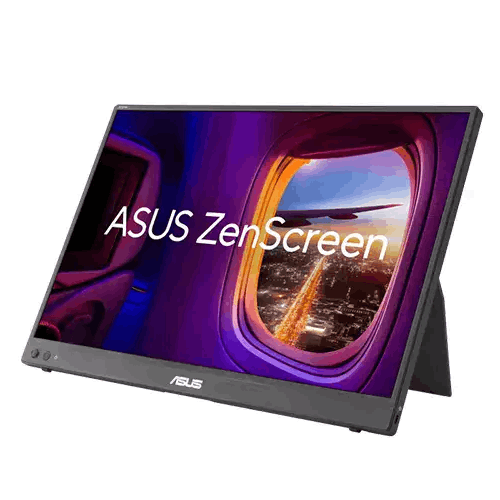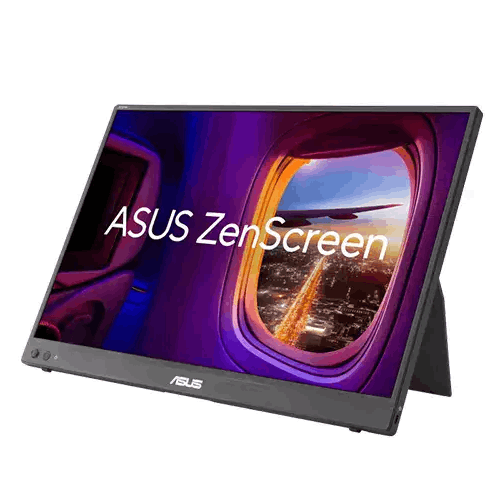
ASUS ZenScreen MB16NCG 16-inch WQXGA IPS Type-C Portable Monitor
Regular Price:৳0.00Availability: SKU: 9.60.13.9715
Quick Overview
-
Support
Saturday – Thursday: 09 AM - 06 PM. -
Payment
Cash on Delivery | Card | Online Payment -
Shipping Cost
Inside Dhaka 100tk | Outside Dhaka 150tk -
Warranty Policy
Read More
Description
ASUS ZenScreen MB16NCG 16-inch WQXGA IPS Type-C Portable Monitor in Bangladesh
Anyone who is accustomed to working on a multi-monitor desktop setup in Dhaka or Chattogram knows the immediate drop in productivity that happens the moment you have to work solely on a single laptop screen. Whether you are a software engineer debugging code while cross-referencing API documentation, a Chartered Accountant or financial analyst auditing complex spreadsheets at a client’s office in Motijheel, a freelance video editor travelling to Cox’s Bazar or Sylhet, or a gamer wanting a bigger, sharper screen for your handheld console, one screen simply feels confining. Yet until recently, most portable monitors available in Bangladesh were stuck at a grainy 15.6-inch 1920 x 1080 resolution that looked blurry next to modern high-DPI laptops and MacBooks. The ASUS ZenScreen MB16NCG 16-inch WQXGA IPS Type-C Portable Monitor elevates portable computing into a completely new league.
Engineered around an expansive 16-inch 16:10 WQXGA (2560 x 1600) IPS panel, the ASUS ZenScreen MB16NCG 16-inch WQXGA IPS Type-C Portable Monitor delivers nearly double the pixel density and a taller, far more productive 16:10 aspect ratio than traditional 1080p portable screens. Powered and driven over a single USB Type-C cable (or via Mini HDMI for universal device support), this ultra-slim, featherlight display slips effortlessly into your backpack alongside your laptop—allowing you to deploy a razor-sharp, dual-monitor workstation anywhere in Bangladesh in less than ten seconds.
Key Display Technology & Visual Brilliance: 16-Inch 16:10 WQXGA (2560 x 1600) IPS Precision
When you place the ASUS ZenScreen MB16NCG 16-inch WQXGA IPS Type-C Portable Monitor beside a modern 16-inch Windows creator laptop or an Apple MacBook Pro, the visual harmony is immediate. Instead of downgrading your eyes to a pixelated 1080p secondary screen, you get Retina-class sharpness and a taller 16:10 workspace that matches flagship laptops pixel for pixel.
- Ultra-Dense WQXGA (2560 x 1600) Resolution (~189 PPI): Packing 4.09 million pixels into a 16-inch diagonal canvas yields an extraordinary pixel density of ~189 pixels per inch—offering nearly 2x the total pixels of Full HD (1920 x 1080) and 11% more vertical screen height than standard 16:9 QHD (2560 x 1440). Small fonts in code editors, intricate financial tables, high-resolution RAW photographs, and dense architectural PDFs appear print-sharp from any viewing distance.
- Productive 16:10 Golden Aspect Ratio: Those 160 extra vertical lines of resolution (2560 x 1600 vs. 2560 x 1440) make a massive difference on a portable screen. You can view more lines of code in VS Code, extra audio/video timeline tracks in Adobe Premiere Pro, and fuller vertical web pages without constant scrolling.
- Studio-Grade IPS Panel with 178-Degree Wide Viewing Angles: Built with high-grade In-Plane Switching (IPS) liquid crystal technology, the panel preserves accurate colors, deep contrast, and consistent brightness across a 178-degree horizontal and vertical viewing cone. When you sit side by side with a client in a Gulshan café or pitch a deck across a boardroom table in Dhaka, everyone sees a vivid, distortion-free image.
- Anti-Glare Matte Optical Surface: Portable monitors are constantly used under challenging lighting—from bright café windows and airport lounges to overhead office tube lights. The precision non-glare matte coating diffuses ambient reflections cleanly so you can work comfortably anywhere without mirror-like glare.
Performance & Core Display Engine: Fluid Responsiveness for Creative Work, Multitasking, and Gaming
Unlike basic 60Hz office portable monitors that feel sluggish when dragging windows, sketching with a stylus tablet, or playing fast-paced games, the ASUS ZenScreen MB16NCG 16-inch WQXGA IPS Type-C Portable Monitor is engineered with a fast, responsive display engine that keeps every visual interaction silky smooth:
- Fluid High-Refresh Motion Clarity: Navigating across two high-resolution screens feels natural and immediate. Cursor tracking, timeline scrubbing in DaVinci Resolve or Premiere Pro, zooming through Figma UI boards, and scrolling through thousand-line documents happen with crisp, zero-smear clarity.
- Vibrant Color Reproduction for Creators on the Move: Whether you are tethered to a mirrorless camera on a commercial photo shoot in Dhaka, color-checking social media reels, or designing brand assets in Photoshop and Illustrator while travelling, the vibrant IPS color gamut ensures your work looks lifelike and dependable.
- Tear-Free Portable Gaming Readiness: When the workday ends, the ASUS ZenScreen MB16NCG 16-inch WQXGA IPS Type-C Portable Monitor transforms into an incredible portable gaming display—delivering sharp 2560 x 1600 visuals and responsive frame delivery for gaming laptops, handheld PCs (such as the ASUS ROG Ally and Steam Deck), PlayStation 5, Xbox, and Nintendo Switch.
Audio & Personal Listening Convenience: Integrated 3.5mm Earphone Jack
When working in a busy co-working space, riding an intercity train or flight between Dhaka and Chattogram, or gaming late at night in a hostel room, clean personal audio is essential. The ASUS ZenScreen MB16NCG 16-inch WQXGA IPS Type-C Portable Monitor features a built-in 3.5mm earphone audio jack that passes digital audio directly from either your USB Type-C or Mini HDMI source straight to your wired headphones, in-ear monitors (IEMs), or portable speaker—handy especially when connecting consoles or camera gear that lack dedicated headphone ports.
Smart Features, Auto-Rotation & Controls: DisplayWidget Center and Eye Care Technology
ASUS designed the ASUS ZenScreen MB16NCG 16-inch WQXGA IPS Type-C Portable Monitor with intelligent software integration that adapts automatically to how you hold and position the screen:
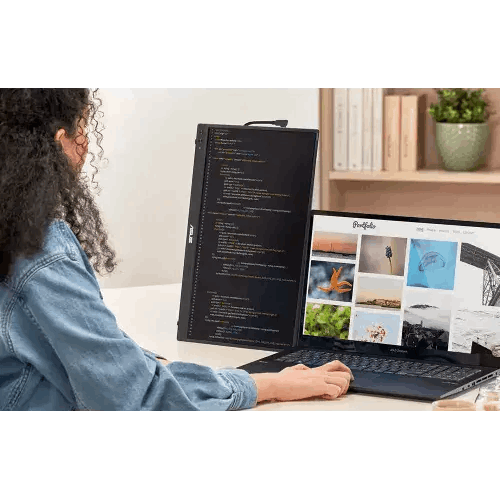
- Automatic Screen Orientation (Landscape & Portrait Modes): Equipped with a built-in G-sensor that works seamlessly with the ASUS DisplayWidget Center software on Windows, the monitor automatically senses its physical orientation and flips the display between Landscape and Portrait modes the moment you turn it vertically! Landscape mode is unbeatable for wide Excel sheets, side-by-side multitasking, and video timelines, while Portrait mode gives you a towering 1600 x 2560 vertical page for software coding, reading legal/medical research PDFs, or monitoring live social media feeds and Discord chats.
- Mouse-Driven ASUS DisplayWidget Center: Instead of pressing tiny physical buttons on the side of the slim bezel, you can adjust brightness, contrast, Splendid color modes, Blue Light Filter levels, and auto-rotation settings directly using your laptop’s trackpad or mouse.
- TÜV Rheinland-Certified Flicker-Free & Low Blue Light: Staring at screens for 10 to 12 hours a day during tight project sprints can cause severe eye strain and headaches. Hardware-certified TÜV Rheinland Flicker-Free backlighting eliminates invisible high-frequency flicker at all brightness settings, while adjustable Low Blue Light technology filters out harmful short-wavelength blue emissions to keep your eyes comfortable day and night.
Hybrid Work, Travel, Studio Tethering & Portable Gaming Capabilities in Bangladesh
In Bangladesh’s dynamic professional and creative landscape, the ASUS ZenScreen MB16NCG 16-inch WQXGA IPS Type-C Portable Monitor unlocks workflows that were previously impossible away from a fixed desk:
- Mobile Dual-Monitor Setup for Software Engineers & DevOps: Pair the 2560 x 1600 ZenScreen in vertical portrait mode beside your 16-inch laptop to read hundreds of lines of code in VS Code or terminal logs while keeping your live application preview open on your main laptop screen.
- Corporate Auditing, Banking & Client Presentations: Financial consultants, auditors, and corporate executives visiting client offices in Motijheel, Gulshan, or Agrabad can set up a dual-screen financial modeling workstation in seconds—or place the ZenScreen facing the client to present slides clearly without crowding around one laptop.
- On-Location Camera Field Monitor for Photographers & Videographers: Using the built-in Mini HDMI port and the rear 1/4-inch threaded tripod socket, commercial photographers and wedding cinematographers across Bangladesh can mount the MB16NCG directly onto a standard camera tripod or light stand to preview 2560 x 1600 live camera feeds and tethered Lightroom captures on set.
- Big-Screen Upgrade for ROG Ally, Steam Deck & Consoles: Connect an ASUS ROG Ally or Steam Deck via USB Type-C, or hook up a PlayStation 5 / Xbox Series S / Nintendo Switch via Mini HDMI, to enjoy crisp WQXGA gaming anywhere—even in a compact dorm room or during family trips.
Design, Kickstand Ergonomics & Build Quality: Ultra-Slim, Featherlight, and Tripod-Ready
Crafted with a sleek, minimalist metallic-finish chassis and ultra-narrow bezels, the ASUS ZenScreen MB16NCG 16-inch WQXGA IPS Type-C Portable Monitor is built for life on the move. Its razor-thin profile and lightweight footprint allow it to slide right into the laptop compartment of any standard 16-inch backpack or briefcase without adding bulk to your daily commute in Dhaka traffic.
Setting up on any surface—whether a small café table, an airplane tray, or a compact home desk—is effortless thanks to its versatile ergonomic fold-out kickstand, which supports the monitor securely in both horizontal landscape and vertical portrait orientations at comfortable viewing angles. Furthermore, an integrated 1/4-inch threaded tripod socket on the rear chassis allows you to mount the display onto any standard camera tripod or ASUS ZenScreen desk stand to elevate the screen to eye level above your laptop!
Real-Life Usage Scenarios in the Bangladesh Context
Perhaps the single greatest real-world advantage of the ASUS ZenScreen MB16NCG 16-inch WQXGA IPS Type-C Portable Monitor in Bangladesh is how it performs during power outages and in compact living spaces:
- Work Through Load-Shedding Without a Wall Socket or UPS: When a sudden power cut hits Dhaka, Chattogram, Rajshahi, or Sylhet, a traditional desktop monitor immediately dies unless it is plugged into a heavy UPS—and even then, a standard desktop monitor drains a UPS battery within 15 to 30 minutes. Because the ASUS ZenScreen MB16NCG is ultra-energy-efficient and draws its power directly from your laptop via a single USB Type-C cable, your entire dual-monitor workstation continues running on your laptop’s internal battery for hours during load-shedding with zero interruption and zero UPS noise!
- Perfect for Compact Apartment & Hostel Desks: Not everyone in Dhaka or university halls has room for a permanent 4-foot dual-monitor desk. With the ZenScreen MB16NCG, you can enjoy a spacious dual-screen WQXGA setup while you work or game, and then fold it flat and tuck it onto a bookshelf in five seconds when you need your table back for books or meals.
- Fanless, Dust-Resistant Reliability: Built with 100% silent passive thermal dissipation and a durable matte chassis, it never sucks in urban dust through cooling fans and stays cool to the touch during warm Bangladeshi summer afternoons.
Compatibility & Ecosystem: Single-Cable USB-C and Universal Mini HDMI
The ASUS ZenScreen MB16NCG 16-inch WQXGA IPS Type-C Portable Monitor connects cleanly to virtually every modern device:
- Full-Function USB Type-C Connectivity: Supports DisplayPort Alt Mode and USB power delivery over a single USB-C cable—allowing compatible Windows laptops, MacBook Pro/Air models, iPads, smartphones, and handheld gaming PCs to transmit native 2560 x 1600 video and power the monitor simultaneously through one cable. (Dual USB-C ports also allow pass-through power connection so your charger can power both the setup and the display).
- Mini HDMI Input: Ensures 100% compatibility with older laptops that lack USB-C video output, desktop PCs, DSLR/mirrorless cameras, PlayStation 5, Xbox Series X/S, and Nintendo Switch (simply pair the Mini HDMI video connection with USB-C power from a laptop USB port, power bank, or wall adapter).
- 3.5mm Earphone Audio Jack: Connect wired headphones or portable speakers directly to the monitor.
Maintenance & Care Tips for Long-Term Portable Durability in Bangladesh
To keep your ASUS ZenScreen MB16NCG 16-inch WQXGA IPS Type-C Portable Monitor looking and performing like brand new across years of daily travel and desk use in Bangladesh:
- Pack Face-Inward or in a Padded Sleeve Inside Your Backpack: When slipping the monitor into your backpack alongside your laptop, always fold the kickstand flat and place the screen facing a soft padded divider (away from sharp metal chargers, keys, or pens) so nothing presses against the IPS panel during bumpy rides.
- Unplug Cables Gently Before Moving the Monitor: Avoid lifting or rotating the monitor while rigid USB-C or Mini HDMI cables are pulled tight at an angle, which protects the side ports over years of daily plugging and unplugging.
- Clean Only with a Dry Optical Microfiber Cloth: Never spray window cleaner, alcohol, or tap water onto the anti-glare WQXGA screen. Power off the display and gently wipe away dust or smudges using a clean, plush microfiber cloth (lightly dampened with a few drops of distilled water only if needed).
✅ Key Features
- 16-Inch WQXGA (2560 x 1600) 16:10 IPS Panel: Delivers Retina-sharp ~189 PPI clarity with nearly 2x the pixels of 1080p and 11% more vertical workspace than standard 16:9 QHD screens.
- Single-Cable USB Type-C Solution: Transmits uncompressed 2560 x 1600 video and powers the monitor simultaneously from your laptop or MacBook using just one clutter-free USB-C cable.
- Universal Mini HDMI Input & 3.5mm Audio Jack: Connects effortlessly to any laptop, desktop PC, DSLR/mirrorless camera, PlayStation, Xbox, or Nintendo Switch alongside headphone audio pass-through.
- Ultra-Slim & Featherlight Travel Design: Engineered with a razor-thin profile and lightweight chassis that slips right into any standard 16-inch laptop bag or backpack.
- Ergonomic Kickstand for Landscape & Portrait Modes: Folds out in seconds to support the monitor securely in either horizontal landscape or vertical portrait orientation on any flat surface.
- Smart Auto-Rotation with ASUS DisplayWidget Center: Automatically detects screen orientation via its built-in G-sensor and rotates your Windows desktop between landscape and portrait modes on the fly.
- Integrated 1/4-Inch Threaded Tripod Socket: Lets you mount the monitor onto any standard camera tripod or desk stand for elevated eye-level viewing or on-set camera monitoring.
- Wide 178-Degree IPS Viewing Angles & Anti-Glare Finish: Ensures vivid, consistent colors from any angle while diffusing bright café windows and overhead office lights.
- TÜV Rheinland-Certified Flicker-Free & Low Blue Light: Protects your eyes from fatigue, dryness, and headaches during 12-hour coding, auditing, and editing marathons.
- Load-Shedding Proof Laptop-Powered Efficiency: Runs directly off your laptop’s internal battery or a USB power bank during Bangladeshi power outages without needing a wall outlet or UPS.
✅ Usage / Applications
- Mobile Dual-Monitor Workstation for MacBook & Windows Laptops: Double your screen real estate instantly in Dhaka cafés, co-working spaces, airport lounges, or hotel rooms across Bangladesh with a single USB-C cable.
- Vertical Portrait Coding & Software Engineering: Rotate the 16-inch screen into 1600 x 2560 portrait mode to view hundreds of lines of razor-sharp code in VS Code, Git diffs, and terminal logs beside your main laptop.
- Corporate Auditing, Financial Modeling & Legal Review: Ideal for Chartered Accountants, bankers, and consultants reviewing massive Excel spreadsheets and multi-page contracts at client sites.
- On-Location Photography & Videography Tethering: Mount the monitor onto a camera tripod via its 1/4-inch socket and connect your Sony, Canon, or Nikon camera via Mini HDMI for high-resolution 2560 x 1600 field monitoring.
- Freelance Video Editing, UI/UX & Graphic Design on the Go: Use the extra 16:10 WQXGA screen to hold tool palettes, Figma components, or multi-track Premiere Pro / DaVinci Resolve timelines while travelling.
- Portable Big-Screen Gaming for ROG Ally, Steam Deck & Consoles: Plug in your handheld gaming PC via USB-C or your PS5 / Xbox / Switch via Mini HDMI for crisp WQXGA gaming anywhere.
- Face-to-Face Client Pitching & Sales Presentations: Mirror your laptop display onto the ZenScreen facing across the table so clients can view proposals, architectural renders, or medical imaging clearly.
- Space-Saving Secondary Monitor for Desktops & Compact Dorms: Add a high-resolution secondary discord/streaming/monitoring screen underneath or beside your main desktop monitor without needing a larger desk.
✅ Benefits of This Product?
- Instant Dual-Screen Productivity Anywhere in Bangladesh: Eliminates the bottleneck of Alt-Tabbing between cramped windows when working away from your main office desk.
- Keep Working on Dual Screens During Load-Shedding: Because it draws power directly from your laptop over USB-C, power cuts never shut down your second monitor.
- Retina-Class Sharpness That Matches Modern Laptops: At 2560 x 1600 (~189 PPI), text and graphics look just as crisp as a MacBook Pro or high-end Windows ultrabook—unlike blurry 1080p portable screens.
- 11% More Vertical Room with 16:10 Aspect Ratio: See more rows of data, more lines of code, and fuller document pages than on narrow 16:9 portable displays.
- Zero Desk Clutter in Small Apartments & Hostels: Folds completely flat when not in use so you can reclaim 100% of your table space in seconds.
- Effortless Tripod Mounting for Ergonomic Height: Use the built-in 1/4-inch tripod thread to position the screen above your laptop for a neck-friendly stacked dual-screen setup.
- Protected Vision Day and Night: TÜV-certified Flicker-Free backlighting and Low Blue Light filtering prevent eye strain during long remote work shifts.
- True Plug-and-Play Compatibility: Works seamlessly with Windows, macOS, ChromeOS, Android, Linux, cameras, and gaming consoles via USB-C and Mini HDMI.
✅ Ideal For
The ASUS ZenScreen MB16NCG 16-inch WQXGA IPS Type-C Portable Monitor is crafted for software engineers, remote freelancers, corporate executives, Chartered Accountants, digital nomads, photographers/videographers, and portable gamers across Bangladesh who refuse to be slowed down by a single laptop screen. If you work on a 14-inch or 16-inch MacBook Pro, MacBook Air, ASUS Zenbook/ROG laptop, Dell XPS, or Lenovo ThinkPad in Dhaka, Chattogram, Sylhet, or Rajshahi, this 2560 x 1600 16:10 display is the ultimate companion that matches your laptop’s high-DPI sharpness. It is equally ideal for professionals who want an interruption-free dual-monitor setup that keeps running on laptop battery power during Bangladeshi load-shedding, as well as students and apartment dwellers who want dual-screen luxury without sacrificing permanent desk space.
✅ Why Choose the ASUS ZenScreen MB16NCG 16-inch WQXGA IPS Type-C Portable Monitor?
Most portable monitors sold in the Bangladeshi market today are generic 15.6-inch 16:9 Full HD (1920 x 1080) panels. When you place a 1080p portable monitor next to a modern 2K/Retina laptop or MacBook, the difference in text sharpness and vertical height is jarring—and fragile magnetic folio cases often slip and collapse on smooth tables. The ASUS ZenScreen MB16NCG 16-inch WQXGA IPS Type-C Portable Monitor solves every one of those pain points with world-leading ASUS ZenScreen engineering.
First, you get a larger, taller 16-inch 16:10 WQXGA (2560 x 1600) IPS panel—delivering nearly double the pixel count of 1080p (~189 PPI vs. ~141 PPI) and 11% more vertical workspace than 16:9 displays. Second, instead of a floppy origami cover, ASUS integrates a sturdy fold-out kickstand that holds the screen rock-steady in both landscape and portrait orientations, plus a built-in 1/4-inch tripod socket so you can mount it onto any standard tripod or desk stand. Third, you get both single-cable USB Type-C connectivity and Mini HDMI, paired with automatic orientation switching via ASUS DisplayWidget Center and TÜV Rheinland Flicker-Free / Low Blue Light eye protection. Backed by ASUS’s global leadership in portable monitors, choosing the MB16NCG means investing in unmatched mobile clarity, versatility, and build quality.
✅ Why Buy This Product from BME?
When purchasing a precision portable display like the ASUS ZenScreen MB16NCG 16-inch WQXGA IPS Type-C Portable Monitor, partnering with a trusted, established technology retailer in Bangladesh guarantees complete peace of mind. Business Machine & Equipment (BME) is dedicated to delivering an authentic, transparent, and hassle-free buying experience for individual professionals and corporate enterprises nationwide:
- Authentic, Factory-Sealed ASUS Sourcing: BME places strict priority on sourcing 100% genuine ASUS ZenScreen monitors through legitimate distribution channels, ensuring your portable monitor arrives factory-sealed with original accessories and verifiable serial numbers.
- Expert Pre-Sales Compatibility Guidance: Unsure whether your specific laptop’s USB Type-C port supports DisplayPort Alt Mode for single-cable video and power, or whether you should use the Mini HDMI connection? BME’s knowledgeable specialists check your laptop model and advise you clearly before you buy.
- Responsive After-Sales & Official Warranty Support: BME stands beside you after the sale, providing complete official invoice documentation and smooth coordination for brand warranty servicing whenever required.
- Safe Delivery Across Dhaka & All 64 Districts: Ultra-slim 16-inch WQXGA IPS panels require careful protective handling during transit. BME ensures fast delivery across Dhaka city and secure, cushioned courier shipping to Chattogram, Sylhet, Rajshahi, Khulna, Barishal, Rangpur, and nationwide.
- Corporate, Audit Firm & B2B Bulk Procurement: For consulting firms, audit practices, software companies, and multinational corporations equipping field executives and remote engineers, BME provides formal B2B quotations, competitive bulk pricing, and VAT-compliant procurement documentation.
✅ Buying Guide: How to Connect and Maximize Your ASUS ZenScreen MB16NCG
Before purchasing and setting up your ASUS ZenScreen MB16NCG 16-inch WQXGA IPS Type-C Portable Monitor, follow this practical checklist to ensure seamless plug-and-play operation from day one:
- Check How Your Laptop or Device Connects:
- Method 1 — Single-Cable USB Type-C (Most Modern Laptops & MacBooks): If your Windows laptop, MacBook Pro/Air, iPad Pro, or ROG Ally handheld has a USB Type-C port that supports DisplayPort Alt Mode (or Thunderbolt 3/4), simply connect a single USB-C cable between your device and the ZenScreen. That one cable transmits native 2560 x 1600 video and powers the monitor simultaneously!
- Method 2 — Mini HDMI + USB Power (All Other Laptops, PCs, Cameras & Consoles): If your laptop’s USB-C port is data-only (or if you are connecting a desktop PC, DSLR camera, PS5, Xbox, or Switch), connect the Mini HDMI port for video and plug the ZenScreen’s USB-C port into your laptop’s USB port, a wall charger, or a portable power bank for power.
- Set Native 2560 x 1600 Resolution & Comfortable Scaling: Because 2560 x 1600 packs a super-sharp ~189 PPI on a 16-inch screen, setting Windows display scaling to 150% or 175% (or default Retina HiDPI scaling on macOS) gives you ultra-crisp, easy-to-read text that matches your primary laptop screen effortlessly.
- Install ASUS DisplayWidget Center for Auto-Rotation: Download the free ASUS DisplayWidget Center utility on Windows so the built-in G-sensor automatically rotates your screen layout whenever you turn the monitor vertically into portrait mode, and lets you adjust brightness and Blue Light Filter levels with your mouse.
- Try a Stacked Setup Using the 1/4-Inch Tripod Socket: If you have a compact table with limited side-to-side width, screw a small desktop camera tripod into the rear 1/4-inch tripod socket to raise the ZenScreen directly above your laptop screen for an ergonomic stacked dual-monitor workstation!
✅ Customers Ask About / Frequently Asked Questions
1. Why is the 16-inch WQXGA (2560 x 1600) resolution on the ASUS ZenScreen MB16NCG much better than standard 15.6-inch 1080p portable monitors?
The ASUS ZenScreen MB16NCG 16-inch WQXGA IPS Type-C Portable Monitor delivers 4.09 million pixels (2560 x 1600) in a taller 16:10 aspect ratio, compared to just 2.07 million pixels on a 1920 x 1080 screen. This nearly doubles your pixel density (~189 PPI) so text, code, spreadsheets, and high-res photos look Retina-sharp next to modern laptops and MacBooks, while giving you 11% more vertical height than 16:9 displays.
2. Does the ASUS ZenScreen MB16NCG need to be plugged into a wall power outlet to work?
No! When connected to a compatible laptop or MacBook via USB Type-C, the monitor draws all the power it needs directly from your laptop through that single USB-C cable. Even if you use Mini HDMI with a camera or console, you can power the monitor from a laptop USB port or a standard USB power bank—making it 100% usable during load-shedding in Bangladesh!
3. Is this portable monitor compatible with Apple MacBook Air and MacBook Pro (M1/M2/M3/M4)?
Yes, it is a phenomenal match for macOS. Using a single USB Type-C cable connected to your MacBook’s Thunderbolt / USB-C port, it outputs native 2560 x 1600 resolution in the exact same 16:10 aspect ratio used by Apple MacBook screens, with zero power bricks required.
4. What if my older Windows laptop only has an HDMI port and no USB-C video output?
It will still work seamlessly! Because the ASUS ZenScreen MB16NCG includes both USB Type-C and a Mini HDMI port, you can connect video from your laptop’s HDMI port into the monitor’s Mini HDMI input, and draw power from any standard USB port on your laptop or a USB charger.
5. Can I use the monitor vertically in Portrait Mode for coding or reading long documents?
Yes! The integrated fold-out kickstand is engineered to support the monitor securely in both Landscape and Portrait orientations. Even better, when you install ASUS DisplayWidget Center on Windows, the built-in sensor automatically flips the screen orientation for you as soon as you stand it up vertically.
6. How does the 1/4-inch tripod socket on the back work?
The rear chassis features a standard 1/4-inch threaded tripod socket—the exact same thread used by all photography tripods and tabletop camera stands. You can mount the ZenScreen onto any tripod to elevate it above your laptop screen or use it as a field monitor on photography and video shoots.
7. Can I connect a PlayStation 5, Xbox, Nintendo Switch, or ASUS ROG Ally to this monitor?
Absolutely. Handheld gaming PCs like the ASUS ROG Ally and Steam Deck connect directly via USB Type-C (with pass-through charging support when your charger is plugged in), while PS5, Xbox Series X/S, and Nintendo Switch connect via the Mini HDMI input—plus you can plug your gaming headset right into the monitor’s 3.5mm audio jack.
8. Will using this portable monitor for 10+ hours a day hurt my eyes?
No. It features hardware-certified TÜV Rheinland Flicker-Free backlighting and adjustable Low Blue Light filtering, which eliminate invisible screen flicker and reduce harsh blue light wavelengths to keep your eyes comfortable during marathon coding, auditing, and editing days.
9. What is the typical warranty coverage when buying this ASUS ZenScreen monitor from BME?
ASUS ZenScreen portable monitors in Bangladesh typically come with an official 3-year brand warranty covering manufacturing defects in accordance with official ASUS warranty policy terms. BME provides complete official invoice documentation and dedicated after-sales assistance to support your warranty claims.
10. Does BME deliver the ASUS ZenScreen MB16NCG outside Dhaka?
Yes, BME offers fast delivery across Dhaka city as well as safe, protective courier delivery to Chattogram, Sylhet, Rajshahi, Khulna, Rangpur, Barishal, and all 64 districts across Bangladesh.
✅ Why Buy This Product
Freedom to work, code, create, and play from anywhere shouldn’t mean squeezing your entire workflow onto one cramped laptop screen. The ASUS ZenScreen MB16NCG 16-inch WQXGA IPS Type-C Portable Monitor puts a breathtaking 2560 x 1600 (16:10) IPS second display right inside your backpack—connecting and powering up in seconds over a single USB Type-C cable or Mini HDMI. Whether you are powering through load-shedding in Dhaka on laptop battery power, writing code in vertical portrait mode at a café, auditing financial spreadsheets at a client’s office, or gaming on your ROG Ally or console while travelling, this ultra-slim portable monitor doubles your screen space without tying you to a desk. Upgrade your mobile productivity today—order the ASUS ZenScreen MB16NCG 16-inch WQXGA IPS Type-C Portable Monitor from Business Machine & Equipment (BME) for authentic ASUS hardware, expert local support, and fast nationwide delivery across Bangladesh!
What is the price of ASUS ZenScreen MB16NCG 16-inch WQXGA IPS Type-C Portable Monitor in Bangladesh?
Write a review
Question Answer
Have question about this product? Get specific details about this product from expert.