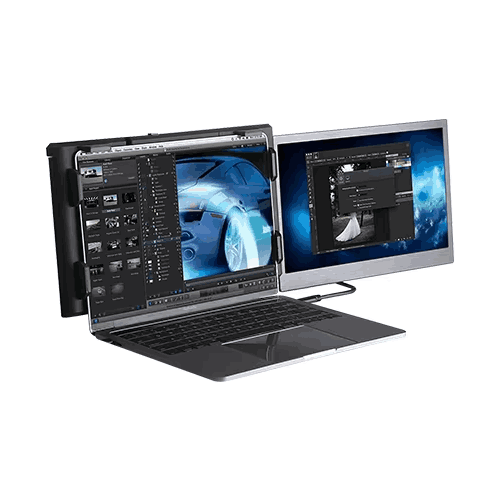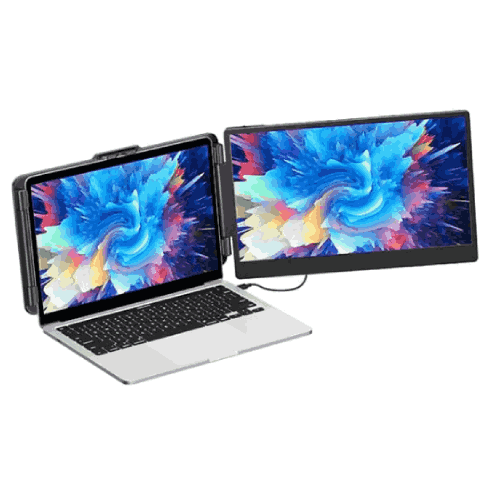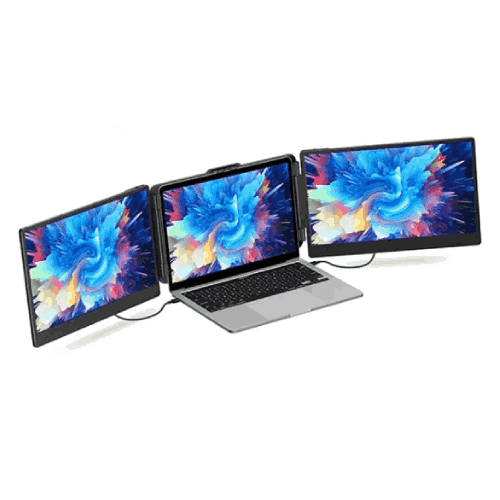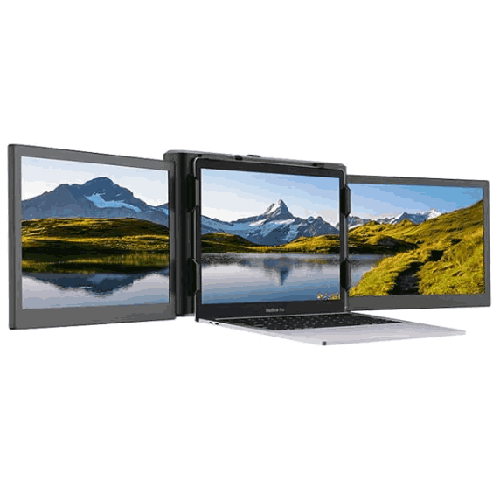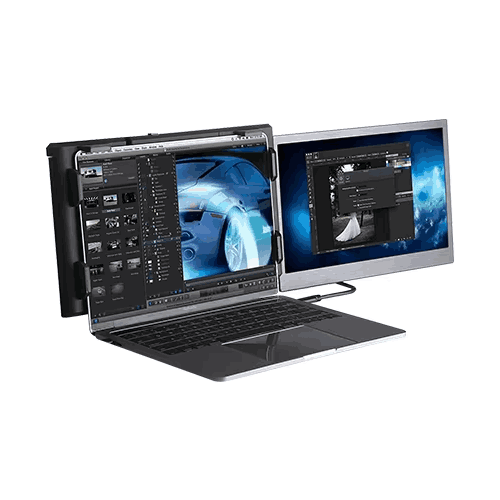
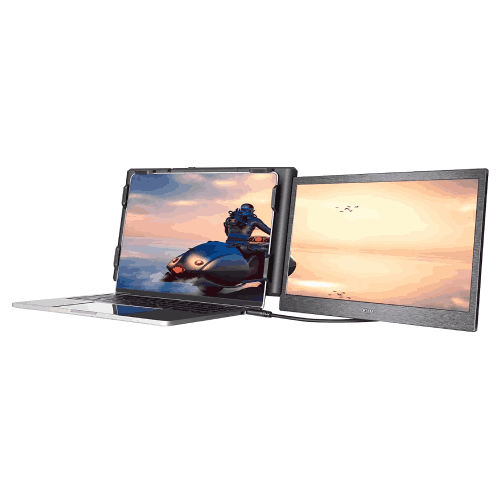
Eloam EL-P1 Plus 13.3-inch Portable Laptop Screen Extender
Regular Price:৳0.00Availability: SKU: 9.60.154.9479
Quick Overview
-
Support
Saturday – Thursday: 09 AM - 06 PM. -
Payment
Cash on Delivery | Card | Online Payment -
Shipping Cost
Inside Dhaka 100tk | Outside Dhaka 150tk -
Warranty Policy
Read More
Description
Eloam EL-P1 Plus 13.3-inch Portable Laptop Screen Extender in Bangladesh
The Eloam EL-P1 Plus 13.3-inch portable laptop screen extender and dual-monitor solution is designed for people in Bangladesh who want desktop-level multitasking on a laptop—without being stuck at a desk. This clever device attaches to your notebook and adds extra 13.3" displays, giving you more screen real estate for work, study, gaming, trading, or content creation anywhere you go.
Instead of juggling tabs on a single cramped laptop screen, you can stretch your workspace across multiple displays: one for your main task, another for communication apps, references, or monitoring tools. Whether you’re working from home in Dhaka, attending online classes in Chattogram, travelling between client offices, or freelancing from a café, the Eloam EL-P1 Plus transforms your laptop into a portable dual- or triple-monitor workstation.
At its core, this is not just another portable monitor—it’s a screen extender system engineered to mount on the laptop itself, keeping your setup tidy, aligned, and truly mobile.
13.3-inch Portable Screen Extender – Laptop Becomes a Multi-Monitor Rig
The signature element of the Eloam EL-P1 Plus is its 13.3-inch display module (and in many setups, a pair of 13.3" panels for left and right), built to sit alongside your laptop’s built-in screen. The diagonal size is carefully chosen:
- Large enough for comfortable reading, code editing, spreadsheets, and chat windows.
- Small and light enough to fold with your laptop and fit in a backpack.
You can think of it as carrying slim side monitors that follow your laptop everywhere. For Bangladeshi users accustomed to single-screen laptops, the impact is huge:
- Professionals can keep e-mail, Teams/Slack, and documentation open on side screens while focusing on the main window in the center.
- Students can keep video lectures on one screen, slides/notes on another, and assignments or Google Docs in the third.
- Developers can code on one, preview on another, and monitor logs/terminal on the third.
- Traders or finance users can keep stock charts, order books, and news feeds visible simultaneously.
You no longer have to constantly Alt+Tab between windows or resize them awkwardly on one small panel.
Portable Dual-Monitor / Triple-Monitor Solution for Laptops
Depending on your configuration and number of EL-P1 Plus panels attached, your laptop effectively becomes a dual-monitor or even triple-monitor setup:
- Dual-monitor: Laptop screen + one Eloam EL-P1 Plus 13.3" side screen.
- Triple-monitor: Laptop screen in the middle + two EL-P1 Plus screens (left and right).
This flexibility is especially useful in Bangladesh where many people work in:
- Small apartments where setting up a full desktop with large monitors is not possible.
- Shared offices and co-working spaces where you can’t fix your own screens permanently.
- On-site client locations where you want multi-screen productivity while remaining fully mobile.
With the Eloam EL-P1 Plus attached, you open your laptop, slide the side screens into position, connect the cable(s), and instantly have a multi-monitor environment wherever you sit.
USB / Laptop-Friendly Connectivity (General Concept)
Portable laptop extenders like the Eloam EL-P1 Plus are typically designed to connect via single-cable solutions such as:
- USB-C (with DisplayPort Alt Mode support), or
- USB-A plus an additional adapter scenario (depending on laptop and model configuration).
Exact ports and cable requirements should be confirmed from the current spec sheet or from BME at purchase, but the design intent is clear: minimal cable clutter and simple plug-and-play use.
For Bangladeshi users:
- Many modern ultrabooks and mid-range laptops now offer USB-C, making single-cable display + power for a portable monitor feasible.
- Even on older laptops, these solutions often come with adapter options to get you up and running.
The key advantage is that you don’t need bulky external power bricks or separate HDMI monitors—with the EL-P1 Plus, your laptop plus a couple of thin cables are enough.
Ideal for Work-from-Home, Remote & Hybrid Work in Bangladesh
The shift to remote and hybrid work has been strong in Bangladesh’s IT, outsourcing, and professional services sectors. A common complaint from laptop-only users is screen fatigue and limited space. The Eloam EL-P1 Plus solves this by providing extra screen area without requiring an entire desk refresh.
Work-from-home scenarios where it shines:
- Software engineers & QA testers: Code editor in center, design docs on left, logs or bug tracker on right.
- Business analysts & managers: Reports or dashboards on one side, e-mail and communication apps on another.
- Content creators & marketers: Editing tools on main screen, asset library or script on the side, preview on the other.
- Customer support & operations: Ticketing system, chat, and CRM windows all visible together.
Instead of constantly shuffling overlapping windows on one panel, you can spread out and work more naturally—like you would on a desktop workstation.
Boosts Productivity for Students, Freelancers & Exam Candidates
In Bangladesh, many students, freelancers, and exam aspirants are now studying or working online:
- University courses often require juggling lecture videos, PDFs, coding environments, and group chats at the same time.
- Freelancers in design, development, writing, and digital marketing typically run multiple tools and communication channels side-by-side.
- Competitive exam candidates (BCS, bank exams, IT certifications) need to view notes, question banks, and online resources simultaneously.
With the Eloam EL-P1 Plus:
- Students can watch lectures full-screen on one display, follow slides or a PDF on the second, and type notes on the laptop panel.
- Freelancers can keep design tools open centrally and references or client chat on the extended screens.
- Exam candidates can read questions on one screen while checking formulas, diagrams, or notes on another, improving revision efficiency.
Because the extender is portable, they are not limited to one study table—they can work from a dorm, library, café, or family home while maintaining a multi-screen layout.
Convenient for Travel, Client Visits & Co-working
Many Bangladeshi professionals—consultants, salespeople, project managers, and technical leads—spend time on the road and in client offices. Bringing two full-sized desktop monitors is impossible; carrying just a laptop often feels cramped. The Eloam EL-P1 Plus is a middle path:
- Packs flat with your laptop in the same backpack or briefcase.
- Quickly mounts on the laptop when you arrive at a meeting room or client site.
- Gives you extra screen space to keep your reference material and presentation tools visible while projecting or sharing your main screen.
For example:
- A sales manager pitches using the laptop built-in screen as presentation source while keeping pricing sheets, CRM data, or talking points open on the attached EL-P1 Plus screen.
- An IT consultant can run remote sessions, documentation, and terminal windows in parallel during troubleshooting.
- A project manager can keep task trackers, status reports, and chat windows visible while discussing updates with the client.
When you’re done, you fold it back, put it in your bag, and move to the next location.
Helpful for Gaming, Streaming & Creative Work
Beyond pure productivity, a portable laptop screen extender like the Eloam EL-P1 Plus is a strong asset for gaming and content creation:
- Gamers & streamers can keep their game on the main laptop display while monitoring stream chat, OBS controls, or system stats on the side screen.
- Video editors can place timelines on one panel and preview, bin, or effects controls on others.
- Graphic designers & illustrators can keep toolbars or palettes separated from the main drawing area.
For Bangladesh’s growing community of streamers, YouTubers, and creative freelancers, this makes laptop-based work much more comfortable, without forcing a permanent desktop setup.
Space-Saving Versus Traditional Monitors
Traditional external monitors are great but often:
- Take up a lot of desk space.
- Require separate stands or mounts.
- Need their own power cables and sometimes bulky adapters.
The Eloam EL-P1 Plus is built for a different use case:
- It attaches directly to your laptop (depending on model hardware design, often with a clamp or sliding frame).
- It folds away with your laptop, so there’s minimal footprint when not in use.
- One combined carry makes transportation easy.
This is perfect for:
- Small apartments where the study table doubles as a dining or family table.
- Dorm rooms and shared hostel rooms.
- Co-working spaces where you can’t leave a personal monitor behind.
General Design & Build Considerations
While exact physical specifications (weight, thickness, hinge mechanism) depend on the final configuration and should be checked with BME, portable extenders like the Eloam EL-P1 Plus typically focus on:
- Slim bezels to reduce distractions and keep the overall footprint small.
- Lightweight materials so your laptop lid is not overburdened.
- Robust hinge or slide mechanisms to handle repeated opening and closing.
- Matte screens (often) to minimize glare under office lights or in bright rooms.
For Bangladeshi conditions, it’s especially useful if the screen surface resists smudges and mild dust, as working environments can be dusty or humid.
Maintenance and Care
To keep your Eloam EL-P1 Plus functioning well:
- Carry it in a padded laptop bag or sleeve: Protects against shocks during bus, bike, or rickshaw rides.
- Clean the screen with a soft microfiber cloth: Avoid paper towels or harsh cleaners that can scratch or damage coatings.
- Avoid bending or twisting the panel: Only use the built-in hinge or mechanism as intended.
- Keep connectors dust-free: Wipe ports and cables gently if you notice dust or residue.
- Avoid extreme heat and humidity: Don’t leave it in locked cars under direct sun or very damp environments for long periods.
These simple practices are especially important when commuting in cities like Dhaka where travel often involves tight spaces and vibration.
✅ Key Features
- 13.3-inch Portable Screen Extender: Adds a sizeable extra display alongside your laptop screen for more productive multitasking.
- Dual/Triple-Monitor Laptop Setup: Enables dual or even triple-screen configurations with one or two extenders attached to your notebook.
- USB Laptop Connectivity: Designed for easy connection to compatible laptops via USB-based solutions (consult spec/ports at purchase).
- Lightweight & Travel-Friendly: Slim and portable design fits easily with your laptop in a backpack or briefcase.
- Ideal for Work, Study & Entertainment: Perfect for office multitasking, online classes, content creation, and gaming side panels.
- Laptop-Mountable Design: Intended to attach neatly to the laptop body, keeping your multi-screen setup compact and aligned.
- Space-Saving Alternative to Desktop Monitors: Provides multi-monitor benefits without requiring a large desk or separate monitor stands.
✅ Usage / Applications
- Office & Corporate Work: Run e-mail, spreadsheets, presentations, and communication apps across multiple screens for smoother workflows.
- University & College Students: Keep lecture videos, slides, notes, and research tabs open side-by-side when studying.
- Freelancers & Remote Workers: Use one screen for main work, another for client communication, and another for references.
- Programmers & IT Professionals: Code on one display, view documentation or browser on another, and run terminal/logs on the side.
- Traders & Finance Users: Monitor charts, watchlists, and news streams together for faster decisions.
- Designers, Editors & Creators: Separate timelines, tools, and preview windows across screens for cleaner interfaces.
- Gamers & Streamers: Play on the main laptop panel while monitoring chat, streaming software, or system performance on the extender.
- Trainers & Presenters: Keep notes and control panels on the extra screen while presenting slides from the laptop display.
✅ Benefits of This Product?
- Massively Increases Screen Real Estate: Gives you far more room to spread out work than a single laptop display, without changing your laptop.
- Boosts Multitasking Efficiency: Reduces constant window switching and tab-juggling, saving time and mental effort.
- Moves with You: Unlike a desktop monitor setup, it travels wherever your laptop goes—perfect for hybrid and on-the-go work.
- Improves Focus and Organization: Lets you dedicate each screen to a specific task or app, making it easier to stay organized.
- Ideal for Small Spaces: Delivers multi-monitor capability without needing a dedicated large desk or separate monitor stands.
- Versatile Across Roles: Useful for students, professionals, gamers, and content creators—one investment that serves many purposes.
- Modernizes Your Existing Laptop: Extends life and usability of your current laptop by adding capabilities usually reserved for desktop rigs.
✅ Ideal For
The Eloam EL-P1 Plus 13.3-inch portable laptop screen extender and dual-monitor solution is ideal for individuals and teams in Bangladesh who rely heavily on laptops but feel constrained by a single screen.
It’s a top choice for:
- Remote workers and office professionals who split time between home and office and need consistent productivity in both places.
- University students and advanced school students involved in coding, engineering, business, or research-based studies that require multiple windows.
- Freelancers and digital nomads in graphic design, development, writing, digital marketing, and consulting who often work from co-working spaces, cafés, and client sites.
- Traders, analysts, and managers who watch multiple sources of information simultaneously.
- Gamers, streamers, and content creators who want streaming dashboards and chats while keeping their main app or game full-screen.
If you frequently catch yourself wishing for “just one more screen” while using your laptop, the Eloam EL-P1 Plus is built precisely for you.
✅ Why Choose the Eloam EL-P1 Plus 13.3-inch Portable Laptop Screen Extender and Dual-Monitor Solution?
The Eloam EL-P1 Plus stands out because it is purpose-built to solve a very specific pain point: limited laptop screen space in a world that demands multitasking. Instead of making you invest in a full desktop setup or carry separate bulky monitors, it integrates with your laptop to create a cohesive multi-screen experience.
Key reasons to choose it:
- Balanced Size & Portability: 13.3" provides enough real estate without being awkward to carry or mount.
- Laptop-Centric Design: It’s not just another standalone portable monitor; it’s a system meant to become part of your laptop when in use.
- Supports Modern Workstyles: Whether you are hybrid, remote, or fully office-based, your workspace can scale up wherever you are.
- Future-Friendly Investment: Even if you upgrade your laptop later, the EL-P1 Plus can move with you to the new machine (subject to port compatibility).
Compared to single portable monitors lying flat on the desk, the Eloam EL-P1 Plus offers a more unified, ergonomic arrangement when mounted properly. And compared to classic external monitors, it wins on flexibility and mobility, especially important in Bangladesh where living and working spaces are often shared or compact.
✅ Why Buy This Product from BME?
Buying the Eloam EL-P1 Plus from Business Machine & Equipment (BME) ensures you get a genuine, Bangladesh-ready unit backed by a seller experienced in IT and productivity solutions.
BME focuses on authentic, brand-aligned products, which is important for a device like a laptop screen extender where build quality, hinges, and electronic components determine long-term reliability.
With customers across corporate offices, universities, training institutes, NGOs, and government organizations, BME can:
- Help you check whether your existing laptops are compatible with the Eloam EL-P1 Plus (ports, power budgets, OS support).
- Advise on how many units make sense for your team (for example, for key remote staff or shared devices in meeting rooms).
- Provide formal quotations and VAT-compliant invoices suitable for institutional and corporate procurement processes.
Additionally, BME aims to provide Bangladesh-oriented guidance—practical advice on how to use the extender in tight spaces, how to pack and carry it safely, and how to integrate it into typical laptop + projector/TV setups used in local organizations.
While detailed warranty and service terms should always be confirmed when ordering, partnering with BME gives you a reliable local contact for questions and after-sales support expectations.
✅ Buying Guide
Before choosing the Eloam EL-P1 Plus 13.3-inch Portable Laptop Screen Extender, consider the following:
1. Laptop Compatibility
Check:
- What ports your laptop has (USB-C, USB-A, HDMI, etc.).
- Whether it supports external displays over USB-C (DisplayPort Alt Mode) if required.
- OS compatibility (commonly Windows; check if macOS support is needed and available).
BME can help you verify this before purchase.
2. How Many Extra Screens You Need
Decide:
- Do you want a dual-screen setup (laptop + one extender)?
- Or a triple-screen setup (laptop + two extenders)?
Think about your tasks: developers, traders, and heavy multitaskers may benefit more from three screens.
3. Use Cases & Frequency
Consider how often you will use multi-screens:
- Daily for work or study?
- Only when traveling or at specific events?
If it’s part of daily work, investing in a solid extender like the EL-P1 Plus makes more sense.
4. Portability & Bag Space
Evaluate your current laptop bag:
- Can it fit a 13.3" portable panel alongside your laptop?
- Do you regularly carry your laptop in situations where extra weight or size is an issue?
The EL-P1 Plus is designed to be carried, but you still want to make sure it suits your style of commuting.
5. Desk / Table Space
Even though it mounts on your laptop, check that your typical working tables in home, office, or library have enough depth and stability to hold a slightly wider multi-screen laptop arrangement.
6. Alternative Options
Compare:
- Static external monitors (less portable).
- Simple standalone portable monitors (don’t integrate as neatly with laptops).
- Doing nothing and staying with a single screen (least expensive, lowest productivity).
For a user with regular multitasking needs, the EL-P1 Plus usually justifies itself in time saved.
7. Budget & Priority Users
If buying for a team, prioritize:
- Staff working in analytics, development, design, operations, and heavy communication roles.
- Key remote workers who spend the most time on laptops.
✅ Customers Ask About / Frequently Asked Questions
Q1: What does the Eloam EL-P1 Plus actually do?
It acts as a 13.3-inch portable laptop screen extender, giving you extra display(s) attached to your laptop for dual or triple-monitor setups.
Q2: Is it good for work from home in Bangladesh?
Yes. It’s excellent for WFH; you can spread out spreadsheets, communication apps, and documents across multiple screens without buying a full desktop monitor setup.
Q3: Can students use it for online classes and study?
Yes. Students can keep lectures, notes, and assignments open simultaneously, which is far more convenient than switching between tabs on a single screen.
Q4: How does it connect to my laptop?
It’s typically designed to connect over laptop-friendly ports (such as USB-C or an appropriate adapter combination). Check the exact connection requirements with BME based on your laptop.
Q5: Is it compatible with all laptops?
Not necessarily every laptop—compatibility depends on available ports and display support. BME can help you check your specific model before you buy.
Q6: Can I travel with the Eloam EL-P1 Plus easily?
Yes. It’s designed to be portable and pack alongside your laptop. Use a padded bag and handle carefully, like any other display.
Q7: Is it good for gaming and streaming?
Yes. You can game on the main laptop display while using the EL-P1 Plus as a side screen for chat, OBS, or system monitors.
Q8: Will it replace a full-size desktop monitor?
For many mobile workers and students, yes—it offers similar multi-screen advantages in a more portable form. For fixed, desk-only setups, traditional monitors may still be preferred.
Q9: Does it need a separate power adapter?
Typically, it is designed to be powered via laptop-compatible connections (such as USB). Exact power details depend on final spec and should be confirmed at purchase.
Q10: What about warranty in Bangladesh?
Warranty duration and coverage depend on the batch and importer. Please confirm current warranty terms with BME when ordering.
Q11: Can I attach two EL-P1 Plus units for triple-monitor use?
The EL-P1 Plus is conceived as part of a dual-monitor laptop solution and may support pairing for triple monitors, depending on ports and system capability. Confirm with BME whether your laptop can drive two units plus its own screen.
✅ Why Buy This Product
The Eloam EL-P1 Plus 13.3-inch Portable Laptop Screen Extender and Dual-Monitor Solution fundamentally changes how you use your laptop in Bangladesh. It upgrades a standard notebook into a multi-monitor workstation you can carry anywhere—home, office, campus, client site, or café.
By giving you more screen space, it:
- Increases focus and productivity.
- Makes multitasking feel more natural.
- Reduces the friction of constant window-switching.
You gain desktop-like efficiency without sacrificing the mobility that a laptop provides. For professionals, students, gamers, and creators who live on their notebooks, the Eloam EL-P1 Plus is not a luxury toy but a practical productivity tool.
Order the Eloam EL-P1 Plus from Business Machine & Equipment (BME) today and experience what it’s like to carry a dual- or triple-monitor setup in your laptop bag—ready to deploy wherever you open your notebook in Bangladesh.
What is the price of Eloam EL-P1 Plus 13.3-inch Portable Laptop Screen Extender in Bangladesh?
Write a review
Question Answer
Have question about this product? Get specific details about this product from expert.