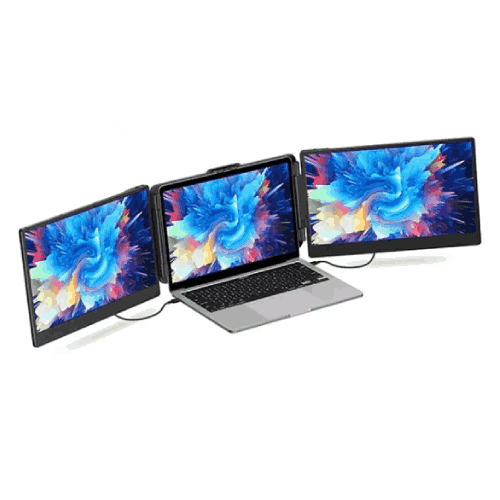
Eloam EL-S2 14 Inch Portable Triple-Screen Extender Monitor
Regular Price:৳0.00Availability: SKU: 9.60.154.9481
Quick Overview
-
Support
Saturday – Thursday: 09 AM - 06 PM. -
Payment
Cash on Delivery | Card | Online Payment -
Shipping Cost
Inside Dhaka 100tk | Outside Dhaka 150tk -
Warranty Policy
Read More
Description
Eloam EL-S2 14 Inch Portable Triple-Screen Extender Monitor in Bangladesh
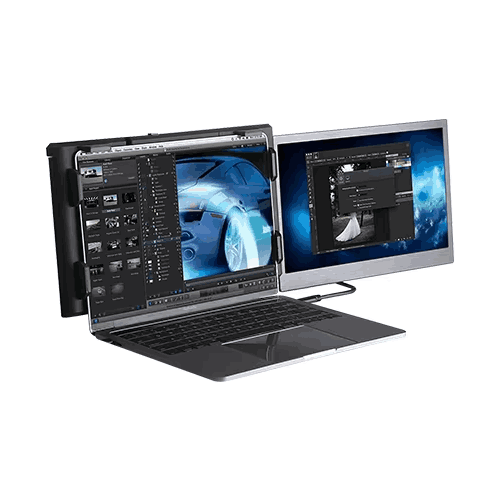
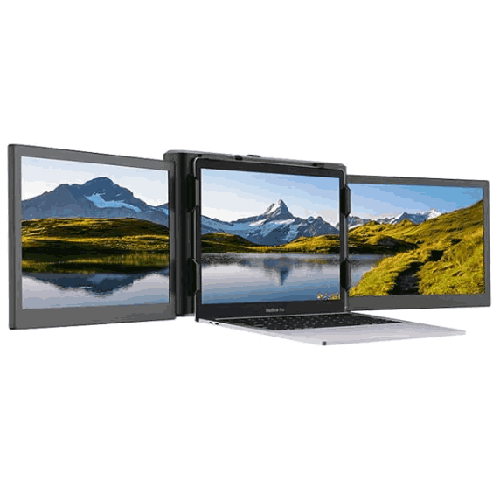
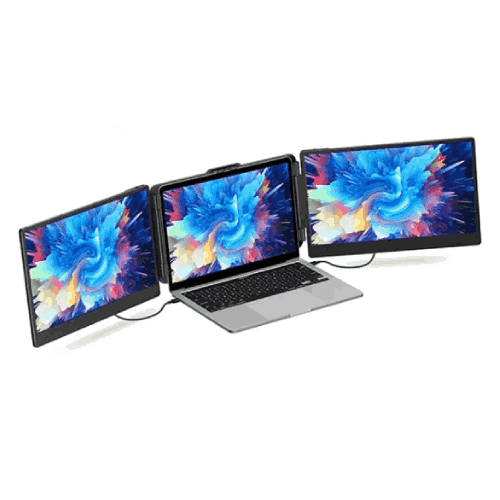
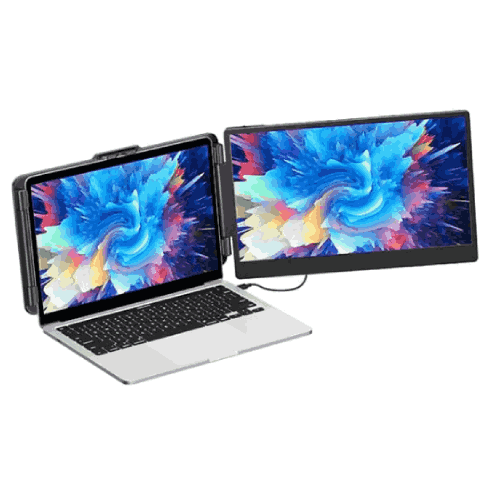
The Eloam EL-S2 14 Inch Portable Triple-Screen Extender Monitor is designed for laptop users in Bangladesh who want genuine multi-monitor productivity without giving up portability. This clever accessory attaches to your notebook and unfolds into two additional 14-inch side screens, giving you a full triple-display setup anywhere you open your laptop.
Instead of working within the tight confines of a single laptop screen—constantly switching between tabs and overlapping windows—you can spread your applications across three displays:
- Left side screen
- Center laptop panel
- Right side screen
For programmers, analysts, designers, students, and remote workers across Bangladesh, the Eloam EL-S2 makes your laptop feel like a full desktop workstation, but one that you can fold and carry in a backpack.
14-Inch Side Screens – Big Enough to Work, Slim Enough to Carry
The 14-inch diagonal size of the Eloam EL-S2 panels is a smart sweet spot:
- Large enough to show documents, code, spreadsheets, and dashboards comfortably.
- Close in size to many 13–15.6" laptops, keeping bezel lines and heights visually aligned.
- Compact enough to fold in with your laptop for transport in a standard laptop bag.
With twin 14" panels, you effectively add the equivalent of two extra laptop-sized monitors alongside your main screen. This is a massive boost in screen real estate compared to a single built-in display.
For typical Bangladeshi users:
- Developers can edit code on one display, preview web apps on another, and keep logs or terminals on the third.
- Business professionals can keep Excel, PowerPoint, and e-mail open at the same time.
- Students can watch lectures, view notes/ebooks, and type assignments simultaneously.
- Traders and finance users can run multiple charting or portfolio tools side by side.
The 14" form factor makes it much easier to adapt to common laptops in our market without overhanging too much or feeling undersized.
Triple-Screen Extender – Turn Your Laptop into a Portable Command Center
The Eloam EL-S2 is not a single separate monitor; it is a triple-screen extender solution:
- It is designed to attach to the laptop lid, often via a bracket or sliding frame.
- Both 14" screens fold out from the sides of your notebook display.
- When deployed, your laptop becomes a 3-panel device with a continuous horizontal workspace.
This design lets you:
- Drag windows from one side screen to another as if using multiple monitors on a desktop.
- Place specific apps on specific screens and leave them there—no need to hide or minimize.
- Work more fluidly, as your eyes scan from left to right like you’re looking at a wide desktop setup.
For users in Bangladesh working from small apartments, shared hostel rooms, compact offices, or co-working tables, this is a major upgrade in experience without needing a dedicated large desk.
Portable Multi-Monitor Setup for Hybrid and Remote Work
Hybrid and remote work are now normal in many Bangladeshi IT firms, BPOs, agencies, and startups. People split their time between:
- Office and home
- University and hostel
- Client sites and project offices
Deploying full-size monitors in all these places is expensive and impractical. The Eloam EL-S2 gives you consistency:
- You use the same triple-screen setup at home, in office, and on the road.
- Wherever you open your laptop, you can swing out the EL-S2 side screens and recreate your familiar workspace.
- There’s no learning curve or adjustment—your main apps can live in the same positions across all environments.
This consistency can significantly reduce friction for work-from-home staff in Dhaka, Rajshahi, Chattogram, Sylhet, Khulna, and smaller cities, making them more efficient every day.
Laptop-Attach Design – Integrated, Not Makeshift
Unlike loose portable monitors that you place on separate stands, the Eloam EL-S2 is built to physically attach to your laptop:
- It typically clamps or slides onto the back of the laptop lid.
- The two 14" panels swing out like wings to the left and right.
- Cable routing stays tighter to the laptop, reducing desk clutter.
This integrated laptop-mount style is particularly valuable in Bangladesh where working surfaces may be:
- Small plastic or wooden tables at home.
- Narrow desks in coaching centers and training rooms.
- Coffee shop tables and co-working benches.
You don’t have to balance multiple stands and monitors on limited space. The laptop plus EL-S2 essentially becomes one multi-screen unit that you can pick up and reposition together.
Ideal for Developers, Creatives, Analysts, and Power Users
The Eloam EL-S2 really shines for users who open many windows throughout the day:
- Programmers and DevOps engineers: code in the center, docs on the left, logs/monitoring on the right.
- Graphic designers & video editors: editing interface in the middle, file browser or script on one side, preview or palette on the other.
- Data analysts & BI professionals: data source on one screen, dashboard on another, notes or SQL editor on the third.
- Project managers & coordinators: task boards, reports, and communication platforms all visible together.
Instead of mentally juggling multiple windows on a single display, you can commit certain roles to each screen and keep your workflow more organized.
In Bangladesh’s fast-growing IT outsourcing and freelancing scene—Upwork, Fiverr, local agencies—the EL-S2 can be a major productivity multiplier.
Big Advantage for Students, Online Learners, and Exam Candidates
For students at universities (DU, JU, BUET, RU, CU, AIUB, NSU, BRAC, and more) or private colleges and coaching centers, study is increasingly digital:
- Live Zoom/Meet classes
- Recorded lectures
- PDF textbooks and slides
- Coding environments or math tools
- Notes in Word/Google Docs
With the Eloam EL-S2:
- You can watch a lecture full-screen on one of the side screens.
- Keep the slide deck or reference PDF on another panel.
- Type notes or solve problems on your main laptop display.
It’s also excellent for exam preparation—HSC, university admission tests, BCS, bank exams, or IT certifications—where you need to cross-check questions, explanations, and reference material quickly. Not having to switch windows repeatedly saves time and reduces mental fatigue.
Gaming, Streaming, and Content Creation on Laptops
Beyond serious productivity, the EL-S2 has clear benefits for gaming and content creation:
- Streamers can play on the main laptop screen while monitoring stream controls and chat on the EL-S2 side panels.
- YouTubers & video editors can spread timeline, effects, and preview windows across three displays, even when working from a single gaming laptop.
- Music producers can keep mixer, arrangement, and plugin windows each on a separate screen.
In Bangladesh’s vibrant content creator community, many people use laptops due to space or budget constraints. The Eloam EL-S2 lets them build a flexible, high-functioning multi-screen studio without a fixed desktop rig.
Space-Efficient vs Traditional Multi-Monitor Setups
Classic triple-monitor setups involve:
- Three large monitors
- Separate stands or monitor arms
- Multiple power cables and HDMI/DisplayPort cables
That’s great in a big office or dedicated home studio—but not realistic for many in Bangladesh.
The Eloam EL-S2 offers a different approach:
- 14" screens that match laptop-friendly proportions.
- No separate bulky stands—the monitors hang on the laptop lid.
- Fewer cables and a much smaller footprint on the table.
This is ideal for:
- 1-room apartments and family homes where the same table is used for study, meals, and everything else.
- Hostels and shared accommodation.
- Co-working desks that you cannot customize heavily.
When you’re done, you fold in the EL-S2 and close your laptop. The entire triple-screen workstation disappears into your bag.
Connectivity and Laptop Requirements (Concept Overview)
Triple-screen extenders like the Eloam EL-S2 are usually built around USB-based laptop connections (often USB-C with DisplayPort Alt Mode, and potentially other combinations). Exact port and power requirements must be confirmed from up-to-date technical specs or from BME, but in general you should check:
- Does your laptop have USB-C with display output support?
- How many external displays can your laptop GPU handle?
- What OS are you using (most often Windows; macOS support may vary)?
If your laptop is a modern mid-range or higher Windows machine with USB-C and at least modest GPU support, it’s likely compatible. For older or entry-level laptops, BME can help evaluate suitability and suggest necessary adapters if applicable.
Maintenance and Handling Tips
To protect your Eloam EL-S2 and keep it working smoothly in Bangladeshi conditions:
- Carry it in a padded laptop bag or case: Treat it like a laptop screen; avoid bumps during bus, train, and rickshaw journeys.
- Clean screens gently: Use a soft microfiber cloth—no harsh cleaners or paper tissue.
- Be careful with the hinge and mounting system: Open and close the side screens slowly; never twist or force.
- Avoid extreme heat and humidity: Don’t leave it in cars under direct sun or in damp storerooms for long periods.
- Keep ports and connectors free of dust: Gently wipe if needed; avoid moisture.
Given Bangladesh’s climate and typical travel scenarios, a bit of extra care goes a long way.
✅ Key Features
- 14" Dual Side Monitors: Two 14-inch panels attach to your laptop, delivering a full triple-screen environment.
- Portable Triple-Screen Extender: Turns your notebook into a multi-monitor workstation that you can carry anywhere.
- Laptop-Attach Design: Mounts directly to the laptop lid for a unified, space-saving multi-screen layout.
- USB-Based Connectivity: Designed to work with modern laptops over convenient USB/video connections (confirm specifics at purchase).
- Optimized for Productivity & Study: Ideal for coding, office apps, analysis, online learning, and creative workflows.
- Travel-Friendly Form Factor: Slim, foldable construction that fits into standard laptop bags and backpacks.
- Desktop-Like Experience Without a Desktop: Delivers multi-monitor benefits in spaces where full-size monitors are impractical.
✅ Usage / Applications
- Software Development & IT Operations: Run IDE, reference docs, and logs across three screens for faster debugging and development.
- Graphic & Video Editing: Place editing timelines, preview windows, and assets/tool panels on separate displays.
- Office & Business Work: Keep spreadsheets, reports, e-mail, and chat apps visible simultaneously.
- University Study & Online Classes: Watch lectures, view slides or textbooks, and take notes/coding exercises at the same time.
- BCS, Bank, and Competitive Exam Prep: Cross-reference question banks, explanations, and notes more efficiently.
- Trading & Financial Analysis: Monitor multiple markets, indicators, and news feeds on separate screens.
- Remote Work & Freelancing: Build a serious workstation experience at home, in co-working, or at client sites.
- Gaming & Streaming: Play on the main screen while handling stream controls, chat, and monitoring panels on the side screens.
✅ Benefits of This Product?
- Huge Boost in Screen Space: Triples your visible workspace compared to using only the laptop display.
- Improves Multitasking and Focus: Assign different tasks/apps to different screens and stop constantly switching windows.
- Portable Multi-Monitor Setup: Gives you desktop-like screen real estate wherever you take your laptop.
- Supports Modern Digital Lifestyles: Perfect for hybrid workers, online learners, and content creators in Bangladesh.
- Saves Desk Space: Delivers triple-screen power without the footprint of three standalone monitors.
- Flexible & Future-Compatible: Can likely be reused when you upgrade your laptop (subject to port compatibility).
- Enhances Professional Image: A clean, triple-monitor setup in client meetings or online calls signals seriousness and preparation.
✅ Ideal For
The Eloam EL-S2 14 Inch Portable Triple-Screen Extender Monitor is ideal for laptop users in Bangladesh who want to push beyond the limits of a single display but still need to stay mobile.
This includes:
- Developers, DevOps engineers, and system admins who work across multiple tools and consoles.
- Data analysts, financial professionals, and traders who depend on continuous visibility into data and markets.
- Designers, video editors, and creative professionals who benefit from separating tools and previews across displays.
- University students, researchers, and serious exam candidates managing lectures, notes, references, and assignments together.
- Remote workers, freelancers, and consultants who need the same powerful workstation experience across multiple locations.
If your laptop is your main workhorse, and you are often limited more by screen space than by processing power, the Eloam EL-S2 is crafted for you.
✅ Why Choose the Eloam EL-S2 14 Inch Portable Triple-Screen Extender Monitor?
Choosing the Eloam EL-S2 means choosing a solution specifically engineered to bring true multi-monitor productivity to your laptop, in line with how people in Bangladesh actually work and study today.
Key reasons:
- 14" side screens hit a practical balance between usability and portability.
- Integrated laptop-attach design provides a consistent, ergonomic multi-screen layout wherever you are.
- You gain desktop-level multitasking without giving up laptop mobility or needing a separate, permanent workspace.
Unlike cobbled-together setups with external monitors or tablets, the EL-S2 offers a unified system that’s been designed from the ground up for this use-case. You fold it out, plug in the connections, and go—no DIY stands, improvised mounts, or messy cable spaghetti.
If your bottleneck is screen space rather than CPU power, this is a meaningful, future-forward upgrade for your laptop-centric workflow.
✅ Why Buy This Product from BME?
Buying the Eloam EL-S2 from Business Machine & Equipment (BME) gives you the confidence of working with a Bangladesh-based specialist in IT, office, and productivity hardware.
With BME, you get:
- Authentic sourcing of the Eloam EL-S2, reducing the risk of low-quality or incompatible imports.
- Practical help checking laptop compatibility (ports, GPU support, OS) before making a purchase decision.
- Formal quotations and VAT-compliant invoices that fit institutional and corporate procurement processes.
- Experience-based guidance for deployment in local home, office, campus, and co-working environments.
BME works with schools, universities, NGOs, corporates, and government organizations throughout Bangladesh, so the team understands how a triple-screen extender like the EL-S2 will be used here—tight desks, hybrid work, online study, and more.
Exact warranty and service terms should be confirmed when ordering, but partnering with BME means having a local, knowledgeable contact for product questions and long-term planning.
✅ Buying Guide
Before you purchase the Eloam EL-S2 14 Inch Portable Triple-Screen Extender Monitor, consider:
1. Laptop Ports & Graphics Capability
- Does your laptop have USB-C with display output or the required video/USB ports?
- How many external monitors can your graphics chip handle?
Share your laptop model with BME to verify.
2. Your Multitasking Style
- Do you regularly run multiple full-screen apps (IDE + browser + docs, or lecture + notes + references)?
- Will three screens actually be used daily, or only occasionally?
The more you multitask, the more benefit you’ll get.
3. Mobility & Locations
- Do you work between home, office, campus, and client sites?
- Is it impractical to leave big monitors in all those places?
If yes, a portable solution like the EL-S2 is ideal.
4. Desk/Surface Size
- Can your usual table handle a slightly wider laptop setup?
- Are chairs/tables stable enough for an attached triple-screen device?
Measure roughly to be sure you can work comfortably.
5. Priority Users If Buying for a Team
For organizations, start with:
- Developers, analysts, key remote staff, and content creators.
- Students or researchers heavily engaged in screen-intensive tasks.
6. Alternatives
Compare with:
- One large external monitor (less portable, good for fixed locations).
- Single standalone portable monitor (adds only one extra screen).
- Doing nothing and sticking with one screen (no cost, but lower productivity).
For heavy laptop users, the value of the EL-S2 becomes clear over time.
✅ Customers Ask About / Frequently Asked Questions
Q1: What is the Eloam EL-S2 used for?
It is used as a portable triple-screen extender that attaches to your laptop, adding two 14" side screens for a three-display workspace.
Q2: Is it suitable for working from home in Bangladesh?
Yes. It’s ideal for WFH, allowing you to run multiple apps across three screens on a small table without needing full-size monitors.
Q3: Can students use it for online classes and study?
Absolutely. Students can watch classes, view slides or textbooks, and type notes or code simultaneously, which is very helpful for complex subjects.
Q4: How does it connect to the laptop?
It uses laptop-friendly USB/video connections (often USB-C and/or other supported ports). Check the exact connectivity requirements with BME for your laptop.
Q5: Will it work with any laptop?
Not every laptop. Compatibility depends on ports, GPU support, and OS. It’s important to confirm with BME before buying.
Q6: Is it easy to travel with?
Yes. It folds in with your laptop and fits in a good-quality laptop bag. Just handle it carefully like you would any display.
Q7: Is the EL-S2 good for coding and IT work?
Yes. Developers and IT staff benefit significantly from having separate screens for IDE, documentation, and logs or monitoring tools.
Q8: Does it need a separate power adapter?
It is generally designed to be powered through laptop-compatible connections. Exact power requirements should be checked against current specs.
Q9: Can it replace traditional external monitors?
For many mobile or space-constrained users, yes—it offers similar multi-monitor capability while being far more portable. For fixed large desks, traditional monitors may still be preferred.
Q10: What warranty is available in Bangladesh?
Warranty terms depend on the batch and supplier. Confirm the current warranty details directly with BME when purchasing.
Q11: Can I use only one side screen if I don’t need all three at once?
In many designs, you can choose which screens to enable depending on your laptop’s capability. Confirm usage flexibility and configuration options with BME and the latest documentation.
✅ Why Buy This Product
The Eloam EL-S2 14 Inch Portable Triple-Screen Extender Monitor offers a real jump in what your laptop can do, especially in Bangladesh where space is often limited and mobility is essential.
It delivers:
- A spacious, organized triple-screen workspace.
- A consistent, powerful setup you can use at home, office, campus, or client sites.
- A major productivity boost for coding, studying, trading, creating, and managing complex workflows.
If you rely on your laptop for serious work or study and are feeling constrained by a single display, this extender provides a practical, future-ready upgrade. Order the Eloam EL-S2 14 Inch Portable Triple-Screen Extender Monitor from Business Machine & Equipment (BME) today and experience the difference a portable three-screen laptop setup can make across your professional, academic, and creative life in Bangladesh.
What is the price of Eloam EL-S2 14 Inch Portable Triple-Screen Extender Monitor in Bangladesh?
Write a review
Question Answer
Have question about this product? Get specific details about this product from expert.