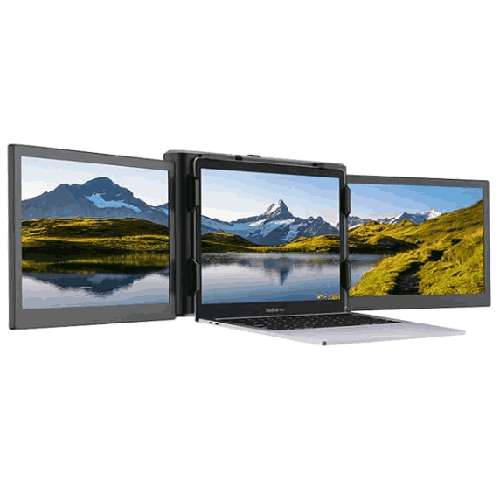
Eloam EL-P2 PRO Portable Triple-Screen Extender Monitor Attach to Laptops
Regular Price:৳0.00Availability: SKU: 9.60.154.9480
Quick Overview
-
Support
Saturday – Thursday: 09 AM - 06 PM. -
Payment
Cash on Delivery | Card | Online Payment -
Shipping Cost
Inside Dhaka 100tk | Outside Dhaka 150tk -
Warranty Policy
Read More
Description
Eloam EL-P2 PRO Portable Triple-Screen Extender Monitor Attach to Laptops in Bangladesh
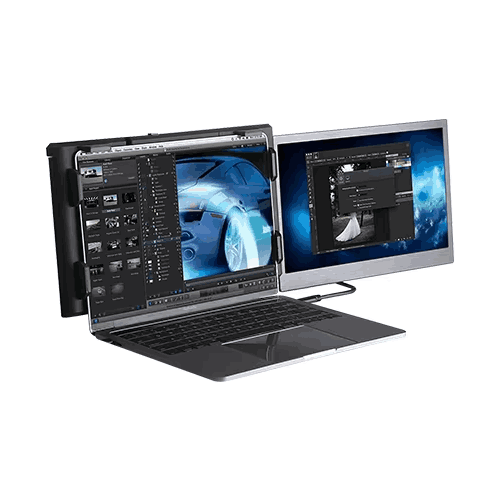
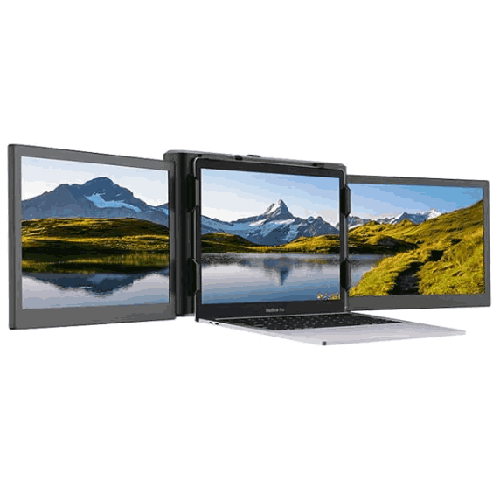
The Eloam EL-P2 PRO is a portable triple-screen extender monitor designed to attach directly to your laptop, instantly turning it into a multi-monitor workstation wherever you are. For laptop users in Bangladesh, this means you can now enjoy the kind of expanded workspace normally reserved for desktop PCs with dual or triple monitors—while staying completely mobile.
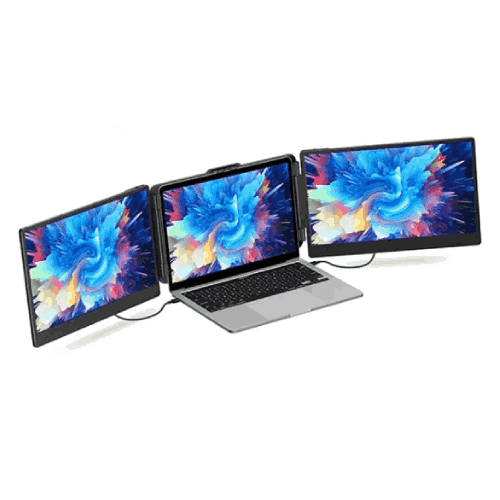
You slide or clamp the Eloam EL-P2 PRO onto the back of your laptop screen, fold out its two side monitors, connect the cables, and your single-screen notebook becomes a three-screen productivity hub: left screen, center laptop display, and right screen, all working in harmony.
Whether you are working from home in Dhaka, coding in a co-working space in Chattogram, trading stocks from Sylhet, traveling between client offices, or studying in a university dorm, the EL-P2 PRO is built to give you a continuous, panoramic workspace on the go.
Triple-Screen Extender – Desktop-Class Multitasking on a Laptop
The Eloam EL-P2 PRO is not just a standalone portable monitor—it is a complete triple-screen extender system:
- Two slim monitor wings flank your laptop’s existing screen.
- Once deployed, you get three screens side-by-side.
- You can extend or mirror displays according to your needs.
In everyday use, this transforms how you work:
- Software developers can keep code, documentation, and preview or logs all visible at once.
- Designers and content creators can place editing tools on one screen, the main canvas on another, and references or file browsers on the third.
- Stock traders and finance professionals can monitor charts, order books, and news feeds simultaneously.
- Managers and office professionals can have e-mail, Excel sheets, and communication tools open together without constant window switching.
- Online teachers and students can keep Zoom/Meet on one screen, slides on another, and notes or resources on the third.
Instead of constantly juggling windows with Alt+Tab, you can dedicate each screen to a specific task, dramatically improving workflow.
Portable Multi-Monitor Setup for Hybrid and Remote Work
Work styles in Bangladesh are increasingly hybrid—sometimes at the office, sometimes at home, sometimes on client sites. Setting up a full desktop rig with large monitors in every location is impractical. The Eloam EL-P2 PRO offers a better solution:
- It travels with your laptop in your backpack or briefcase.
- It attaches directly to the laptop lid, forming a single portable unit.
- It deploys quickly: open laptop, swing out side screens, plug in connectors.
For remote and hybrid workers:
- At home, you unfold the EL-P2 PRO and create a quasi-desktop workstation on your dining table or study desk.
- In the office, you detach it or keep using it on your main workstation for continuity.
- At client offices, you take your whole triple-screen setup out of your bag and work just like you do at home.
You no longer have to feel “screen starved” when leaving your primary workstation.
Designed to Attach to Laptops – Clean, Integrated Layout
One of the special aspects of the Eloam EL-P2 PRO is its laptop-attach design. Unlike separate portable monitors that sit on separate stands, this unit is built to mount to the laptop itself (via a sliding frame, bracket, or clamp mechanism depending on the exact design):
- The side screens line up with the top and bottom edges of your laptop display.
- Cable routing is closer and neater.
- The entire setup moves together when you reposition your laptop.
For Bangladeshi users working in tight spaces—small apartments, shared desks, café tables—this integrated approach matters. You don’t have to balance separate monitors and stands on small surfaces; your laptop plus EL-P2 PRO becomes a single, unified multi-screen device.
Perfect Companion for Coders, Creators, Traders, and Power Users
Triple-screen setups are especially loved by people with heavy multitasking needs:
- Programmers and DevOps engineers: Keep IDE on one screen, browser or API docs on another, and logs/terminals on a third.
- Graphic designers and video editors: Use one screen as a full-sized preview, another for timeline/tools, and a third for file management or script.
- Traders and analysts: Monitor multiple markets, orders, and news feeds in parallel.
- Marketing and operations teams: Manage social feeds, dashboards, and communication tools simultaneously.
In Bangladesh’s growing IT, outsourcing, and startup ecosystems, the Eloam EL-P2 PRO offers serious productivity without expensive, static office installations.
Study, Research, and Online Learning with Triple Screens
Bangladeshi students often have to juggle:
- Recorded or live lectures.
- PDF textbooks, research papers, or slides.
- Assignments in Word, Excel, coding IDEs, or online platforms.
With the EL-P2 PRO:
- Set your video lecture on one screen.
- Keep the slide/PDF open on the second.
- Write notes or code on the center laptop display.
Pharmacy, medical, engineering, BBA/MBA, and IT students in universities like DU, BUET, NSU, BRAC, CUET, RUET, AIUB, and others can dramatically improve their digital study environment with a triple-screen setup—especially during exam season or project work.
Similarly, BCS and bank job aspirants can keep online tests, question banks, and notes open side-by-side, optimizing limited study time.
Travel-Ready Multi-Screen Rig
Commuting in Bangladesh—by car, bus, train, ride-sharing, or even domestic flights—means you’re moving between environments that rarely have consistent equipment. The Eloam EL-P2 PRO is engineered to move with you:
- Folds flat along with your laptop.
- Fits into most laptop bags with a bit of planning.
- Requires only laptop-friendly connections (e.g., USB-C/USB-based connectivity; specific interface to be confirmed with current spec).
For professionals who regularly travel between cities—Dhaka, Chattogram, Sylhet, Rajshahi, Khulna, and beyond—the ability to carry a multi-screen workstation in a single bag is a huge advantage.
You can:
- Set up quickly in hotels, project offices, and client meeting rooms.
- Maintain the same multi-screen workflow regardless of location.
- Avoid dependency on whatever display infrastructure happens to be available.
Gaming, Streaming, and Content Creation on the Side
While the Eloam EL-P2 PRO is primarily a productivity tool, it also benefits gamers and streamers in Bangladesh:
- Keep the main game on the laptop display.
- Use one side screen for streaming tools (OBS, Streamlabs).
- Use the other for monitoring chat, Discord, or system stats.
For content creators:
- Edit video on the center display, keep media bins and effects on one side, and preview or script on the other.
- For audio production, use mixer/views on one side and arrangement on the main.
If you are building a personal brand on YouTube, Facebook Live, or Twitch from a laptop, the extra screens let you monitor your content ecosystem without constantly minimizing your primary app.
Space-Efficient Alternative to Traditional Desk Monitors
Full-size monitors are excellent—when you have the space and stability for them. However, many Bangladeshi users:
- Live in small flats where the same table must serve multiple purposes.
- Work from rented rooms or hostels with limited desk surface.
- Use multipurpose office desks where adding two extra 24" monitors is unrealistic.
The Eloam EL-P2 PRO solves this:
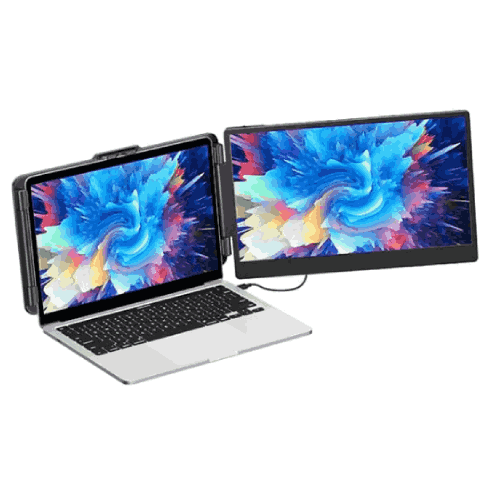
- It adds two side screens without requiring extra stands or large base footprint.
- It packs away with the laptop, freeing the desk completely when you’re done.
- It doesn’t need dedicated shelving or monitor arms.
If you’ve always wanted multi-monitor benefits but felt they were impractical for your space, this solution is designed specifically for that constraint.
General Connectivity & Laptop Requirements (Conceptual)
While exact port configuration and cable details must be confirmed from current official specs or from BME, triple-screen extenders like the EL-P2 PRO typically rely on:
- USB-C with DisplayPort Alt Mode (preferable on modern laptops), or
- Combinations of USB + video output (such as HDMI) with suitable adapters.
Before purchase, you should check:
- Whether your laptop has USB-C with display output capability.
- How many external displays your GPU can drive (especially on older or entry-level laptops).
- Supported operating systems (commonly Windows, sometimes macOS; confirm).
BME can help you evaluate compatibility for popular models from Lenovo, HP, Dell, Asus, Acer, MSI, Apple (where supported), etc., in the Bangladesh market.
Maintenance and Care for Long-Term Use
To keep the Eloam EL-P2 PRO working reliably:
- Transport in a padded bag: Treat it like a laptop—avoid hard knocks, especially in crowded traffic.
- Clean screens gently: Use a microfiber cloth, no harsh chemicals. Avoid pressing too hard.
- Respect hinge and mount mechanisms: Open and close the side screens slowly; don’t twist or overextend.
- Avoid extreme conditions: Don’t leave the unit exposed to direct midday sun or in very humid, enclosed spaces for extended periods.
- Cable discipline: Don’t yank cables; coil them loosely when packing.
Simple precautions like these are especially important given Bangladesh’s climate and typical commute patterns.
✅ Key Features
- Triple-Screen Laptop Extender: Adds two side monitors to your laptop screen, creating a full three-panel workspace.
- Portable, Laptop-Attach Design: Mounts directly to your notebook, folding in and out for quick deployment and pack-up.
- Productivity-Oriented Layout: Lets you dedicate separate screens to different apps—ideal for coding, trading, design, or study.
- USB-Based Laptop Connectivity: Designed for connection to modern laptops using user-friendly interfaces (confirm port requirements).
- Travel-Friendly and Compact: Slim, foldable form factor fits alongside your laptop in most backpacks or business bags.
- Space-Efficient Multi-Monitor Solution: Offers multi-screen capability without requiring full-sized desktop monitors and stands.
- Suitable for Work, Study, and Entertainment: Versatile across office tasks, online learning, gaming, streaming, and creative projects.
✅ Usage / Applications
- Office Professionals & Managers: Keep e-mail, reports, and chat apps open together for smoother communication and decision-making.
- Developers & IT Professionals: Use one screen for IDE, another for browser/docs, and a third for logs or terminals.
- Designers, Editors, and Creators: Spread timelines, tools, previews, and references across three displays for efficient editing.
- Students & Online Learners: Watch lectures, view slides or textbooks, and take notes or code at the same time.
- Traders & Financial Analysts: Monitor charts, positions, and market news simultaneously.
- Remote Workers & Freelancers: Build a full workstation in any location—home, co-working space, or client office.
- Gamers & Streamers: Game on the main screen while managing streaming software and chat on the side displays.
- Project Managers & Consultants: Keep project trackers, documentation, and communication windows visible in client meetings.
✅ Benefits of This Product?
- Massively Expanded Workspace: Triples your effective screen area compared to a lone laptop display.
- Boosts Multitasking Productivity: Reduces time lost switching between windows and tabs, helping you work faster and more comfortably.
- Portable Multi-Monitor Experience: Brings desktop-style multi-screen benefits to any location where you can open your laptop.
- Space-Saving for Small Desks: Delivers three screens without dedicating your table to large standalone monitors.
- Improves Focus and Organization: You can group related tasks by screen (e.g., communication left, main work center, references right).
- Adaptable to Many Professions and Use Cases: One investment that enhances output across study, office work, creative projects, and trading.
- Upgrades Existing Laptops: Extends the usefulness of your laptop without needing to buy a full desktop system.
✅ Ideal For
The Eloam EL-P2 PRO Portable Triple-Screen Extender Monitor is ideal for laptop users in Bangladesh who feel limited by a single display and need serious multitasking capacity.
It’s especially well-suited for:
- Software engineers, DevOps, and IT professionals relying heavily on multiple tools and terminals.
- Designers, video editors, and content creators who want separate spaces for timelines, tools, preview, and scripts.
- Data analysts, traders, and financial professionals monitoring multiple data streams in real time.
- University students, researchers, and serious exam candidates juggling lectures, reading materials, and writing tools.
- Remote workers, freelancers, and consultants who work in varied locations but want a consistent multi-monitor workflow.
If you often catch yourself thinking, “I wish I had more screen space” while working on your laptop, the EL-P2 PRO is tailor-made for your workflow.
✅ Why Choose the Eloam EL-P2 PRO Portable Triple-Screen Extender Monitor?
The Eloam EL-P2 PRO stands out because it turns your laptop into a self-contained triple-monitor workstation, without demanding a permanent desk or heavy hardware:
- It offers a clean, integrated triple-screen layout that moves with your laptop.
- It addresses the reality of modern Bangladeshi work and study—hybrid locations, limited space, and heavy multitasking.
- It provides desktop-class screen real estate in a form factor you can carry anywhere.
Compared to using one or two standalone portable monitors, the EL-P2 PRO’s laptop-attach design offers a more ergonomic and unified user experience. Compared to classic big monitors, you gain huge advantages in flexibility and portability.
If you need genuine multi-screen power, but your life and work are centered around a laptop—not a desktop—the Eloam EL-P2 PRO is a smart, forward-looking choice.
✅ Why Buy This Product from BME?
Buying the Eloam EL-P2 PRO from Business Machine & Equipment (BME) connects you with a Bangladesh-based IT and office equipment specialist who understands local user needs.
With BME, you get:
- Genuine, brand-aligned product sourcing, reducing risk of low-quality or incompatible imports.
- Help in evaluating laptop compatibility, including port types (USB-C, USB-A, HDMI) and external display limits.
- Formal quotations and VAT-compliant invoices suitable for corporate, institutional, and NGO procurement.
- Context-aware guidance for deployment in Bangladeshi homes, offices, universities, and co-working spaces.
BME’s experience across education, corporate, NGO, and government sectors means they can advise whether the EL-P2 PRO is best for certain teams (e.g., developers, analysts, remote staff) and how to roll it out efficiently.
While warranty coverage and exact service terms must be confirmed at purchase, working with BME gives you a local partner to consult for product usage questions and long-term planning.
✅ Buying Guide
Consider these points before purchasing the Eloam EL-P2 PRO Portable Triple-Screen Extender Monitor:
1. Laptop Port & GPU Capability
Check:
- Does your laptop have USB-C with display output, or suitable video/USB ports for the EL-P2 PRO?
- How many external monitors can your laptop’s graphics support?
If unsure, share your laptop model with BME for a compatibility check.
2. Your Multitasking Load
Ask yourself:
- Do you regularly use 3–5 apps/windows at the same time?
- Would you benefit from always seeing e-mail, communication tools, and main work simultaneously?
The heavier your multitasking, the more value you’ll get.
3. Mobility Needs
Do you work in multiple locations:
- Home and office?
- University and hostel?
- Different client sites?
If yes, the portability of EL-P2 PRO becomes a major advantage over fixed desktop monitors.
4. Space Constraints
Consider your usual desk:
- Is there room for three displays side-by-side?
- Would attaching monitors directly to the laptop reduce clutter and make setup easier?
In cramped spaces, the EL-P2 PRO’s integrated design pays off.
5. Who in Your Team Needs It Most?
For organizations:
- Prioritize developers, analysts, remote staff, and key managers.
- Consider shared use in meeting or training rooms where multi-screen setups can improve sessions.
6. Alternative Solutions
Compare with:
- A single external monitor (less multitasking freedom).
- Standard portable monitors (may not integrate as smoothly).
- Remaining on a single laptop screen (lowest cost, lowest productivity).
For many intensive users, the EL-P2 PRO offers the best balance between capability and portability.
✅ Customers Ask About / Frequently Asked Questions
Q1: What is the Eloam EL-P2 PRO used for?
It is used as a portable triple-screen extender that attaches to your laptop, giving you two additional side displays for a three-screen workspace.
Q2: Is it useful for work-from-home in Bangladesh?
Yes. It’s excellent for WFH, allowing you to keep multiple apps and documents open across three screens on a single laptop-based setup.
Q3: Can students benefit from the EL-P2 PRO?
Yes. Students can watch lectures, view slides or textbooks, and take notes or code all at the same time without switching windows constantly.
Q4: How does it connect to the laptop?
It connects through laptop-compatible ports (commonly USB-C / USB plus video, depending on model). You should confirm the exact connectivity requirements with BME based on current specifications.
Q5: Does it work with all laptops?
Not all. It depends on your laptop’s available ports and external display support. Always check compatibility before purchase.
Q6: Can I travel with the EL-P2 PRO attached to my laptop?
You should fold and pack it properly for travel, just like you would with your laptop. It is designed to be portable, but you must still handle it with care.
Q7: Is it suitable for trading and financial analysis?
Yes. Triple screens are ideal for traders and analysts who need to monitor multiple charts, orders, and information sources at once.
Q8: Will it replace a full desktop setup?
For many users, yes. It gives desktop-like multi-monitor capability using only a laptop and the extender, especially valuable where space and mobility are key.
Q9: Does it need extra power adapters?
Typically, it is designed to be driven and powered via laptop-friendly connections; however, exact power requirements should be confirmed with current specs.
Q10: What warranty is available in Bangladesh?
Warranty details (duration and coverage) depend on the batch and supplier. Please check with BME at the time of purchase.
Q11: Can I use only one side screen if I don’t need all three?
In many multi-screen extenders, you can choose how many screens to activate based on laptop and software configuration. Confirm usage flexibility with BME and the current model documentation.
✅ Why Buy This Product
The Eloam EL-P2 PRO Portable Triple-Screen Extender Monitor is a game-changer for laptop users in Bangladesh who want to move beyond the limits of a single screen without giving up mobility.
It gives you:
- Three screens to organize your digital life.
- Desktop-level productivity in a laptop form factor.
- Flexibility to work effectively from almost any location.
If your laptop is the heart of your work, study, or creative life, this extender dramatically upgrades what that laptop can do—both in the office and on the road.
Order the Eloam EL-P2 PRO from Business Machine & Equipment (BME) today and experience a true multi-monitor workstation you can fold, pack, and carry anywhere across Bangladesh.
What is the price of Eloam EL-P2 PRO Portable Triple-Screen Extender Monitor Attach to Laptops in Bangladesh?
Write a review
Question Answer
Have question about this product? Get specific details about this product from expert.