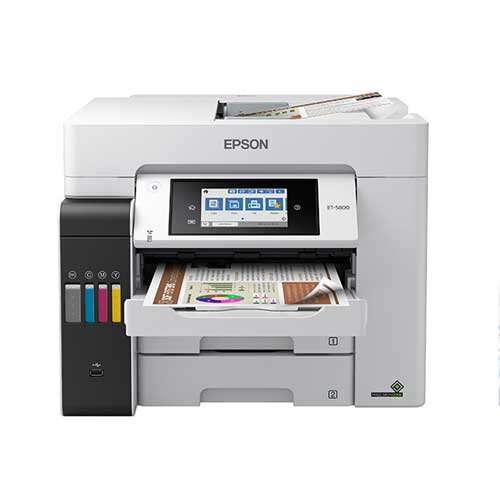
Epson EcoTank L11050 A3+ Wi-Fi Ink Colour Tank Printer
Cash Price: ৳61,500.00 Regular Price:৳62,500.00Availability: In Stock SKU: 1.3.8.3121
Quick Overview
-
Support
Saturday – Thursday: 09 AM - 06 PM. -
Payment
Cash on Delivery | Card | Online Payment -
Shipping Cost
Inside Dhaka 350tk | Outside Dhaka 550tk -
Warranty Policy
Read More
Description
Epson EcoTank L11050 A3+ Wi-Fi Ink Colour Tank Printer Prices in Bangladesh
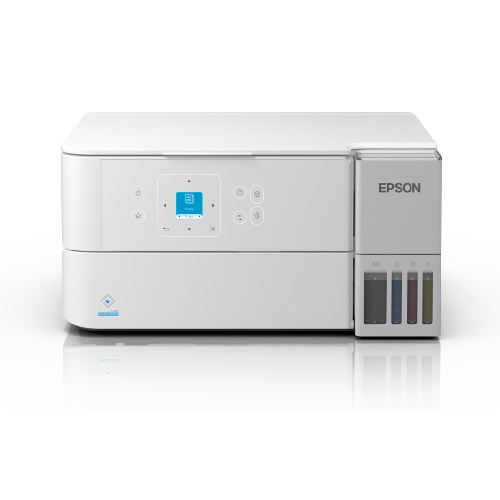
The Epson EcoTank L11050 is a single-function, four-colour ink tank printer for users who need dependable A3+ colour printing at home, in a studio or at work. Its refillable ink tank system is designed for high-volume printing without standard ink cartridges, while built-in Wi-Fi and Wi-Fi Direct provide flexible printing from compatible computers and mobile devices.
Print resolution reaches 4800 × 1200 dpi, supporting detailed documents, charts and colour graphics. Under ISO test conditions, the L11050 prints up to 15 images per minute (ipm) in black and 8 ipm in colour on A4, or up to 5.5 ipm in black and 3 ipm in colour on A3. Draft-mode speeds can be higher, depending on settings and document content.
The printer supports paper sizes up to A3+ and has a rear paper feed with a standard capacity of up to 100 sheets of A4 plain paper. Epson Smart Panel and supported Epson Connect services offer mobile printing and printer-management options. The L11050 is a print-only model: it does not include scanning, copying, faxing or automatic duplex printing.
Technical Specifications
| Specification | Details |
|---|---|
| Model | Epson EcoTank L11050 |
| Printer type | Single-function colour ink tank printer |
| Print technology | Epson PrecisionCore inkjet |
| Ink colours | Four-colour: black, cyan, magenta and yellow |
| Maximum print resolution | 4800 × 1200 dpi |
| ISO print speed, A4 | Up to 15 ipm black / 8 ipm colour |
| ISO print speed, A3 | Up to 5.5 ipm black / 3 ipm colour |
| Draft print speed, A4 | Up to 30 ppm black / 20 ppm colour |
| Maximum paper size | A3+ |
| Paper feed | Rear feed |
| Standard A4 plain-paper input | Up to 100 sheets |
| Connectivity | Wi-Fi, Wi-Fi Direct, USB |
| Mobile printing | Epson Smart Panel and supported Epson Connect services |
| Automatic duplex printing | No |
| Functions | Print only |
| Approx. dimensions, closed | 498 × 358 × 165 mm |
| Approx. weight | 6.4 kg |
| Ink compatibility | Epson 003-series bottles are listed in some regions; verify the correct code for the specific unit |
Key Features
- A3+ print capability: Produce larger documents, diagrams, artwork and marketing materials without outsourcing every large-format print job.
- Refillable EcoTank system: Refill the integrated tanks from ink bottles to support high-volume printing with less reliance on disposable cartridges.
- Detailed colour output: Print at up to 4800 × 1200 dpi for fine text, charts and colour graphics.
- Wireless network printing: Connect through Wi-Fi so compatible devices can send print jobs without a direct USB connection.
- Wi-Fi Direct support: Print from compatible devices through a direct wireless connection when a router is not convenient.
- Mobile app control: Use Epson Smart Panel on supported devices for setup, printing and printer monitoring.
- A4 office productivity: Reach up to 15 ipm in black and 8 ipm in colour under ISO test conditions.
- A3 print performance: Print A3 pages at up to 5.5 ipm in black and 3 ipm in colour under ISO conditions.
- Flexible paper sizes: Handle a range of supported media, including A3+, A3, A4 and selected smaller sizes and envelopes.
- Compact A3+ footprint: Add large-format printing to a home office or small studio without moving to a large production printer.
- Heat-Free PrecisionCore technology: Epson’s print technology is designed to reduce power use compared with some conventional printing technologies.
- Replaceable maintenance components: The maintenance box and pickup roller are replaceable, which can help simplify servicing where parts are available.
Usage and Applications
The Epson EcoTank L11050 can be used for:
- A3 and A3+ business reports, charts and presentations
- Architecture, engineering and design drawings
- School and university materials, diagrams and classroom visuals
- Marketing posters, flyers and promotional documents
- Colour documents for small businesses and home offices
- Design proofs and artwork on compatible paper
- Wireless printing from compatible phones, tablets and computers
Benefits of This Product
- Print larger in-house: A3+ capability gives teams more flexibility for oversized documents and creative work.
- Manage ongoing ink costs: The refillable tank design supports high-volume printing without standard cartridges.
- Share printing wirelessly: Wi-Fi and Wi-Fi Direct offer convenient placement and connection options.
- Create detailed colour prints: High-resolution output supports readable text, graphics and diagrams.
- Fit A3+ printing into a smaller workspace: Its compact design suits home offices, studios and small businesses.
- Simplify mobile printing: Epson’s supported mobile tools make it easier to print from compatible devices.
Why Choose the Epson EcoTank L11050?
Choose the L11050 if you need A3+ colour printing, wireless connectivity and refillable ink tanks in one compact printer. It is well suited to users who print regularly and need larger formats for documents or graphics. Since it only prints and does not offer automatic two-sided printing, consider whether you need separate scanning equipment or frequently print duplex documents.
Why Buy This Product from BME?
BME can help Bangladesh-based buyers check the L11050’s current price and availability, confirm the correct regional ink bottles, and review warranty and delivery options. Ask BME to confirm the exact model configuration, included supplies and local after-sales support before ordering.
Buying Guide
- Confirm your print-size needs: The L11050 supports paper up to A3+; check that your preferred paper type and dimensions are supported.
- Check whether print-only is enough: This model does not scan, copy or fax.
- Plan for two-sided printing: Automatic duplex printing is not available, so pages must be turned manually for double-sided jobs.
- Choose your connection method: Confirm that Wi-Fi, Wi-Fi Direct or USB fits your devices and workspace.
- Verify ink-bottle compatibility: Ink codes can vary by regional version; confirm the correct Epson bottles for the unit before purchase.
- Check the included supplies: Confirm which ink bottles and accessories come in the specific package.
- Review local warranty and service: Ask BME about warranty coverage and service availability in Bangladesh.
Frequently Asked Questions:
What is the maximum paper size supported by the Epson L11050?
It supports printing up to A3+ on compatible media.
Is the Epson EcoTank L11050 a multifunction printer?
No. It is a single-function printer and does not scan, copy or fax.
Does it support Wi-Fi printing?
Yes. It supports Wi-Fi and Wi-Fi Direct, along with Epson mobile printing options for compatible devices.
What is the A4 print speed?
Under ISO test conditions, it prints up to 15 ipm in black and 8 ipm in colour. Actual results vary with print settings, content, paper and connection.
Can the L11050 print on both sides automatically?
No. Automatic duplex printing is not supported; double-sided printing requires manually turning the paper.
How many sheets can the paper tray hold?
The rear feed holds up to 100 sheets of A4 plain paper under the stated standard configuration. Capacity can vary for other media.
Which ink bottles does the L11050 use?
Epson lists 003-series bottles for some regional versions. Confirm the correct ink code for the exact printer unit with BME before buying.
How many pages can the included or replacement ink print?
Epson advertises yields of up to 4,500 black pages and 7,000 colour pages for certain compatible replacement bottles. Actual yield depends on print content, usage, setup and regional package.
Can I print from a mobile phone?
Yes, using supported Epson mobile printing features and a compatible device.
Is this printer suitable for photo or graphic work?
It can print colour graphics and compatible photo media. Results depend on paper type, print settings and the intended output quality.
What is the price of Epson EcoTank L11050 A3+ Wi-Fi Ink Colour Tank Printer in Bangladesh?
Write a review
Question Answer
Have question about this product? Get specific details about this product from expert.

Epson EcoTank L8050 Ink Tank Photo Printer




Epson LQ-590II Dot Matrix Printer