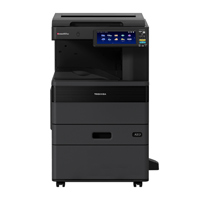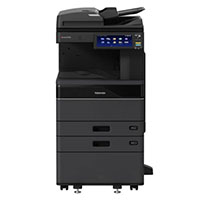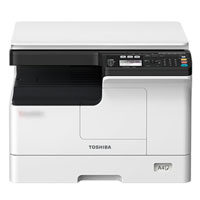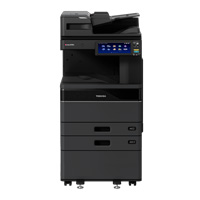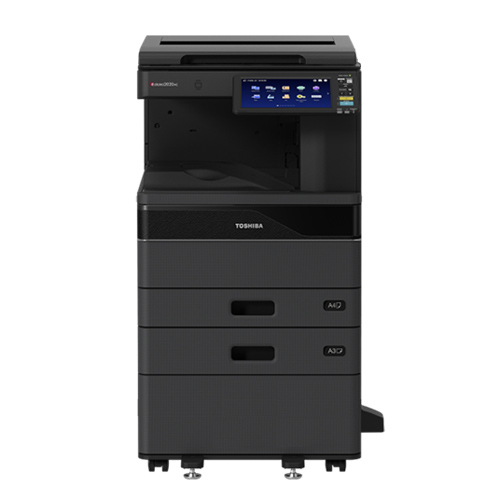
Toshiba e-Studio 3028A Multi-Function Mono Photocopier Machine
Cash Price: ৳176,000.00 Regular Price:৳179,500.00Availability: In Stock SKU: 1.1.2.728
Quick Overview
-
Support
Saturday – Thursday: 09 AM - 06 PM. -
Payment
Cash on Delivery | Card | Online Payment -
Shipping Cost
Inside Dhaka 1500tk | Outside Dhaka 3000tk -
Warranty Policy
Read More
Specification
General Information
| Brand | Toshiba |
| Model | e-Studio 3028A |
| Copy System | Laser printing System |
| Display | 10.1-inch color WSVGA touch screen tilting display |
| Memory | RAM: 4GB |
| Storage | SSD 128GB (Optional 320 GB HDD) self-encrypting Drive |
| Warm-Up time | 20 Sec |
| Toner Yield | 43.900 sheets, 5% coverage |
| Developer & Drum | 100,000 sheets |
Paper Handling Features
| Paper capacity | 2 Drawer (550*2) 1100 sheets, 100 sheets – bypass |
| Original Feed RADF Or DSDF (Optional Item) | 300 sheets DSDF, 100 sheets RADF |
| Paper Size | A3, A4, A5, Letters, Banners, Envelope |
| Paper weight (g/m2) | 60–256 gsm |
| Preventive Maintenance | 100.000 pages |
Copy Features
| Printing Speed | 30 ppm (A4) |
| Resolution | 600 x 600 dpi, 1200 x 1200 dpi (PS) |
| Reproduction Ratio | 25%–400% in 1% steps |
| Multiple copying | Max 999 Copie |
| Duplex | Yes |
| Copy Mode | Text, Text/Photo, Photo |
| Unique function | Template |
| First Copy Out | 4.3 seconds |
Scan Features
| Resolution | 600 dpi, 400 dpi, 300 dpi, 200 dpi, 150 dpi, 100 dpi |
| DSDF Scan | 120 ppm simplex, (Monochrome or Colour). |
| File formats | TIFF, PDF, JPEG, XPS, Slim PDF |
| Scan To | e-filing, USB, PC, SMB, FTP, Email, Twain, Files |
| Scan mode | Full color, Auto color, Monochrome, Grayscale. |
| Image Compression | Color/Grayscale: JPEG (High, Middle, Low) |
E-FILING Features
| Operation Method | Control panel or Use Top Access from PC |
| Number of Boxes | 1 public box, 200 Private User Boxes |
| Capacity of Boxes | 100 folders per box, 400 files per folder, 200 (pages) per files |
e-BRIDGE Next print Features
| Speed | 30 ppm. |
| PDL | PCL5e, PCL5c, PCL6 (PCL XL), PS3, PDF, XPS, JPEG |
| Resolution | 600 x 600 dpi (1bit), 1200 x 1200 dpi (1bit). |
| Resolution | 600 x 600 dpi (1bit), 1200 x 1200 dpi (1bit). |
| Interface | 2x RJ45 Ethernet (10/100/1000 Base-T), USB 2.0 (High- speed), Optional 802.11b/g/n, Wireless Lan/Bluetooth. |
| Network Protocols | TCP/IP (IPv4, IPv6), NetBIOS trên TCP/IP, IPX/SPX Novell, Ether talk for the Macintosh environment |
| Wireless Device | Airprint, Mopria, app e-Bridge Print & Capture trên IOS và Android (download at Apple App or Google Play) |
| Device management | Top Access, EFMS6.2 (e-BRIDGE Fleet Management ), e-Suite, PaperCut MF |
| Account Control | 10000 Users or 1.000 departments. Support User Authentication. |
Description
Toshiba e-Studio 3028A Multi-Function Monochrome Photocopier Machine Best Price in Bangladesh
If you're looking for the Toshiba e-Studio 3028A Monochrome Photocopier Machine in Bangladesh, you'll find it to be a highly efficient and reliable choice for all your copying needs. The machine comes with a laser printing system, a 10.1-inch color touch screen, and a high paper capacity, making it ideal for various settings like offices and small businesses. As for the Toshiba 3028A price in Bangladesh, it is competitively priced with a cash price of ৳176,000.00, EMI options are also available, and the product is currently in stock.
In today's fast-paced office environments in Bangladesh, the demand for efficient and reliable photocopiers has never been higher. Whether you're running a small business or managing a bustling corporate office, the right photocopier can make all the difference. Meet the Toshiba e-Studio 3028A, a monochrome photocopier machine designed to meet all your copying needs. With its state-of-the-art features and robust performance, this machine is setting new standards for reliability and efficiency in Bangladesh.
Key Features of the Toshiba e-Studio 3028A Photocopier Machine
When it comes to selecting a photocopier machine in Bangladesh, features and benefits are paramount. The Toshiba e-Studio 3028A stands out in this regard with a range of features designed to meet the demands of modern workplaces.
Laser Printing System:
The Toshiba e-Studio 3028A employs a sophisticated laser printing system that ensures crisp, clear, and high-quality copies every time. This technology guarantees precision and clarity in every print, making your documents look professional and polished.
10.1-inch Color Touch Screen:
The machine boasts a 10.1-inch color WSVGA touchscreen with a tilting display. This intuitive interface simplifies navigation and allows users to access and control functions effortlessly, enhancing the user experience.
Paper Handling:
With a paper capacity of 1100 sheets spread across two drawers and an additional bypass for 100 sheets, the Toshiba e-Studio 3028A is adept at handling a variety of paper sizes, including A3, A4, A5, letters, banners, and envelopes. The machine also offers versatile options for original feedings, such as 300 sheets DSDF and 100 sheets RADF.
Other Features:
The photocopier comes with a memory of 4GB RAM and storage options of SSD 128GB, with an optional 320 GB HDD. The machine also offers a toner yield of 43,900 sheets and a developer & drum life of 100,000 sheets, ensuring longevity and reliability.
Benefits of Toshiba e-Studio 3028A Photocopier Machine
The Toshiba e-Studio 3028A is more than just a photocopier; it's a comprehensive solution designed to enhance productivity and simplify your workflow. Here are some of the key benefits that make this machine a valuable addition to any workspace:
Efficiency Boost: With a fast printing speed of 30 ppm and a warm-up time of just 20 seconds, the Toshiba e-Studio 3028A ensures that you can get your copying tasks done quickly, boosting overall efficiency.
User-Friendly Experience: The 10.1-inch color touch screen is intuitive and easy to navigate, ensuring that users of all levels can operate the machine with ease.
Versatile Paper Handling: The machine's ability to handle a variety of paper sizes, from A3 to letters and even banners, makes it a versatile choice for diverse printing needs.
Cost Savings: The duplex feature allows for double-sided printing, saving on paper costs. Additionally, the high toner yield of 43,900 sheets ensures that you get the most out of each toner cartridge.
Space and Time Optimization: With a high paper capacity of 1100 sheets and the option of RADF or DSDF for original feeding, the machine minimizes the need for frequent refills, saving time and effort.
Secure and Reliable: The optional self-encrypting drive ensures that your data is secure, making it a reliable choice for sensitive documents.
Environmentally Friendly: The Toshiba e-Studio 3028A is designed with energy-saving features and efficient toner usage, making it an eco-friendly option for your office.
Why Choose Toshiba e-STUDIO3028A?
The Toshiba e-STUDIO3028A is a strong choice when an organization needs more than a basic photocopier.
It combines:
30 ppm A4 + A3 Support + Automatic Duplex + Colour Scanning + Network Printing + 10.1" Touchscreen + 4GB RAM + 128GB SSD + e-BRIDGE Next
This combination makes it suitable for organizations where multiple employees need to share a centralized document-processing machine.
The model is also designed around modern network and document-management workflows rather than simply copying paper documents.
Why Buy This Product?
Choose the Toshiba e-STUDIO3028A if you need:
- A professional A3 mono photocopier
- 30 ppm A4 productivity
- A3 printing and copying
- Automatic duplex
- Colour document scanning
- Network printing
- Mobile printing
- Large paper capacity
- Large touchscreen operation
- e-BRIDGE Next technology
- Secure document storage
- A multifunction system for multiple users
For Bangladesh organizations, the machine is particularly suitable for corporate offices, banks, government departments, educational institutions, NGOs, factories, engineering firms and professional service organizations.
Buying Guide for Toshiba e-STUDIO3028A
1. Decide Your Monthly Workload
Before purchasing, estimate your average monthly pages.
For moderate office workloads, the 3028A's 30 ppm A4 class is a practical choice. For substantially heavier workloads, compare it with faster Toshiba e-STUDIO models.
2. Choose the Document Feeder
Top Cover
Suitable when most copying is performed from individual sheets or the platen.
RADF
Better for routine multi-page copying and scanning.
DSDF
Recommended for organizations that frequently digitize large document batches because Toshiba specifies substantially higher scanning throughput with this configuration.
3. Check Paper Capacity
The standard setup is approximately 1,200 sheets. If your office frequently prints large jobs, consider optional paper-feed configurations that can increase total capacity to approximately 5,200 sheets.
4. Consider Network Requirements
For a multi-user office, make sure the installation includes the appropriate:
- LAN connection
- Network configuration
- Printer drivers
- Scan-to-network configuration
- User authentication where required
5. Check Mobile Printing
If employees print from smartphones and tablets, verify the required wireless/mobile-printing options before ordering.
6. Consider Security
For banks, government organizations and corporate offices, ask about:
- User authentication
- Secure printing
- Data encryption
- SSD security
- Network security
- Access control
- Job management
7. Compare Total Cost of Ownership
Do not compare only the machine price.
Consider:
Machine + toner + drum/developer + maintenance kit + spare parts + service + installation + expected cost per page.
8. Confirm the Exact Configuration
This is particularly important with the e-STUDIO3028A because Top Cover, RADF and DSDF configurations can differ.
A Bangladesh supplier quotation should clearly mention:
- Exact model
- Document feeder
- Paper configuration
- Network features
- Optional accessories
- Warranty
- Installation
- Service support
- Consumables
Usage Guidance of Toshiba e-Studio 3028A
Operating the Toshiba e-Studio 3028A is designed to be straightforward and user-friendly. Below is a step-by-step guide to help you set up and use this monochrome photocopier machine efficiently.
Setting Up the Machine:
Placement: Ensure that the machine is placed on a stable, flat surface with adequate space around it for ventilation and operation.
Power Connection: Connect the power cord to a grounded electrical outlet and turn on the machine using the power button.
Initial Setup: Use the 10.1-inch color touch screen to set up initial preferences such as language, date, and time.
Basic Operations:
Loading Paper: Open the paper drawers and adjust the guides according to the size of the paper you're using.
Load the paper into the drawers and ensure it is aligned properly before closing the drawers.
Copying Documents: Place the original document face-down on the scanner bed or in the DSDF tray.
Select the desired settings such as the number of copies, color or monochrome, and duplex printing on the touch screen.
Press 'Start' to initiate the copying process.
Scanning to External Storage:
Insert a USB drive into the USB port.
Place the document to be scanned on the scanner bed or DSDF tray.
Select 'Scan' and choose the destination as 'USB'. Adjust settings as needed and press 'Start'.
Printing from External Storage:
Insert a USB drive containing the document to be printed.
Navigate to the document using the touch screen and select 'Print'. Adjust settings as needed and press 'Start'.
Maintenance and Troubleshooting:
Regularly check for any software updates and ensure that the machine is kept clean and free of dust.
Consult the user manual or contact customer support to troubleshoot any issues.
FAQs of The Toshiba e-Studio 3028A
How to set up the machine?
Setting up the Toshiba e-Studio 3028A involves placing the machine on a stable surface, connecting it to a power source, and following the on-screen instructions for initial setup such as configuring language, date, and time. For detailed guidance, refer to the user manual provided with the product.
What is the warranty period?
The Toshiba e-Studio 3028A typically comes with a manufacturer's warranty. The exact warranty period and terms may vary, so it's recommended to check the product documentation or inquire with the seller for specific details.
What are the shipping and return policies?
Shipping and return policies can vary by seller. Generally, the product is shipped within a few business days of the order confirmation. Returns are usually accepted within a specified period, provided the product is in its original condition. For precise information, it's best to check with the seller or refer to the purchase platform's policies.
What is Toshiba e-STUDIO3028A?
The Toshiba e-STUDIO3028A is an A3 monochrome multifunction photocopier/printer with colour scanning designed for professional office environments.
Is Toshiba e-STUDIO3028A a colour photocopier?
No. It is a monochrome printer and copier. However, its scanner supports colour scanning.
What is the printing speed?
Toshiba's series specification lists the e-STUDIO3028A at 30 ppm A4 and 16 ppm A3.
Does it print A3?
Yes. The e-STUDIO3028A supports A3 printing and copying.
Does it support A4?
Yes. A4 is supported with a rated output speed of up to 30 ppm.
Does it have automatic duplex?
Yes. Automatic duplex printing is standard.
Does it have a touchscreen?
Yes. It features a 10.1-inch multi-touch colour panel.
How much RAM does it have?
The Toshiba series specification lists 4GB RAM for the e-STUDIO3028A.
Does it have an SSD?
Yes. Toshiba specifies a 128GB security SSD.
How much paper can it hold?
The standard configuration consists of two 550-sheet cassettes plus a 100-sheet bypass tray. The maximum paper capacity can reach approximately 5,200 sheets with optional equipment.
Can it scan in colour?
Yes. Colour, auto-colour, grayscale and monochrome scanning modes are supported.
Does it support OCR?
Yes. OCR scanning and searchable-document workflows are supported, depending on configuration.
Can it scan to email?
Yes. Scan-to-email is supported.
Can it scan to USB?
Yes. Scan-to-USB is supported.
Can multiple computers use the copier?
Yes. Network connectivity allows the e-STUDIO3028A to operate as a shared office printer/scanner.
Does it support mobile printing?
Yes. Toshiba lists technologies including AirPrint, Mopria and e-BRIDGE Print & Capture, subject to configuration.
Is it suitable for banks and corporate offices?
Yes. Its A3 document capability, network connectivity, scanning, user management and security-oriented features make it suitable for many corporate and institutional environments.
Is it suitable for government offices?
Yes. It can be used for centralized printing, copying and scanning of A4 and A3 administrative documents.
Can it print large CAD drawings?
It can handle A3 technical documents, but it is not an A1/A0 large-format plotter. Organizations producing large engineering drawings should use a dedicated plotter.
What is the Toshiba e-STUDIO3028A price in Bangladesh?
Bangladesh market prices vary according to configuration, condition, feeder, accessories, warranty and service package. Current online Bangladesh listings show different prices for Top Cover and RADF configurations, so buyers should request a quotation for the exact configuration rather than relying on a single advertised price.
In conclusion, the Toshiba e-Studio 3028A stands out as a solution that perfectly aligns with the crucial need for a reliable and efficient photocopier. Its advanced features, user-friendly interface, and cost-effective operation make it a valuable asset for any workspace, from small home offices to bustling corporate environments.
Understanding the Toshiba e-Studio 3028A price in Bangladesh further highlights the machine's value proposition. It offers a perfect blend of quality, efficiency, and affordability, ensuring that you receive optimal performance without straining your budget.
What is the price of Toshiba e-Studio 3028A Multi-Function Mono Photocopier Machine in Bangladesh?
Recommended products

Topics products
Write a review
Question Answer
Have question about this product? Get specific details about this product from expert.
Toshiba e-Studio 2528A Monochrome Copier Machine


Toshiba e-Studio 2528A Monochrome Copier Machine

Toshiba E-Studio 2020AC Colour Copier Machine

Toshiba e-Studio 3028A Auto Duplex Mono Copier Machine (with RADF)

Toshiba e-Studio 4528A Auto Duplex Mono Copier Machine (with RADF)


Toshiba E-Studio 2020AC Multi-Function Color Photocopier Machine with Auto Duplex