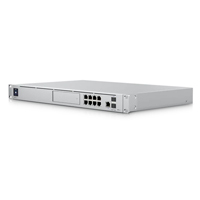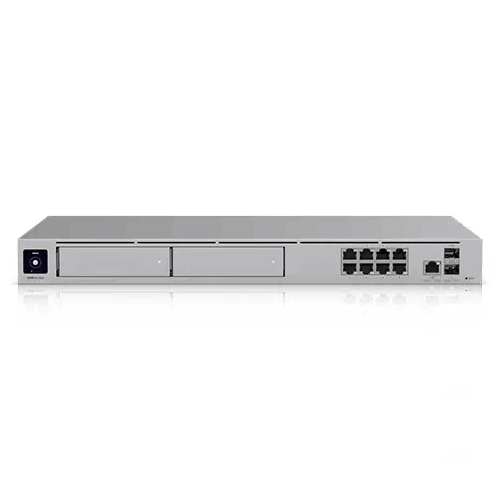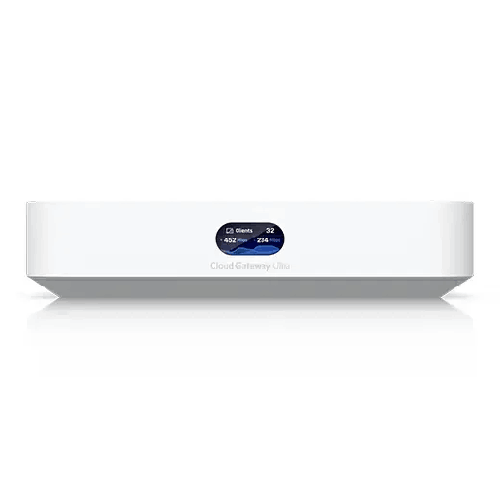
Ubiquiti UniFi UCG-Ultra 1 Gbps Compact Cloud Gateway
Regular Price:৳0.00Availability: SKU: 6.54.287.9214
Quick Overview
-
Support
Saturday – Thursday: 09 AM - 06 PM. -
Payment
Cash on Delivery | Card | Online Payment -
Shipping Cost
Inside Dhaka 100tk | Outside Dhaka 150tk -
Warranty Policy
Read More
Description
Ubiquiti UniFi UCG-Ultra 1 Gbps Compact Cloud Gateway Price in Bangladesh
The Ubiquiti UniFi UCG‑Ultra 1 Gbps Compact Cloud Gateway is designed for people who want a more controlled, modern network experience without building a complex rack setup. It’s a compact desktop UniFi cloud gateway built to run the UniFi Network application suite, giving you centralized network control, strong security capabilities, and modern VPN/SD‑WAN tools—while keeping power consumption and physical footprint remarkably small.
This is the kind of gateway you choose when you want your network to be stable and intentional: separate guests from staff, control IoT devices, keep remote access secure, and create a foundation that can scale as your device count grows.
Compact, practical, and easy to place—built for real Bangladesh spaces
Not every deployment in Bangladesh has a server room. Many users want a clean setup on a desk, a shelf, or near the ISP’s fiber ONU. The UCG‑Ultra’s confirmed dimensions of 141.8 × 127.6 × 30 mm make it easy to place almost anywhere without dominating the space. Its compact desktop form factor also suits apartments and small offices where you don’t want a rack cabinet.
Despite its size, the UCG‑Ultra is positioned to behave like a serious gateway: Multi‑WAN capability, IDS/IPS security inspection, advanced NAT and routing features, and robust VPN options—all managed through UniFi.
UniFi Application Suite: focused on what most users need—Network
Unlike higher-tier UniFi consoles that may also run Protect or Access, the UCG‑Ultra’s suite is confirmed as:
- UniFi Application Suite: Network: Yes
That’s a clear message: this model is meant to be a dedicated network gateway/controller. For many Bangladesh users, that is exactly the right choice. If your priority is building a stable wired + wireless UniFi network—managing access points, switches, VLANs, and policies—this “Network-only” focus keeps things efficient.
It can manage:
- Managed UniFi Devices: 30+
- Simultaneous Users Connected: 300+
For a typical home, 30+ UniFi devices is well beyond what most people need. For a small office, it’s a strong practical ceiling—enough for multiple access points and switches if the network grows over time.
1 Gbps class IDS/IPS—security that’s actually usable
Security features look great on paper until they slow down the network. The UCG‑Ultra provides:
- IDS/IPS Throughput: 1 Gbps
That throughput level is important for Bangladesh users on fast fiber plans. It means you can enable intrusion detection/prevention while still targeting a gigabit-class experience. The gateway also includes a robust security set:
- Stateful Firewall: Yes
- Application-Aware Layer 7 Firewall: Yes
- DPI & Traffic Identification: Yes
- Zone-Based Firewall Advanced Filtering (Regions, Domains, Apps): Yes
- Content Filtering: Yes
- Intrusion Prevention (IPS/IDS): Yes
- Ad Blocking: Yes
- VLAN/Subnet-based Traffic Segmentation: Yes
- IDS/IPS Signatures: 55,000+ with CyberSecure
For homes, content filtering and ad blocking can make browsing cleaner. For offices, Layer‑7 and zone-based controls can help enforce browsing policies and reduce risk. For both, segmentation is the real long-term win: IoT devices and guest phones shouldn’t live on the same network as work laptops and file servers.
2.5GbE WAN: ready for faster ISP handoffs and cleaner LAN design
The UCG‑Ultra’s default WAN port is:
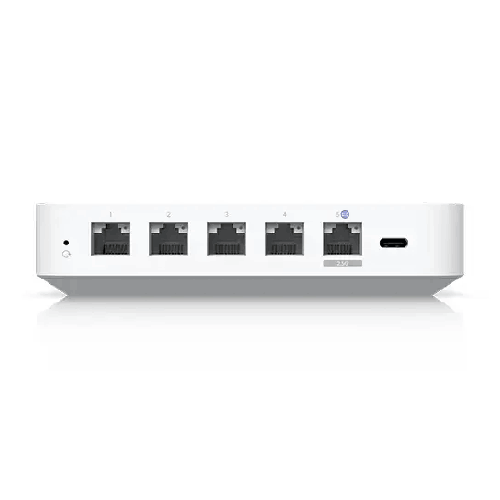
- Default WAN Ports: (1) 2.5 GbE RJ45
This is a thoughtful design choice. Many Bangladesh users are now seeing ONUs and routers with multi-gig ports, and more will follow. Even if your internet is under 1Gbps today, a 2.5GbE WAN port provides breathing space, reduces bottleneck risk, and supports future upgrade paths.
The rest of the port layout provides:
- 1 GbE RJ45: 4 ports (1G/100M/10M)
- 2.5 GbE RJ45: 1 port (2.5G/1G/100M/10M)
For a small office, four GbE ports can connect essentials: a switch uplink, a NAS, a key workstation, or a VoIP system. If you need more ports, the UniFi approach is to add a switch—keeping the gateway focused on routing, security, and policy.
Multi‑WAN in Bangladesh: a practical feature, not luxury
Internet reliability varies by neighborhood and provider. In some areas, a line can be perfect for weeks and then have intermittent issues. That’s why Multi‑WAN Load Balancing: Yes and support for Max. WAN Port Count: 4 stands out.
With Multi‑WAN, organizations can run:
- Primary fiber connection for day-to-day work
- Secondary ISP as backup for business continuity
The UCG‑Ultra also supports:
- Internet Quality and Outage Reporting: Yes
- Additional Internet Failover with UniFi LTE Backup: Yes
For businesses that rely on cloud tools—Google Workspace, Microsoft 365, web-based ERP—failover capability can turn “internet problems” into a manageable event instead of a crisis.
Advanced routing for networks that are maturing
Small networks grow up quickly. First it’s “one Wi‑Fi.” Then you add a guest network. Then you add cameras, printers, smart TVs, and perhaps a second office floor. The UCG‑Ultra includes capabilities that help you keep structure:
- Dynamic Routing: OSPF (Yes), BGP (Yes)
- Advanced QoS: Yes
- mDNS: Yes
- Advanced NAT: SNAT/DNAT/Masquerade/NAT Pooling/1-to-1 NAT (Yes)
- Integrated RADIUS Server: Yes
- RADIUS over TLS (RadSec): Yes
- Policy-based WAN and VPN Routing: Yes
- Customizable DHCP Server: Yes
- IPv6 ISP Support: Yes
- IGMP Proxy: Yes
- Virtual Network Override: Yes
- MAC Address Table Size: 2,000
Not every home user will use OSPF or BGP, but for small offices and advanced users, having these tools allows professional design patterns—especially when integrating with upstream providers or connecting networks across sites.
VPN & SD‑WAN: remote access and site-to-site connectivity without extra licensing
In Bangladesh, remote access is increasingly common. Owners travel, managers visit branches, and teams work from home. Instead of exposing internal services publicly (risky) or depending on consumer remote desktop hacks, a structured VPN is the safer approach.
The UCG‑Ultra supports:
- License-Free SD‑WAN: Yes
- Site-to-Site VPN: Site Magic, IPsec, OpenVPN
- VPN Server: Identity Endpoint One-Click VPN, Teleport Zero-Configuration VPN, WireGuard, OpenVPN, L2TP
- VPN Client: OpenVPN, WireGuard
WireGuard is popular for its speed and simplicity, while IPsec remains common for site-to-site links. Teleport-style workflows can be especially attractive for teams that want secure access without complex manual configuration for every user.
For Bangladesh SMEs, this can translate into practical outcomes:
- Secure access to office NAS/ERP from home
- Secure camera access without port forwarding
- Connecting branch offices so staff can use central services
- Reducing downtime when staff need to troubleshoot remotely
Low power consumption: ideal for always-on operation
Power in Bangladesh can fluctuate, and many users run UPS systems for networking gear. A gateway that draws less power makes UPS backup more effective.
The UCG‑Ultra specifies:
- Max. Power Consumption: 6.2W
- Power Method: USB Type‑C (5V DC/3A)
- Power Supply: USB Type‑C (5V DC/3A) (Adapter included)
- Supported Voltage Range: 100–240V AC
- Heat Dissipation: 21 BTU/hr
This combination is highly practical. USB‑C powering can simplify installations and makes it easier to maintain backup power solutions. Low heat output also helps in warmer environments where small devices are placed in less ventilated spaces.
Performance foundation: CPU, memory, and storage
A modern gateway needs enough compute and memory to handle security inspection, routing, and management services smoothly. The UCG‑Ultra includes:
- Processor: Quad-core ARM Cortex‑A53 at 1.5 GHz
- System Memory: 3 GB
- On-board Storage: 16 GB
For UniFi Network duties, these specifications are aligned with the device’s role as a compact cloud gateway for gigabit-class environments.
Usability touches: status display and local controls
The UCG‑Ultra provides:
- 0.96" status display
- Management: Ethernet, Bluetooth
- Button: Factory reset
- LEDs: Ethernet (Yes)
That small status display can be surprisingly helpful in real life. In a Dhaka office, if someone reports “internet is down,” you can quickly check whether the gateway is running, whether it’s connected, and whether the issue is likely upstream or internal.
Mobile app requirements: plan for the right UniFi app versions
For smooth setup and management, software compatibility matters. Application requirements listed:
- UniFi iOS: Version 10.12.0 and later
- UniFi Android: Version 10.11.2 and later
This is useful for buyers who manage networks primarily via mobile devices—common in Bangladesh small businesses where IT support may not always sit behind a desk.
Where the UCG‑Ultra fits best in Bangladesh
The UCG‑Ultra is a strong choice when you want:
- A UniFi gateway/controller for a small office or advanced home
- Multi‑WAN planning with performance-focused routing and policies
- IDS/IPS security at a gigabit class level
- A clean, compact device with low power draw
- A gateway that manages up to 30+ UniFi devices as your network grows
It’s especially compelling for:
- Apartments in Dhaka where you plan to add UniFi access points for consistent coverage
- Small offices with 20–80 staff devices and the need for guest separation
- Retail offices where uptime matters and a backup ISP is used
- Power users building VLANs for IoT and work devices
- Teams that need secure VPN access for remote work
Practical setup approach (without overcomplicating it)
To get the best experience, think in layers:
- Use the UCG‑Ultra as the secure gateway and control plane for your UniFi network.
- Add UniFi access points for wireless coverage (placement matters more than “router power”).
- Add a UniFi switch if you need more ports or PoE for APs/cameras.
- Segment networks early—Guest, IoT, Staff/Work—so you don’t redesign later.
- If uptime is critical, add a second WAN connection and define failover policies.
Done this way, you build a network that is easier to maintain and far more predictable.
In short, the Ubiquiti UniFi UCG‑Ultra 1 Gbps Compact Cloud Gateway is for Bangladesh users who want a modern network core with real security, multi‑WAN flexibility, and UniFi-managed simplicity—without the space, power, and complexity of a bigger console.
✅ Key Features
- 1 Gbps IDS/IPS Throughput: Enables serious intrusion prevention at gigabit-class performance for safer everyday networking.
- 2.5GbE RJ45 WAN Port: Keeps the WAN side future-ready and reduces bottlenecks with high-speed ISP handoffs.
- Compact Desktop Design: Fits small homes and offices where space and clean placement matter.
- UniFi Network Application Suite Support: Lets you manage UniFi switches and access points from a unified platform.
- Multi‑WAN Load Balancing Ready: Helps maintain uptime by supporting multiple WAN connections and smarter routing strategies.
- Advanced Firewalling (Layer‑7 + DPI): Improves visibility and policy control beyond basic NAT routers.
- Content Filtering & Ad Blocking: Supports cleaner browsing experiences and more controlled network environments.
- VLAN/Subnet Segmentation: Helps isolate guest and IoT devices to improve security and reduce internal disruption.
- License-Free SD‑WAN + Modern VPN Options: Supports WireGuard, IPsec, OpenVPN, and Teleport-style workflows for remote access.
- Low Power Consumption (6.2W) via USB‑C: Reduces heat and makes UPS backup more practical for Bangladesh power conditions.
- Integrated RADIUS + RadSec: Enables more professional Wi‑Fi authentication approaches for staff networks.
- Status Display + Bluetooth Management: Simplifies setup, monitoring, and quick status checks.
✅ Usage / Applications
- UniFi gateway for apartments in Dhaka paired with UniFi APs for full-room coverage.
- Small office network core for SMEs needing structured VLANs and policy control.
- Multi‑WAN setups using two ISPs for failover and better uptime.
- Remote work access using WireGuard/OpenVPN/Teleport VPN tools.
- Guest Wi‑Fi isolation for offices, studios, and client-facing businesses.
- IoT device segregation for smart TVs, smart plugs, and cameras to keep them away from work devices.
- Retail back office connectivity for POS systems and cloud reporting.
- Education or coaching centers needing controlled browsing and bandwidth management.
✅ Benefits of This Product?
- More stable, predictable networking through UniFi-managed visibility and policy-based control.
- Better security without heavy slowdown thanks to 1 Gbps IDS/IPS throughput.
- Cleaner future upgrades because 2.5GbE WAN supports faster ISP handoffs over time.
- Reduced clutter and easier placement due to compact size and USB‑C power.
- Improved uptime strategy with Multi‑WAN load balancing and outage reporting features.
- Safer guest and IoT usage via VLAN segmentation and filtering controls.
- Simpler remote access with built-in SD‑WAN and VPN options—no separate appliance required.
- Scales with your UniFi setup managing 30+ UniFi devices as your network expands.
✅ Ideal For
The Ubiquiti UniFi UCG‑Ultra 1 Gbps Compact Cloud Gateway is ideal for Bangladesh users who want a professional UniFi gateway in a small, low-power form. It’s a great fit for advanced home users in Dhaka who are building a proper UniFi setup with access points for consistent coverage across rooms. It’s also well suited for SMEs and small offices that need guest network isolation, IoT separation, and reliable performance during busy periods—without needing a rack-mounted console. If your business wants to add a second ISP for uptime, run a secure VPN for remote access, or enable security features like IDS/IPS and content filtering, the UCG‑Ultra is a practical core device. It also matches users who prefer controlling everything from the UniFi app and want a gateway that can scale to dozens of UniFi devices over time.
✅ Why Choose the Ubiquiti UniFi UCG-Ultra 1 Gbps Compact Cloud Gateway?
The UCG‑Ultra is an excellent choice when you want the discipline and visibility of UniFi networking without the size and overhead of larger consoles. Its big advantage is balance: it’s compact enough for a desk setup, yet capable enough to run advanced security and routing features that typical consumer routers either don’t offer—or can’t run at meaningful speed.
With 1 Gbps IDS/IPS throughput, it’s positioned for modern Bangladesh fiber users who want security enabled without sacrificing the experience for meetings, streaming, and cloud work. The 2.5GbE WAN port also makes it a smart long-term buy, because it helps your gateway stay relevant as ISP equipment and handoffs move beyond 1GbE.
Feature depth is another reason. Multi‑WAN load balancing, advanced NAT options, RADIUS/RadSec, VLAN segmentation, and modern VPN choices (including WireGuard and Teleport) make it a strong tool for both home power users and small office IT teams. And because it’s part of the UniFi ecosystem, it becomes the “brain” for your UniFi switches and access points—making your network easier to expand and easier to troubleshoot.
If you want a gateway that keeps your network structured, secure, and scalable—without demanding a rack cabinet—the UCG‑Ultra is a clear, practical choice.
✅ Why Buy This Product from BME?
A compact gateway like the UniFi UCG‑Ultra is often purchased as the starting point of a larger UniFi setup. Buying from Business Machine & Equipment (BME) helps Bangladesh customers make that setup decision with more confidence—especially when planning how the gateway will pair with access points, switches, and WAN connections.
BME can support you with product selection guidance: for example, confirming how to use the 2.5GbE WAN port with your ISP ONU, choosing the right switch if you need more Ethernet ports or PoE, and planning a UniFi AP layout for better coverage across your rooms or office floor. For business purchases, BME can also provide quotation and procurement-friendly documentation so organizations can buy through proper channels without friction.
Because UniFi networks are strongest when they’re planned rather than improvised, BME’s value is in helping you build a complete, realistic shopping list—gateway plus the right accessories—so you avoid common mistakes like underestimating Wi‑Fi coverage, skipping segmentation planning, or choosing the wrong uplink path. This makes your deployment smoother from day one and helps ensure the UCG‑Ultra delivers the stability and control it’s designed for.
✅ Buying Guide
- Step 1: Confirm your internet plan and WAN handoff: If your ISP ONU/modem supports faster Ethernet, the UCG‑Ultra’s 2.5GbE WAN port is a strong match.
- Step 2: Decide if you need Multi‑WAN: If your office can’t tolerate downtime, plan a second ISP or UniFi LTE backup approach and set failover priorities.
- Step 3: Map your UniFi ecosystem: Count how many access points and switches you’ll manage now and later. The UCG‑Ultra is designed to manage 30+ UniFi devices.
- Step 4: Plan Wi‑Fi coverage separately: The UCG‑Ultra is a gateway (not an AP). Choose UniFi access points based on your layout, wall type, and user density.
- Step 5: Build VLAN structure early: Common Bangladesh setup: Staff/Work, Guest, IoT, Cameras. Starting clean avoids major rewiring later.
- Step 6: Choose the right switch: If you need PoE for APs/cameras or more ports than the gateway provides, add a UniFi PoE switch.
- Step 7: Decide security posture: If you’ll enable IDS/IPS and content filtering, test during peak hours and adjust policies to match your usage.
- Step 8: Plan VPN needs: For remote access, WireGuard is a common choice; for site-to-site, IPsec or Site Magic may fit better.
- Step 9: Avoid common mistakes: Don’t expect a gateway to fix Wi‑Fi coverage without good AP placement; don’t keep guest devices on the same network as office PCs; don’t skip a UPS if uptime matters.
- Step 10: Document settings: Keep records of VLANs, SSIDs, admin accounts, WAN settings, and VPN configuration for faster support.
✅ Customers Ask About / Frequently Asked Questions
-
Q: Is the UniFi UCG‑Ultra a Wi‑Fi router?
A: It’s a compact cloud gateway designed to run UniFi Network. It does not include integrated Wi‑Fi in the specifications provided, so Wi‑Fi coverage typically comes from separate UniFi access points. -
Q: What internet speed is it designed for?
A: It specifies 1 Gbps IDS/IPS throughput, and includes a 2.5GbE WAN port, making it suitable for gigabit-class connections with security features enabled. -
Q: Can it handle multiple internet connections (Multi‑WAN)?
A: Yes. Multi‑WAN load balancing is supported, and the device supports up to 4 WAN ports. -
Q: Does it support 2.5GbE on WAN?
A: Yes. The default WAN port is (1) 2.5GbE RJ45. -
Q: How many LAN ports are available?
A: It has 4 × 1GbE RJ45 ports plus 1 × 2.5GbE RJ45 port (as listed in the port layout). -
Q: What VPN options are supported?
A: It supports WireGuard and OpenVPN as VPN client options, and WireGuard/OpenVPN/L2TP plus Teleport for VPN server use, with site-to-site options including IPsec and Site Magic. -
Q: Can it manage UniFi access points and switches?
A: Yes. It supports the UniFi Network application suite and is designed to manage UniFi devices (30+ listed). -
Q: Is it good for a small office in Bangladesh?
A: Yes, especially if you want VLAN segmentation, secure remote access, and a gateway that can scale with a growing UniFi setup. -
Q: What power adapter does it use?
A: It uses USB Type‑C (5V DC/3A) power, and the adapter is included. Input range supports 100–240V AC. -
Q: Does it have a status display?
A: Yes. It includes a 0.96" status display. -
Q: Is it NDAA compliant?
A: Yes, it is marked NDAA Compliant: ✓ in the provided specifications. -
Q: Which UniFi mobile app versions are required?
A: UniFi iOS version 10.12.0+ and UniFi Android version 10.11.2+ are listed as requirements.
✅ Why Buy This Product
For Bangladesh homes and SMEs, the fastest upgrade is often not “more Mbps,” but a better network core. The Ubiquiti UniFi UCG‑Ultra 1 Gbps Compact Cloud Gateway gives you UniFi-managed control, a 2.5GbE WAN port for modern ISP handoffs, and security features like IDS/IPS, Layer‑7 firewalling, and content filtering—without demanding rack space or high power draw. It’s built for users who want a cleaner, more professional network where guest devices and IoT gadgets don’t compromise work devices, and where remote access can be done securely through built-in VPN tools.
If you’re building a UniFi ecosystem with access points and switches—or you’re replacing a consumer router that can’t keep up with your current usage—the UCG‑Ultra is a practical foundation. Order the Ubiquiti UniFi UCG‑Ultra from BME and set up a network core that’s stable, scalable, and ready for gigabit-class connectivity in Bangladesh.
What is the price of Ubiquiti UniFi UCG-Ultra 1 Gbps Compact Cloud Gateway in Bangladesh?
Write a review
Question Answer
Have question about this product? Get specific details about this product from expert.

Grandstream GXW4232 32 FXS Port VoIP Gateway