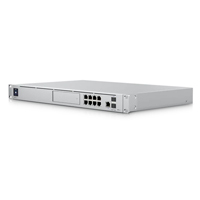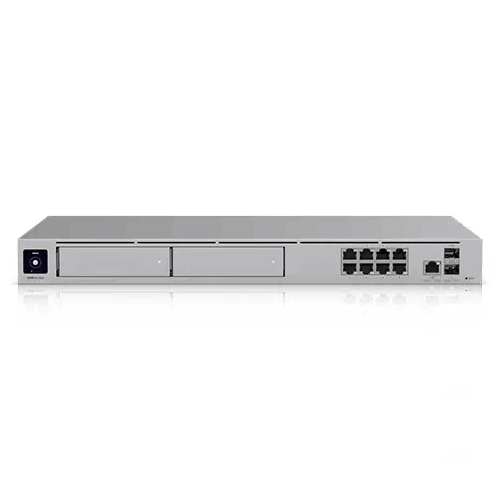
Ubiquiti UniFi UDR7 WiFi 7 10G Cloud Gateway with PoE switch
Regular Price:৳0.00Availability: SKU: 6.54.287.9212
Quick Overview
-
Support
Saturday – Thursday: 09 AM - 06 PM. -
Payment
Cash on Delivery | Card | Online Payment -
Shipping Cost
Inside Dhaka 100tk | Outside Dhaka 150tk -
Warranty Policy
Read More
Description
Ubiquiti UniFi UDR7 WiFi 7 10G Cloud Gateway with PoE switch Price in Bangladesh
The Ubiquiti UniFi UDR7 WiFi 7 10G Cloud Gateway with PoE switch is built for this new reality. It’s not only a Wi‑Fi router and not only a security gateway. It’s a compact desktop UniFi cloud gateway that combines next-generation wireless, serious multi‑WAN flexibility, and a UniFi application suite that can grow with you. For Bangladesh users who want to reduce network headaches and gain proper visibility into what’s happening on their network, the UDR7 is designed to be a single, modern core—simple enough for a streamlined setup, yet powerful enough to behave like professional infrastructure.
A modern “network core” in a compact desktop form
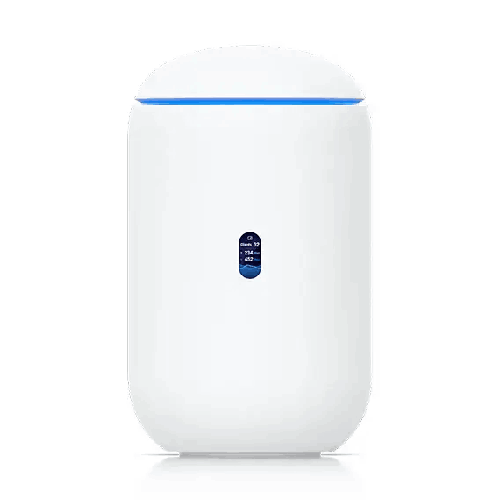
One of the best things about the UDR7 is that it aims to deliver an enterprise-style UniFi experience without demanding a full rack cabinet or a dedicated server room. Its compact desktop form factor and dimensions (⌀110 x 184.1 mm) make it realistic for apartments, small offices, clinics, showrooms, and training centers—places where you want strong networking but don’t want a big, noisy, complicated setup.
In Bangladesh, that matters. Many networks are installed in spaces that are not designed as IT rooms—near a reception desk, on a shelf behind a counter, or inside a manager’s cabin. A compact gateway with an integrated display and a clean industrial design fits those environments far better than bulky equipment.
Wi‑Fi 7, in real life—why it feels different
Wi‑Fi 7 is not just a label. It’s a practical step forward for environments where you need higher throughput, lower latency, and better handling of busy airwaves. The UDR7 supports 802.11a/b/g/n/ac/ax/be (WiFi 6/6E, WiFi 7). That means it’s prepared for both older devices (phones, laptops, smart TVs you already own) and new Wi‑Fi 7-capable devices you may buy in the coming years.
What you’ll notice in daily use is not only peak speed on a single device, but smoother performance when many devices are active at once. In a typical Dhaka household, it’s common to see multiple phones, a smart TV, one or two laptops, perhaps a game console, and a few smart cameras or IoT devices. In a small business, you may add POS terminals, guest devices, and staff laptops. A Wi‑Fi system that’s built for higher capacity can keep the experience stable even when “everyone is online.”
The UDR7’s integrated Wi‑Fi throughput is specified as:
- 6 GHz: 5.7 Gbps
- 5 GHz: 4.3 Gbps
- 2.4 GHz: 688 Mbps
Those numbers are not a promise of real-world internet speed—your ISP plan and device capability matter—but they are a strong indicator of wireless headroom. In practical terms, it suggests the UDR7 can serve as a powerful wireless core for high-throughput local traffic (like moving files to a NAS, streaming inside the home, or local camera feeds) while keeping internet usage smooth.
Coverage planning for Bangladesh homes and small offices
The UDR7 lists a coverage area of 160 m² (1,750 ft²). Coverage always depends on walls, layout, and interference. In Bangladesh apartments, thick concrete walls and multiple rooms can reduce coverage compared to open spaces. Still, this specification provides a helpful starting point: for many medium-size apartments, small duplex homes, or compact office floors, the UDR7 can be a strong primary Wi‑Fi source.
If you have a long corridor apartment, or you want excellent signal in every corner, UniFi’s ecosystem advantage becomes important: you can extend coverage using additional UniFi access points (not included unless specified). The gateway becomes the “brain,” and additional APs become the “reach.”
10G and 2.5GbE WAN: a gateway that respects upgrades
Bangladesh internet packages are improving, and many users are now adopting higher-speed fiber connections. But even beyond internet speed, fast WAN and LAN ports help in two major ways:
- They keep your gateway from becoming the bottleneck as your ISP upgrades.
- They make it easier to build a faster internal network—important for offices using local servers, NAS, or heavy internal transfers.
The UDR7 supports up to Max. WAN Port Count: 4 and includes Multi‑WAN Load Balancing and failover-oriented features like Internet Quality and Outage Reporting. In Bangladesh, where ISP reliability can vary by area and time, Multi‑WAN is a serious advantage. Some businesses keep two connections—one primary and one backup—so that meetings and business operations continue even if one ISP has an outage.
The Default WAN Ports are confirmed as:
- (1) 10G SFP+
- (1) 2.5 GbE RJ45
For power users and small businesses, this is a practical combination. SFP+ provides flexibility for high-speed uplinks (depending on your module/transceiver and ISP handoff), while 2.5GbE RJ45 makes it easy to connect common fiber ONUs and high-speed modems using standard Ethernet cabling.
A small PoE switch built in—cleaner installs, fewer adapters
In Bangladesh network installations, clutter is common: a router, a small switch, a PoE injector, a power strip, and a tangle of adapters. The UDR7 reduces that complexity by giving you integrated switching with high-speed RJ45 ports and PoE capability.
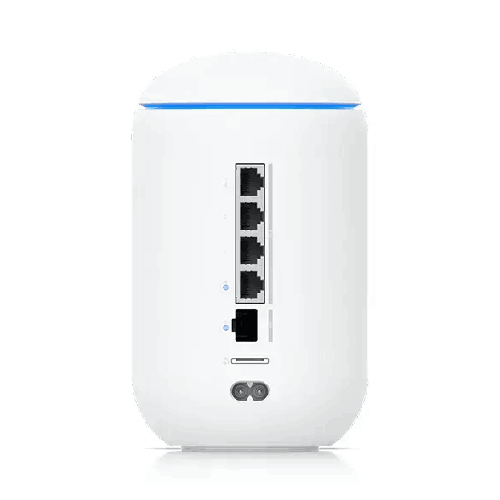
The confirmed Port Layout includes:
- 2.5 GbE RJ45: 4 (1 PoE) (2.5G/1G/100M/10M)
- 10G SFP+: 1 (10G/1G)
It also has a confirmed PoE Budget: 15.4W, with max PoE wattage per port 15.4W and PoE voltage range 44–57V. This is a meaningful feature for clean setups: you can power a compatible UniFi access point or another PoE device from the gateway itself (within the power budget), reducing the need for separate PoE injectors—especially useful where plug points are limited.
In small offices in Dhaka, that “one less adapter” can be the difference between a neat, reliable setup and a fragile mess that fails when someone accidentally unplugs something.
Security that goes beyond basic firewalling
A modern network in Bangladesh needs more than NAT and a password. Guest Wi‑Fi, staff devices, IoT gadgets, cameras, and visiting laptops create a constant security challenge. The UDR7 includes a strong set of security features that help you create a more controlled environment:
- Stateful Firewall: Yes
- Application-Aware Layer 7 Firewall: Yes
- DPI & Traffic Identification: Yes
- Zone-Based Firewall Advanced Filtering (Regions, Domains, Apps): Yes
- Content Filtering: Yes
- Intrusion Prevention (IPS/IDS): Yes
- Ad Blocking: Yes
- VLAN/Subnet-based Traffic Segmentation: Yes
It also lists IDS/IPS Throughput: 2.3 Gbps, which matters because security inspection should not cripple performance. If you enable IDS/IPS on a weak router, it often slows down dramatically. A gateway that can handle security inspection at a meaningful throughput is a big win for offices and advanced home users who want security turned on without sacrificing user experience.
There’s also an indication of signature depth: “20,000+ with CyberSecure: Yes.” That suggests a broad signature set (as stated), helpful for detection capabilities.
UniFi Application Suite: more than networking
A standout element of the UDR7 is its participation in the UniFi Application Suite, confirmed as:
- Network: Yes
- Protect: Yes
- Access: Yes
- Talk: Yes
- Connect: Yes
This matters for buyers who want one platform that can expand. Even if you start with Wi‑Fi and routing today, you may add cameras, door access, or communications features later. The UDR7 is designed to sit at the center of that ecosystem.
For Bangladesh businesses, this “grow later” flexibility is valuable. Many organizations start with a simple requirement—stable Wi‑Fi and internet—and later add surveillance, access control, or a more structured network. Choosing a gateway that doesn’t force you to replace everything when your needs evolve is one of the smartest long-term decisions.
NVR storage: pre-installed microSD for basic Protect usage
The UDR7 confirms: NVR Storage: Pre-installed 64GB microSD for NVR, and Expansion Slot: MicroSD Card. This is a practical detail for smaller deployments. You can begin with basic camera recording needs without immediately installing separate NVR hardware (within capacity limits and depending on camera settings and recording configuration).
The device also states a guideline for managed cameras:
- Managed Cameras: (5) HD, (2) 2K, (1) 4K
That’s a useful planning baseline. For a small shop, a small office, or a clinic, that camera range can be enough. In Bangladesh retail environments, many setups require 4–8 cameras depending on floor layout. Knowing the gateway’s intended capability helps set realistic expectations and avoid overloading a device designed for compact deployments.
Scale for devices and users—busy environments included
The UDR7 lists:
- Managed UniFi Devices: 30+
- Simultaneous Users Connected: 300+
For a typical home, these numbers provide more than enough headroom. For a small-to-mid office, training center, café, or co-working space, the user capacity claim is particularly important. In Bangladesh, it’s common for guest environments to swell during events, classes, or promotions. A gateway designed to handle many simultaneous connections helps keep the experience usable when the crowd arrives.
Networking features that matter in professional setups
Beyond speed, the UDR7 includes a number of features that are typically associated with more advanced network designs:
- Dynamic Routing (OSPF: Yes)
- Advanced QoS: Yes
- mDNS: Yes
- Advanced NAT (SNAT/DNAT/Masquerade/NAT Pooling/1-to-1 NAT): Yes
- Integrated RADIUS Server: Yes
- RADIUS over TLS (RadSec): Yes
- Policy-based WAN and VPN Routing: Yes
- Customizable DHCP Server: Yes
- IPv6 ISP Support: Yes
- IGMP Proxy: Yes
- Virtual Network Override: Yes
- MAC Address Table Size: 2,000
For a Bangladesh SMB that is outgrowing a basic router, these are the capabilities that help you build a more professional environment. For example, RADIUS can support stronger Wi‑Fi authentication for staff. Advanced NAT and routing features can support special connectivity needs—like publishing a service, handling multiple subnets, or managing multiple uplinks with policies.
VPN and SD‑WAN: remote work and multi-branch made simpler
Remote work and distributed teams are now common. Businesses in Bangladesh often have a head office in Dhaka and a branch in Chattogram, Sylhet, or Khulna—or they have remote staff traveling and needing secure access. The UDR7 includes:
- License-Free SD-WAN: Yes
- Site-to-Site VPN: Site Magic, IPsec, OpenVPN
- VPN Server: Identity Endpoint One-Click VPN, Teleport Zero-Configuration VPN, WireGuard, OpenVPN, L2TP
- VPN Client: OpenVPN, WireGuard
For many organizations, the ability to create secure tunnels without paying per-device VPN licensing is a meaningful cost advantage. It’s also valuable for IT teams who want to roll out remote access with fewer steps and fewer third-party dependencies.
In Bangladesh, this can be used for:
- Remote access to office ERP or NAS
- Secure connectivity between two offices
- Access to camera systems without exposing them publicly
- Safer connections for traveling managers
Hardware and power considerations (Bangladesh friendly)
The UDR7 confirms:
- Processor: Quad-core ARM Cortex-A53 at 1.5 GHz
- System Memory: 3 GB
- Max. Power Consumption: 26W (Excluding PoE output)
- Power Method: Universal AC input, 100–240V AC, 1.5A Max, 50/60 Hz
- Power Supply: AC/DC, Internal, 50W
- Heat Dissipation: 89 BTU/hr (Excluding PoE Output)
- Ambient Operating Temperature: -10 to 40°C
- Ambient Operating Humidity: 5 to 95% noncondensing
Universal AC input is especially useful for Bangladesh, where voltage conditions can fluctuate and where the same device may be deployed in different buildings with different power quality. The practical recommendation is still to use a UPS for core networking—particularly for offices and CCTV environments—because network downtime can create real business losses.
LCM status display: quick at-a-glance checks
The UDR7 includes a 0.96" status display. While small, this is a helpful usability touch. In real deployments, it’s useful to confirm device status at a glance—especially when the gateway is placed where a full monitor isn’t connected. It’s the kind of feature you appreciate when troubleshooting during a busy workday and you need quick reassurance that the gateway is online.
Wireless design details (for those who care about signal planning)
For Wi‑Fi planning and expectations, the UDR7 provides detailed radio capability:
- MIMO: 2x2 (DL/UL MU‑MIMO) on 6 GHz, 5 GHz, and 2.4 GHz
- Antenna Gain: 6 GHz 6 dBi, 5 GHz 7 dBi, 2.4 GHz 5 dBi
- Max TX Power: 6 GHz 24 dBm, 5 GHz 26 dBm, 2.4 GHz 23 dBm
- Wireless Security: WPA‑PSK, WPA‑Enterprise (WPA/WPA2/WPA3/PPSK)
- Max BSSIDs: 4 per radio
For Bangladesh office deployments, WPA‑Enterprise support is especially valuable if you want staff authentication that feels more professional than a shared password.
Where the UDR7 fits best: realistic expectations
The UDR7 is a “do a lot in one device” gateway: Wi‑Fi 7 access point, security gateway, UniFi suite host, switching, and PoE. This makes it ideal for buyers who want a strong all-in-one with a clean footprint. It’s a strong choice for:
- Apartments and larger homes that want premium Wi‑Fi and better security controls
- Small-to-mid offices that want Wi‑Fi + gateway + basic PoE in one core unit
- Retail/restaurant environments that want staff/guest separation and simple management
- Clinics, studios, and training centers that need consistent performance and visibility
For very large buildings, very high camera counts, or multi-floor coverage with heavy client density, the best practice is to use the UDR7 as the gateway/core and add dedicated access points (and perhaps dedicated NVR storage) depending on your needs. The advantage is that you’re not locked in—you can grow your UniFi environment naturally.
Everyday Bangladesh scenarios (how it actually helps)
Scenario 1: Family evening peak load
Around 8pm, kids stream YouTube, parents scroll, someone joins a call, and the TV runs Netflix. A Wi‑Fi 7 gateway with strong throughput headroom helps reduce buffering and lag, especially when devices shift between rooms.
Scenario 2: Small office with guests
A client comes to your office in Dhanmondi or Banani and asks for Wi‑Fi. You can provide a guest network with isolation while keeping internal systems safe, and you can apply content filtering policies as needed.
Scenario 3: Backup ISP for uptime
Your primary line goes down during business hours. Multi‑WAN load balancing and failover planning can keep essential connectivity alive if you have a secondary ISP, minimizing downtime.
Scenario 4: Cleaner camera setup
You add a few cameras. With Protect support and built-in microSD NVR storage, you can start small, learn the system, and expand when needed—without buying an NVR on day one.
Scenario 5: Remote access without complexity
A manager is traveling and needs access to office resources. VPN features like WireGuard and Teleport support make secure remote access more achievable without building a complex third-party VPN stack.
Care tips for longer life (general best practices, no guesswork)
Keep the gateway in a ventilated area, away from direct sunlight and heavy dust. Use a stable power source and consider a UPS for consistent uptime. Avoid placing it inside closed wooden cabinets with no airflow—Bangladesh summer heat can build up quickly in enclosed spaces. If you’re using PoE, remember that additional PoE load increases heat; keep airflow in mind. Finally, schedule firmware changes during off-hours and document your network plan (VLANs, SSIDs, admin access) so troubleshooting stays simple.
By combining Wi‑Fi 7, a 10G SFP+ uplink option, 2.5GbE switching, PoE output, IDS/IPS security, multi‑WAN features, and the UniFi application suite, the Ubiquiti UniFi UDR7 WiFi 7 10G Cloud Gateway with PoE switch becomes a practical “center of gravity” for modern networks in Bangladesh—powerful enough for serious use, yet compact enough for real spaces where people actually work and live.
✅ Key Features
- WiFi 7 (802.11be) Integrated Access Point: Delivers next-generation wireless capacity for smoother performance in busy homes and offices.
- Tri-band Throughput (6 GHz/5 GHz/2.4 GHz): Adds more wireless headroom so multiple users and devices can stay responsive simultaneously.
- 10G SFP+ Default WAN Port: Enables a high-speed uplink option for future-ready connectivity and advanced deployments.
- 2.5 GbE RJ45 Default WAN Port: Makes high-speed Ethernet WAN simple with common fiber ONUs and modern modems.
- Multi‑WAN Load Balancing & Failover Tools: Helps maintain uptime by supporting multiple internet connections and quality/outage reporting.
- IDS/IPS Throughput up to 2.3 Gbps: Lets you keep advanced security inspection enabled without sacrificing day-to-day performance.
- Built-in 2.5GbE Switch with PoE (15.4W budget): Powers a compatible PoE device and reduces extra injectors and adapters in your setup.
- UniFi Application Suite Support (Network/Protect/Access/Talk/Connect): Gives you one platform that can expand beyond Wi‑Fi into security and business solutions.
- Pre-installed 64GB microSD for NVR: Lets you start small with camera recording workflows without immediate extra storage hardware.
- Advanced Networking (OSPF, VLAN, QoS, RADIUS, IPv6): Supports structured, professional networks for SMEs and power users.
- VPN & SD‑WAN Toolkit (WireGuard, IPsec, OpenVPN, Teleport): Improves remote access and site-to-site connectivity with flexible options.
- Compact Desktop Form Factor with Status Display: Fits modern spaces and offers quick at-a-glance operational visibility.
✅ Usage / Applications
- Premium home Wi‑Fi in Dhaka apartments where many devices stream and browse simultaneously.
- SME office networks needing guest Wi‑Fi isolation and better traffic control.
- Retail shops and restaurants that require stable customer Wi‑Fi without risking internal devices.
- Training centers and coaching institutes with many concurrent student connections.
- Small clinics and diagnostic centers needing reliable connectivity plus the option to add cameras.
- Startup offices and co-working spaces where user count spikes during events or peak hours.
- Multi‑ISP setups for businesses that need backup internet for meetings and cloud tools.
- UniFi Protect starter deployments for small camera counts using microSD NVR storage.
- Remote access for managers and staff using WireGuard/OpenVPN/Teleport-based workflows.
- VLAN-based segmented networks separating staff, guest, and IoT/cameras for better security.
✅ Benefits of This Product?
- Smoother Wi‑Fi in busy hours because Wi‑Fi 7 and tri-band throughput provide more wireless breathing room.
- Cleaner, simpler network setup by combining gateway, Wi‑Fi, switching, and basic PoE in one compact device.
- Better security posture with stateful firewalling, Layer 7 controls, IDS/IPS, and content filtering features.
- More reliable business continuity when configured with Multi‑WAN and failover strategies.
- Faster internal networking potential using 2.5GbE RJ45 ports and a 10G SFP+ WAN option.
- Professional segmentation capability through VLAN/subnet-based traffic separation for staff/guest/IoT.
- Future-ready ecosystem growth thanks to UniFi Application Suite support beyond basic networking.
- Practical remote connectivity via SD‑WAN and VPN options for branch links and secure work-from-anywhere access.
- At-a-glance device confidence using the built-in status display for quick checks.
✅ Ideal For
The Ubiquiti UniFi UDR7 WiFi 7 10G Cloud Gateway with PoE switch is ideal for Bangladesh users who want premium Wi‑Fi plus professional-grade control without building a complex rack-based network from day one. It’s a strong match for mid-to-large apartments and duplex homes where multiple family members stream, study, and work online at the same time—especially if you want better stability during evening peak usage. It also suits SMEs, clinics, studios, showrooms, and training centers in Dhaka or Chattogram that need guest Wi‑Fi separation, strong security controls, and the ability to scale into a wider UniFi ecosystem later. If your network plan includes adding a PoE-powered device, connecting a faster WAN uplink, or creating VLANs for staff and IoT/cameras, the UDR7 fits naturally. It’s equally appealing for power users who want advanced routing, VPN options, and deeper network visibility in a compact desktop gateway.
✅ Why Choose the Ubiquiti UniFi UDR7 WiFi 7 10G Cloud Gateway with PoE switch?
The UDR7 stands out because it blends next-generation wireless with real gateway capability in a form factor that actually fits Bangladesh homes and small offices. Instead of treating Wi‑Fi as a basic add-on, it delivers Wi‑Fi 7 tri-band throughput that’s designed for busy environments where many devices compete for airtime. That’s a tangible upgrade for modern usage—streaming, meetings, cloud syncing, and smart devices all running together.
At the same time, it’s not “just a fast router.” It’s a UniFi cloud gateway that supports the wider UniFi Application Suite, which makes it a future-proof starting point. You can begin with Wi‑Fi and routing today, then expand into cameras, access control, or additional UniFi devices without changing platforms. For buyers who don’t want to rebuild their network every time requirements change, that long-term value is a major advantage.
Its networking feature set also makes it different from typical consumer routers: Multi‑WAN load balancing, OSPF, VLAN support, integrated RADIUS, advanced NAT options, and a broad VPN/SD‑WAN toolkit. These are the capabilities that help a network stay organized as it grows. Add to that the confirmed 10G SFP+ and 2.5GbE WAN options, plus a 2.5GbE switch with PoE output, and the UDR7 becomes a compact “network command center” that’s ready for faster links and cleaner installs.
✅ Why Buy This Product from BME?
When you purchase a gateway like the UniFi UDR7, you’re not only buying hardware—you’re choosing the core of your network. That’s why buying from a professional Bangladesh seller like Business Machine & Equipment (BME) matters. BME is positioned to support customers who need a smooth buying process for both home and business use, including clear product identification and guidance on what to pair with the gateway for a complete setup.
For many buyers, the biggest risk isn’t performance—it’s ordering the wrong unit for the intended deployment, or missing practical components like proper uplink modules, suitable Ethernet cabling for 2.5GbE, or the right PoE expectations for the device you want to power. BME can help you match the UDR7’s confirmed capabilities—10G SFP+ WAN, 2.5GbE ports, PoE budget, and UniFi suite support—to your actual needs, whether you’re setting up in Dhaka, Chattogram, or elsewhere in Bangladesh.
BME can also support business purchasing workflows—such as providing a formal quotation and procurement-friendly documentation—so offices, institutions, and project buyers can purchase confidently. If you share your device count, floor plan, and camera or AP plan, BME can help you build a sensible UniFi shopping list that avoids overbuying or underbuilding.
✅ Buying Guide
- Step 1: Measure your space and layout: Start with your floor size and wall materials. Concrete walls and long corridors common in Bangladesh apartments can reduce real coverage, even with strong hardware.
- Step 2: Decide your performance goal: If you want the benefits of Wi‑Fi 7, ensure your key devices (new phones/laptops) can use 6 GHz and Wi‑Fi 7 features for the best experience.
- Step 3: Plan WAN strategy (single vs Multi‑WAN): If uptime matters, consider a secondary ISP. The UDR7 supports Multi‑WAN load balancing and reporting—use it to reduce downtime impact.
- Step 4: Choose the right uplink method: Confirm whether your ISP handoff can use the 10G SFP+ port or the 2.5GbE RJ45 port. If you need SFP+ modules, choose compatible ones and keep spares for business environments.
- Step 5: Map your wired needs: Count how many wired devices you’ll connect—PCs, NVR, smart TV, NAS, printers. The UDR7 provides four 2.5GbE RJ45 ports, and you may add a UniFi switch if you need more.
- Step 6: Plan PoE usage carefully: The UDR7 offers one PoE port with a 15.4W budget. Check your PoE device’s wattage requirement so you don’t exceed the budget.
- Step 7: Use VLANs for a cleaner network: Separate staff, guest, and IoT/cameras. This improves security and makes troubleshooting easier.
- Step 8: Decide camera expectations early: If you plan to use UniFi Protect, compare your camera count/resolution goal with the UDR7’s listed managed camera guideline and microSD storage approach.
- Step 9: Avoid common mistakes: Don’t assume Wi‑Fi speed equals internet speed; don’t expect one device to cover every multi-floor building; don’t power high-wattage PoE devices without checking PoE budget; don’t run business and guest devices in the same subnet.
- Step 10: Think about expansion: If you may add more APs later, plan cable routes and switch placement now for a cleaner upgrade path.
✅ Customers Ask About / Frequently Asked Questions
-
Q: Is the UniFi UDR7 good for Bangladesh homes and apartments?
A: Yes. With Wi‑Fi 7 tri-band radios and a compact desktop design, it’s well suited for many modern homes, especially where multiple people stream and work online simultaneously. -
Q: Does the UDR7 support Wi‑Fi 7 and 6 GHz?
A: Yes. It supports 802.11be (Wi‑Fi 7) and includes 6 GHz throughput specifications, along with 5 GHz and 2.4 GHz support. -
Q: What WAN ports does the UDR7 include by default?
A: It includes (1) 10G SFP+ and (1) 2.5GbE RJ45 as default WAN ports, and supports up to a maximum of 4 WAN ports. -
Q: Can I use two ISPs with the UDR7?
A: Yes. Multi‑WAN load balancing is supported, which is helpful if you want primary + backup ISP connectivity for better uptime. -
Q: Does it have a built-in PoE switch?
A: It includes four 2.5GbE RJ45 ports, with one PoE port, and a total PoE budget of 15.4W. -
Q: Is IDS/IPS supported, and will it slow down my connection?
A: IDS/IPS is supported, and the device specifies 2.3 Gbps IDS/IPS throughput, which indicates it’s designed to run security inspection at meaningful speeds. -
Q: Can it run UniFi Protect for cameras?
A: Yes. UniFi Protect support is listed, and the device includes a pre-installed 64GB microSD for NVR storage (with microSD expansion). -
Q: How many cameras can it handle?
A: The guideline provided is up to (5) HD, (2) 2K, or (1) 4K managed camera scenario (actual results depend on settings and usage). -
Q: Does it support VLAN and guest isolation?
A: Yes. VLAN 802.1Q and guest traffic isolation are supported, along with VLAN/subnet-based traffic segmentation features. -
Q: Which VPN options are available?
A: It supports Site-to-Site VPN options (Site Magic, IPsec, OpenVPN) and VPN server/client options including WireGuard, OpenVPN, and L2TP, plus Teleport zero-configuration VPN. -
Q: Is it suitable for a small office with 50–100 users?
A: It can be, depending on usage patterns. The device lists 300+ simultaneous users capability, but real performance depends on traffic type, AP coverage planning, and how the network is configured. -
Q: What power input does it support in Bangladesh?
A: It supports universal AC input 100–240V AC, 50/60 Hz, which aligns with typical Bangladesh power environments (a UPS is still recommended for stability).
✅ Why Buy This Product
If you’re tired of Wi‑Fi that collapses under load, a network that’s hard to control, or a setup that can’t grow with your needs, the Ubiquiti UniFi UDR7 WiFi 7 10G Cloud Gateway with PoE switch is a smart upgrade path. It combines a next-generation Wi‑Fi 7 access point, a 10G SFP+ uplink option, 2.5GbE switching, and meaningful security features like IDS/IPS and Layer‑7 filtering—inside a compact desktop gateway that fits real homes and offices in Bangladesh.
Just as importantly, the UDR7 is part of the UniFi ecosystem. That means you can start with one device and expand later—add UniFi switches for more ports, additional access points for full-coverage Wi‑Fi, and UniFi Protect cameras as your security needs grow. For buyers who want one clean platform instead of multiple apps and random boxes, the UDR7 is a practical, future-oriented core. Order the UniFi UDR7 from BME and build a network that feels stable, secure, and ready for the next few years of devices and demands.
What is the price of Ubiquiti UniFi UDR7 WiFi 7 10G Cloud Gateway with PoE switch in Bangladesh?
Write a review
Question Answer
Have question about this product? Get specific details about this product from expert.

Grandstream GXW4232 32 FXS Port VoIP Gateway