Ubiquiti UniFi UDW WiFi 6 Wall-mounted 10G Cloud Gateway
Regular Price:৳0.00Availability: SKU: 6.54.287.9213
Quick Overview
-
Support
Saturday – Thursday: 09 AM - 06 PM. -
Payment
Cash on Delivery | Card | Online Payment -
Shipping Cost
Inside Dhaka 100tk | Outside Dhaka 150tk -
Warranty Policy
Read More
Description
Ubiquiti UniFi UDW WiFi 6 Wall-mounted 10G Cloud Gateway Price in Bangladesh
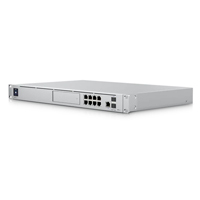
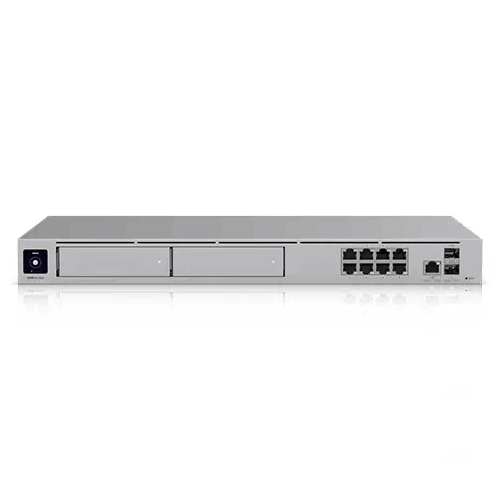
The Ubiquiti UniFi UDW WiFi 6 Wall-mounted 10G Cloud Gateway is designed for exactly that moment: when you want the network to look and behave like a professional system, not a collection of boxes. It combines a high-capacity UniFi cloud gateway, a powerful PoE switching platform, integrated Wi‑Fi 6, and built-in storage for UniFi Protect recording—packaged in a wall-mounted form factor that can become a clean, centralized networking hub for a floor, a department, or a full small-to-mid business.
This product is especially relevant in Bangladesh because the most common pain points are not theoretical—they’re daily realities: power fluctuations, mixed device quality, tight spaces, and the constant pressure to keep operations running. The UDW’s value is that it brings structure, control, and scalability into one integrated unit, while still offering the performance headroom and advanced features expected in serious deployments.
A wall-mounted network hub that changes how your office feels
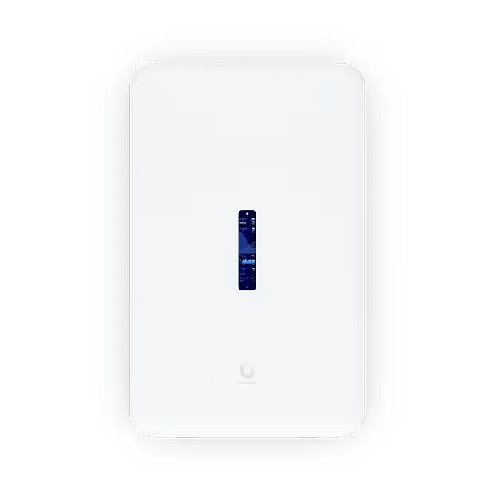
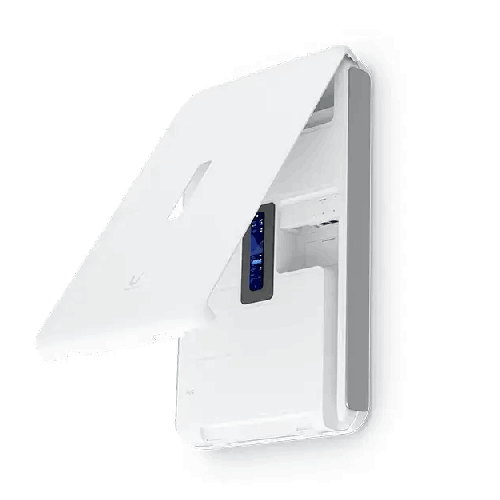
Unlike typical gateways that live hidden behind a desk, the UDW is made to be installed properly—on a wall, like an IT hub. Its confirmed dimensions (549 × 342 × 62 mm) show it’s built to be a substantial, centralized device. For Bangladesh offices, showrooms, clinics, and institutions where cable discipline is often the difference between reliability and chaos, wall-mounting can be a major advantage.
When the core of the network is wall-mounted:
- Cable routing can be cleaner and easier to label
- Staff are less likely to unplug something accidentally
- IT teams can troubleshoot faster because everything is in one place
- The network looks professional—important for client-facing environments
The UDW is not just “a device”—it’s a design decision: you’re choosing to run networking as infrastructure, similar to how you’d treat electrical panels or security systems.
UniFi Application Suite: a platform, not a single feature
The UDW supports the full UniFi Application Suite, confirmed as:
- Network: Yes
- Protect: Yes
- Access: Yes
- Talk: Yes
- Connect: Yes
For Bangladesh businesses, this matters because needs change. A company might start with Wi‑Fi and switching, then add cameras after an incident, then add access control when they expand, and later introduce VoIP. With the UDW, the idea is to keep everything under one UniFi umbrella—consistent management, consistent policies, and a more unified operational picture.
Even if you don’t use every application from day one, knowing the platform can grow reduces future replacement costs and avoids the “new software for each system” problem.
Built for scale: devices, users, and the reality of busy networks
The UDW lists strong capacity planning guidance:
- Managed UniFi Devices: 100+
- Simultaneous Users Connected: 300+
This is meaningful in Bangladesh because “users” often include more than staff. It includes customers, visitors, students, trainees, and temporary contractors. In showrooms, training centers, and hospitality spaces, device counts can spike unexpectedly. A network core designed to handle a high number of simultaneous connections helps keep performance stable when demand rises.
It also supports MAC Address Table Size: 8,000, which indicates readiness for large numbers of devices moving through the network over time—useful in campuses, multi-tenant floors, and guest-heavy environments.
10G-ready networking: stop bottlenecks before they begin
As businesses adopt faster internet and build faster internal backbones, the gateway and uplinks become critical. The UDW offers:
- 10G SFP+: 2 ports (10G/1G)
- Default WAN Ports: (1) 2.5 GbE RJ45 and (1) 10G SFP+
- Max. WAN Port Count: 8
In practical terms, this gives Bangladesh IT teams flexibility. You can connect high-speed uplinks to aggregation switches, servers, or other core infrastructure. Even if your internet is not 10G today, 10G uplinks can still matter for internal flows—NAS backups, camera traffic, and cross-floor switching.
If your organization plans to grow, the cost of replacing a gateway later can be painful—not only in money, but in downtime and redesign. Starting with a 10G-capable core helps avoid that cycle.
A serious PoE switching platform: 420W budget for real deployments
One of the most business-critical features of the UDW is its integrated switch and PoE capabilities. The confirmed port layout includes:
- 1 GbE RJ45: 17 ports with PoE support distributed as (4) PoE++, (4) PoE+, and (4) PoE
- 2.5 GbE RJ45: 1 port
- 10G SFP+: 2 ports
The confirmed PoE Budget is 420W, with per-port maximums:
- PoE: 15.4W
- PoE+: 30W
- PoE++: 60W
For Bangladesh deployments, that’s a big deal. PoE simplifies installations because devices can be powered through Ethernet—no need for an electrician to add power outlets everywhere. With a high PoE budget, you can power multiple access points, IP phones, and even higher-wattage devices that require PoE++ (depending on your device requirements), all from a centralized, UPS-protected location.
This is especially useful for:
- Multi-access-point Wi‑Fi coverage across rooms and corridors
- VoIP phone systems in offices
- IP cameras placed where power sockets are inconvenient
- Reception desk devices and wall-mounted tablets (where applicable)
It’s also practical for Bangladesh environments where neat cable management is often overlooked. A centralized PoE setup reduces power adapters and helps you maintain a more reliable system.
Redundancy that supports always-on businesses
The UDW includes (2) hot-swappable PSUs, with (2) hot-swappable AC/DC 550W PSU and (1) pre-installed PSU indicated in the data you provided. Redundant/hot-swappable power is a strong feature for businesses where network downtime can stop operations.
In real terms, redundancy can help organizations maintain service during PSU failure or during planned maintenance—especially when combined with a UPS strategy. For Bangladesh businesses with long operating hours—retail, call centers, clinics, logistics—reducing single points of failure is a sensible engineering step.
The power and consumption details provided are:
- Power Method: Universal AC input 100–240V AC, 7A Max., 50/60Hz
- Max. Power Consumption: 532W (Including PoE output)
- Heat Dissipation: 382 BTU/hr (Excluding PoE Output)
These are not minor figures; they signal that the UDW is serious infrastructure. That also means planning matters: ensure ventilation, avoid enclosed boxes with no airflow, and keep the installation away from direct sunlight—particularly relevant in Bangladesh summer conditions.
Integrated Wi‑Fi 6: convenience for coverage within the hub’s area
The UDW includes integrated Wi‑Fi with:
- WiFi Standard: 802.11a/b/g/n/ac/ax (WiFi 6)
- Throughput: 5 GHz 2.4 Gbps; 2.4 GHz 300 Mbps
- MIMO: 5 GHz 4×4 MU‑MIMO; 2.4 GHz 2×2 MU‑MIMO
- Coverage Area: 140 m² (1,500 ft²)
- Max BSSIDs: 8 per radio
- Security: WPA‑PSK and WPA‑Enterprise (WPA/WPA2/WPA3/PPSK)
For Bangladesh offices, built-in Wi‑Fi can cover a nearby zone—reception, a cluster of rooms, or a section of a floor—while the PoE switch can power additional UniFi APs to extend coverage across the entire site. This can create a clean, scalable design: the UDW acts as the core and also provides Wi‑Fi where it’s installed.
Security and control that matches professional needs
Security isn’t just for large enterprises anymore. Even small businesses in Bangladesh face risks: malware, phishing, compromised devices, and unauthorized access through shared passwords. The UDW includes:
- Stateful Firewall: Yes
- Application-Aware Layer 7 Firewall: Yes
- DPI & Traffic Identification: Yes
- Zone-Based Firewall advanced filtering (Regions, Domains, Apps)
- Content Filtering: Yes
- Intrusion Prevention (IPS/IDS): Yes
- Ad Blocking: Yes
- VLAN/Subnet-based Traffic Segmentation: Yes
- IDS/IPS Signatures: 55,000+ with CyberSecure
- IDS/IPS Throughput: 3.5 Gbps
The throughput matters because it suggests you can run deeper security features while keeping performance suitable for busy environments. For organizations that want to enable IPS/IDS rather than leaving security optional, that capacity is a key differentiator.
Advanced networking: built for real network design
The UDW supports higher-level networking capabilities that are especially relevant for Bangladesh businesses with multiple floors, branches, or complex policies:
- Dynamic Routing: OSPF (Yes), BGP (Yes)
- Advanced QoS: Yes
- mDNS: Yes
- Advanced NAT: Yes (including 1-to-1 NAT and NAT pooling)
- Integrated RADIUS and RadSec: Yes
- Policy-based WAN and VPN routing: Yes
- IPv6 ISP support: Yes
- All Traffic Flows: Yes
- Customizable DHCP: Yes
- VLAN 802.1Q: Yes
- Guest Traffic Isolation: Yes
- License-Free SD‑WAN: Yes
BGP is particularly notable for more advanced multi-site or provider-like networks, while OSPF supports internal routing designs that can scale. For many SMEs, you won’t use every feature immediately—but having them available means the platform won’t limit you when your network becomes more sophisticated.
VPN and SD‑WAN: practical for Bangladesh’s distributed reality
The UDW includes:
- Site-to-Site VPN: Site Magic, IPsec, OpenVPN
- VPN Server: Identity Endpoint One-Click VPN, Teleport Zero-Configuration VPN, WireGuard, OpenVPN, L2TP
- VPN Client: OpenVPN, WireGuard
- Additional Internet Failover with UniFi LTE Backup: Yes
This is particularly helpful for Bangladesh organizations that must connect branch offices or support remote work securely. Instead of using a separate VPN appliance, the gateway can become the central VPN point. With Teleport and WireGuard support, remote access can be both user-friendly and secure.
UniFi Protect recording storage built in: 512GB microSD + 128GB SSD
For businesses planning surveillance, the UDW provides storage out of the box:
- Pre-installed 512 GB microSD for NVR
- Built-in 128 GB SSD for detection recordings
- On-board Storage: 16 GB eMMC, integrated 128 GB SSD, pre-installed 512 GB microSD card
- Expansion Slot: MicroSD card
This combination is valuable for “start now, expand later” use cases. It’s not a substitute for large, multi-drive NVR storage for huge camera deployments, but for many small-to-mid setups in Bangladesh—offices, showrooms, clinics, schools—it can be an efficient way to begin with centralized recording.
The managed camera guidance you provided is:
- (12) HD
- (7) 2K
- (4) 4K
Those numbers help buyers set realistic expectations about the intended scale.
Touchscreen display: operational clarity at the wall
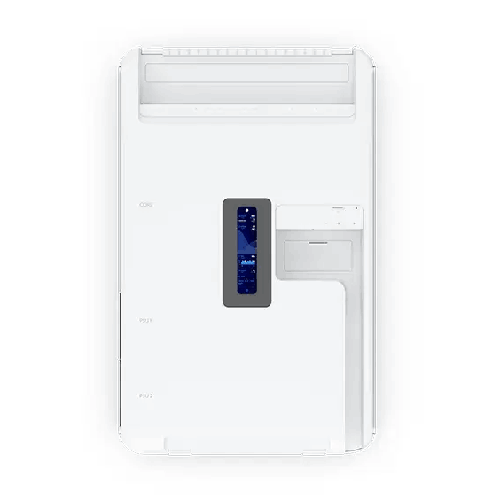
The UDW includes a 4.7" touchscreen LCM display. In practical operations, a display on the network hub can be more than a “nice-to-have.” It can support quick checks during troubleshooting, quick status confirmation, and a more transparent operational mindset—especially for teams that don’t want to open laptops for every quick glance.
For Bangladesh offices where non-IT staff may also be involved in basic checks (like confirming whether the system is up during an outage), visible status can reduce panic and speed up communication with IT support.
Build, materials, and installation mindset
The UDW uses a mixed-material approach:
- Enclosure: Polycarbonate, galvanized steel, aluminum alloy
- Mount Material: Stainless steel
- Weight: 8.6 kg
This signals a product intended for permanent, professional installation. For Bangladesh installations, that means you should plan proper mounting on a strong wall surface, ideally with secure cable routing and consideration for airflow. Because it includes high PoE power capability, it’s worth installing in a location that stays relatively cool and dust-managed.
Bangladesh deployment examples
Example 1: Office + showroom combination
A company in Gulshan runs a showroom on the front side and offices behind. The UDW can provide guest Wi‑Fi for visitors while keeping staff devices segmented. PoE can power ceiling-mounted access points and cameras without additional injectors.
Example 2: Clinic with security and access control plans
A clinic in Uttara wants Wi‑Fi for staff tablets, cameras for reception and corridors, and possibly access control later. The UDW provides a path to start with networking and cameras, then extend into Access when ready.
Example 3: Training institute with high client turnover
An institute in Mirpur has new student devices every day. With strong device table capacity and 300+ simultaneous user support, plus guest isolation and content filtering, the network can remain safer and more manageable.
Example 4: Multi-branch retail operations
A retail chain may standardize on UniFi across locations. With SD‑WAN and VPN features, the head office can create consistent policies and connect branches for secure access to central services.
Care, maintenance, and best practices (general but useful)
Because the UDW can deliver high PoE power, treat it as infrastructure:
- Keep ventilation clear and avoid sealed cabinets.
- Label ports and cables; it saves hours later.
- Use a UPS sized for your gateway and PoE load if uptime matters.
- Segment networks early (staff/guest/cameras/IoT). It’s easier to start clean than to fix later.
- Plan firmware updates during off-hours and document changes.
- Review PoE power draw and ensure you’re within budget when adding devices.
The Ubiquiti UniFi UDW WiFi 6 Wall-mounted 10G Cloud Gateway is ultimately for buyers who want their network to be clean, scalable, and controlled—powered, secured, and managed from one wall-mounted hub. If you’re building a serious office network in Bangladesh and want a platform that can handle switching, PoE, security, Wi‑Fi, and UniFi applications in one place, the UDW is built for that job.
✅ Key Features
- Wall-mounted 10G UniFi Cloud Gateway: Creates a clean, centralized network hub that’s ideal for modern offices and institutions.
- Dual 10G SFP+ Ports: Supports high-speed uplinks for backbone switching and future-ready expansion.
- 17-Port Integrated GbE Switch with Multi-Class PoE: Powers access points, phones, and cameras while simplifying cabling.
- High PoE Budget (420W): Enables larger PoE deployments without stacking multiple midspan injectors or extra switches.
- IDS/IPS Throughput up to 3.5 Gbps: Lets you run advanced security inspection while maintaining strong performance.
- UniFi Application Suite Ready (Network/Protect/Access/Talk/Connect): Helps you expand from networking into surveillance and business systems on one platform.
- Built-in NVR Storage (512GB microSD + 128GB SSD): Supports UniFi Protect recording workflows without immediate extra storage purchases.
- Wi‑Fi 6 Integrated Radio: Provides on-site wireless coverage plus the ability to extend with additional UniFi APs.
- Redundant Hot-Swappable PSUs: Improves resilience for always-on business networks and easier service planning.
- Advanced Routing & SD‑WAN Toolkit (OSPF/BGP/VPN): Fits multi-site networks and remote access needs with modern VPN options.
- 4.7" Touchscreen Display: Offers quick status visibility and a more approachable operational experience.
- Professional-Grade Security Controls: Includes Layer‑7 firewalling, content filtering, ad blocking, DPI, and segmentation tools.
✅ Usage / Applications
- Corporate offices in Dhaka/Chattogram needing a centralized gateway, PoE switching, and secure segmentation.
- Showrooms and retail outlets requiring guest Wi‑Fi plus protected internal networks and CCTV.
- Clinics, diagnostic centers, and hospitals powering access points and cameras with PoE while keeping networks separated.
- Training institutes and schools with high device turnover and the need for guest isolation and filtering.
- Warehouses and logistics hubs supporting PoE cameras, staff Wi‑Fi, and stable uplinks.
- Multi-branch businesses using VPN/SD‑WAN to connect sites securely.
- Hospitality spaces where guest networks must remain separate from admin systems.
- SMEs building a UniFi ecosystem with future plans for Access control or Talk.
✅ Benefits of This Product?
- Cleaner installations because one wall-mounted hub replaces multiple scattered devices.
- Lower downtime risk through redundant hot-swappable PSU design and professional architecture.
- Simpler PoE expansion with a large 420W PoE budget for access points and cameras.
- Better security control using Layer‑7 firewalling, IPS/IDS, segmentation, and filtering.
- Higher capacity for growth with support for 100+ managed UniFi devices and 300+ simultaneous users.
- Future-ready uplinks with dual 10G SFP+ ports plus 2.5GbE WAN option.
- Built-in Protect storage so you can start surveillance recording without immediate additional NVR hardware.
- Stronger multi-site readiness with license-free SD‑WAN and modern VPN features.
- Improved troubleshooting clarity using visible status via the touchscreen and UniFi management tools.
✅ Ideal For
The Ubiquiti UniFi UDW WiFi 6 Wall-mounted 10G Cloud Gateway is ideal for Bangladesh organizations that want a professional network core that looks clean, scales well, and stays manageable. It’s a strong fit for SMEs and mid-size businesses with growing device counts—especially those planning multiple access points, IP cameras, and VoIP phones powered by PoE. It also suits offices that need guest Wi‑Fi isolation, VLAN-based segmentation, and content filtering for safer browsing. If you run a showroom, clinic, training institute, or branch-based business and you want one platform to manage networking plus future UniFi Protect/Access/Talk needs, the UDW fits naturally. Because it is wall-mounted, it’s especially good for sites that value cable discipline and physical accessibility for troubleshooting. For teams in Dhaka and Chattogram that need stability, visibility, and room to expand, the UDW can function like an “all-in-one network cabinet” on the wall.
✅ Why Choose the Ubiquiti UniFi UDW WiFi 6 Wall-mounted 10G Cloud Gateway?
The UDW is a rare product category: a wall-mounted cloud gateway that also behaves like a serious PoE switching and security platform. Instead of building your network from separate pieces—router + PoE switch + NVR + Wi‑Fi—the UDW lets you unify those foundations into one structured hub. That brings immediate advantages in Bangladesh deployments where neat cable management, uptime, and easy troubleshooting directly affect daily operations.
Performance is one reason to choose it. With 3.5 Gbps IDS/IPS throughput, the UDW is positioned to keep advanced security features enabled without turning your network sluggish. With 10G SFP+ ports and a 2.5GbE RJ45 WAN option, it also supports modern uplinks and future growth. And because it can manage 100+ UniFi devices and 300+ simultaneous users, it’s ready for environments that are already busy today—training centers, offices with heavy guest presence, and institutions.
Another reason is power delivery. The 420W PoE budget is a serious advantage for networks that rely on PoE devices. You can power multiple access points and cameras without stacking extra injectors, which makes the installation cleaner and easier to maintain.
Finally, the UniFi Application Suite support means the UDW can evolve with your organization. You can start with networking and Wi‑Fi, then add Protect recording, Access control, and other UniFi services as needs grow—without replacing your core platform.
✅ Why Buy This Product from BME?
Buying a device like the UniFi UDW is not just a purchase—it’s a network design decision. Business Machine & Equipment (BME) can help Bangladesh buyers approach that decision more confidently by matching the UDW’s capabilities to real deployment needs. Because this product integrates switching, PoE power delivery, gateway security, Wi‑Fi, and storage, it’s important to plan the full ecosystem: which UniFi access points you’ll power, how many cameras you’ll run, how you’ll segment guest and staff networks, and what uplinks you’ll use for 10G and 2.5G connectivity.
BME can support business and project buyers who need procurement-friendly purchasing, including formal quotation and documentation suitable for accounts and institutional buying processes. If you share your floor size, expected user count, PoE device list, and whether you want multi‑WAN, BME can help you build a complete bill of materials—so you don’t miss practical items like the correct SFP+ modules, patch cords, or UPS sizing considerations for PoE-heavy deployments.
Most importantly, BME can help ensure you’re selecting the right UniFi device for your scale—so your investment stays effective as your network grows in Dhaka, Chattogram, or across branches in Bangladesh.
✅ Buying Guide
- Step 1: Confirm your installation location: Because the UDW is wall-mounted, choose a strong wall with space for airflow and clean cable routes. Avoid direct sunlight and overly dusty areas.
- Step 2: List your PoE devices and wattage needs: Count access points, cameras, and phones. Match each device’s PoE requirement (PoE/PoE+/PoE++) to available ports and confirm you stay within the 420W PoE budget.
- Step 3: Plan your uplinks: Decide if you’ll use 10G SFP+ for backbone switching or server/NAS connectivity. Choose suitable SFP+ modules and cabling for your environment.
- Step 4: Decide WAN strategy: If uptime matters, plan Multi‑WAN with two ISPs. The UDW supports up to 8 WAN ports and Multi‑WAN load balancing.
- Step 5: Build a segmentation plan: Design VLANs for Staff, Guest, IoT, and Cameras. This is one of the biggest quality upgrades you can make in a Bangladesh office network.
- Step 6: Define Wi‑Fi coverage strategy: Use the integrated Wi‑Fi 6 for coverage near the hub and add PoE-powered UniFi APs for full floor coverage as needed.
- Step 7: Plan surveillance storage expectations: The UDW includes microSD and SSD storage for Protect. Estimate retention needs based on camera count, resolution, and recording mode.
- Step 8: Consider redundancy and power stability: Use a UPS appropriate for your gateway and PoE load. Redundant PSUs help, but stable input power improves overall uptime.
- Step 9: Avoid common mistakes: Don’t mix guest and office devices on the same subnet, don’t underestimate heat in enclosed spaces, and don’t overcommit PoE ports without checking device wattage.
- Step 10: Document everything: Keep a simple network map (uplinks, VLANs, IP ranges) so future changes are safe and fast.
✅ Customers Ask About / Frequently Asked Questions
-
Q: What is the UniFi UDW used for?
A: It’s a wall-mounted UniFi cloud gateway that combines routing/security, PoE switching, Wi‑Fi 6, and UniFi application suite capability for business networks. -
Q: Does the UDW support 10G connectivity?
A: Yes. It includes two 10G SFP+ ports, and a default 10G SFP+ WAN option. -
Q: How many Ethernet ports does the UDW have?
A: It includes 17 × 1GbE RJ45 ports plus 1 × 2.5GbE RJ45 port, along with 2 × 10G SFP+ ports. -
Q: How much PoE power can it provide?
A: The total PoE budget is 420W, with support for PoE (15.4W), PoE+ (30W), and PoE++ (60W) on designated ports. -
Q: Can I power UniFi access points and cameras directly from the UDW?
A: Yes, within PoE port type limits and the total PoE budget. It’s designed for PoE-heavy deployments. -
Q: Does it support IDS/IPS, and what throughput is rated?
A: Yes. IDS/IPS is supported with a specified throughput of 3.5 Gbps. -
Q: Can it run UniFi Protect recording without a separate NVR?
A: It includes pre-installed 512GB microSD for NVR and a built-in 128GB SSD for detection recordings, which can support Protect recording needs within capacity planning. -
Q: Is it suitable for multi-branch VPN?
A: Yes. It supports license-free SD‑WAN and VPN options including IPsec, OpenVPN, WireGuard, and Site Magic for site-to-site connectivity. -
Q: Does it support VLAN and guest isolation?
A: Yes. VLAN 802.1Q, guest traffic isolation, and VLAN/subnet-based traffic segmentation are supported. -
Q: Is the power input suitable for Bangladesh?
A: It supports universal AC input 100–240V, 50/60Hz. For best uptime, businesses often pair this with a UPS. -
Q: What environmental conditions does it support?
A: It lists operating temperature -10 to 40°C and humidity 5 to 95% noncondensing, which covers typical indoor deployments when ventilation is properly managed. -
Q: Does it have a display for status and control?
A: Yes. It includes a 4.7" touchscreen for status visibility and interaction.
✅ Why Buy This Product
A strong network is a business advantage in Bangladesh—customers expect fast guest Wi‑Fi, teams rely on cloud applications, and security systems run continuously. The Ubiquiti UniFi UDW WiFi 6 Wall-mounted 10G Cloud Gateway is built for organizations that want their network to be clean, scalable, and professionally controlled from one hub. With integrated PoE switching, 10G uplinks, IDS/IPS security capacity, and built-in storage for UniFi Protect, it can replace several separate devices and reduce the mess that often causes downtime.
If you’re planning a serious office upgrade—or building a new site where you want the network to “just work” while remaining easy to manage—this wall-mounted UniFi gateway is a practical long-term foundation. Order the Ubiquiti UniFi UDW from BME to build a more resilient, structured network that can scale with your users, your devices, and your future UniFi expansion.
What is the price of Ubiquiti UniFi UDW WiFi 6 Wall-mounted 10G Cloud Gateway in Bangladesh?
Write a review
Question Answer
Have question about this product? Get specific details about this product from expert.

Grandstream GXW4232 32 FXS Port VoIP Gateway