

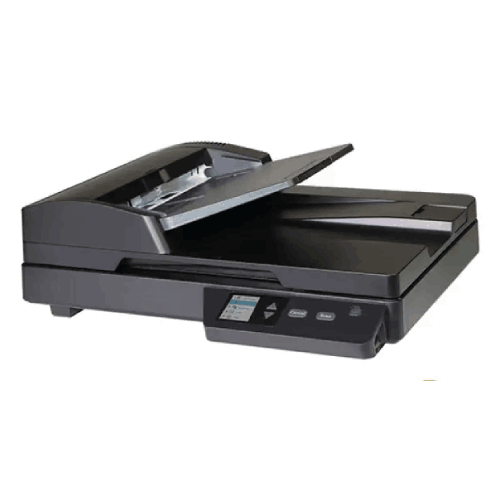
Avision AD136 Document Scanner
Regular Price:৳38,500.00Availability: SKU: 7.29.199.9674
Quick Overview
-
Support
Saturday – Thursday: 09 AM - 06 PM. -
Payment
Cash on Delivery | Card | Online Payment -
Shipping Cost
Inside Dhaka 100tk | Outside Dhaka 150tk -
Warranty Policy
Read More
Description
Avision AD136 Document Scanner Price in Bangladesh
The Avision AD136 Document Scanner combines a flatbed with a 75-sheet automatic document feeder (ADF), according to the specifications supplied. These two scanning methods give users options for presenting suitable originals: place an individual item on the flatbed, or load a batch of supported sheets into the feeder. Which method is appropriate depends on the type and condition of the documents and the scanner’s handling instructions.
The listed scan speed is 36 pages per minute (ppm) and 72 images per minute (ipm) for colour and black-and-white scanning at 200 or 300 dpi. The flatbed is specified with optical resolution up to 1200 × 1200 dpi. USB 3.2 Gen 1x1 connectivity and a recommended daily volume of up to 3,000 sheets are also listed. Together, these details offer a useful starting point for comparing the AD136 with other office scanners.
Two methods for handling originals
The flatbed and ADF serve different purposes in a scanning workflow. The ADF can handle a prepared stack of supported sheets, while the flatbed gives the user a place to scan an original individually. Having both options means buyers can assess one scanner for tasks that involve more than one kind of document-handling process.
The supplied information does not state the flatbed’s maximum scan area, the paper sizes accepted by the ADF or the types of material that can safely pass through it. If your work involves mixed sizes, unusually thick paper or delicate originals, check the manufacturer’s handling guidance before scanning. Do not assume every original is suitable for the ADF or that every format fits the flatbed.
75-sheet automatic document feeder
The ADF has a listed capacity of 75 sheets. This gives users a reference for planning batch preparation, but the practical capacity can depend on the documents and the manufacturer’s loading instructions. Confirm supported paper sizes, thickness and condition before using it with a particular stack.
A feeder capacity figure does not specify how many pages can be scanned in one uninterrupted job or which paper types the feeder accepts. Prepare documents as directed and keep the stack within the scanner’s stated limits. If your work involves batches throughout the day, consider the 75-sheet capacity alongside the time needed to prepare pages, check the resulting files and save them to the correct location.
36 ppm and 72 ipm scanning speeds
The supplied specifications list 36 ppm and 72 ipm in colour and black-and-white at 200 or 300 dpi. Pages per minute and images per minute are different measures, so keep the terms distinct when comparing scanners. The information does not provide test conditions or explain whether the rates apply to both the flatbed and ADF.
For a fair comparison, ask which paper size, scan mode and connection are used to measure the stated speeds. Real-world throughput can also depend on the computer, software, document condition, file settings and the time needed to organise the output. If your workflow includes scanning both sides of pages, verify automatic duplex capability directly; the supplied specifications do not explicitly state it.
Scanning at 200 or 300 dpi
The listed speed figures apply to scanning at 200 or 300 dpi in colour and black-and-white. These settings provide useful reference points when assessing everyday document work. The best setting depends on the purpose of the scan, the amount of detail needed and how the resulting files will be stored or shared.
The supplied information does not identify all available scan modes or the file formats produced. It also does not state whether the scanner offers grayscale or other image settings. If your workflow depends on particular output options, confirm them before ordering. A settings choice can affect image detail, file size and processing time, so it is worth matching the scan setup to the documents you handle rather than selecting a setting without considering its use.
Up to 1200 × 1200 dpi optical resolution on the flatbed
The flatbed is specified with optical resolution up to 1200 × 1200 dpi. This figure applies specifically to the flatbed in the supplied product information; it should not automatically be applied to the ADF. No maximum ADF resolution was provided, so ask for that detail if you need to compare the two scanning methods.
Resolution requirements vary with the document and the intended result. A readable copy of routine paperwork may have different needs from a document where small text or fine details must be retained. Confirm which resolutions are available for each scan path and how the scanner’s software presents those options. If image detail is important, testing representative originals can help you determine whether the available settings meet your needs.
Recommended daily volume of up to 3,000 sheets
The Avision AD136 has a recommended daily scanning volume of up to 3,000 sheets. This figure can help buyers assess whether the scanner is worth considering for regular workplace use. It is a recommended daily volume, not a guarantee that every type of document can be processed in the same way or at the listed speed.
Estimate your typical volume and your busiest periods. Include the time needed to prepare pages, load the ADF, check scans and organise files. If scanning is a frequent task for several users, ask whether the manufacturer provides additional workload guidance or maintenance recommendations. Comparing your actual workflow with the stated daily volume can help you assess fit more realistically than relying on a speed figure alone.
USB 3.2 Gen 1x1 connectivity
USB 3.2 Gen 1x1 connectivity is listed for document scanning. This gives buyers a specific interface to check against the computers and setup where the AD136 will be used. Confirm the required cable, the compatible host connection and whether any driver or software installation is necessary. Package contents were not provided, so do not assume that a particular cable is included.
The supplied specifications list USB connectivity but do not identify Ethernet or Wi-Fi for this AD136 model. Do not transfer network features from another scanner model or assume that the scanner can be shared wirelessly. If more than one computer needs access, check what the documented connection and software setup allow.
Planning a practical document workflow
A scanner is one part of a broader process that may include document preparation, image review, file naming and storage. Before choosing the AD136, decide which types of paperwork will be scanned, how often scanning will happen and where the resulting files should be kept. This can help you check whether the feeder, flatbed, stated speed and recommended daily volume fit your actual needs.
For example, an office may need to digitise routine correspondence, forms or business records. These are possible document workflows, not a claim that every size or paper type is supported. Verify the paper-handling limits for the originals you plan to use. Also check whether your existing software can manage the output and whether the computer used for scanning meets the scanner’s requirements.
Choosing between flatbed and ADF
Use the ADF for a batch only when the originals are suitable for its documented paper-handling limits. Use the flatbed for an individual original when that approach better suits the material or scanning task. The supplied specifications do not explain whether the two scanning methods can be selected or managed through the same software workflow, so confirm the operating procedure if it matters to your staff.
Consider the nature of your documents before deciding which method will be used most often. If your work includes both stacks of ordinary paperwork and originals that need individual placement, the combination of ADF and flatbed may be worth evaluating. Check the flatbed’s scan area and the ADF’s accepted media before deciding that the scanner supports a particular document type or size.
Colour and black-and-white modes
The stated 36 ppm and 72 ipm speeds are specified for colour and black-and-white scanning at 200 or 300 dpi. This gives buyers information about the modes named in the supplied specification. It does not provide details about grayscale scanning, colour depth, image-processing options or how the two modes compare under different conditions.
Think about whether documents need to retain colour information, such as coloured annotations or markings. For documents where colour is not important, black-and-white scanning may be part of the planned workflow. Confirm the available settings in the scanner’s documentation and check how they affect file output. If your work depends on grayscale or a particular colour setting, verify that capability instead of assuming it from the colour and black-and-white speed listing.
Duplex scanning: confirm before relying on it
The specifications give a rate of 72 images per minute, but they do not explicitly describe the AD136’s duplex function or state that it automatically scans both sides of a sheet. If two-sided scanning is important to your workflow, ask for confirmation from the product documentation before purchase.
This distinction matters when estimating workload. A speed stated in images per minute does not by itself provide enough information to confirm the scanner’s duplex mechanism or the conditions under which the rate applies. Check whether the model scans both sides automatically, whether a particular setting is required and what speed applies to that mode. Do not assume a feature that was not explicitly included in the supplied specifications.
Software and computer compatibility
The supplied information does not identify the AD136’s drivers, supported operating systems, included applications, OCR functions or output file formats. These details can affect how easily a scanner fits into an existing office process. If you use a particular operating system or document-management application, confirm compatibility for the exact scanner model before ordering.
Ask whether software is included, supplied separately or downloaded from the manufacturer. If searchable documents are required, verify OCR support and whether any additional software or licence is needed. Also check which file formats can be produced and whether they work with your storage and recordkeeping process. Do not assume that software or OCR is included simply because the product is a document scanner.
Setting up scanning for a team
In a shared workplace, decide who will use the AD136 and how they will handle scanned files. USB 3.2 Gen 1x1 is the listed connection. The product information provided does not state network-sharing features, so check the documented method before planning to use the scanner from multiple computers.
Establish simple steps for preparing documents, selecting scan settings and naming or saving the resulting files. This can help staff follow a consistent process, but it is a workflow choice rather than a feature of the scanner. If several users need access, ask which software setup is supported and whether each computer needs its own driver or installation. Confirm these details before introducing the scanner into a shared work area.
Potential uses in Bangladesh workplaces
The Avision AD136 may be considered by offices, businesses, administrative teams and educational organisations looking for a scanner with a flatbed and ADF. The stated speed, resolution and daily volume provide specifications to compare against the documents and workload in a particular organisation.
For an office in Bangladesh, potential tasks might include digitising routine forms, correspondence or records, subject to the scanner’s confirmed paper-handling limits and software compatibility. The USB connection can be assessed against the computers available in the workplace. These are possible uses, not a guarantee that the scanner supports every document type, software platform or business process.
Before choosing it, confirm the requirements of the people who will use the scanner and the way digital files will be stored. Check the product details and applicable purchase terms with BME; this page does not assume local stock, delivery, installation or warranty arrangements.
Comparing the AD136 with other scanners
When comparing the AD136 with other scanners, check that the figures you compare mean the same thing. Ask what conditions apply to the 36 ppm and 72 ipm speeds, whether they apply to a specific scan path and which settings are used. Confirm the ADF’s capacity, the flatbed’s optical resolution and the recommended daily volume for each model.
Also compare supported paper sizes, duplex operation, software, operating systems and connections. These details were not provided for the AD136, so they should be confirmed if they are part of your requirements. A scanner with a similar headline speed may differ in paper handling or software, while another model may offer different connectivity. Compare the complete workflow rather than choosing by a single number.
Checking the finished scans
A practical way to assess a scanner is to review samples that reflect the documents you actually handle. Check whether text is readable, pages are correctly aligned and colour or black-and-white output suits the intended use. The supplied information does not describe image-enhancement, blank-page removal or other processing functions, so check these separately if they matter.
Testing representative documents can also help establish useful settings at 200 or 300 dpi. Consider how the files will be shared or archived, and confirm that the software produces an output format your team can use. A test does not replace checking the manufacturer’s supported paper limits, but it can help you evaluate everyday output once compatibility is established.
Before putting the scanner into regular use
Before regular scanning begins, confirm the setup instructions, required drivers and supported computer connection. Use the manufacturer’s instructions for loading paper, selecting scan settings and maintaining the device. The product information supplied does not state its cleaning procedure or service requirements, so follow the guidance for the exact model rather than using instructions for a different scanner.
For the first test, scan a small group of documents that reflects your normal workload. Check how the sheets feed, whether the output is legible and whether files are saved where expected. Confirm any two-sided workflow separately if needed. Once the setup is checked, a clear process for preparing originals and naming files can help users handle routine scanning consistently.
✅ Key Features
- Flatbed and ADF design: The AD136 combines a flatbed with a 75-sheet automatic document feeder.
- 36 ppm / 72 ipm scanning: These speeds are specified for colour and black-and-white scanning at 200 or 300 dpi.
- Flatbed optical resolution: Up to 1200 × 1200 dpi is listed for the flatbed.
- 75-sheet feeder capacity: The ADF capacity provides a reference for preparing supported document batches.
- Recommended daily volume: The scanner is specified for up to 3,000 sheets per day.
- USB 3.2 Gen 1x1 connection: USB 3.2 Gen 1x1 is listed for document scanning.
- Two document-presentation options: The flatbed and ADF let buyers assess different ways of handling suitable originals.
✅ Usage / Applications
- Office paperwork: Evaluate the AD136 for routine documents after confirming their sizes and paper types are supported.
- Administrative records: Check its scanning settings and software against your filing process.
- Business forms: Confirm media handling and output requirements before choosing it for regular form scanning.
- Invoices and correspondence: Assess the paper size, condition and batch volume your workflow requires.
- Educational administration: Check computer and software compatibility for school or training-office documents.
- Batch scanning: Consider the 75-sheet ADF for batches of supported sheets.
- Individual originals: Assess the flatbed for documents better handled separately.
- Digital recordkeeping: Confirm output formats and any required OCR software before building an archive workflow.
✅ Benefits of This Product?
- Two scanning methods: The flatbed and ADF provide different ways to handle suitable originals.
- Batch capacity reference: The 75-sheet ADF specification helps with planning a document batch.
- Clear speed figures: The stated 36 ppm and 72 ipm rates offer performance details to compare.
- Flatbed resolution detail: Up to 1200 × 1200 dpi optical resolution is specified for the flatbed.
- Colour and black-and-white scanning speeds: Both modes are included in the stated rates at 200 or 300 dpi.
- Daily workload guidance: The recommended volume of up to 3,000 sheets helps buyers assess potential fit.
- USB connection specified: USB 3.2 Gen 1x1 provides a defined interface to check against a computer.
- More informed evaluation: Confirming paper handling and software can help determine suitability before purchase.
✅ Ideal For
The Avision AD136 is ideal for offices and businesses evaluating a document scanner with both a flatbed and a 75-sheet ADF. It may suit workflows that handle batches of supported loose sheets as well as individual originals better placed on a flatbed. The supplied 36 ppm / 72 ipm speeds, colour and black-and-white modes at 200 or 300 dpi, and recommended daily volume of up to 3,000 sheets provide useful points for comparison.
Before choosing it, consider the documents you handle, how often you scan and which computers will connect to the scanner. Confirm supported paper sizes, ADF limits, duplex operation, software, operating-system compatibility and output formats. The flatbed’s optical resolution is specified up to 1200 × 1200 dpi; this figure should not automatically be applied to the ADF. If your workflow depends on a particular file format or OCR, verify those requirements before purchase.
✅ Why Choose the Avision AD136 Document Scanner?
The Avision AD136 is worth considering if your scanning workflow could benefit from both a flatbed and an automatic document feeder. The supplied specifications list a 75-sheet ADF alongside the flatbed, giving buyers two ways to present suitable originals. This combination can be relevant when work includes batches of supported loose pages as well as individual items that should be placed separately.
The scanner’s listed speed is 36 ppm / 72 ipm in colour and black-and-white at 200 or 300 dpi. Its flatbed optical resolution is specified up to 1200 × 1200 dpi, and its recommended daily volume is up to 3,000 sheets. These details provide a starting point for comparing performance against a real office workload. Confirm the test conditions, the exact meaning of the speed figures and whether automatic duplex scanning is supported if that function matters to you.
USB 3.2 Gen 1x1 is the stated connection for document scanning. Software, operating-system support, supported media sizes and file formats were not included in the supplied information, so verify them before choosing the AD136 for an existing setup.
Choose this model when its confirmed paper handling, performance and connection requirements match your workflow. Checking the complete specifications can help you make a more informed comparison with other scanners.
✅ Why Buy This Product from BME?
Check BME’s product listing or contact BME to confirm the current Avision AD136 price and purchase details in Bangladesh. The specifications supplied identify key speed, capacity, resolution and connection features, but additional details may be important for your particular workflow.
Ask for the product documentation and confirm which paper sizes and types the ADF supports, whether duplex scanning is available and which conditions apply to the 36 ppm / 72 ipm rates. If your work depends on a particular operating system, application or file format, verify software and driver compatibility before ordering. Also confirm what the 1200 × 1200 dpi flatbed resolution means for your intended scans.
Check the package contents, any required cable or software and applicable warranty terms with BME. These details were not provided in the specifications supplied here. Confirming them before purchase can help you assess the exact scanner and avoid assuming that unlisted accessories, services or features are included.
✅ Buying Guide
- Estimate the workload: Compare your typical and busiest scanning days with the recommended volume of up to 3,000 sheets.
- Check your documents: Confirm supported sizes, paper types and condition for both the flatbed and ADF.
- Plan batch loading: The ADF is listed for 75 sheets; follow the manufacturer’s loading guidance.
- Confirm speed conditions: Ask which document size and scan settings apply to the 36 ppm / 72 ipm figures.
- Clarify duplex operation: The supplied details do not explicitly confirm automatic two-sided scanning.
- Verify resolution: Up to 1200 × 1200 dpi optical resolution is specified for the flatbed; confirm ADF resolution separately.
- Match the connection: Check USB 3.2 Gen 1x1 compatibility and cable requirements for your computer.
- Check software: Confirm supported operating systems, drivers, file formats and OCR requirements.
- Plan file handling: Decide where scans will be saved and how files will be named or retrieved.
- Confirm purchase details: Check package contents, current price and applicable warranty terms with BME.
✅ Customers Ask About / Frequently Asked Questions
- Q: What is the Avision AD136 price in Bangladesh? A: The supplied details do not include a price. Check BME’s listing or contact BME for a current quote.
- Q: Does the AD136 have a flatbed and an ADF? A: Yes. Both are listed, and the ADF has a stated capacity of 75 sheets.
- Q: What scanning speed is specified? A: The supplied figures are 36 ppm / 72 ipm in colour and black-and-white at 200 or 300 dpi.
- Q: Does it scan both sides automatically? A: The supplied information does not explicitly confirm automatic duplex scanning. Verify this if it is required.
- Q: What is the flatbed resolution? A: Up to 1200 × 1200 dpi optical resolution is specified for the flatbed.
- Q: Does that resolution also apply to the ADF? A: The supplied information specifies the figure for the flatbed only. Confirm the ADF resolution separately.
- Q: What is the recommended daily volume? A: Up to 3,000 sheets per day is specified as the recommended daily scanning volume.
- Q: What connection does the AD136 use? A: USB 3.2 Gen 1x1 is listed for document scanning.
- Q: Does it support Wi-Fi or Ethernet? A: Neither is listed in the supplied specifications for the AD136. Do not assume these features.
- Q: Which software and operating systems does it support? A: Those details were not supplied. Confirm compatibility with your computer and applications.
- Q: What warranty applies in Bangladesh? A: No warranty term was supplied. Ask BME to confirm the terms for the unit being offered.
✅ Why Buy This Product
Consider the Avision AD136 if you need a document scanner with a flatbed and a 75-sheet ADF. Its listed 36 ppm / 72 ipm speeds for colour and black-and-white scanning at 200 or 300 dpi, flatbed optical resolution up to 1200 × 1200 dpi and recommended daily volume of up to 3,000 sheets provide useful specifications to compare with your workload.
Before choosing it, confirm supported paper sizes, automatic duplex capability, software, operating-system compatibility and the conditions behind its speed figures. The supplied connection is USB 3.2 Gen 1x1; do not assume Wi-Fi or Ethernet support for this model. For current product information and to check whether the AD136 fits your office workflow, contact BME before ordering.
What is the price of Avision AD136 Document Scanner in Bangladesh?
Write a review
Question Answer
Have question about this product? Get specific details about this product from expert.

Avision AD130 Flatbed Color Document Scanner



Avision AV332F Document Scanner
Avision AD136WN Document Scanner
Avision AD136 Document Scanner
Avision AD136 Document Scanner

Avision FB5000 A3 Size Slim Flatbed Scanner
Avision AD136 Document Scanner
Avision AD136WN Document Scanner
Avision AV332F Document Scanner





Avision AD5800 High-Valume A3 Document Scanner

AVISION MiWand 2 Wi-Fi Pro Portable Scanner


