

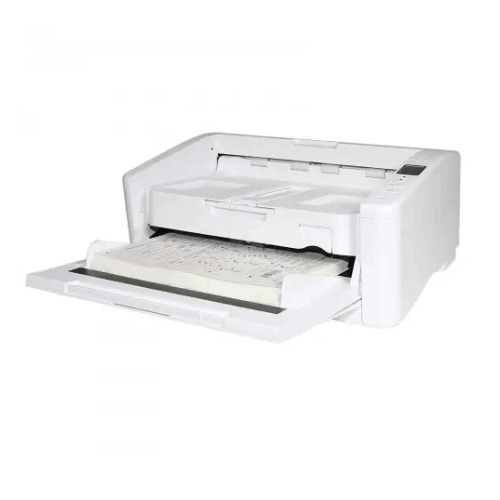
Avision AD6090 Heavy Duty Scanner
Regular Price:৳0.00Availability: SKU: 7.29.199.9227
Quick Overview
-
Support
Saturday – Thursday: 09 AM - 06 PM. -
Payment
Cash on Delivery | Card | Online Payment -
Shipping Cost
Inside Dhaka 100tk | Outside Dhaka 150tk -
Warranty Policy
Read More
Description
Avision AD6090 Heavy Duty Scanner Price in Bangladesh
The Avision AD6090 Heavy Duty Scanner is built for that environment. It’s not a “small office” scanner and it’s not a “scan occasionally” device. It’s designed as a heavy-duty, high-volume ADF document scanner with a 150-sheet ADF capacity and a daily duty cycle / recommended daily volume up to 20,000 pages. In practical terms, this is the kind of scanner you deploy when scanning is a production workflow—part of daily operations—where downtime, misfeeds, and missing pages create real business risk.
For Bangladesh organizations that are actively digitizing archives or running continuous document capture, the AD6090 offers a compelling combination: strong batch handling, advanced feed protection features like ultrasonic detection, broad file format output, long paper mode support, and modern connectivity via USB 3.2. It’s the type of scanner that helps a department move from “we scan when we can” to “we scan as a system.”
Heavy-duty ADF scanning: why it matters for Bangladesh operations
Many companies in Bangladesh start digitization using entry-level ADF scanners. It works until volume increases. Then the problems begin:
- Too many reloads because ADF capacity is small
- Too many interruptions due to jams and double-feeds
- Slow throughput that creates backlogs
- Inconsistent file naming and storage because scanning becomes stressful
- Missed pages that cause compliance risks
A heavy-duty scanner addresses those pain points by being built for volume and consistency. The AD6090’s 150-sheet ADF supports larger batches per run, reducing interruptions. The up to 20,000 pages/day capacity signals that it’s intended for continuous use.
In Bangladesh, this matters for sectors like:
- Banking and financial services (KYC, account opening, loan documentation)
- Insurance (claims, customer records, policy documents)
- Government contractors and record digitization projects
- Healthcare administration (forms, billing documents, patient paperwork archives)
- BPO and shared services (large daily intake of documents)
- Logistics and courier (POD documents, manifests, delivery notes)
150-sheet ADF capacity: fewer stops, cleaner batch rhythm
The AD6090 includes an ADF capacity of 150 sheets. For production scanning, this changes everything. Instead of loading 20–50 pages at a time, staff can prepare larger batches and scan with fewer interruptions. That’s especially useful in Bangladesh offices where scanning is only one part of a staff member’s job—less time babysitting the feeder means more time doing actual processing and verification.
A larger ADF also supports better organization: you can scan one complete file or one complete customer batch in one run, reducing the chance of mixing documents.
Daily duty cycle up to 20,000 pages: built for continuous work
You provided both “daily duty cycle up to 20,000 sheets” and “recommended daily volume up to 20,000 pages.” This places the AD6090 firmly in heavy-duty territory. For organizations in Bangladesh that are digitizing archives or processing daily intake at scale, that level of duty guidance helps justify the investment: the scanner is designed for consistent high usage, not occasional peaks.
This is also important for planning:
- You can set scanning targets per day
- You can staff a scanning station with predictable output
- You can build workflows around scanning as a dependable step, not a bottleneck
Optical resolution and output resolution: clarity plus flexibility
The AD6090 specifications include:
- Optical Resolution: 600 dpi
- Output Resolution: 1200 dpi
For most high-volume scanning, 200–300 dpi is commonly used to balance speed and file size. But 600 dpi optical resolution provides strong clarity for small text, barcodes, and documents that have been photocopied multiple times—common in Bangladesh records. Output resolution up to 1200 dpi gives additional options when a larger output is desired.
CIS technology + LED: “earth-friendly” and consistent illumination
The scanner uses:
- Technology: Contact Image Sensor (CIS)
- Light Source: LED (CIS)
- Earth-friendly LED technology (as stated)
LED illumination is widely appreciated for consistent scanning without long warm-up cycles. In busy Bangladesh scanning rooms, that translates into smoother operation throughout the day and consistent results across batches.
Ultrasonic paper jam detection: protect completeness
One of the most expensive scanning mistakes is a missing page—especially in KYC files, claims, and audit documents. The AD6090 includes:
- Ultrasonic paper jam detection: Yes
Ultrasonic double-feed detection is a major advantage for production scanning because it helps detect overlapping sheets. For Bangladesh compliance-heavy environments, this feature supports accuracy and reduces the need for repeated rescanning and manual cross-checking.
Long paper mode: made for unusual-length documents
Bangladesh workflows often involve long documents—reports, continuous-form printouts, and extended pages. The AD6090 supports long paper mode in color duplex:
- Up to 200 dpi: 240 in.
- Up to 300 dpi: 218 in.
- Up to 600 dpi: 59 in.
Long paper mode helps you scan these documents as a single continuous file, rather than cutting or scanning in sections. This saves time and preserves completeness.
Embossed card scanning: flexible intake for service desks
The AD6090 supports:
- Card Scan: Embossed card (Thickness 1.25 mm)
This is useful in front-office and onboarding environments where thicker card-like materials may need scanning as part of customer files or service processes.
File format flexibility: built for many departments
The scanner supports a broad set of file formats including:
BMP, PNG, GIF, JPEG, Single-Page PDF, Multi-Page PDF, Multi-TIFF, TIFF, RTF, TXT, OCR (for iScan only), XPS, DOC, XLS, PPT, DOCS, XLSX, PPTX, HTML
For Bangladesh organizations, the most common production scanning outputs are multi-page PDF and multi-page TIFF. Accounts departments often standardize on multi-page PDF. Archive projects may use TIFF for image integrity. The wide format list also supports specialized workflows where output needs to feed into office documents or indexing systems.
OCR is listed as “for iScan only”, meaning OCR output depends on the iScan workflow/software. That’s a key planning point: OCR is typically software-driven. If searchable PDFs are required, ensure the workflow includes an OCR-capable process.
USB 3.2 Gen1 connectivity and onboard memory
The AD6090 uses:
- Interface: USB 3.2 Gen1x1
- Memory Size: 512MB SDRAM
High-speed USB connectivity supports fast transfer of large batches, and memory supports stable scanning operation and buffering in continuous workflows.
Power and noise considerations for a scanning room
Power consumption is specified as:
- Operation < 48W
- Ready < 14W
- Sleep < 3.1W
- Off < 0.2W
Acoustical noise is specified as:
- Operation < 58 dB
- Standby < 25 dB
In Bangladesh offices, scanners are sometimes placed in open admin areas. Noise specs help buyers understand whether the device is suitable for shared spaces. For very heavy daily scanning, many organizations still prefer a dedicated scanning corner for better workflow control and less distraction.
Physical planning: dimensions and weight
Dimensions provided:
- Maximum: 460 × 680 × 198 mm
- Minimum: 460 × 310 × 198 mm
Weight: - 12 kg
These specs indicate a substantial machine. In practice, you should plan a stable desk with enough depth for the extended footprint during operation. In Bangladesh record rooms, it’s a good idea to create a scanning station with space for “in” trays, “out” trays, and file sorting.
Driver and OS support: built for Windows environments
OS support listed:
- Windows XP / Vista / 7 / 8 / 8.1 / 10
Bundled software:
- ISIS driver, TWAIN driver, WIA driver
- Button Manager, AVScan, PaperPort
TWAIN/ISIS/WIA driver support helps integrate the scanner into a wide range of capture applications and document management workflows. Button Manager can support one-touch operations, while AVScan and PaperPort are useful for typical office scanning and filing tasks.
Because Windows versions beyond Windows 10 weren’t listed in your provided specs, they are not claimed here.
Important note: scanning speed field is incomplete
Your provided spec list includes “Scanning Speed: Scanning Speed:” but no actual speed numbers. For accuracy, this page does not state ppm/ipm. If you provide the confirmed scanning speed specifications, I can incorporate them across the long description, features, FAQs, and technical summary.
Bangladesh deployment examples
Bank branch digitization desk:
A dedicated scanning desk handles daily customer intake. The 150-sheet ADF reduces reloads, ultrasonic detection reduces missing pages, and multi-page PDF outputs make filing consistent.
Insurance claims processing:
Claims often arrive in thick batches with mixed paper quality. Heavy-duty ADF handling plus long paper mode and flexible formats make the workflow more resilient.
Government record digitization project:
A scanning room processes archived files. A 20,000 pages/day duty guidance supports continuous scanning targets and predictable throughput planning.
Large accounts department:
Month-end paperwork spikes are common. A high ADF capacity and robust duty cycle allow the department to clear backlogs quickly.
Best practices for getting maximum value (general but practical)
- Use ultrasonic detection for important batches where missing pages are unacceptable.
- Standardize scan settings: create profiles for invoices vs forms vs archival scans.
- Set naming rules and folder structures before scanning begins.
- Prepare paper: remove staples and align sheets to reduce jams.
- Separate special media (cards, very thin receipts, long documents) into dedicated batches.
- Verify batches quickly to ensure completeness, especially for compliance files.
The Avision AD6090 Heavy Duty Scanner is ultimately about operational confidence. It’s designed for teams in Bangladesh that can’t afford scanning delays, incomplete files, or fragile equipment. With its 150-sheet ADF, heavy daily duty guidance, CIS+LED engine, ultrasonic detection, long paper mode, and wide file format support, it fits production scanning environments where scanning is not an occasional task—it’s part of the organization’s daily rhythm.
✅ Key Features
- Heavy-Duty Daily Duty Cycle up to 20,000 Sheets: Supports continuous high-volume scanning for production workflows.
- 150-Sheet ADF Capacity: Reduces reloads and keeps batch scanning efficient in busy departments.
- USB 3.2 Gen1 Interface: Enables fast data transfer for large scanning sessions.
- 600 dpi Optical Resolution: Captures clear details for archives, fine text, and photocopied documents.
- Up to 1200 dpi Output Resolution: Provides flexible output sizing for specialized scanning needs.
- CIS + LED (“Earth-friendly” LED Technology): Supports consistent illumination and efficient operation throughout the day.
- Ultrasonic Paper Jam/Double-Feed Detection: Helps prevent missing pages and reduces rework in compliance scanning.
- Long Paper Mode Support: Scans extra-long documents as a single continuous file at defined resolution limits.
- Embossed Card Scanning (1.25 mm): Adds flexibility for thicker media in onboarding/service workflows.
- Wide File Format Support: Includes multi-page PDF and multi-TIFF for organized filing and archiving.
- Bundled TWAIN/ISIS/WIA Drivers: Improves compatibility with office and enterprise capture software.
- Low Standby Noise: Helps keep the work environment calmer when the scanner is idle.
✅ Usage / Applications
- Bank and financial services scanning for KYC, loan, and customer onboarding files.
- Insurance claim documentation digitization for multi-page case files.
- Government and institutional record digitization for archive conversion projects.
- BPO/service center intake scanning for continuous daily document processing.
- High-volume accounts departments scanning invoices, vouchers, and statements.
- Healthcare admin paperwork scanning for forms, billing, and non-diagnostic records.
- Logistics documentation scanning for PODs, manifests, and delivery paperwork.
- Long-page document scanning using long paper mode for extended reports.
- Mixed-media scanning including embossed cards and varied paper types (workflow dependent).
✅ Benefits of This Product?
- Clears scanning backlogs faster with high ADF capacity and heavy-duty daily volume guidance.
- Reduces missing-page risk using ultrasonic double-feed detection in critical workflows.
- Supports more consistent compliance filing through reliable batch scanning and multi-page outputs.
- Improves scanning station efficiency by reducing reload frequency and manual handling.
- Handles unusual document lengths without stitching through long paper mode.
- Creates flexible output with wide file format support for different department needs.
- Supports stable day-long operation with LED illumination and practical power modes.
- Fits professional software ecosystems through TWAIN/ISIS/WIA driver availability.
- Improves archive readability with 600 dpi optical resolution for fine text and stamps.
✅ Ideal For
The Avision AD6090 Heavy Duty Scanner is ideal for Bangladesh organizations where scanning is a production process—not an occasional task. It’s a strong match for banks and financial institutions processing daily KYC files, insurance offices handling claims documentation, and BPO/service centers that receive large paper intakes every day. It also suits government record digitization projects and large corporate accounts departments that need to convert high volumes of invoices and supporting documents into structured archives. With a 150-sheet ADF and up to 20,000 pages/day recommended daily volume, it’s designed for teams that must keep scanning moving without frequent interruptions. If your workflow demands completeness and accuracy—supported by ultrasonic detection—and you regularly handle long documents, mixed media, and large batch sizes, the AD6090 fits naturally into a high-volume scanning station in Dhaka, Chattogram, or any major Bangladesh operation.
✅ Why Choose the Avision AD6090 Heavy Duty Scanner?
The AD6090 is chosen for one main reason: reliability at scale. When scanning volumes climb into the thousands per day, typical office scanners become bottlenecks. The AD6090’s up to 20,000 pages/day duty guidance and 150-sheet ADF make it suitable for production-style scanning where staff need to process large batches continuously. This is crucial in Bangladesh environments where documentation is still paper-heavy and digital conversion is tied to compliance, service speed, and audit readiness.
Its feature set also supports accuracy and flexibility. Ultrasonic paper jam/double-feed detection helps prevent missing pages—an issue that can create serious compliance and operational risk. Long paper mode enables scanning of extended documents without manual stitching. The scanner’s 600 dpi optical resolution supports clarity for small text and stamp-heavy paperwork, while wide file format support and TWAIN/ISIS/WIA drivers make it easier to integrate into existing capture workflows.
If you need a scanner that can handle volume consistently, reduce errors, and support a disciplined digitization process in Bangladesh, the AD6090 is a practical heavy-duty choice.
✅ Why Buy This Product from BME?
A heavy-duty production scanner is a significant investment, and the best results come from matching the scanner to your real workflow—volume targets, document types, software environment, and scanning station setup. Business Machine & Equipment (BME) can help Bangladesh buyers deploy the Avision AD6090 as a complete solution, not just a device purchase.
BME can support procurement processes such as formal quotation and documentation for accounts—important for banks, institutions, and corporate buyers. If you share your daily page count, whether you need long-paper scanning, and how you plan to store output files (multi-page PDF, TIFF archives, etc.), BME can guide you on best-practice setup: creating scan profiles, organizing folders, training staff on batch preparation, and planning the scanning desk space based on the scanner’s operational footprint.
Because the AD6090 is designed for volume, small planning mistakes can waste time—like placing it on a desk with no out-tray space or scanning without naming rules. BME’s value is helping you avoid that and get production-level efficiency from day one.
✅ Buying Guide
- Step 1: Confirm your daily volume needs: If you routinely scan thousands of pages per day, choose a heavy-duty model rated for high daily duty cycles like the AD6090.
- Step 2: Evaluate ADF capacity vs batch size: A 150-sheet ADF is ideal when you want fewer reloads and smoother batch flow.
- Step 3: Decide your accuracy requirements: For compliance files, ultrasonic double-feed detection helps reduce missing pages.
- Step 4: Check document variety: If you scan long pages or thick media, confirm long paper mode and card thickness support fit your needs.
- Step 5: Plan your scan settings strategy: Use 200–300 dpi for most archives; use higher DPI for stamps, small text, or poor-quality originals.
- Step 6: Choose file formats by department: Multi-page PDF for accounts/HR; TIFF/multi-TIFF for archival imaging; image formats for quick sharing.
- Step 7: Confirm software integration: TWAIN/ISIS/WIA driver support helps with many capture tools; verify your workflow requirements.
- Step 8: Build a scanning station: Allocate desk space for the scanner at maximum footprint plus paper staging and sorting.
- Step 9: Standardize naming and storage rules: Without file organization, high-volume scanning becomes unusable quickly.
- Step 10: Avoid common mistakes: Don’t overload the ADF beyond rated capacity, don’t scan stapled sets, and don’t skip verification for critical batches.
✅ Customers Ask About / Frequently Asked Questions
-
Q: What makes the Avision AD6090 “heavy duty”?
A: It supports a daily duty cycle / recommended daily volume up to 20,000 pages and includes a 150-sheet ADF, designed for continuous high-volume scanning. -
Q: How many sheets can the ADF hold?
A: The ADF capacity is 150 sheets. -
Q: What is the optical resolution?
A: Optical resolution is 600 dpi, with output resolution up to 1200 dpi. -
Q: What interface does it use?
A: It connects via USB 3.2 Gen1x1. -
Q: Does it support ultrasonic double-feed detection?
A: Yes. Ultrasonic paper jam detection is listed as supported. -
Q: Can it scan long documents?
A: Yes. It supports long paper mode with specified limits at 200/300/600 dpi in color duplex. -
Q: Can it scan embossed cards?
A: Yes. It supports embossed card scanning up to 1.25 mm thickness. -
Q: Does it support multi-page PDF output?
A: Yes. Multi-page PDF is included in the supported file formats list. -
Q: Is OCR supported?
A: OCR is listed as “OCR (for iScan only)”, meaning OCR output depends on using iScan workflow/software. -
Q: Which operating systems are supported?
A: OS support is listed as Windows XP, Vista, 7, 8, 8.1, and 10. -
Q: What software and drivers are included?
A: Bundled software includes ISIS, TWAIN, and WIA drivers, plus Button Manager, AVScan, and PaperPort. -
Q: What are the physical dimensions and weight?
A: Dimensions range from 460 × 310 × 198 mm (minimum) to 460 × 680 × 198 mm (maximum), and weight is 12 kg. -
Q: What is the scanning speed?
A: Scanning speed was not provided in the specifications you shared, so it is not stated here.
✅ Why Buy This Product
If your organization in Bangladesh is serious about document digitization—daily KYC intake, claims processing, invoice archiving, or large-scale record conversion—the scanner you choose must be built for volume and accuracy. The Avision AD6090 Heavy Duty Scanner delivers that production-ready foundation with a 150-sheet ADF, a recommended daily volume up to 20,000 pages, and reliability-focused features like ultrasonic double-feed detection and long paper mode. With USB 3.2 connectivity, wide file format support (including multi-page PDF and multi-TIFF), and TWAIN/ISIS/WIA drivers, it fits into professional capture workflows where throughput and completeness matter.
Order the Avision AD6090 from BME to build a high-volume scanning station that reduces backlogs, improves archive discipline, and supports compliance-grade record keeping across Bangladesh operations.
What is the price of Avision AD6090 Heavy Duty Scanner in Bangladesh?
Write a review
Question Answer
Have question about this product? Get specific details about this product from expert.

Canon CanoScan Lide 300 Flatbed Scanner


Avision FB5000 A3 Size Slim Flatbed Scanner



Avision FB5000 A3 Size Slim Flatbed Scanner




Avision AD5800 High-Valume A3 Document Scanner

AVISION MiWand 2 Wi-Fi Pro Portable Scanner


Avision AV332U Sheet-fed Document Scanner

Avision AD345GFWN Flatbed Color Document Scanner

Avision AD130 Flatbed Color Document Scanner


