

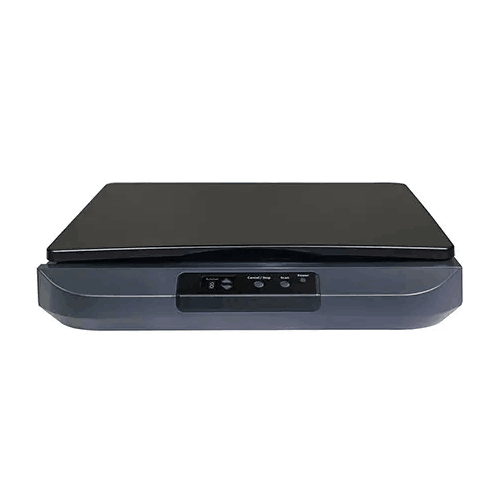
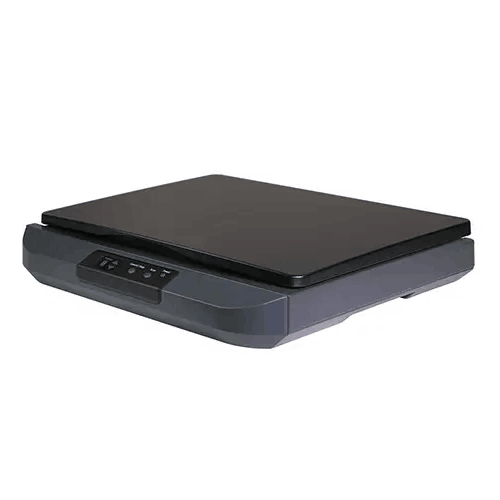
Avision FB5100 A3 Flatbed Scanner
Regular Price:৳0.00Availability: SKU: 7.29.199.9222
Quick Overview
-
Support
Saturday – Thursday: 09 AM - 06 PM. -
Payment
Cash on Delivery | Card | Online Payment -
Shipping Cost
Inside Dhaka 100tk | Outside Dhaka 150tk -
Warranty Policy
Read More
Description
Avision FB5100 A3 Flatbed Scanner Price in Bangladesh
The Avision FB5100 A3 Flatbed Scanner is positioned for exactly these situations: it’s an A3 flatbed scanner designed to digitize large originals with the control and safety that only a flatbed can provide. Unlike ADF-based scanners that are optimized for speed with standard paper, a flatbed focuses on accuracy, careful handling, and consistent results—even when the document is thick, delicate, stapled, or slightly damaged.
For Bangladesh organizations—whether in Dhaka, Chattogram, Khulna, or Sylhet—the value of an A3 flatbed is simple: it helps you capture large-format pages in one pass, preserve the original, and build a cleaner digital archive that supports everyday work and compliance needs.
Why A3 scanning matters in Bangladesh workflows
Many teams buy an A4 scanner first because it’s cheaper and “good enough.” Then the first oversized document arrives and the compromises begin: scan in sections, stitch images together, fold the document (ruining it), or photograph it (inconsistent and low quality). An A3 flatbed removes these compromises.
Typical Bangladesh use-cases where A3 is essential:
- Engineering drawings, layouts, and approval sheets
- School and college registers that exceed A4
- Oversized certificates, posters, and notices
- Legal-size and ledger-style documents
- Archive pages where folding is not acceptable
An A3 flatbed scanner becomes especially valuable when the document’s integrity matters—because you can scan without forcing the paper through rollers.
Flatbed scanning: control and care for sensitive originals
A flatbed scanner lets you place a document carefully, align it properly, and scan without mechanical feeding pressure. That’s ideal for:
- Stamped documents (common in Bangladesh)
- Papers with staples or minor tears
- Old documents with brittle pages
- Thick items or bound materials scanned page-by-page
- Documents that must remain flat and undistorted
This is why many admin and archival teams prefer flatbeds for critical originals—even if they use an ADF scanner for routine stacks.
What we will not guess (accuracy-first policy)
You provided only the product name (Avision FB5100 A3 Flatbed Scanner) without confirmed specifications such as resolution, scan area, interface, scan speed, sensor type, driver support, OS compatibility, dimensions, or bundled software. Because your rules require strict accuracy, this product page intentionally does not state any unconfirmed specs.
If you share the FB5100 specification sheet (even a short list like max resolution, interface, scan area, driver protocol), I can update this page with a fully spec-anchored long description, a stronger “Short Technical Specifications” section, and feature bullets that reference only confirmed facts.
Until then, the content focuses on what is confirmed: it is an Avision FB5100 A3 flatbed scanner designed for A3 flatbed scanning use-cases.
Bangladesh scenarios where the FB5100 can fit naturally
1) School and college administration
A3 flatbeds are ideal for scanning registers, attendance books, and large-format institutional documents that must be archived safely.
2) Engineering and construction offices
Teams can digitize site drawings, plans, and marked-up approvals. The ability to scan A3 in one pass improves speed and preserves detail.
3) Legal and compliance work
Large forms, attachments, and stamp-heavy paperwork can be scanned cleanly without folding—important for readability and integrity.
4) Print shops and design studios
Design teams can digitize artwork, posters, and layouts for rework, reproduction, or digital archiving.
5) Archive and digitization projects
A flatbed is often the preferred method for older paper due to gentle handling and alignment control.
How A3 scanning supports better record-keeping
In Bangladesh, many organizations still rely on paper storage, and retrieving old records can be slow. A structured digitization approach makes a huge difference:
- Faster retrieval during audits and compliance checks
- Easier sharing between head office and branches
- Better security through digital backups
- Reduced dependence on physical storage rooms
- Lower risk of losing critical pages
An A3 flatbed scanner supports this transition because it can handle both standard pages and oversized originals—allowing one scanner to cover more document types.
Best practices for using an A3 flatbed scanner (general, safe guidance)
- Assign a dedicated scanning station with enough desk space.
- Clean the glass regularly with a microfiber cloth to avoid dust lines.
- Use appropriate DPI settings: lower for fast archiving, higher for drawings and detailed stamps.
- Avoid folding originals; scan them flat whenever possible.
- Use consistent file naming (date + department + reference number) so your archive is actually searchable.
- If scanning for compliance, verify scans immediately to avoid missing pages.
Choosing the right A3 flatbed for your needs
Before you finalize purchase, it helps to check:
- Maximum scan area (true A3/ledger support)
- Optical resolution (for drawings and small text)
- Interface type (USB vs network)
- Software/driver support (TWAIN/WIA/ICA)
- Workflow needs (PDF, multi-page PDF, OCR support)
- Physical dimensions (desk space planning)
Once you share confirmed FB5100 specs, this page can include those details precisely.
For Bangladesh organizations that need to digitize A3 documents safely, the Avision FB5100 A3 Flatbed Scanner is a practical category choice—built for large originals, careful handling, and controlled scanning workflows that support reliable archives.
✅ Key Features
- A3 Flatbed Scanning Format: Supports scanning oversized originals in a single pass (A3 category).
- Flatbed Design for Safe Handling: Helps scan delicate, stamped, or sensitive documents with greater control than ADF feeding.
- Ideal for Mixed Document Types: Suitable for large registers, drawings, certificates, and office paperwork.
- Archive-Friendly Workflow Fit: Supports digitization projects where consistent, careful scanning is required.
- Better Alignment Control: Lets operators position documents precisely for cleaner results.
- Useful for Stamped and Signed Papers: Flatbed scanning preserves clarity on seals and signatures common in Bangladesh documentation.
- Practical for Education and Government-facing Work: Suitable for scanning larger official formats used in institutions.
- Supports Cleaner Digital Filing: Helps reduce paper clutter by converting documents into digital records (workflow dependent).
✅ Usage / Applications
- Scanning A3 registers and institutional records for schools, colleges, and offices.
- Digitizing engineering drawings and plans for construction and technical teams.
- Archiving legal and compliance documentation that should not be folded.
- Scanning posters, layouts, and artwork for print shops and design studios.
- Creating digital backups of sensitive originals for audit readiness and safe storage.
- Office document archiving where mixed page sizes are common.
- Library and archive projects for preserving large-format printed pages.
- Project documentation scanning for procurement and operational records.
✅ Benefits of This Product?
- Eliminates the need to stitch scans by capturing larger pages in one pass (A3 category).
- Protects original documents by avoiding roller feeding and reducing handling stress.
- Improves archive quality through controlled placement and scanning consistency.
- Supports faster retrieval of records after digitization, especially for audits and compliance.
- Reduces paper storage dependency by enabling structured digital filing.
- Handles real-world document conditions common in Bangladesh (stamps, folds, mixed sizes).
- Fits education and engineering workflows where oversized pages are routine.
- Makes digitization projects more achievable by covering both standard and large originals.
✅ Ideal For
The Avision FB5100 A3 Flatbed Scanner is ideal for Bangladesh organizations that regularly handle oversized documents and want a safer, more controlled way to digitize them. It fits school and college administrations that archive large registers and institutional records, engineering and construction offices that scan drawings and approvals, and legal/compliance teams that deal with large stamped paperwork that should not be folded. It’s also suitable for print shops and design studios that need to capture A3 artwork and layouts cleanly. If your workflow includes fragile originals, mixed page sizes, or documents that require careful placement and consistent results, an A3 flatbed scanner like the FB5100 is a practical foundation for building a long-term digital archive.
✅ Why Choose the Avision FB5100 A3 Flatbed Scanner?
The most important reason to choose an A3 flatbed scanner is control. In real Bangladesh offices, papers are not always “scanner-friendly.” They come stapled, stamped, slightly torn, or oversized. A flatbed approach minimizes risk because you’re not forcing documents through rollers. You place the page on the glass, align it properly, and scan with confidence—especially for important originals where damage or distortion is unacceptable.
The FB5100 is positioned for teams that want to build a dependable scanning workflow for A3 documents: registers, drawings, certificates, and official paperwork. It’s the right direction if you’re tired of scanning oversized pages in parts, manually stitching scans, or relying on mobile photos that vary in quality. An A3 flatbed scanner also supports better long-term record keeping, because it allows you to digitize a wider variety of document sizes with consistent process discipline.
To make your product listing even stronger and more accurate, share the confirmed FB5100 specifications (resolution, interface, max scan area, driver support). I will then refine the content so every feature statement is tied to verified specs while keeping the language fully unique and Bangladesh-optimized.
✅ Why Buy This Product from BME?
Buying an A3 flatbed scanner for Bangladesh use is easiest when the seller can help you match the scanner to your real workflow—education registers, engineering drawings, legal paperwork, or archive projects. Business Machine & Equipment (BME) can support you with purchase planning so you select the right A3 scanner category and build a smooth scanning routine around it.
For institutional and business buyers, BME can also support procurement processes such as providing a formal quotation and documentation for accounts, which is often required for schools, offices, and projects. If you share your usage scenario—how many pages you scan per day, what sizes you handle, and whether you need OCR or specific driver protocols—BME can guide you toward a setup that fits your environment and helps you avoid common mistakes like under-planning desk space or choosing the wrong type of scanner for fragile originals.
✅ Buying Guide
- Step 1: Confirm you truly need A3: If you scan registers, drawings, or oversized paperwork, A3 avoids scan stitching and preserves originals.
- Step 2: Identify document sensitivity: For fragile or important originals, flatbed scanning is safer than ADF feeding.
- Step 3: Check your workflow output needs: Decide whether you primarily need PDF, multi-page PDF, TIFF, or image files for archiving.
- Step 4: Plan desk space: A3 flatbeds need a dedicated surface with room to open the lid comfortably.
- Step 5: Consider scanning frequency: If you scan daily in high volume, plan staffing and file organization; flatbeds are controlled but more manual than ADF scanners.
- Step 6: Verify software compatibility: Confirm driver protocols and OS support for your PCs (Windows/macOS/Linux) once specs are available.
- Step 7: Decide resolution strategy: Use lower DPI for faster archiving; use higher DPI for drawings, small text, and stamp clarity.
- Step 8: Build a file naming system: Organize by date, department, and reference number to keep archives useful.
- Step 9: Maintain scan quality: Clean glass regularly and keep the scanning area dust-managed.
- Step 10: Avoid common mistakes: Don’t fold originals to fit A4 scanners, and don’t rely on mobile photos for official archiving when consistency matters.
✅ Customers Ask About / Frequently Asked Questions
-
Q: What type of scanner is the Avision FB5100?
A: It is an A3 flatbed scanner, designed for scanning large originals using a flatbed glass surface. -
Q: Is an A3 flatbed scanner necessary for schools in Bangladesh?
A: If you scan large registers or oversized records, A3 scanning can save time and improve archive quality by avoiding scan stitching. -
Q: Is the FB5100 suitable for engineering drawings?
A: An A3 flatbed scanner is a common choice for scanning drawings and plans because it captures large pages in one pass and preserves detail. -
Q: Can it scan delicate or old documents safely?
A: Flatbed scanners are generally safer for fragile originals because there is no roller feeding; you control placement and handling. -
Q: Does it support OCR?
A: OCR support depends on the bundled or chosen scanning software. OCR specifications were not provided, so they are not stated here. -
Q: What is the maximum resolution of the FB5100?
A: Resolution specifications were not provided, so this page does not list them to avoid inaccuracies. -
Q: How does it connect to a computer (USB or network)?
A: Connectivity specifications were not provided. Share the confirmed interface type to include it accurately. -
Q: Is it suitable for office document archiving?
A: Yes. A3 flatbed scanners are widely used for archiving when documents include mixed sizes and sensitive originals. -
Q: Can BME help me choose the right scanner for my workflow?
A: Yes. Share your document sizes, daily volume, and output needs (PDF/OCR), and BME can guide you to the right scanner category and setup plan. -
Q: Do I need a dedicated space for an A3 scanner?
A: Yes, it’s recommended. A3 flatbeds require a stable surface and space for lid movement to support comfortable daily use.
✅ Why Buy This Product
If your work in Bangladesh involves oversized documents—A3 registers, engineering drawings, legal forms, or large certificates—an A3 flatbed scanner is one of the most straightforward ways to digitize them properly. The Avision FB5100 A3 Flatbed Scanner is designed for controlled, careful scanning where you want to preserve the original and avoid the compromises of folding pages or stitching partial scans. For schools, engineering offices, legal teams, and archive projects, an A3 flatbed helps build a cleaner, more reliable digital record system and reduces dependence on physical storage over time.
What is the price of Avision FB5100 A3 Flatbed Scanner in Bangladesh?
Write a review
Question Answer
Have question about this product? Get specific details about this product from expert.

Canon CanoScan Lide 300 Flatbed Scanner


Avision FB5000 A3 Size Slim Flatbed Scanner



Avision FB5000 A3 Size Slim Flatbed Scanner





Avision AD5800 High-Valume A3 Document Scanner

AVISION MiWand 2 Wi-Fi Pro Portable Scanner


Avision AV332U Sheet-fed Document Scanner

Avision AD345GFWN Flatbed Color Document Scanner

Avision AD130 Flatbed Color Document Scanner


