

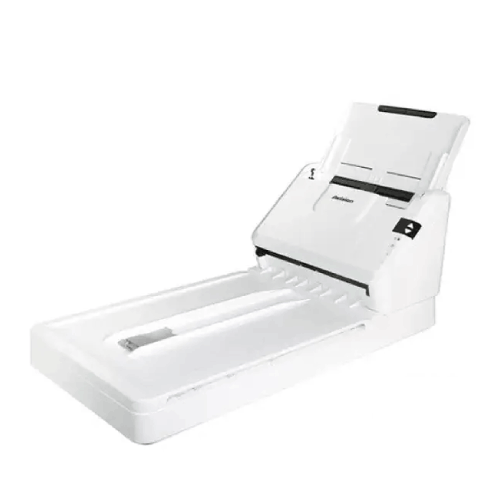
Avision AV332F Document Scanner
Regular Price:৳54,000.00Availability: SKU: 7.29.199.9672
Quick Overview
-
Support
Saturday – Thursday: 09 AM - 06 PM. -
Payment
Cash on Delivery | Card | Online Payment -
Shipping Cost
Inside Dhaka 100tk | Outside Dhaka 150tk -
Warranty Policy
Read More
Description
Avision AV332F Document Scanner in Banglades
The Avision AV332F Document Scanner is identified by the supplied product name as an Avision document scanner. No technical datasheet or detailed specifications were provided with the request, so this description does not assign a feeder type, scanning speed, resolution, duplex capability, interface, supported paper size, software or warranty to the model. Those details can be important when choosing a scanner, and should be confirmed for the exact AV332F before purchase.
This page therefore presents the AV332F by its confirmed identity and provides practical guidance for evaluating whether it fits a document-scanning workflow. A scanner should be selected according to the papers and volumes a user needs to handle, the computer or system it must connect to, and how scanned files will be used. Checking those requirements before ordering can help buyers compare models without relying on unconfirmed assumptions.
Begin with the documents you need to scan
Make a list of the materials the scanner will be expected to handle. An office may need to digitize everyday correspondence, internal forms or administrative records. A school or training organisation may handle printed handouts and paperwork, while a small business may need to keep digital copies of business documents. These are examples of potential scanning workflows, not a statement that the AV332F supports every document type or size.
Note whether the material is loose paper, bound pages, fragile originals or documents with unusual dimensions. The product name alone does not identify how the scanner accepts originals, so check the AV332F’s documented paper-handling method before deciding it suits your needs. If your documents include small slips, long pages or delicate originals, ask specifically whether those items are supported and how they should be placed.
Plan for the daily workload
Estimate how many pages you expect to scan in an ordinary day and during your busiest periods. The required capacity can differ significantly between occasional home or desk use and regular office scanning. The AV332F’s scan speed and recommended daily workload were not supplied, so confirm both if your scanning is time-sensitive or routine.
Do not choose a scanner based only on a headline speed if one is later provided. Check what that speed measures, including page size, colour mode, resolution and whether the figure refers to one-sided or two-sided scanning. Actual workflow time can also include preparing originals, reviewing images, naming files and saving them in the right location. A realistic estimate of this full process can help you decide what performance level the AV332F needs to provide.
Confirm how documents are fed
A scanner can handle originals in different ways, and the supplied product name does not establish which mechanism the AV332F uses. Before buying, confirm whether it has an automatic document feeder, a flatbed surface or another arrangement. Do not infer a flatbed or feeder feature from the letters in the model number.
The right mechanism depends on the material and work pattern. A feeder may be relevant when processing multiple loose pages, while a flatbed can be useful for certain items that should not be fed through rollers. These are general selection considerations, not confirmed features of the AV332F. If your work includes mixed document types, ask how each kind should be scanned and whether any accessory or extra handling step is required.
Check the stated scan speed and workload limits
Scan speed can affect how efficiently a scanner fits into a busy workflow. No speed figure was supplied for the AV332F. If the manufacturer or seller provides one, check whether it is quoted in pages per minute, images per minute or another measure, and whether the stated rate applies to colour, grayscale or monochrome scanning.
Ask whether a recommended daily duty cycle is specified and how that figure is defined. A maximum or recommended workload can help buyers judge whether a scanner is suitable for occasional use or regular processing. Do not assume that a device can sustain a particular volume just because a speed figure appears in another listing. Confirm that any performance information applies to the exact AV332F model and the conditions in which you intend to use it.
Understand resolution and image output
The AV332F’s optical resolution and available scan settings were not included in the information supplied. Confirm the actual optical resolution before purchase if image detail is important. If a listing gives both optical and interpolated resolution, distinguish between them rather than comparing the largest number alone.
Consider what the scanned files will be used for. A searchable archive, a readable copy of a form and a detailed image for close inspection can have different requirements. Resolution, colour settings, file format and software all influence the result. Ask which image settings and output formats are available on the AV332F, and whether any required software is supplied or obtained separately. Do not assume a particular image quality or scanning mode from the product name alone.
Consider colour and document legibility
Different workflows may require black-and-white, grayscale or colour scans. The available specifications do not state which colour modes the AV332F supports. Confirm the supported modes and any relevant settings if colour information, stamps, annotations or photographs are part of your records.
Legibility can depend on more than the scanner’s resolution. Original paper condition, print quality, colour settings, document alignment and the software used to save the image can all affect the result. If the scanner will be used for documents that must be reviewed or archived, test sample pages from your own workflow when possible. This can show whether the output is clear enough for the intended purpose without presuming that the AV332F includes a specific enhancement or image-processing feature.
Check page sizes and paper handling
No supported paper dimensions, paper-weight range or media-handling details were supplied. Confirm the minimum and maximum sizes the AV332F can scan, as well as any restrictions on paper thickness or document length. This is especially useful if your materials include forms, receipts, long pages, cards or mixed-size paperwork.
Ask how originals should be prepared and whether particular materials need to be scanned individually. The product name does not confirm a special-purpose document path or support for non-standard media. If your business relies on scanning a specific form or document type, verify that exact requirement before ordering. Checking this early can help avoid choosing a scanner that does not match the papers your organisation handles most often.
Verify one-sided and two-sided scanning requirements
The supplied information does not say whether the AV332F supports duplex scanning, meaning scanning both sides of a page. If your documents commonly have information on both sides, ask whether the model can capture both sides and whether that process is automatic or requires the page to be turned and scanned again.
This can affect both convenience and total processing time, but no duplex capability should be assumed from the model name. If a seller listing mentions duplex scanning, check that the claim applies to the AV332F variant being offered. Also confirm any limits on page size or scan mode when using that function. Accurate information about sidedness helps buyers estimate how the scanner would fit into everyday work.
Check software, OCR and file formats
No software, operating-system support, optical character recognition (OCR) capability or output file formats were provided. If you need searchable documents, ask whether the AV332F includes OCR software or supports use with compatible third-party applications. Do not assume that a scanner includes OCR simply because digitized documents can later be processed by software.
Confirm which file formats are supported by the scanner or its software and whether they suit your archiving and sharing needs. If an organisation uses a particular document-management system, check compatibility before purchase. Also ask which operating systems and driver versions are supported, and whether software is included in the package or must be downloaded separately. These details can affect how quickly the AV332F can be put into service in an existing office.
Confirm connectivity and computer compatibility
The AV332F’s connection types were not supplied. Check the official documentation for the available interface, cable requirements and any network functions before planning where the scanner will be used. Do not assume USB, Ethernet, Wi-Fi or mobile-device support unless confirmed for the exact model.
Also check computer compatibility. Verify the supported operating systems, driver availability and any software requirements for each computer that will use the scanner. In a shared office, consider whether the device is intended for one workstation or can be used by multiple users through the documented connection method. Confirm any setup requirements with the seller or manufacturer so you can plan the necessary cables and equipment before installation.
Plan file destinations and recordkeeping
A scanning workflow continues after the image is captured. Decide where the files will be saved, how they will be named and who will be allowed to access them. These decisions matter for an office, school or business that needs to retrieve digital records later. The information supplied does not describe any AV332F destination, network, cloud or document-management functions, so verify these separately if they are required.
A consistent file-naming method can make everyday records easier to locate. Consider whether files should be organised by date, department, customer or document type, and which people are responsible for checking and storing them. These are workflow-planning steps, not scanner features. Clarifying the process can help you choose software and hardware that fit together rather than selecting a scanner in isolation.
Potential workplace and organisational uses
The Avision AV332F may be considered for a business or organisation looking for a document scanner. Possible settings to assess include an administrative office, a small business, a school or a service desk where staff want to digitize paper information. The documents and volume involved will determine whether the exact model is suitable.
Before using a scanner for sensitive or confidential records, establish how the files will be stored, who can access them and how long they should be retained. The supplied product information does not make claims about security, encryption, regulatory compliance or cloud storage. Check the scanner’s documented functions and the organisation’s own data-handling requirements before choosing a system for private or regulated records.
Installation and first-use checks
Before connecting the AV332F, confirm the required cables, power arrangements, drivers and software from its product documentation. None of those details were included with the supplied product name. Prepare the computer and any required software before setting up the scanner, especially if it will be used on a managed office device with restricted installation permissions.
For initial testing, use several representative pages from your normal workflow. Check alignment, readability, colour, file creation and where the files are saved. If your work depends on a particular document size, sidedness or format, include that in the test. A small compatibility check can help identify setup requirements before the scanner is introduced into daily use. Follow the manufacturer’s instructions for loading, cleaning and handling originals.
Routine maintenance and ongoing use
Scanner maintenance depends on the model’s design and instructions. The supplied information does not state the AV332F’s cleaning procedure, consumable parts or maintenance interval. Follow the official guidance for its sensor, glass, feed mechanism or other components rather than using a generic method that might not suit the device.
Keep the product documentation and any relevant software information available for the people who use the scanner. If multiple users share it, establish a consistent way to prepare originals and report scanning issues. Ask about service requirements and warranty coverage before purchase if support arrangements are important to your organisation. No maintenance or warranty terms should be assumed from the brand or model name alone.
Compare the AV332F against your requirements
When comparing document scanners, use the same requirements for every model. Write down the document sizes you handle, approximate daily volume, colour needs, whether two-sided scanning is required, and which computers or systems will connect to the device. Then compare the confirmed specifications and software details of each model.
For the AV332F, no speed, resolution, feeder, duplex, connectivity, software or duty-cycle figures were supplied here. Request those details before comparing it against products with complete specifications. This approach helps avoid decisions based on a model name or an unverified retailer description. If a particular feature is essential, get confirmation in writing from the product documentation or seller before committing to a purchase.
A practical next step
The confirmed information identifies the Avision AV332F as a document scanner. To decide whether it fits your workflow, confirm its supported media, scan performance, resolution, feed design, duplex capability, connections, software and local purchase terms. A clear match between those details and your daily task is more useful than assuming capabilities that were not provided.
Contact BME to check the current listing and ask for the exact specifications of the AV332F being offered. If the scanner will be used with a particular operating system, application or document type, include that information in your enquiry. Once the relevant details are confirmed, you can compare the model against your needs and make a more informed choice.
✅ Key Features
Accuracy note: Only the brand, model and product category are confirmed from the supplied title. The first three points below are product facts; the remaining points are checks to make before buying, not claims about the scanner’s capabilities.
- Brand: The supplied product name identifies the scanner as an Avision product.
- Model: The model designation provided is AV332F.
- Product category: The supplied name identifies it as a document scanner.
- Scanning mechanism to confirm: Check whether the exact unit uses a feeder, a flatbed or another arrangement.
- Performance to confirm: Request the scan speed and recommended workload for the AV332F.
- Image output to confirm: Check optical resolution, colour modes and supported file formats.
- Handling to confirm: Verify supported paper sizes, duplex capability and any media restrictions.
- Compatibility to confirm: Check interfaces, drivers, software and supported operating systems.
✅ Usage / Applications
The following are potential document-scanning workflows, not confirmation that the AV332F supports every document size or handling requirement.
- Office records: Consider it for digitizing everyday paperwork if its supported media and workflow meet your needs.
- Administrative documents: Evaluate it for forms and correspondence after checking the required scan settings.
- Business paperwork: Check whether it suits the document types and daily volume your business handles.
- Invoices and receipts: Confirm supported sizes and paper handling before using it for these materials.
- Education records: Consider it for school or training paperwork after checking software and file requirements.
- Service-desk paperwork: Assess whether its confirmed speed and connections match the intended workflow.
- Home document organisation: Verify that its software and computer compatibility suit the way you plan to store files.
- Digital archiving: Check available file formats and any required OCR software before building an archive workflow.
✅ Benefits of This Product?
These are potential benefits of using a suitable document scanner. Whether the AV332F provides them in your intended workflow depends on its confirmed specifications and compatibility.
- Paper-to-digital workflow: A document scanner can help convert paper documents into digital files when the model supports the required format and process.
- Easier file organisation: Digital documents may be easier to sort and store when used with an appropriate software workflow.
- Potentially simpler retrieval: A well-organised digital archive can help users find records without searching through paper files.
- Workflow planning: Checking the AV332F against your documents and workload can help establish whether it is a suitable choice.
- Computer compatibility check: Confirming drivers and operating-system support can help avoid setup problems.
- More informed comparison: Verifying features lets you compare the model fairly with other scanners.
- Reduced uncertainty before ordering: Confirming paper handling, speed and software helps clarify whether the scanner fits your needs.
✅ Ideal For
The Avision AV332F is ideal for buyers evaluating a document scanner for an office, business, school or home workflow. The supplied product name confirms its brand, model and category, but does not provide the technical information needed to determine which documents it can handle or how quickly it scans. Its suitability will depend on the exact paper sizes, daily volume, image quality and file workflow required.
Before choosing it, confirm whether the AV332F has a feeder or flatbed, whether it scans both sides, what resolution and speed it supports, and which software and connections are available. Check compatibility with your computers and the files or applications you use. If the scanner will handle sensitive records, plan file access and storage separately; no security or compliance feature was supplied. Buyers should also confirm package contents and warranty terms for the product offered in Bangladesh.
✅ Why Choose the Avision AV332F Document Scanner?
The AV332F is worth considering if you are looking for an Avision product identified as a document scanner. For buyers starting to compare scanning equipment, an exact model name gives a clear point of reference for checking the official product information, retailer listing and compatibility with an intended workflow.
The specifications provided so far are limited to the brand, model and product category. That means the AV332F should not be selected on the assumption that it has a particular feed mechanism, duplex scanning, scan speed, resolution, daily duty cycle, interface or software package. Those features can strongly affect how well a scanner fits an office, school, small business or home setup. Confirm them for the exact model before comparing it with alternatives.
A thoughtful evaluation starts with the documents you need to scan and the destination for the resulting files. Check supported paper sizes, colour modes, output formats, drivers and the computers or systems you plan to use. If two-sided scanning or a specific daily volume matters, ask for those details directly.
Choose the Avision AV332F when its confirmed specifications match your requirements. The model name alone is not enough to establish suitability, but verifying the details can help you make a considered purchase rather than relying on assumptions.
✅ Why Buy This Product from BME?
For buyers in Bangladesh, check BME’s product listing or contact BME to confirm details about the Avision AV332F Document Scanner. Since only the product name was provided for this draft, it is important to verify the exact specifications of the unit being offered before ordering.
Ask BME for the manufacturer’s specifications or product documentation. In particular, confirm the scan mechanism, speed, optical resolution, duplex capability, supported paper sizes, connectivity, software and operating-system compatibility. If the scanner needs to work with a particular computer or document-management application, describe that setup so the relevant details can be checked.
Also confirm the package contents, any required cables or software, and the warranty terms that apply in Bangladesh. The supplied information does not establish availability, included accessories or warranty coverage. Checking these points with BME helps you make an informed purchase based on the exact AV332F product and your intended workflow, without relying on features that have not been confirmed.
✅ Buying Guide
- Define the workload: Estimate the number of pages you scan on a typical and busy day.
- List the documents: Note page sizes, paper types and whether originals are fragile, bound or unusual.
- Confirm the mechanism: Ask whether the AV332F is feeder-based, flatbed or another design.
- Check speed and duty cycle: Request the model’s documented scan speed and recommended workload.
- Verify resolution and colour modes: Confirm optical resolution and whether colour, grayscale and monochrome scanning are supported.
- Check duplex needs: Ask whether both sides of a page can be scanned and how that function works.
- Match software and file output: Confirm drivers, OCR availability, output formats and operating-system compatibility.
- Plan connections: Verify the exact interface and any cable or network requirements.
- Check package and warranty: Confirm what is included and which warranty terms apply to the unit in Bangladesh.
- Avoid common assumptions: Do not infer a flatbed, ADF, duplex scanning, speed, resolution or software from the model name.
✅ Customers Ask About / Frequently Asked Questions
- Q: What is the Avision AV332F price in Bangladesh? A: No price was supplied. Check BME’s listing or contact BME for current pricing.
- Q: Is the AV332F a document scanner? A: Yes. The supplied product name identifies it as an Avision document scanner.
- Q: What is its scan speed? A: A speed figure was not supplied. Confirm the exact specification with BME or the product documentation.
- Q: Does the AV332F support duplex scanning? A: Duplex capability was not specified. Check before purchase if you need to scan both sides of pages.
- Q: Does it have an automatic document feeder or flatbed? A: The supplied information does not identify its scanning mechanism. Confirm whether it has a feeder, a flatbed or another design.
- Q: What is its optical resolution? A: No resolution figure was supplied. Ask for the manufacturer’s specification.
- Q: Which paper sizes can it scan? A: Supported sizes and paper-handling limits were not provided. Confirm the exact range for your documents.
- Q: What software and operating systems does it support? A: No software or operating-system information was supplied. Verify compatibility with your computer before buying.
- Q: What is included in the box? A: Package contents were not provided. Ask BME to confirm the supplied accessories and software.
- Q: What warranty applies in Bangladesh? A: No warranty term was supplied. Confirm the applicable local terms with BME.
✅ Why Buy This Product
Consider the Avision AV332F if you are looking for a document scanner and want to assess this specific Avision model for your workflow. The model and product category are confirmed by the supplied name; detailed performance and compatibility information still needs to be checked.
Before purchasing, verify the scanning mechanism, speed, resolution, duplex capability, supported documents, software and connection options. These details determine whether a scanner can handle your paperwork and work with your computer or office process. Confirm package contents and warranty terms as well. For current product information and to check whether the AV332F fits your needs, contact BME before ordering.
What is the price of Avision AV332F Document Scanner in Bangladesh?
Write a review
Question Answer
Have question about this product? Get specific details about this product from expert.

Avision AD130 Flatbed Color Document Scanner


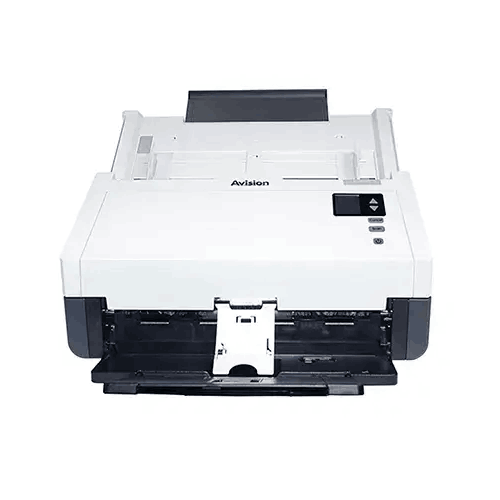

Avision AV332F Document Scanner
Avision AV332F Document Scanner
Avision AD136 Document Scanner

Avision FB5000 A3 Size Slim Flatbed Scanner
Avision AD136 Document Scanner
Avision AD136WN Document Scanner
Avision AV332F Document Scanner





Avision AD5800 High-Valume A3 Document Scanner

AVISION MiWand 2 Wi-Fi Pro Portable Scanner


