

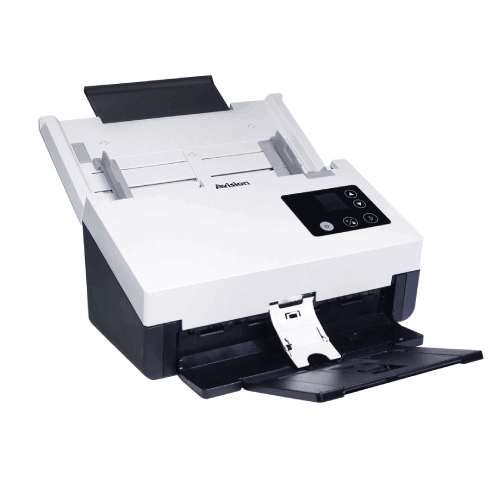
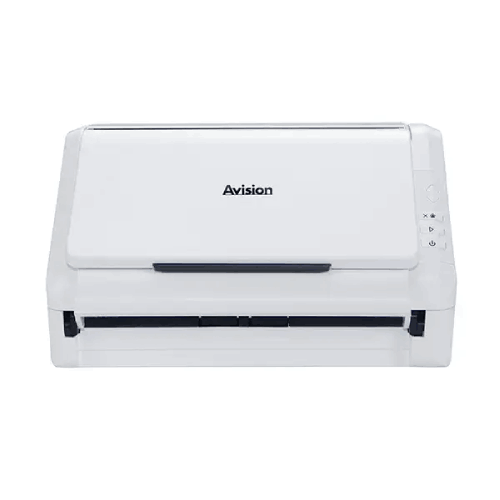
Avision AD345FWN Document Scanner
Regular Price:৳0.00Availability: SKU: 7.29.199.9225
Quick Overview
-
Support
Saturday – Thursday: 09 AM - 06 PM. -
Payment
Cash on Delivery | Card | Online Payment -
Shipping Cost
Inside Dhaka 100tk | Outside Dhaka 150tk -
Warranty Policy
Read More
Description
Avision AD345FWN Document Scanner Price in Bangladesh
The Avision AD345FWN Document Scanner is designed for that balanced reality. It combines flatbed and ADF document feeding modes, meaning you can choose the right method based on the paper in front of you. For routine paperwork, the 100-sheet ADF supports efficient batch capture. For sensitive or awkward originals, the flatbed gives you more control and safer handling. Add a high 1200 dpi optical resolution and a fast modern interface like USB 3.1 Gen 1, and the AD345FWN becomes a practical scanner for offices in Dhaka, Chattogram, and across Bangladesh that want both speed and flexibility in one station.
This is the kind of scanner that fits departments where scanning is part of operational discipline: accounts, HR, legal/admin, procurement, and any organization building digital archives for faster retrieval and compliance.
Why flatbed + ADF is a big advantage in Bangladesh offices
Many offices start with an ADF scanner, because it’s faster for stacks. But Bangladesh paperwork often includes:
- Stamped papers with uneven thickness
- Fragile originals that can tear in rollers
- Photocopies that are curled or wrinkled
- Documents with staples or sensitive attachments
- Small single-page items that need careful alignment
With a hybrid scanner, you don’t have to compromise. You can scan a batch through the ADF, then scan a fragile certificate on the flatbed, all in the same workflow. That reduces downtime, reduces staff frustration, and improves the overall quality of your archive.
100-sheet ADF capacity: built for real batch scanning
The AD345FWN includes an ADF capacity of 100 sheets. That’s a strong practical advantage for Bangladesh organizations that scan daily in bursts—month-end invoice scanning, audit preparation, admissions processing, or customer onboarding documentation.
A 100-sheet ADF helps by:
- Reducing the number of times staff reload the feeder
- Keeping multi-document batches together (fewer mix-ups)
- Speeding up scanning routines during busy periods
- Supporting more consistent “scan-and-file” discipline
In a typical Dhaka office, the difference between a small ADF and a 100-sheet ADF is felt immediately. It turns scanning from an interruption into a manageable routine.
Optical resolution 1200 dpi: clarity for archives, stamps, and fine text
The scanner’s optical resolution is listed as 1200 dpi. For everyday office scanning, many users choose 200–300 dpi for speed and file size control. But having 1200 dpi optical capability is important when you need high detail.
In Bangladesh, high-detail scanning is useful for:
- Stamps, seals, and signatures on official papers
- Small printed text on forms and legal documents
- Faint printing from older photocopies
- Documents that may need to be enlarged or reprinted later
- Verification tasks where clarity avoids disputes
Optical resolution is especially valuable because it reflects real sensor capture capability—meaning the scanner can preserve more detail at the source.
CIS technology: consistent capture in a modern scanner design
The AD345FWN uses Contact Image Sensor (CIS) technology. CIS-based scanners are commonly used for document scanning because they provide sharp capture in a compact design. Paired with a high optical resolution rating, CIS can produce clean, consistent document output—ideal for text-heavy paperwork and structured archives.
USB 3.1 Gen 1 interface: smoother high-volume workflow
Interface is specified as USB 3.1 Gen 1. For busy scanning sessions, a faster interface helps avoid transfer bottlenecks—particularly when scanning at higher resolution or capturing many pages in a single session.
In Bangladesh offices, where scanners are often shared and scanning happens in bursts, this matters. The device can complete jobs more smoothly and keep staff moving, rather than waiting for files to transfer.
How the AD345FWN fits Bangladesh workflows (real scenarios)
Scenario 1: Accounts and VAT file digitization
An accounts team scans invoices, purchase records, and VAT documents. The 100-sheet ADF supports batch scanning, while the flatbed covers odd items like stapled papers or delicate originals.
Scenario 2: HR onboarding and employee records
HR receives multi-page forms plus sensitive originals. Batch scan routine pages through ADF; scan certificates on flatbed for safer handling.
Scenario 3: Front-desk and admin office scanning
Admin staff often scan mixed materials: letters, signed approvals, ID copies (paper), and attachments. Having both flatbed and ADF makes the workstation more versatile.
Scenario 4: Legal and procurement documentation
Tender documents, agreements, and compliance paperwork often come with mixed page quality. Hybrid scanning reduces the “this page can’t go through” problem.
Why hybrid scanning can reduce total cost and complexity
Many organizations in Bangladesh end up buying two devices: a flatbed for delicate documents and an ADF for daily stacks. That increases:
- Desk space needs
- Maintenance complexity
- Training time for staff
- Inconsistent scanning workflows
A combined flatbed + ADF scanner reduces those operational costs. It also keeps scanning consistent: one device, one workflow, one station.
Care and handling tips for best results (general and safe)
- Prepare batches before scanning: remove staples and align pages.
- Use the flatbed for delicate originals rather than forcing them into the ADF.
- Clean the flatbed glass periodically to avoid dust spots.
- Use practical DPI settings: lower DPI for routine filing, higher DPI for stamps and detailed originals.
- Organize output with a consistent naming structure (date + department + reference number).
- Verify important batches immediately before disposing or filing originals.
What this page does not claim (accuracy-first)
You did not provide scanning speed (ppm/ipm), duplex capability, supported paper sizes/weights, daily duty cycle, file formats, bundled software, driver protocol (TWAIN/WIA/ISIS), network/Wi‑Fi features (despite “FWN” in the model), OS support, power details, dimensions, or weight. To follow your accuracy rule, these specifications are omitted.
If you share the AD345FWN datasheet or your confirmed spec sheet, I can enhance the page with those exact, verified details and a richer technical summary.
With the information you provided, the Avision AD345FWN Document Scanner is best understood as a flexible office scanner built around three clear strengths: hybrid flatbed + ADF scanning, high-capacity 100-sheet ADF for batch work, and high-detail 1200 dpi optical resolution, connected through a modern USB 3.1 Gen 1 interface—an excellent combination for Bangladesh offices that handle mixed document types every day.
✅ Key Features
- Hybrid Scanning (Flatbed + ADF): Lets you batch-scan standard paperwork and safely scan delicate originals on the flatbed.
- 100-Sheet ADF Capacity: Reduces reload frequency and supports faster batch processing for busy offices.
- 1200 dpi Optical Resolution: Captures fine details for clearer archives, stamps, and small text.
- CIS (Contact Image Sensor) Technology: Supports consistent capture quality in a modern document-scanning design.
- USB 3.1 Gen 1 Interface: Helps keep scanning and file transfer smooth during larger scanning sessions.
- Better Fit for Mixed Paperwork: Handles real Bangladesh workflows where documents vary in condition and format.
- Cleaner Scanning Station Setup: Combines two scanning approaches in one device, reducing equipment clutter.
- Practical for Compliance and Archiving: Supports more careful handling of official documents that require clarity and preservation.
✅ Usage / Applications
- Accounts and finance document archiving for invoices, statements, and VAT paperwork.
- HR file digitization for employee forms and supporting documentation.
- Procurement and tender documentation scanning for safer, searchable archives (OCR dependent on software).
- Legal/admin paperwork capture involving stamps, signatures, and sensitive pages.
- Education administration scanning for admissions files and office records.
- Small business document backup workflows to reduce paper clutter and improve retrieval speed.
- Front desk document capture where mixed paper quality requires both ADF and flatbed flexibility.
- Mixed-batch scanning routines combining standard paper stacks and delicate originals in one workflow.
✅ Benefits of This Product?
- More flexible than ADF-only scanners because you can choose flatbed scanning when originals need careful handling.
- Faster batch work with a high-capacity 100-sheet ADF that reduces interruptions.
- Cleaner, clearer archives thanks to 1200 dpi optical resolution for detailed capture.
- Lower workflow friction because staff don’t have to switch between different scanners for different paper types.
- More professional record-keeping by supporting consistent scanning routines for daily operations.
- Better readiness for audits and compliance through faster digitization and improved document preservation.
- Saves space and reduces device clutter by combining flatbed and ADF in one scanning station.
- Improves turnaround time for departments that need quick digitization and sharing.
✅ Ideal For
The Avision AD345FWN Document Scanner is ideal for Bangladesh offices that scan every day and deal with a mix of document types—some suitable for fast batch scanning, others requiring careful flatbed handling. It’s a strong fit for accounts teams digitizing invoices and statements, HR departments building employee files that include certificates, and admin/procurement teams scanning tender and approval documents with stamps and signatures. The 100-sheet ADF makes it practical for departments that scan in bursts during busy hours, while the flatbed option supports delicate originals that shouldn’t be forced through rollers. If your office in Dhaka or Chattogram wants one scanner that can cover both routine batch scanning and careful single-item scanning, the AD345FWN fits that hybrid requirement well.
✅ Why Choose the Avision AD345FWN Document Scanner?
The AD345FWN is a practical choice because it addresses the most common scanning challenge in Bangladesh workplaces: mixed paperwork. ADF scanners are excellent for speed, but they can’t handle every document safely. Flatbeds are safe, but they can slow down batch work. By offering both flatbed and ADF feeding modes, the AD345FWN lets your team scan the right way for each document instead of forcing a compromise.
Its 100-sheet ADF is a real productivity advantage for departments that scan frequently—accounts, HR, administration—because it reduces reloading and keeps batches organized. Meanwhile, the 1200 dpi optical resolution supports clean, detailed scans that preserve stamp clarity, fine text, and important document details that might matter later during audits or dispute resolution. CIS technology and a modern USB 3.1 Gen 1 interface round out the setup, helping ensure consistent capture and smoother file handling.
For organizations that want to build a reliable scan-and-file routine—without buying separate flatbed and ADF scanners—the AD345FWN offers a sensible, scalable solution.
✅ Why Buy This Product from BME?
A hybrid scanner like the Avision AD345FWN becomes most valuable when it’s matched to the right workflow—how your team scans, where files are stored, and what kinds of documents you handle daily. Business Machine & Equipment (BME) can help Bangladesh buyers choose and deploy the AD345FWN with practical clarity, whether you’re buying for a small office, an institutional department, or a project-based digitization workflow.
BME can support procurement steps such as quotation and documentation suitable for accounts—important for office purchasing in Bangladesh. If you share your document types and scanning routine (batch invoices, HR files, tender documents), BME can also guide you on setting up a smoother scanning station: deciding when to use flatbed vs ADF, establishing folder structures, and choosing practical scan resolution settings so file sizes stay manageable.
This kind of practical guidance reduces trial-and-error and helps ensure your AD345FWN becomes a consistent productivity tool from the first week—not a device that sits unused because the workflow wasn’t planned.
✅ Buying Guide
- Step 1: Confirm you need both flatbed and ADF: If you scan stacks plus delicate originals, a hybrid scanner avoids compromise and saves time.
- Step 2: Check ADF capacity vs your batch size: A 100-sheet ADF is ideal if you often scan large stacks in one go.
- Step 3: Plan your resolution strategy: Use lower DPI for routine filing; use higher DPI when stamps, fine text, or detailed originals matter.
- Step 4: Set up a dedicated scanning station: Ensure the scanner is placed where documents arrive, with enough space for handling batches.
- Step 5: Build a file naming system: Date + department + reference number keeps archives searchable and audit-friendly.
- Step 6: Decide storage workflow: Local folder, shared network folder, or upload process—define it before scanning begins.
- Step 7: Prepare documents properly: Remove staples, flatten curled pages, and separate fragile items for flatbed scanning.
- Step 8: Standardize scan profiles: Create consistent settings for accounts vs HR vs admin to keep output uniform.
- Step 9: Verify critical scans immediately: Ensure important pages are captured before filing away originals.
- Step 10: Avoid common mistakes: Don’t force delicate originals through the ADF; don’t scan everything at maximum DPI unnecessarily.
✅ Customers Ask About / Frequently Asked Questions
-
Q: What type of scanner is the Avision AD345FWN?
A: It is a document scanner that supports both flatbed and ADF document feeding modes. -
Q: How many sheets can the ADF hold?
A: The ADF capacity is 100 sheets. -
Q: What is the optical resolution?
A: Optical resolution is listed as 1200 dpi. -
Q: What sensor technology does it use?
A: It uses CIS (Contact Image Sensor) technology. -
Q: How does it connect to a computer?
A: It connects via USB 3.1 Gen 1. -
Q: Does it support duplex scanning?
A: Duplex capability was not provided in your specifications, so it is not stated here. -
Q: Does it have Wi‑Fi or Ethernet networking?
A: Network/Wi‑Fi specifications were not provided, so this page does not claim network connectivity. -
Q: What paper sizes does it support in the ADF?
A: Supported scan sizes were not provided, so they are omitted for accuracy. -
Q: Is it suitable for scanning stamped official documents in Bangladesh?
A: Yes. The flatbed option is particularly useful for stamped or delicate documents because it allows careful handling. -
Q: Is it good for accounts and HR scanning?
A: Yes. A 100-sheet ADF supports batch scanning for routine office paperwork, while the flatbed supports sensitive originals. -
Q: Can BME help me choose the right scanning setup?
A: Yes. Share your daily scan volume and document types, and BME can guide you toward an efficient workflow.
✅ Why Buy This Product
For Bangladesh offices, the most frustrating scanning problem is inconsistency: some documents scan easily, while others jam, crumple, or require slow manual handling. The Avision AD345FWN Document Scanner solves this by combining flatbed and ADF scanning in one device—so you can batch-scan routine paperwork through the 100-sheet ADF and switch to flatbed scanning for sensitive or awkward originals. With 1200 dpi optical resolution and CIS technology, it’s built to produce clear, detailed archives, while USB 3.1 Gen 1 connectivity supports smoother file transfer during busy scanning sessions.
What is the price of Avision AD345FWN Document Scanner in Bangladesh?
Write a review
Question Answer
Have question about this product? Get specific details about this product from expert.

Canon CanoScan Lide 300 Flatbed Scanner


Avision FB5000 A3 Size Slim Flatbed Scanner



Avision FB5000 A3 Size Slim Flatbed Scanner





Avision AD5800 High-Valume A3 Document Scanner

AVISION MiWand 2 Wi-Fi Pro Portable Scanner


Avision AV332U Sheet-fed Document Scanner

Avision AD345GFWN Flatbed Color Document Scanner

Avision AD130 Flatbed Color Document Scanner


