

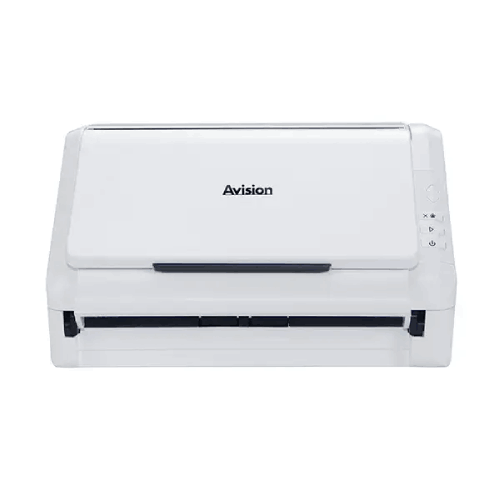
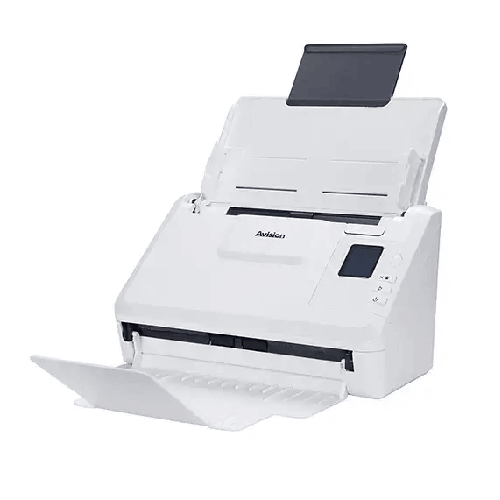
Avision AD340GWN Duplex Scanner
Regular Price:৳0.00Availability: SKU: 7.29.199.9218
Quick Overview
-
Support
Saturday – Thursday: 09 AM - 06 PM. -
Payment
Cash on Delivery | Card | Online Payment -
Shipping Cost
Inside Dhaka 100tk | Outside Dhaka 150tk -
Warranty Policy
Read More
Description
Avision AD340GWN Duplex Scanner Price in Bangladesh
The Avision AD340GWN Duplex Scanner is built for that kind of modern, busy workflow. It combines a strong ADF-based duplex scanning engine with connectivity options that matter in real workplaces: Wi‑Fi and RJ‑45 Gigabit Ethernet, plus USB 3.2 for direct PC scanning. For Bangladesh SMEs, branches, schools, and departments that want a practical scanner that can sit on a shared desk yet still be reachable over the network, the AD340GWN brings a balanced package: productivity speed, paper handling flexibility, and broad software/OS compatibility.
This is not the biggest scanner in the lineup—and that’s part of the appeal. It’s designed to deliver production-style benefits without demanding a huge footprint or high power draw. When you want a scanner that feels like an everyday tool, not an occasional machine, the AD340GWN fits that role.
Duplex ADF scanning: the fastest way to digitize routine paperwork
ADF scanning is about momentum. You load pages, press scan, and the scanner does the repetitive work of feeding and capturing. Duplex scanning takes it further by capturing both sides in one pass—an immediate time saver for double-sided forms common in Bangladesh offices.
The AD340GWN scanning speed is specified as:
- B/W @ 200 dpi, A4: Simplex 40 ppm; Duplex 80 ipm
- B/W @ 300 dpi, A4: Simplex 40 ppm; Duplex 80 ipm
- Color @ 200 dpi, A4: Simplex 40 ppm; Duplex 80 ipm
These speeds are a strong productivity fit for everyday department scanning: fast enough to clear stacks quickly, and consistent across common resolutions.
Recommended daily volume: sized for real work, not occasional use
The AD340GWN lists:
- Recommended Daily Volume: Up to 8,000 pages
This is a key buying point for Bangladesh organizations. Many scanners look fine for occasional tasks but struggle when scanning becomes a daily routine. A recommended daily volume of up to 8,000 pages signals that the AD340GWN is meant for frequent, repeatable scanning loads—accounts departments, admissions desks, service counters, and branch offices.
Wi‑Fi and Ethernet: network-friendly scanning for shared teams
One of the most practical benefits of this model is connectivity:
- Network connection: RJ‑45 Ethernet 10/100/1000 Mb
- Wi‑Fi standard: IEEE 802.1b/g/n
- Interface: USB 3.2 Gen1x1
In Bangladesh offices, scanners are often shared. A network-capable scanner can be placed where documents arrive—reception, admin desk, records room—while scanning output is accessed by teams. Ethernet provides stability (especially in offices with many users), while Wi‑Fi offers flexibility when wired cabling is difficult.
USB 3.2 remains valuable for a direct connection to a PC when you want maximum simplicity or when a department prefers a dedicated scanning workstation.
Optical and output resolution: clarity with flexibility
The AD340GWN provides:
- Optical Resolution: 600 × 600 dpi
- Output Resolution: 1200 × 1200 dpi
For typical document digitization, 200–300 dpi is often enough. But an optical resolution of 600 dpi provides clarity for small print, fine lines, and documents that have been photocopied repeatedly—a common case in Bangladesh record keeping. Output resolution up to 1200 dpi offers additional flexibility for special use cases where larger output dimensions are desired.
Paper handling: from small documents to legal size
The scanner supports a wide range of paper sizes and weights:
- ADF Minimum: 74 × 52 mm (A8)
- ADF Maximum: 216 × 356 mm (Legal)
- ADF Capacity: 50 sheets (80 g/m² or 20 lb paper)
- Paper Weight: 27 g/m² to 413 g/m² (7 to 110 lb)
This range is practical for Bangladesh offices that handle mixed materials—small slips, standard A4, and legal-size sheets. The ability to accept heavier paper weights also helps when scanning thicker forms or certain certificate-style papers.
Embossed card support: useful at front desks
The AD340GWN supports:
- Card Scan: Embossed card (Thickness 1.25 mm)
This is useful for service desks, HR departments, and branch offices where card-like documents may need scanning as part of onboarding or record collection workflows. Even if you’re not scanning plastic cards daily, having the capability provides flexibility when those needs arise.
Long paper mode: one file for unusually long documents
Long-page scanning is a surprisingly common need in Bangladesh—especially for certain reports, receipts, or continuous-form outputs. The AD340GWN provides Long Paper Mode:
- Up to 200 dpi Color Duplex 240 in. (6096 mm)
- Up to 300 dpi Color Duplex 218 in. (5540 mm)
- Up to 600 dpi Color Duplex 59 in. (1500 mm)
This helps you scan long documents in one pass without cutting, folding, or scanning in sections—saving time and preserving completeness.
Ultrasonic jam/double-feed detection: fewer missing pages
When scanning high-volume batches, one risk is missing a page due to double-feeds. That can be expensive in audit or compliance workflows. The AD340GWN includes:
- Ultrasonic paper jam detection: Yes
This feature helps the scanner detect overlapping pages and reduces the chance of incomplete document sets. In Bangladesh sectors like finance, insurance, healthcare admin, and legal services, that reliability can be more valuable than raw speed.
Color and grayscale depth: better archives, better OCR inputs
The scanner supports:
- Color mode: 48-bit input / 24-bit output
- Grayscale mode: 16-bit input / 8-bit output
- Halftone patterns: Dither and Error Diffusion
This matters for preserving stamps, highlights, and faint printing—common in official paperwork. Better-quality scans also generally support more accurate OCR results (where OCR is used through software workflows).
File formats: from simple PDFs to office-ready outputs
The supported output formats list is extensive:
BMP, PNG, GIF, JPEG, Single-Page PDF, Multi-Page PDF, Multi-TIFF, TIFF, RTF, TXT, OCR (for iScan only), XPS, DOC, XLS, PPT, DOCX, XLSX, PPTX, HTML
For Bangladesh organizations, the most used are typically:
- Multi-Page PDF for filing complete document sets
- Multi-TIFF/TIFF for archival imaging
- JPEG/PNG for quick sharing of single pages
The availability of DOC/XLS/PPT outputs can be useful for certain workflows, though many organizations still prefer to keep scanning outputs as PDF for integrity and easier storage.
OCR is listed as “for iScan only”, meaning OCR output depends on the iScan workflow/software. This is an important planning note: if searchable PDFs are critical, confirm the scanning software workflow you plan to use.
Bundled software and drivers: easy integration with existing systems
Bundled items include:
- TWAIN Driver
- ISIS Driver
- WIA Driver
- Button Manager
- PaperPort
- AVScan
- WorldCard Team
For Bangladesh enterprises and IT-managed offices, TWAIN and ISIS are important for compatibility with many document management systems and capture platforms. WIA supports Windows-native scanning workflows. Button Manager supports one-touch scanning actions that can reduce training needs for staff.
WorldCard Team suggests additional contact/business card management workflows (as listed), useful in front-desk environments depending on how the organization uses it.
OS support: ideal for mixed environments
The scanner supports a wide OS range:
- Windows 7/8/10/11
- Windows Server 2008R2/2012/2016/2019/2022/2025
- Fedora, openSUSE, Debian, Ubuntu
- macOS 10.12~10.15, macOS 11 Big Sur, macOS 12 Monterey, macOS 13 Ventura, macOS 14 Sonoma
This matters in Bangladesh because organizations often have a blend of older PCs, newer laptops, server-based workflows, and mixed OS deployments. Broad compatibility reduces friction when the scanner is moved between departments or when PCs are upgraded.
Power and noise: comfortable for shared workspaces
Power consumption is listed as:
- Operation: < 17 W
- Ready: < 6 W
- Sleep: < 1.9 W
- Off: < 0.2 W
Noise is listed as:
- Operation: < 52 dB
- Ready: < 25 dB
Lower operational noise is a practical advantage in customer-facing counters and shared admin rooms—common setups in Bangladesh SMEs.
Physical footprint and weight: easy to deploy
The scanner weight is listed as 2.5 kg, which is quite manageable for relocation within an office. This supports flexible placement: you can move it between a records room and a front desk if needed, or set it up temporarily for a digitization drive.
Some lines in the data provided contain mismatches (for example, “Document feeding mode: 512MB SDRAM” and “Dimensions: 48-bit input 24-bit output”). Because accuracy is crucial, this page does not claim specific physical dimensions for the AD340GWN. If you share the correct dimension spec, BME can include it in the listing precisely.
Where the AD340GWN makes the most sense in Bangladesh
This model is best suited for:
- SME offices that scan daily but want a compact, manageable device
- Branch offices where network scanning access is valuable
- Accounts and HR departments scanning forms, invoices, and records routinely
- Education administration scanning admission files and paperwork
- Healthcare admin desks scanning forms and patient documentation (non-diagnostic)
- Service centers where fast duplex scanning and small-document handling matter
- Organizations needing Wi‑Fi flexibility because wiring is not always possible
Simple best practices to improve results (general, workflow-safe tips)
- Keep paper batches consistent: avoid mixing extremely thin receipts with thick cards in one run.
- Fan and align sheets before loading to reduce multi-feed risk.
- Use the ultrasonic detection feature to reduce missing pages when scanning important batches.
- Choose output settings based on purpose: PDF for filing, TIFF for archives, JPEG for quick sharing.
- If OCR is important, scan at 300 dpi with good contrast and use the correct OCR-capable workflow (as your software supports).
- Create naming conventions: date + department + batch number makes searching far easier later.
The Avision AD340GWN Duplex Scanner is ultimately about making scanning feel predictable: fast duplex capture, fewer jams, flexible connectivity, and output options that support real filing systems. For Bangladesh organizations that want to digitize at scale without building a huge scanning station, it’s a practical, work-ready choice.
✅ Key Features
- Duplex Scanning up to 80 ipm: Captures both sides in one pass to speed up everyday scanning work.
- Fast Simplex Speed up to 40 ppm: Keeps batch scanning productive for busy offices and branches.
- Wi‑Fi + Gigabit Ethernet Connectivity: Enables flexible placement and shared access in Bangladesh office environments.
- USB 3.2 Gen1x1 Interface: Supports fast, stable direct PC scanning when required.
- Recommended Daily Volume up to 8,000 Pages: Built for frequent, high-usage department scanning routines.
- 50-Sheet ADF Capacity: Supports efficient batch scanning without constant reloads.
- Ultrasonic Paper Jam/Double-Feed Detection: Helps prevent missing pages in compliance and record workflows.
- Long Paper Mode Support: Scans extra-long documents in one continuous file for better completeness.
- Wide Paper Weight Support (27–413 g/m²): Handles mixed paper types from thin sheets to heavier forms.
- Embossed Card Scanning (1.25 mm): Useful for front-desk and service workflows with thicker media.
- Broad File Format Support: Includes multi-page PDF and multi-page TIFF for organized archiving.
- TWAIN/ISIS/WIA Driver Bundle: Integrates with many office and enterprise document capture systems.
✅ Usage / Applications
- Accounts department invoice digitization into multi-page PDFs for filing and audits.
- HR onboarding document scanning for employee records and compliance storage.
- Branch office scanning stations needing shared access via Ethernet or Wi‑Fi.
- Education admissions paperwork scanning and record archiving.
- Logistics documentation scanning (delivery notes, forms, and attachments).
- Insurance and claims paperwork batch scanning with duplex capture.
- Government liaison and compliance documentation scanning with completeness checks.
- Service counters scanning small slips and standard documents quickly.
- Long document scanning using long paper mode for extended forms and reports.
✅ Benefits of This Product?
- Faster turnaround on paperwork with high duplex and simplex scanning speeds.
- Better reliability for important batches thanks to ultrasonic double-feed/jam detection.
- More flexible office placement because it supports Wi‑Fi, Ethernet, and USB connections.
- Reduced staff time per batch with a 50-sheet ADF and quick duplex capture.
- Handles varied paper types across common Bangladesh office document mixes.
- Supports organized archiving using multi-page PDF and multi-page TIFF outputs.
- Easier integration with existing systems through TWAIN, ISIS, and WIA driver support.
- Lower operating costs with low power draw in ready and sleep modes.
✅ Ideal For
The Avision AD340GWN Duplex Scanner is ideal for Bangladesh offices that need dependable day-to-day scanning with the convenience of network connectivity. It’s a strong choice for SME departments—accounts, HR, admin, and compliance—where scanning is frequent and batches are large enough to require speed, but the workspace doesn’t suit a heavy, oversized production scanner. Branch offices and service counters will appreciate the flexibility of Wi‑Fi and Gigabit Ethernet, which makes it easier to place the scanner where documents actually arrive while still keeping output accessible. It’s also a good fit for education administration, logistics offices, and insurance paperwork processing where duplex scanning reduces handling time. If your workflow includes mixed paper thickness, occasional embossed cards, or long-form documents, the AD340GWN provides practical handling features to cover those real-world needs.
✅ Why Choose the Avision AD340GWN Duplex Scanner?
The AD340GWN is a smart choice when you want production-style benefits—speed, duplex scanning, and accuracy controls—without stepping into a bulky high-end scanning station. With up to 40 ppm simplex and 80 ipm duplex, it’s fast enough for most department workloads in Bangladesh. The recommended daily volume of up to 8,000 pages signals that it’s designed for frequent use, not just occasional scanning.
What makes this model stand out in everyday office realities is connectivity. Many scanners assume a single PC connection, but the AD340GWN supports Wi‑Fi (802.11b/g/n) and RJ‑45 Gigabit Ethernet, along with USB 3.2. That flexibility supports shared environments and cleaner desk setups, especially in offices where cabling is difficult or where multiple staff members need access.
Reliability features such as ultrasonic paper jam/double-feed detection reduce missing pages—crucial for compliance-heavy paperwork. Long paper mode and wide paper weight support further increase flexibility, allowing the scanner to adapt to Bangladesh’s mixed document formats. If you want a balanced scanner that’s fast, network-friendly, and built for consistent daily use, the AD340GWN fits that requirement well.
✅ Why Buy This Product from BME?
Selecting a document scanner for business use in Bangladesh is about matching the scanner’s real capabilities to your real workload—daily volume, connectivity needs, document sizes, and software compatibility. Business Machine & Equipment (BME) can help you purchase the Avision AD340GWN with that clarity, especially if you’re planning a scanning workflow for an office, branch, school, or service desk.
BME can help you validate practical decisions like whether your team should use USB (dedicated workstation) or Ethernet/Wi‑Fi (shared access), and how to set up consistent scanning profiles for multi-page PDF archiving. For organizations, BME can support procurement steps such as formal quotation and documentation for accounts, helping business buyers purchase smoothly.
If you share your typical document types—legal-size forms, small slips, mixed paper thickness, or long-page documents—BME can guide you on setup best practices and workflow planning so the AD340GWN delivers the speed and reliability benefits it’s designed for from day one.
✅ Buying Guide
- Step 1: Confirm your daily scanning volume: If your department scans regularly and needs high throughput, a scanner rated up to 8,000 pages/day fits better than entry-level models.
- Step 2: Decide on connectivity: Choose Ethernet for stability, Wi‑Fi for flexible placement, or USB for a dedicated scanning PC setup.
- Step 3: Check duplex requirements: For double-sided paperwork, duplex scanning saves major time and prevents manual page flipping.
- Step 4: Review document sizes: Confirm you need up to legal size (216 × 356 mm) and whether you scan small items (minimum 74 × 52 mm).
- Step 5: Plan for mixed media: If you scan heavy paper or cards, verify thickness and weight support, and separate media types into appropriate batches.
- Step 6: Consider long paper mode: If you handle extended documents, match your resolution to long-page limits for reliable scanning.
- Step 7: Choose file formats for each department: Multi-page PDF for filing, multi-TIFF for archives, and image formats for quick sharing.
- Step 8: Plan OCR workflow: If you need searchable text, confirm iScan/OCR workflow usage and set consistent scan settings (often 300 dpi for OCR).
- Step 9: Prioritize reliability controls: Use ultrasonic detection for important batches where missing pages would be costly.
- Step 10: Avoid common mistakes: Don’t scan stapled pages, don’t overload the ADF, and don’t mix very thin and very thick sheets in one stack without testing.
✅ Customers Ask About / Frequently Asked Questions
-
Q: Is the Avision AD340GWN a duplex scanner?
A: Yes. It supports duplex scanning with speeds listed up to 80 ipm. -
Q: What is the scanning speed?
A: Up to 40 ppm simplex and 80 ipm duplex for A4 documents at 200/300 dpi in B/W and 200 dpi in color. -
Q: Does it support Wi‑Fi and Ethernet?
A: Yes. Wi‑Fi is listed as IEEE 802.1b/g/n, and wired networking is RJ‑45 Ethernet 10/100/1000 Mb. -
Q: What is the recommended daily volume?
A: Up to 8,000 pages per day (recommended daily volume). -
Q: How many sheets does the ADF hold?
A: 50 sheets (80 g/m² or 20 lb paper). -
Q: What document sizes can it scan through the ADF?
A: Minimum 74 × 52 mm (A8) and maximum 216 × 356 mm (Legal). -
Q: Does it have ultrasonic double-feed detection?
A: Yes. Ultrasonic paper jam detection is listed as supported. -
Q: Can it scan embossed cards?
A: Yes. It supports embossed cards up to 1.25 mm thickness. -
Q: What interface can I use if I don’t want network scanning?
A: It supports USB 3.2 Gen1x1 for direct PC connection. -
Q: What is the optical resolution?
A: 600 × 600 dpi optical resolution (output resolution up to 1200 × 1200 dpi). -
Q: Which drivers are included?
A: Bundled software includes TWAIN driver, ISIS driver, WIA driver, Button Manager, PaperPort, AVScan, and WorldCard Team. -
Q: Which operating systems are supported?
A: Windows (including multiple Server versions), Linux distributions (Fedora/openSUSE/Debian/Ubuntu), and macOS versions up to macOS 14 Sonoma (as listed).
✅ Why Buy This Product
When scanning becomes part of your daily operations in Bangladesh, you need a scanner that doesn’t slow the team down. The Avision AD340GWN Duplex Scanner delivers a strong mix of speed (up to 40 ppm / 80 ipm), duplex efficiency, and reliability features like ultrasonic detection that help prevent missed pages. Its real advantage is flexibility: you can deploy it as a USB scanner for a dedicated workstation or make it accessible through Wi‑Fi or Gigabit Ethernet for shared office workflows. With multi-page PDF support, wide paper handling range, and a recommended daily volume up to 8,000 pages, it fits the needs of accounts, HR, admin, education, and service environments.
What is the price of Avision AD340GWN Duplex Scanner in Bangladesh?
Write a review
Question Answer
Have question about this product? Get specific details about this product from expert.

Canon CanoScan Lide 300 Flatbed Scanner


Avision FB5000 A3 Size Slim Flatbed Scanner


Avision FB5000 A3 Size Slim Flatbed Scanner





Avision AD5800 High-Valume A3 Document Scanner

AVISION MiWand 2 Wi-Fi Pro Portable Scanner


Avision AV332U Sheet-fed Document Scanner

Avision AD345GFWN Flatbed Color Document Scanner

Avision AD130 Flatbed Color Document Scanner


