

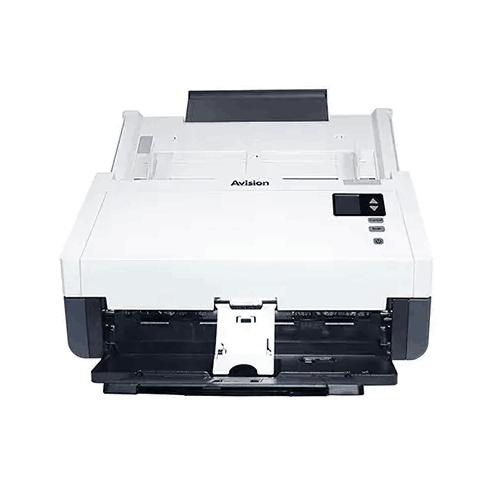
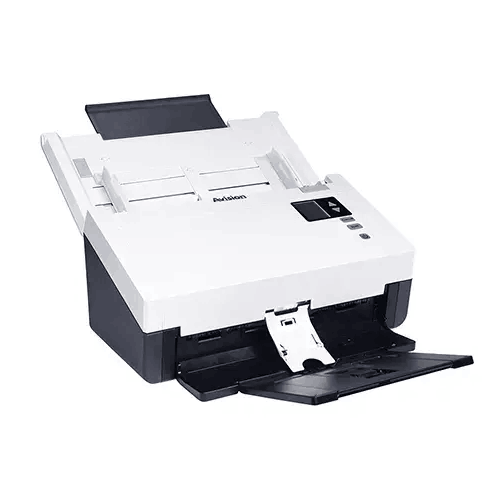
Avision AD345GN Document Scanner
Regular Price:৳0.00Availability: SKU: 7.29.199.9217
Quick Overview
-
Support
Saturday – Thursday: 09 AM - 06 PM. -
Payment
Cash on Delivery | Card | Online Payment -
Shipping Cost
Inside Dhaka 100tk | Outside Dhaka 150tk -
Warranty Policy
Read More
Description
Avision AD345GN Document Scanner Price in Bangladesh
The Avision AD345GN Document Scanner is designed for exactly these busy environments. It’s an ADF (Automatic Document Feeder) document scanner built for speed, volume, and reliability—where “scan a few pages” turns into “scan a few thousand pages,” and where paper quality is inconsistent: thin receipts, thicker forms, long pages, ID cards, and everything in between.
What makes the AD345GN attractive for Bangladesh buyers is that it brings together the right mix for production scanning: a fast duplex engine, a large ADF, long-paper support, broad driver compatibility, and jam-prevention tools like ultrasonic detection. Instead of forcing your team to babysit the scanner all day, the AD345GN is meant to keep the workflow moving with fewer interruptions.
ADF scanning: the productivity difference you feel immediately
Flatbed scanners are great for delicate originals. But when the job is volume—hundreds of invoices, stacks of forms, multi-page files—ADF scanning is what changes the pace of a department. With an ADF scanner, you load a batch, press scan, and the scanner feeds pages automatically.
The AD345GN supports:
- Document feeding mode: ADF
- ADF Capacity: 100 sheets (A4: 80 g/m² or 20 lb)
That 100-sheet capacity is a practical advantage for Bangladesh offices, where scanning tasks often come in bursts—end of month closing in accounts, audit preparation, or batch processing of customer forms. Larger ADF capacity means fewer reloads, less time wasted, and a smoother “batch scanning” rhythm.
High speed scanning that matches real office pressure
If scanning is part of daily production, speed is not a luxury—it’s the difference between clearing work today or pushing it to tomorrow. The AD345GN scanning speed is specified as:
- B/W @ 200 dpi, A4: Simplex 60 ppm; Duplex 120 ipm
- B/W @ 300 dpi, A4: Simplex 60 ppm; Duplex 120 ipm
- Color @ 200 dpi, A4: Simplex 60 ppm; Duplex 120 ipm
These figures position the AD345GN as a serious workhorse. For Bangladesh operations where multiple people depend on a single scanning station, higher speed reduces queue time and improves department productivity.
Duplex at 120 ipm is especially valuable for double-sided forms—common in KYC files, bank documents, insurance applications, and corporate paperwork.
High daily volume guidance: built for continuous workloads
The scanner lists:
- Recommended Daily Volume: Up to 10,000 sheets
This specification is important for business buyers in Bangladesh who want a scanner that can keep pace with consistent, high-volume tasks. A scanner that’s designed for low daily volume tends to suffer more jams, wear faster, and become unreliable when pushed. The AD345GN’s recommended daily volume suggests it’s intended for production environments—exactly where scanning is not optional.
Optical resolution and output resolution: clarity plus flexibility
The AD345GN includes:
- Optical Resolution: 600 × 600 dpi
- Output Resolution: 1200 × 1200 dpi
For typical document archiving, 200–300 dpi is common. But having a 600 dpi optical baseline supports scanning smaller text, fine print, and barcode/QR content with better clarity. Output resolution up to 1200 dpi offers flexibility for special cases—though optical resolution is the core measure for real detail capture.
This matters in Bangladesh because a lot of documents are photocopied repeatedly, stamped multiple times, and printed on lower-quality paper. Higher optical clarity can be the difference between a readable archive and a file that staff struggle to interpret.
CMOS-CIS sensor and LED light source: modern scanning engine
The AD345GN uses:
- Technology: CMOS-CIS
- Light Source: LED
CIS-based designs are common in document scanners for compactness and consistent capture. LED illumination supports stable scanning, fast warm-up, and consistent results throughout the day—useful in high-volume environments where the scanner runs continuously.
Paper handling flexibility: from thin sheets to thick card stock
Bangladesh offices rarely scan uniform paper. One batch might include thin receipts, another might include thicker legal forms. The AD345GN supports:
- Paper Weight: 27 g/m² to 413 g/m² (7 to 110 lb)
- Card Scan: Embossed card (Thickness 1.25 mm)
- Scan Size (ADF Minimum): 50 × 50 mm
- ADF Maximum: 216 × 356 mm (Legal) (8.5 × 14 in.)
That range makes the scanner versatile for mixed office work. For example:
- Scan national ID photocopies and forms (as paper)
- Scan thick application forms and certificates
- Scan smaller slips and receipts (within the minimum size)
- Scan legal-size documents often used in official workflows
Long paper mode: made for unusual forms and reports
Long paper support is extremely practical in Bangladesh, where certain reports, receipts, and dot-matrix-style output can be unusually long. The AD345GN provides Long Paper Mode specifications:
- Up to 200 dpi Color Duplex 240 in. (6096 mm)
- Up to 300 dpi Color Duplex 218 in. (5540 mm)
- Up to 600 dpi Color Duplex 59 in. (1500 mm)
This is a major advantage if your organization deals with extended-length documents. Instead of cutting or scanning in segments, long paper mode keeps everything in one clean file.
Ultrasonic paper jam detection: fewer ruined batches
Jams and double-feeds are a real cost. They waste time and can cause missing pages—dangerous in compliance-heavy environments like finance and healthcare. The AD345GN includes:
- Ultrasonic paper jam detection: Yes
Ultrasonic double-feed detection can help identify overlapping pages and prevent incomplete scans. For Bangladesh organizations that must maintain accurate records, this feature alone can justify stepping up to a production-class scanner.
File formats and OCR-ready workflows
Scanning isn’t just about capturing images; it’s about creating usable files for teams. The AD345GN supports a wide set of formats:
BMP, PNG, GIF, JPEG, Single-Page PDF, Multi-Page PDF, Multi-TIFF, TIFF, RTF, TXT, OCR (for iScan only), XPS, DOC, XLS, PPT, DOCX, XLSX, PPTX, HTML
This is especially useful in Bangladesh offices that have different requirements across departments:
- Accounts may want searchable PDFs
- HR may want multi-page PDFs per employee
- Legal teams may prefer TIFF for archival imaging
- Some workflows may export to Office formats for quick editing or sharing
The listing notes OCR (for iScan only), which suggests OCR output depends on the specific software workflow used. This is a practical point: OCR results are not only scanner-dependent; they are also software-dependent. With the right workflow, OCR helps convert scanned pages into searchable text—critical for large archives.
Bundled software: practical tools for day-to-day scanning
The AD345GN comes with:
- TWAIN Driver
- ISIS Driver
- Button Manager
- PaperPort
- AVScan
For IT teams and system integrators in Bangladesh, TWAIN and ISIS driver support is valuable. Many document management systems and enterprise capture solutions rely on these standards. Button Manager helps create one-touch workflows, while tools like PaperPort and AVScan support typical office needs such as filing and basic scan management.
USB 3.2 Gen1x1 interface: faster transfer, smoother batch scanning
Connectivity is listed as:
- Interface: USB 3.2 Gen1x1
For high-speed duplex scanning, fast USB connectivity helps ensure that scanning doesn’t slow down due to data transfer limitations—especially when scanning color pages or long documents in batches.
Memory and performance stability
The scanner includes:
- Memory Size: 512MB SDRAM
In production scanning, onboard memory supports buffering and stable processing during fast duplex operation. It helps reduce the risk of slowdowns during continuous batch scanning.
Power consumption: suitable for always-on departments
Power figures provided:
- Operation: < 37.22 W
- Ready: < 8.11 W
- Sleep: < 2.17 W
- Off: < 0.1 W
In Bangladesh, departments often keep scanners ready throughout the day. Efficient ready and sleep power levels help reduce electricity use and heat buildup—especially important in smaller rooms or shared workspaces.
Noise levels: office-friendly operation
Noise is often overlooked until you place a scanner near customer service desks. The AD345GN specifies:
- Operation: < 56 dB
- Ready: < 45 dB
This makes it easier to deploy in open-plan offices, front desks, or shared admin spaces without the scanner becoming a constant distraction.
Physical footprint: plan your scanning station properly
The AD345GN dimensions are given as both maximum and minimum (likely reflecting tray positions):
- Maximum: 316 × 680 × 239 mm
- Minimum: 316 × 191 × 168 mm
- Weight: 4.3 kg
In practice, you’ll want a dedicated scanning station with enough depth for the extended footprint during operation. In Bangladesh offices, a stable desk and proper paper staging area (in tray and out tray space) can greatly reduce misfeeds and keep scans organized.
OS support: broad coverage for Bangladesh organizations
The AD345GN supports a wide range of systems:
- Windows 7/8/10/11
- Windows Server 2008R2/2012/2016/2019/2022/2025
- Fedora, openSUSE, Debian, Ubuntu
- macOS 10.12~10.15, macOS 11 Big Sur, macOS 12 Monterey, macOS 13 Ventura, macOS 14 Sonoma
This breadth is valuable for organizations with mixed device policies or long IT upgrade cycles—common in Bangladesh institutions where older systems may still be in use in certain departments.
Where the AD345GN fits best in Bangladesh
The AD345GN is a particularly strong match for:
- Banks, NBFIs, and microfinance offices scanning KYC and customer documents daily
- Insurance companies handling multi-page claim forms and records
- Corporate accounts departments digitizing invoices, VAT documents, and statements
- Hospitals and diagnostic centers archiving forms and reports (paper-based processes still common)
- Government liaison offices and compliance teams where record completeness is critical
- Logistics and courier companies scanning delivery notes and proof-of-delivery documents
- Education administration scanning admissions records and student files
- BPO and service centers that process high document volumes with strict accuracy requirements
Best-practice workflow tips (general but very practical)
To get the best performance and reliability from an ADF scanner:
- Remove staples and clips before scanning.
- Fan and align paper stacks to reduce double-feeds.
- Separate very thin pages (like receipts) and scan them in smaller batches.
- Use ultrasonic detection settings appropriately if your workflow allows sensitivity adjustments.
- Adopt a consistent file naming rule (date + department + batch number) to keep archives usable.
- Use multi-page PDF for document sets and TIFF for archival image needs.
- For OCR, keep scans clean: 300 dpi and good contrast often yield better recognition.
A scanner that supports growth, not just today’s workload
In Bangladesh, many businesses start digitization as a short-term cleanup project—then realize scanning becomes permanent. A scanner like the AD345GN is a better long-term investment because it’s built for ongoing volume and diverse paper handling. It’s fast enough to keep departments productive, flexible enough to handle thick cards and long pages, and robust enough (on paper) to support daily production scanning expectations.
If your team wants to stop treating scanning as a constant interruption and start treating it as a streamlined process, the Avision AD345GN Document Scanner is designed for that shift.
✅ Key Features
- High-Speed Duplex Scanning (Up to 60 ppm / 120 ipm): Clears large batches quickly, ideal for busy Bangladesh offices.
- 100-Sheet ADF Capacity: Reduces reload time and keeps batch scanning smooth and consistent.
- Recommended Daily Volume up to 10,000 Sheets: Supports production-level scanning without constant slowdowns.
- Ultrasonic Paper Jam/Double-Feed Detection: Helps prevent missing pages and reduces re-scans in compliance workflows.
- Long Paper Mode Support: Scans unusually long documents in one file—useful for reports and extended forms.
- Wide Paper Weight Range (27–413 g/m²): Handles everything from thin sheets to thick documents with better flexibility.
- Embossed Card Scanning (Up to 1.25 mm): Supports ID-style cards and thicker materials for front-desk processes.
- 2.5-Inch-Class Legal Size Support (Up to 216 × 356 mm): Fits legal documents common in official paperwork.
- 2.5GbE? (Not applicable) USB 3.2 Interface: Uses USB 3.2 Gen1x1 for faster transfer during high-speed scanning.
- Strong Security/Output Flexibility: Creates multi-page PDFs, multi-page TIFFs, and multiple office-ready formats for different departments.
- TWAIN + ISIS Driver Support: Integrates with many document management and enterprise capture applications.
- Low Power in Ready/Sleep: Helps reduce electricity use and heat in always-on departments.
✅ Usage / Applications
- KYC and onboarding document scanning in banks, NBFIs, and microfinance branches.
- Invoice and accounts file digitization for VAT, purchase records, and supplier documentation.
- HR file archiving for employee forms, contracts, and compliance records.
- Healthcare paperwork capture in clinics and diagnostic centers for faster retrieval.
- Logistics and courier documentation scanning (delivery notes, POD documents).
- Education admissions and admin scanning for student files and institutional records.
- Legal and compliance batch scanning where completeness and audit trails matter.
- BPO/service center workflows that process high daily paper volumes.
- Mixed-media scanning including thick paper, cards, and varied sizes.
- Long document scanning using long paper mode for extended-length pages.
✅ Benefits of This Product?
- Cuts scanning time dramatically with fast simplex/duplex speeds for daily batch work.
- Reduces errors and missing pages using ultrasonic jam/double-feed detection.
- Improves department productivity by minimizing reloads with a 100-sheet ADF.
- Supports real-world paper variety including thin sheets, heavy paper, and embossed cards.
- Enables cleaner digital archives with multi-page PDF and TIFF output for structured filing.
- Fits enterprise workflows through TWAIN and ISIS driver integration with capture software.
- Handles unusual document lengths without manual stitching thanks to long paper mode.
- Works across many OS environments (Windows, Server editions, Linux distros, macOS versions).
- Keeps operating costs sensible with low ready/sleep power draw.
✅ Ideal For
The Avision AD345GN Document Scanner is ideal for Bangladesh organizations that scan documents every day and need speed plus reliability. It’s a strong fit for banks, financial institutions, and insurance offices where duplex scanning, accuracy, and complete records are essential. It’s also well suited for corporate accounts departments digitizing invoices and VAT paperwork, HR teams archiving employee files, and logistics companies processing delivery documentation in volume. Because it supports a wide paper weight range and embossed card scanning, it works well in front-desk environments where document types change constantly. If your organization needs long paper mode for extended-length forms, wants a large 100-sheet ADF to reduce reloads, and expects production-like scanning volumes up to 10,000 sheets per day, the AD345GN aligns well with those requirements in Dhaka, Chattogram, and beyond.
✅ Why Choose the Avision AD345GN Document Scanner?
The AD345GN is a strong choice when your scanning workload is defined by three things: volume, variety, and accuracy. With up to 60 pages per minute and 120 images per minute duplex, it’s built to keep busy departments moving—especially when scanning is tied directly to revenue, compliance, or customer service. The 100-sheet ADF supports batch scanning without constant reloading, which is a daily productivity gain in Bangladesh offices where staff often multitask.
Accuracy and completeness matter just as much as speed. Features like ultrasonic paper jam/double-feed detection help prevent missed pages—critical for KYC files, claims documentation, and audit records. The scanner’s recommended daily volume up to 10,000 sheets also signals that it’s intended for real production routines, not occasional scanning.
Finally, the AD345GN is flexible. Long paper mode, legal-size scanning, broad format support (multi-page PDF/TIFF and more), and TWAIN/ISIS drivers make it easy to integrate into existing workflows—whether you’re scanning to a shared folder, a document management system, or structured archives. For Bangladesh organizations that want a scanner that can adapt as processes evolve, the AD345GN is a dependable, scalable choice.
✅ Why Buy This Product from BME?
For a production-grade ADF scanner, choosing the right model is only half the job; the other half is selecting a seller who can support a smooth procurement and deployment process in Bangladesh. Business Machine & Equipment (BME) can help ensure the Avision AD345GN matches your actual workflow—whether you need high-volume duplex scanning, long paper mode for extended documents, or compatibility with specific operating systems and capture software.
BME can support business buyers with procurement-friendly steps such as formal quotations and documentation for accounts. If you’re planning to integrate the scanner into an existing system (TWAIN/ISIS-based applications, shared filing workflows, or department-level digitization), BME can help you confirm the fit before purchase so you avoid costly mismatches.
For Bangladesh offices, setup success often depends on the details: workspace footprint, paper preparation habits, file naming and storage rules, and selecting the right output format for each department. BME can guide you through those practical considerations so the AD345GN delivers measurable productivity benefits from the first week of use.
✅ Buying Guide
- Step 1: Estimate your daily volume: If you scan hundreds to thousands of pages daily, choose a scanner with a production-class recommended volume like the AD345GN’s up to 10,000 sheets/day guidance.
- Step 2: Confirm duplex needs: If your documents are often double-sided, prioritize duplex speed and stability; 120 ipm duplex can reduce time significantly.
- Step 3: Check ADF capacity: A 100-sheet ADF reduces staff time spent reloading and re-stacking papers.
- Step 4: Review document sizes: Confirm you need up to legal size (216 × 356 mm) and whether you scan small slips (minimum 50 × 50 mm).
- Step 5: Consider paper variety: If you scan mixed thickness and receipts, check paper weight range and card thickness support (up to 1.25 mm embossed card).
- Step 6: Decide on long paper needs: If you handle very long documents, confirm long paper mode limits at your preferred resolution.
- Step 7: Plan OCR and file formats: If you need searchable text, build an OCR workflow using supported software; choose multi-page PDF for filing, TIFF for archives, and image formats for quick sharing.
- Step 8: Confirm driver compatibility: TWAIN and ISIS are important for document management systems; confirm OS support across your PCs/servers.
- Step 9: Set up a scanning station: Leave space for the scanner’s maximum footprint, create in/out paper trays, and train staff on paper preparation.
- Step 10: Avoid common mistakes: Don’t scan stapled pages, don’t mix very different paper weights in the same batch without testing, and don’t store important files without a consistent naming and backup policy.
✅ Customers Ask About / Frequently Asked Questions
-
Q: Is the Avision AD345GN a duplex scanner?
A: Yes. It supports duplex scanning with speeds specified up to 120 ipm at 200/300 dpi in B/W and 200 dpi in color. -
Q: What is the scanning speed for A4 documents?
A: Up to 60 ppm simplex and 120 ipm duplex at 200/300 dpi (B/W), and 200 dpi (color), as listed. -
Q: How many sheets can the ADF hold?
A: The ADF capacity is 100 sheets (A4, 80 g/m²). -
Q: What is the maximum paper size it can scan?
A: ADF maximum is 216 × 356 mm (Legal). -
Q: Can it scan long documents?
A: Yes. Long Paper Mode supports up to 240 inches (6096 mm) at 200 dpi color duplex, with different limits at 300/600 dpi. -
Q: Does it have double-feed detection?
A: Yes. Ultrasonic paper jam detection is listed as supported. -
Q: What interface does it use to connect to a PC?
A: It uses USB 3.2 Gen1x1. -
Q: What file formats are supported?
A: It supports many formats including Multi-page PDF, Multi-TIFF, TIFF, JPEG, PNG, and additional formats such as DOC/DOCX, XLS/XLSX, PPT/PPTX, HTML, and more (as listed). -
Q: Is OCR supported?
A: OCR is listed as “OCR (for iScan only)”, indicating OCR output depends on the iScan workflow/software. -
Q: Which operating systems are supported?
A: It supports Windows 7/8/10/11, multiple Windows Server versions, Linux distros (Fedora, openSUSE, Debian, Ubuntu), and macOS versions from 10.12 through macOS 14 Sonoma. -
Q: How much power does it use?
A: Operation is listed as < 37.22W, ready < 8.11W, sleep < 2.17W, and off < 0.1W. -
Q: Can it scan embossed cards?
A: Yes. Card scan support includes embossed cards up to 1.25 mm thickness.
✅ Why Buy This Product
For Bangladesh businesses, the goal of scanning isn’t just “creating PDFs”—it’s building a workflow that saves time, reduces errors, and keeps records instantly retrievable. The Avision AD345GN Document Scanner is built for that mission, combining high-speed duplex performance (up to 60 ppm / 120 ipm), a large 100-sheet ADF, long paper mode for extended documents, and ultrasonic detection to reduce missed pages. With broad driver and OS support, plus multi-page PDF and multi-TIFF output, it fits comfortably into both simple folder-based filing and more structured document management environments.
What is the price of Avision AD345GN Document Scanner in Bangladesh?
Write a review
Question Answer
Have question about this product? Get specific details about this product from expert.

Canon CanoScan Lide 300 Flatbed Scanner


Avision FB5000 A3 Size Slim Flatbed Scanner


Avision FB5000 A3 Size Slim Flatbed Scanner





Avision AD5800 High-Valume A3 Document Scanner

AVISION MiWand 2 Wi-Fi Pro Portable Scanner


Avision AV332U Sheet-fed Document Scanner

Avision AD345GFWN Flatbed Color Document Scanner

Avision AD130 Flatbed Color Document Scanner


