

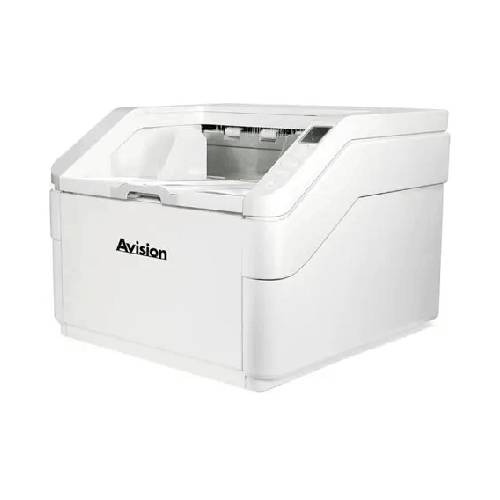
Avision AD8120UN Heavy Duty Scanner
Regular Price:৳0.00Availability: SKU: 7.29.199.9229
Quick Overview
-
Support
Saturday – Thursday: 09 AM - 06 PM. -
Payment
Cash on Delivery | Card | Online Payment -
Shipping Cost
Inside Dhaka 100tk | Outside Dhaka 150tk -
Warranty Policy
Read More
Description
Avision AD8120UN Heavy Duty Scanner Price in Bangladesh
One of the clearest productivity advantages of the Avision AD8120UN Heavy Duty Scanner is its 500-sheet ADF capacity. In practical terms, that means your operator can load large stacks at once, reducing interruptions and keeping workflows moving. For teams in Bangladesh working in shared scanning rooms or central record sections, fewer reloads can translate into better throughput and more predictable daily output. Instead of stopping every few minutes to reload 50–100 pages, operators can focus on batch organization, file naming rules, and quality checking—tasks that actually improve archive quality.
The second “big-picture” capability is the daily duty cycle of up to 100,000 sheets. This specification matters because it reflects the scanner’s intended workload level. Many office scanners can scan quickly, but they are not built to handle sustained heavy workloads day after day. In a real-world Bangladesh environment—where projects can involve scanning millions of pages over weeks—duty cycle is a key indicator that the machine is designed for production usage rather than light departmental tasks. For digitization drives, procurement compliance scans, or backlogged file conversions, a high duty cycle helps you plan realistic targets and reduces the risk of pushing a device beyond its intended use.
Connectivity is kept simple and reliable with USB3.2 Gen1x1. For many organizations, especially those with controlled IT policies or dedicated scanning stations, a fast USB connection is the most straightforward way to deploy. You can set up a workstation in your Dhaka head office, a branch scanning desk, or a dedicated document control room and connect the scanner directly to a PC that runs your scanning workflow. USB-based deployment can also simplify troubleshooting because the workflow is localized: scanner → PC → storage/server/cloud (as per your organization’s policy).
The Avision AD8120UN Heavy Duty Scanner also supports curved or straight paper path operation. Paper path options matter more than many teams initially realize. A curved path is common for general document stacks and keeps the machine compact and efficient. A straight path, however, can be beneficial when you need gentler handling or easier feeding for certain document types and conditions. In Bangladesh, document sets often include mixed paper quality—thin carbon copies, older files, folded pages, photocopies, or forms that have been stored in humid conditions. Having the flexibility of curved or straight path helps operators adapt the feed approach to the document batch rather than forcing every stack through the same route. This can reduce misfeeds and improve operator confidence during long scanning shifts.
Another operationally useful feature included in your confirmed requirements is auto power off settings. In many Bangladeshi offices, scanners remain powered on in shared workspaces. Auto power management can support energy-saving habits and reduce unnecessary power usage during idle times—especially relevant for departments that scan in bursts throughout the day. It can also help protect equipment by ensuring it is not left running continuously without need.
From a project planning perspective, the AD8120UN is particularly useful when your organization wants to standardize scanning across teams. Standardization is important for consistency: consistent file sizes, consistent naming conventions, consistent batch handling, and predictable operator training. With a high-capacity ADF, your training can focus less on “how to keep reloading paper” and more on good scanning discipline: removing staples, aligning pages, batch separators, and quality checking.
In Bangladesh, many digitization projects are time-bound and often tied to audit requirements, compliance, or a transition to new ERP/document management systems. The Avision AD8120UN Heavy Duty Scanner can function as a core device in a scanning cell—where one or more operators prepare documents while another monitors scan output. This division of labor is common in large offices and can dramatically increase daily productivity. Because the scanner is designed for heavy workloads (up to 100,000 sheets per day), it fits that “scan cell” role better than lighter office models.
If you are a procurement manager, an IT administrator, or an operations lead comparing options, it’s useful to think in terms of total workflow cost rather than just upfront purchase price. A scanner that requires frequent attention, constant reloads, or struggles with mixed document batches can raise labor costs and create delays. On the other hand, a heavy-duty unit with a 500-sheet ADF can reduce labor friction. That is why organizations in Dhaka, Gazipur industrial zones, Narayanganj garment documentation teams, Chattogram logistics offices, and Sylhet-based regional headquarters often consider production-grade scanners when document volumes rise.
The Avision AD8120UN Heavy Duty Scanner also fits organizations that need to keep scanning local—meaning the scanning station is within the same department or floor as the record room—rather than relying on external scanning service vendors. For many Bangladeshi institutions, keeping sensitive documents internal is important for confidentiality and control. A robust in-house scanning setup helps maintain data governance while still meeting digitization targets.
At BME, we also understand that buying a heavy-duty scanner is not only about the machine—it’s about how it integrates into your environment: desk/stand placement, operator workflow, PC specification suitability, and the file organization method your team will follow. If you need to build a complete scanning workflow, BME can guide you on practical considerations like: ensuring you have a dedicated scanning PC, planning a storage destination (local NAS, server share, or approved cloud), setting up folder permission structure, and defining a simple batch naming convention that staff can follow consistently.
The bottom line: if your organization is frequently limited by small ADF trays, slow batch handling, and scanners that weren’t designed for large daily volume, the Avision AD8120UN Heavy Duty Scanner is a strong candidate in Bangladesh for production-level document capture—especially when you specifically need USB3.2 Gen1x1, a 500-sheet ADF, a 100,000-sheet daily duty cycle, auto power off settings, and curved or straight paper path flexibility.
✅ Key Features
- 500-sheet ADF capacity: Load large batches at once to reduce reload interruptions during high-volume scanning.
- Daily duty cycle up to 100,000 sheets: Built for demanding production workloads and continuous scanning operations.
- USB3.2 Gen1x1 interface: Fast, stable connectivity for dedicated scanning workstations in office environments.
- Curved paper path option: Suitable for standard batch scanning with efficient paper handling.
- Straight paper path option: Helps adapt feeding for certain document conditions and improves handling flexibility.
- Auto power off settings: Supports better energy management during idle periods in shared offices.
- Heavy-duty positioning: Designed for organizations that scan large volumes daily rather than occasional scanning.
- Batch-friendly workflow support: High-capacity input helps teams focus on sorting and indexing rather than constant reloading.
✅ Usage / Applications
- Centralized scanning stations in corporate head offices in Dhaka
- Bank and NBFI document digitization (account opening packs, forms, supporting documents)
- Insurance policy and claim file archiving
- Import/export paperwork scanning for freight forwarding and C&F operations
- Invoice, purchase order, and delivery challan scanning for accounts departments
- HR employee file digitization and long-term record retention
- University/college admissions and student file archiving
- NGO program documentation archiving and audit preparation
- Legal office case file digitization and record room conversion
- Government office document archiving initiatives and record modernization
✅ Benefits of This Product?
- Reduces operator time spent reloading paper due to the 500-sheet ADF
- Supports large projects with high daily targets thanks to up to 100,000 sheets/day duty cycle
- Helps build a predictable, repeatable scanning workflow for teams
- Improves productivity in shared scanning rooms by minimizing frequent interruptions
- Allows flexibility for different document batch conditions using curved or straight paper path
- Simplifies deployment with direct USB3.2 Gen1x1 connection to a workstation
- Encourages better energy habits with auto power off settings
- Fits both ongoing daily scanning and temporary bulk digitization projects
✅ Ideal For
- Banks, NBFIs, and financial institutions managing continuous document intake and archiving
- Large corporate offices with centralized documentation and compliance needs
- Logistics and clearing agents handling frequent document sets and shipping paperwork
- Government and public sector offices working on archive modernization
- Universities and education boards digitizing admissions, exam, and student records
- Scanning service providers who need a high-capacity ADF for client projects
- NGOs and development organizations maintaining audit-ready program documentation
✅ Why Choose the Avision AD8120UN Heavy Duty Scanner?
Choosing the Avision AD8120UN Heavy Duty Scanner makes sense when your biggest bottleneck is not “scan quality” but “scan throughput and workflow stability.” Many organizations in Bangladesh already know how to scan; the challenge is scanning fast enough, consistently enough, and with less operator fatigue. The AD8120UN’s 500-sheet ADF directly targets the everyday reality of bulk scanning by reducing how often staff must stop to reload documents.
The up to 100,000 sheets daily duty cycle is equally important because it aligns with production environments—where scanning is not a once-a-week task but a routine workload. Add the practicality of USB3.2 Gen1x1, and you get a setup that is easy to deploy at a dedicated workstation without complicated network integration.
Finally, the ability to select curved or straight paper path supports the mixed-document reality common in Bangladesh: diverse paper quality, older files, and varied batch types. Combined with auto power off settings, it’s a practical tool for real offices—not just a spec sheet.
✅ Why Buy This Product from BME?
- Bangladesh-focused product guidance: We help you match the scanner to your expected daily volume and workflow style.
- Quotation support for organizations: BME can provide formal quotations for corporate, NGO, education, and government procurement processes.
- Source confidence: We prioritize authentic sourcing and proper product identification (model matching) before delivery.
- Pre-sales clarification: We help confirm what’s included and how to deploy it with your scanning PC and storage workflow.
- After-sales assistance orientation: We support customers with practical usage guidance and coordination steps if service is required.
✅ Buying Guide
- Estimate your real daily volume: If your department scans thousands to tens of thousands of pages daily, choose a heavy-duty model aligned with that workload—AD8120UN is positioned for up to 100,000 sheets/day.
- Confirm batch size needs: If frequent paper reloads slow your team, a 500-sheet ADF is a major operational advantage.
- Plan the scanning station: Ensure you have a dedicated PC and an operator-friendly space near the record room to reduce movement and mishandling.
- Decide your paper path approach: For mixed documents, the option for curved or straight paper path can help adapt to batch conditions.
- Think about power habits: Use auto power off settings to reduce idle power usage in busy offices with shared equipment.
- Align with archiving rules: Define file naming, folder structure, and retention policy before scanning starts so output stays organized.
- Check integration needs: Since confirmed connectivity is USB3.2, ensure your workflow is designed around a workstation-based scan pipeline.
✅ Customers Ask About / Frequently Asked Questions
-
Q1: Is the Avision AD8120UN suitable for large digitization projects in Bangladesh?
A: Yes, it is positioned for high-volume environments, with a daily duty cycle of up to 100,000 sheets and a 500-sheet ADF. -
Q2: What is the ADF capacity of the Avision AD8120UN?
A: The confirmed ADF capacity is 500 sheets. -
Q3: What interface/connection does the Avision AD8120UN use?
A: The confirmed interface is USB3.2 Gen1x1. -
Q4: Can this scanner handle different paper feeding routes?
A: Yes, it supports curved or straight paper path, which helps in adapting to different batch handling needs. -
Q5: Does it have any power-saving functionality?
A: It includes auto power off settings, useful for reducing idle power usage. -
Q6: Is this scanner more appropriate for a shared scanning room than a desktop personal scanner?
A: Typically yes—because the AD8120UN is designed as a heavy-duty unit with large ADF capacity and high daily duty cycle. -
Q7: Can BME provide a quotation for corporate or government purchase?
A: Yes, BME can provide formal quotations for organizational procurement requirements. -
Q8: Is USB deployment practical for offices in Dhaka/Chattogram?
A: Yes—USB3.2 Gen1x1 makes it practical to deploy as a dedicated scanning workstation in many typical office setups. -
Q9: Is this a good choice for invoice and accounts document scanning?
A: It can be, especially if the accounts team needs to scan large stacks and wants fewer reload interruptions. -
Q10: How do I choose between curved and straight paper path?
A: Choose based on your batch type and handling preference. Many teams use curved path for standard stacks and straight path for batches that benefit from a more direct feed route.
✅ Why Buy This Product
Choose the Avision AD8120UN Heavy Duty Scanner when your organization wants to move beyond slow, small-batch scanning and build a stable, high-throughput document capture workflow. Contact BME to check current availability in Bangladesh and to get a formal quotation for your office, branch network, or digitization project.
What is the price of Avision AD8120UN Heavy Duty Scanner in Bangladesh?
Write a review
Question Answer
Have question about this product? Get specific details about this product from expert.

Canon CanoScan Lide 300 Flatbed Scanner


Avision FB5000 A3 Size Slim Flatbed Scanner



Avision FB5000 A3 Size Slim Flatbed Scanner




Avision AD5800 High-Valume A3 Document Scanner

AVISION MiWand 2 Wi-Fi Pro Portable Scanner


Avision AV332U Sheet-fed Document Scanner

Avision AD345GFWN Flatbed Color Document Scanner

Avision AD130 Flatbed Color Document Scanner


