

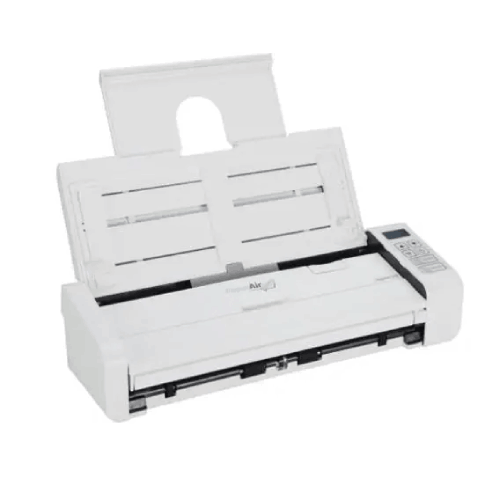
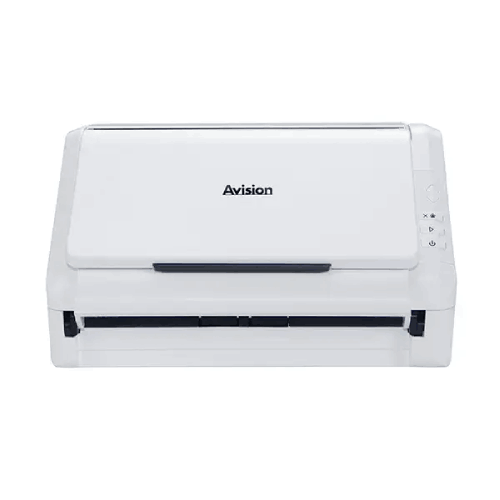
Avision PaperAir 215 Document Feeding Scanner
Regular Price:৳0.00Availability: SKU: 7.29.199.9224
Quick Overview
-
Support
Saturday – Thursday: 09 AM - 06 PM. -
Payment
Cash on Delivery | Card | Online Payment -
Shipping Cost
Inside Dhaka 100tk | Outside Dhaka 150tk -
Warranty Policy
Read More
Description
Avision PaperAir 215 Document Feeding Scanner Price in Bangladesh
The Avision PaperAir 215 Document Feeding Scanner is designed for exactly this middle ground. It’s an ADF document feeding scanner that helps you turn small stacks of paper into digital files quickly and consistently. With a 20-sheet ADF, 600 dpi optical resolution, and a simple USB 2.0 interface, the PaperAir 215 is a practical fit for Bangladesh users who want the speed advantage of automatic feeding—without the footprint and cost of larger departmental scanners.
It also comes with a realistic daily-work positioning: recommended daily volume up to 1000 pages. That number makes the PaperAir 215 easy to place: it’s ideal for everyday office scanning tasks, student paperwork, and routine digitization—without pushing into the “industrial scanning” category.
Why an ADF scanner is a smart upgrade from flatbed scanning
Flatbed scanners are great for fragile originals and photos, but they can be slow for paperwork. If your workflow involves repeated scanning of standard documents, ADF scanning is simply more efficient. You load a batch, scan, and move on.
For Bangladesh users, ADF scanning is especially useful for:
- Invoices and receipts that must be digitized and stored
- Office forms and approvals
- Coaching center registrations and student documents
- HR paperwork in small companies
- Small business documentation that needs quick backup copies
When scanning is easy, teams are more likely to scan immediately—meaning less paper clutter and better record-keeping.
20-sheet ADF capacity: built for the way SMEs and home offices scan
The PaperAir 215 offers ADF capacity: 20 sheets. This is an ideal size for typical Bangladesh scanning batches: a few invoices, a set of forms, or a small document bundle.
A 20-sheet ADF helps by:
- Reducing the time spent feeding pages one by one
- Making scanning less disruptive during busy hours
- Encouraging consistent digitization habits
- Supporting quick batch capture before filing papers physically
It’s also a good fit for shared desks in smaller offices because the device is designed around compact workflow needs.
Optical resolution 600 dpi: clear text and readable archives
The scanner provides optical resolution: 600 dpi. For most routine scanning, many users choose 200–300 dpi to keep file sizes smaller. But 600 dpi optical capability is valuable when you need extra clarity for:
- Small printed text and fine lines
- Stamps and signatures (common in Bangladesh paperwork)
- Forms that may be photocopied and faint
- Documents you may need to zoom in later for verification
In short: it helps create cleaner, more readable digital records—especially useful when your files are shared across departments and reviewed later.
USB 2.0 interface: simple, stable, and easy to support
The PaperAir 215 uses USB 2.0. For many Bangladesh offices, USB is the simplest and most dependable scanning connection:
- Easy installation on a single workstation
- Straightforward troubleshooting
- No network configuration required
- Consistent performance for routine scanning volumes
For small offices, a common workflow is to connect the scanner to one designated PC (accounts/admin desk) and save scanned files into shared folders for team access.
Recommended daily volume up to 1000 pages: right-sized for routine use
A key strength of this scanner is honest positioning:
- Recommended Daily Volume: Up to 1000 pages
That makes it suitable for:
- Small business admin desks
- Tuition centers and training institutes
- Small accounting firms
- Front desks with regular paperwork
- Home offices that need consistent scanning, but not at industrial scale
In Bangladesh, many small organizations scan somewhere between a few dozen to a few hundred pages daily. The PaperAir 215 is designed to handle that level of work comfortably when used with good paper preparation practices.
Bangladesh use scenarios that match the PaperAir 215
Scenario 1: Accounts and small business filing
A business in Mirpur or Uttara scans invoices and delivery notes daily to keep digital backups. A 20-sheet ADF makes the task quick and repeatable.
Scenario 2: Coaching center admissions
A tuition center collects student forms and supporting papers. Scanning them into organized folders helps keep records safer and easier to retrieve.
Scenario 3: Personal document management
Many individuals now keep digital copies of certificates, bills, and official forms. A compact ADF scanner makes this less time-consuming than flatbed scanning.
Scenario 4: Branch-to-head-office sharing
A branch office scans paperwork and emails it to head office. USB scanning via a laptop or desktop keeps the process simple.
Getting better results: practical best practices (general and safe)
Even a good ADF scanner performs best when you treat scanning like a process:
- Remove staples, clips, and pins before scanning.
- Align and “fan” the stack to reduce multi-feeds.
- Avoid mixing very thin receipts and heavier card-like papers in the same batch without testing.
- Use consistent settings: choose an office standard (for example, 300 dpi for most documents) so file sizes stay predictable.
- Verify critical document batches immediately after scanning.
What this page does not claim (for accuracy)
You did not provide scanning speed (ppm/ipm), duplex capability, supported paper sizes, paper weight range, bundled software, driver standards (TWAIN/WIA), operating system support, dimensions, or power consumption. To comply with your accuracy rule, those specifications are not included here.
If you share a complete spec list, I can expand the listing with deeper feature explanations and a fully populated technical summary—still unique and Bangladesh-optimized.
Overall, the Avision PaperAir 215 Document Feeding Scanner is a practical choice for Bangladesh buyers who want the convenience of ADF scanning for routine daily workloads. It’s compact, simple to connect, and designed for the kind of consistent, manageable volume that many SMEs and home offices deal with every week.
✅ Key Features
- ADF Document Feeding Mode: Lets you scan small batches efficiently instead of placing pages one by one on a flatbed.
- 20-Sheet ADF Capacity: Supports quick scanning of common paperwork sets like invoices, forms, and admissions files.
- 600 dpi Optical Resolution: Produces clear scans for readable archives and better detail capture.
- USB 2.0 Interface: Delivers a straightforward plug-and-scan setup for Bangladesh offices and home workstations.
- Recommended Daily Volume up to 1000 Pages: Right-sized for routine scanning needs in small offices and institutions.
- Compact Workflow Fit: Designed for desks where space is limited and scanning must stay simple.
- Suitable for Regular Paperwork Digitization: Helps turn daily documents into organized digital files for storage and sharing.
- Practical for Shared Office Use: Works well when connected to a dedicated PC for team scanning routines.
✅ Usage / Applications
- Invoice and accounts paperwork scanning for digital filing and audit preparation.
- Small office administration scanning for forms, approvals, and internal records.
- Training institute/student paperwork digitization for admissions and batch documentation.
- Personal document archiving for certificates, bills, and important papers.
- Front desk scanning for quick email sending and internal sharing (workflow dependent).
- Branch office document sharing to send files to head office quickly.
- Tender and quotation paperwork digitization for easier retrieval later.
- Small business compliance record keeping with structured folder storage.
✅ Benefits of This Product?
- Saves time compared to flatbed scanning by feeding multiple pages automatically.
- Improves daily productivity for routine scanning tasks in Bangladesh SMEs.
- Helps reduce paper clutter by encouraging faster digitization and better filing habits.
- Creates clearer archives with 600 dpi optical resolution for readable records.
- Easy to install and use due to USB 2.0 connectivity and simple workstation setup.
- Right-sized for routine volume with up to 1000 pages/day recommended usage.
- Supports better record retrieval by creating consistent digital copies for storage and sharing.
✅ Ideal For
The Avision PaperAir 215 Document Feeding Scanner is ideal for Bangladesh users who scan regularly but don’t need a heavy departmental scanner. It fits small offices, retail back offices, tuition centers, and home offices where paperwork must be digitized consistently—especially invoices, forms, and small document bundles. With a 20-sheet ADF, it’s well suited for scanning in short batches throughout the day, keeping records organized without taking up large desk space. It also works well for individuals who want to build a personal archive of certificates, bills, and official paperwork in a neat digital folder structure. If your scanning requirement is steady, practical, and routine—up to around 1000 pages per day—this model is a sensible match for Bangladesh workflows.
✅ Why Choose the Avision PaperAir 215 Document Feeding Scanner?
The PaperAir 215 makes sense because it focuses on the most common scanning need in Bangladesh: converting everyday paperwork into usable digital files—quickly, without complexity. Its 20-sheet ADF is a practical size for routine batches like invoices, admission documents, and office forms. You don’t have to scan page-by-page like a flatbed, and you don’t need a large machine built for massive departmental volumes.
Its 600 dpi optical resolution supports clean, readable digital archives—especially important when documents include stamps, signatures, or small printed text. USB 2.0 connectivity keeps setup simple and support-friendly: connect it to a PC and scan, without involving network setup. Finally, with a recommended daily volume up to 1000 pages, it’s positioned as a reliable everyday tool rather than an occasional device. For many SMEs and home offices in Bangladesh, that “right-sized” balance is exactly what makes the PaperAir 215 a smart buy.
✅ Why Buy This Product from BME?
When buying a scanner in Bangladesh, the best result comes from matching the device to your real workflow—your daily page volume, your document types, and how your team will store and share scanned files. Business Machine & Equipment (BME) can help you purchase the Avision PaperAir 215 with the right expectations and a practical setup approach for your office or home environment.
BME can support business procurement processes such as providing quotation and documentation for accounts, which is often essential for offices and institutions. If you share your typical documents (invoices, forms, student files) and whether you prefer multi-page PDFs or image files, BME can guide you on an efficient workflow—like setting up a dedicated scanning PC and standardized naming conventions. This helps ensure the PaperAir 215 becomes a dependable daily tool for organized digitization, not just another device on the desk.
✅ Buying Guide
- Step 1: Confirm you need ADF scanning: If you frequently scan stacks of standard paper, an ADF scanner saves time compared to flatbed models.
- Step 2: Match ADF capacity to your batches: For typical small stacks, a 20-sheet ADF is practical; for larger stacks, consider higher-capacity models.
- Step 3: Choose your scan resolution strategy: Use 200–300 dpi for everyday filing; use higher resolution when details or stamps must be preserved clearly.
- Step 4: Plan your workstation setup: USB 2.0 scanners work best when connected to a dedicated PC used for scanning and filing.
- Step 5: Decide where files will be stored: Local folders, shared drive, or cloud upload (depending on your office practice).
- Step 6: Standardize file naming: Date + vendor/student/client + reference number keeps retrieval easy.
- Step 7: Prepare documents properly: Remove staples and align sheets to reduce misfeeds and scanning interruptions.
- Step 8: Separate tricky media: Scan very thin slips or unusual paper types in smaller batches for better reliability.
- Step 9: Verify critical batches: Always review important scans immediately to ensure no pages are missing.
- Step 10: Avoid common mistakes: Don’t overload the ADF, don’t store important records without backups, and don’t use extremely high DPI for all documents (files become unnecessarily large).
✅ Customers Ask About / Frequently Asked Questions
-
Q: What type of scanner is the Avision PaperAir 215?
A: It is a document feeding (ADF) scanner, designed to scan small stacks of paper automatically. -
Q: How many sheets can I load in the ADF?
A: The ADF capacity is 20 sheets. -
Q: What is the optical resolution?
A: Optical resolution is listed as 600 dpi. -
Q: How does it connect to a computer?
A: It uses a USB 2.0 interface. -
Q: Is it suitable for daily office use in Bangladesh?
A: Yes. It is rated for a recommended daily volume up to 1000 pages, suitable for routine office workflows. -
Q: Does it support duplex scanning?
A: Duplex capability was not provided in the specifications you shared, so it is not stated here. -
Q: Can it scan legal-size documents?
A: Supported paper size was not provided, so this page does not claim legal-size support. -
Q: Does it support multi-page PDF output?
A: Output formats and bundled software details were not provided, so specific format claims are omitted for accuracy. -
Q: Can I use it with a laptop?
A: Yes. USB 2.0 connectivity allows use with laptops or desktops that have USB ports. -
Q: Is it good for scanning invoices and receipts?
A: It’s well suited for routine invoice scanning. For very small receipts, results depend on document size and handling; scanning in smaller batches is recommended.
✅ Why Buy This Product
If you want to digitize everyday paperwork in Bangladesh without the slow, manual routine of flatbed scanning, the Avision PaperAir 215 Document Feeding Scanner is a practical step up. With a 20-sheet ADF, 600 dpi optical resolution, and USB 2.0 connectivity, it’s built to make routine scanning faster and simpler for home offices, small businesses, coaching centers, and admin desks. Its recommended daily volume of up to 1000 pages fits the real needs of many organizations—steady scanning throughout the week, without requiring a large production scanner.
What is the price of Avision PaperAir 215 Document Feeding Scanner in Bangladesh?
Write a review
Question Answer
Have question about this product? Get specific details about this product from expert.

Canon CanoScan Lide 300 Flatbed Scanner


Avision FB5000 A3 Size Slim Flatbed Scanner



Avision FB5000 A3 Size Slim Flatbed Scanner





Avision AD5800 High-Valume A3 Document Scanner

AVISION MiWand 2 Wi-Fi Pro Portable Scanner


Avision AV332U Sheet-fed Document Scanner

Avision AD345GFWN Flatbed Color Document Scanner

Avision AD130 Flatbed Color Document Scanner


